Zod vs Valibot vs Yup for forms and API edges in real apps
Zod vs Valibot vs Yup: compare bundle size, shared schemas, and error handling for forms and API edges so you can pick the right fit.
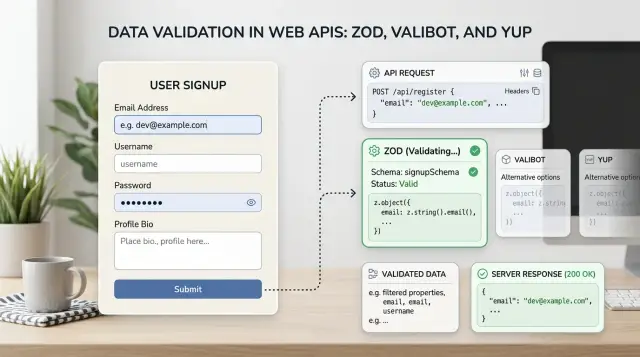
Table of Contents
Why this choice gets messy fast
At first, this feels like a small library decision. Pick a validator, write a few rules, move on. In a real app, Zod, Valibot, and Yup pull you toward different tradeoffs around developer speed, shared schemas, bundle size, and error handling.
Forms need quick, clear feedback. If someone mistypes an email, they expect a useful message right away. APIs have a different job. They must reject bad input every time, whether it comes from an old mobile app, a broken script, or a bot sending junk to your endpoint.
Then the team asks for one schema that works everywhere. That often helps. It cuts drift and removes duplicated rules. But the browser wants friendly messages and light code, while the server wants stricter checks and predictable output. Those needs do not always line up.
Most teams want five things from one choice: fast form feedback, strict API checks, one shared schema, a small client bundle, and errors that help both users and developers. You can usually get most of that. Getting all of it takes more care.
How Zod, Valibot, and Yup differ
The real difference is not popularity. It is how each library feels when you write schemas, change them later, and reuse them in forms and API handlers.
Zod fits TypeScript projects well. The schema syntax is direct, and inferred types usually match what developers expect. If your app uses TypeScript on the frontend and backend, Zod is often the easiest default. Refactors are usually calmer too. Rename a field, split an object, tighten a rule, and the schema and types tend to stay close together.
Valibot takes a smaller, more modular approach. You build validation from smaller functions instead of leaning on one large API. Some teams like that because it stays explicit and can be easier to keep out of the client bundle when they only need a few pieces. Others find it a bit more verbose for common cases.
Yup still shows up in many older React form stacks, especially in apps that grew around Formik. If your team already knows it and the current setup works, keeping it can be the sensible move. The friction usually shows up in TypeScript heavy code. Shared schemas and type inference often need more care than they do with Zod.
If you are starting fresh with TypeScript, Zod is usually the safest default. If browser weight matters a lot, Valibot deserves a serious look. If you already run Yup in production and it is not causing pain, do not migrate just because newer tools exist.
Bundle size and what users actually download
On a public page, extra JavaScript gets noticed fast. A signup form on a marketing site has very little room for added code, especially on older phones. An internal admin screen usually has more slack because people open it less often and expect heavier tools.
Ignore install size and package page claims. What matters is the built client bundle. Tree shaking, form adapters, error mappers, helper wrappers, and shared utilities change the real number. Teams sometimes switch libraries to save a few kilobytes, then lose the savings through extra integration code.
Server side validation changes the calculation. If validation only runs in API handlers or server actions, users do not download that library at all. In that setup, developer speed and clear error output may matter more than browser size. Shared schemas still help, but careless imports can pull server code into the client and cancel the benefit.
A simple example makes the tradeoff obvious. A newsletter form on a landing page feels every extra byte. A billing screen with more complex rules may care more about shared schemas and fewer bugs than shaving off the last bit of JavaScript.
Measure your own app before switching. Compare the built bundle, test the page where validation runs most, and include adapter code in the test. Reputation is a weak proxy for what your users actually download.
Using one schema in forms and at the API edge
One shared schema can remove a lot of quiet bugs. You write the core data rules once, then use the same field names and shape checks in the form and at the API edge. That helps avoid the classic mess where the browser accepts a value and the server rejects it a few seconds later.
The shared part should be the data rules, not every part of the user experience. A form can say "Please enter your email." The API can log "email must be a valid address." Same rule, different jobs. The screen should help a person fix the field quickly. The server should return a stable reason that developers can trace.
Transforms need the same split. Trimming spaces from an email field in the browser is fine. Silent coercion at the API edge is riskier because it can hide bad requests and make debugging harder. A solid pattern is to share a base schema, then add thin wrappers for each side. Let the form be a little forgiving. Keep the server strict.
Test the awkward values early. Empty strings, numbers coming from text inputs, timezone surprises in dates, null versus undefined, and arrays that sometimes arrive with one item and sometimes none cause more trouble than teams expect.
Picture an age field. The browser receives "18" as text because HTML inputs do that. Your form can convert it to a number for convenience. The API edge should still verify that the final value is a real number in range, not "18 ", "18.0abc", or an empty string that slipped through.
How errors reach the screen and the logs
Validation errors do two jobs at once. They tell a person what to fix, and they tell your app what broke. Keep those outputs separate.
On screen, short messages work best. "Enter a valid email" is enough. API clients need a stable path or code, such as customer.email and invalid_email. Logs need the raw payload, the failing rule, and the full error object. If you force one format to serve all three audiences, one of them loses.
Zod usually makes this split easy because its issues already include readable paths and messages. Valibot also returns structured errors and can make more sense when client size is tight. Yup works well in many forms, but teams often spend more time reshaping its errors before API clients can rely on them.
Nested arrays expose weak error formatting fast. If items[2].price turns into one vague message for the whole row, the UI gets confusing and the logs stop helping. A practical pattern is to keep stable error codes in the schema, map those codes to short UI messages, and send the raw issue object to logs.
A realistic app example
Picture a SaaS signup page with three fields: name, email, and company size. The form looks small, but it touches three places at once. The browser needs fast feedback, the API edge needs to block bad input, and the admin panel may later use the same data with stricter rules.
On the public form, users should see simple errors before they press submit. "Enter your name" is enough. "Use a valid email" is enough. Bundle size matters here more than many teams admit. On a laptop in the office, a heavier validator may feel fine. On an older phone on 4G, the page feels slow much sooner.
When the request reaches the API edge, the rules need to stay strict. If name is missing, email is malformed, or company size is empty, the route should reject the request in one place and return field level errors. That is where shared schemas help. With Zod or Valibot, many teams define the shape once and reuse it. Yup can still work well in the form, but teams often add separate server validation later, and that split creates drift.
Now add an admin panel. Support staff can edit the same record, but they usually need tighter rules than the public signup page. Maybe the public form accepts "1-10" typed by the user, while the admin screen only allows a fixed set such as "1-10", "11-50", and "51-200". A base schema with a small extension handles that well. Copying and tweaking a second schema usually does not.
Mistakes that create pain later
Most schema pain starts small. A field works in one form, fails at the API edge, and nobody notices until bad data reaches storage or logs fill with useless errors.
One common mistake is using different coercion rules on the client and server. The browser turns "42" into a number, but the API expects a string and trims it first, or the other way around. Users see one result, your backend sees another, and support gets stuck with bugs that are hard to repeat.
Another mistake is hiding every failure behind one generic message like "Invalid input." That feels tidy for a day, then slows everyone down. Users do not know what to fix, and developers lose the detail they need in logs.
Copying schemas into every form library, API route, and test file creates a slower kind of damage. After a few months, nobody knows which version is the real rule. Shared schemas matter less because they look elegant and more because they stop quiet drift.
Transforms can also trip teams up. If you trim, cast, split, or reshape data before basic checks pass, you can turn a clear validation error into confusing behavior. Check the raw value first. Transform it after you know it matches the expected shape.
Tool switching causes its own mess. A team reads trend chatter, swaps libraries, updates adapters, and only later checks what shipped to users. Measure before you migrate, not after.
How to choose without overthinking it
A short spike tells the truth faster than a week of opinions. Build one real form, one server handler, and one nested payload. The daily annoyances show up quickly when you try actual work.
Start with the browser bundle, not the README. Add the library to a page that already has your form code and see what reaches the client. Then test type sharing in the most boring way possible: write one schema for something common, reuse it in the form and at the API edge, and note how much glue code you had to write.
A simple trial is enough:
- Build one real form and one server handler with the same schema.
- Measure the built client bundle after the import.
- Send broken nested payloads and inspect the UI errors, API response, and logs.
- Count the wrappers, adapters, and custom mappers you needed.
Nested arrays deserve extra attention. A flat login form makes every library look easy. A cart with line items, discounts, and shipping addresses does not. If the error output gets messy there, your UI code gets noisy and your logs stop helping.
My rule of thumb is simple. Pick Yup if your app already depends on it and the migration cost is higher than the pain. Pick Zod if you want the safest default for shared schemas and a large ecosystem. Pick Valibot if bundle size is tight and you still want shared typed validation without carrying extra weight.
What to do next
Test one real path in your app. A signup flow, contact form, or settings page is enough. Pair the form with one API route that handles the same data, then check three things: what lands in the client bundle, whether the shared schema feels natural, and how much work it takes to turn validation errors into something both users and developers can use.
Keep the rollout narrow at first. Do not move every form, every endpoint, and every old validator in one pass. One stable example is better than a half finished rewrite spread across the codebase.
It also helps to leave a short note in the repo about why you chose the library, where it should run, and how errors should look. Six months later, that note saves real time.
If your codebase already mixes validation styles and the rewrite path is unclear, a second opinion can help before the pattern spreads. Oleg Sotnikov at oleg.is does that kind of Fractional CTO advisory work for teams that need to balance lean frontends, strict APIs, and practical shared schemas.


