Who owns AI output in business processes without confusion
Who owns AI output in a business process? Set reviewer, system owner, and business approver roles early so errors stop bouncing between teams.
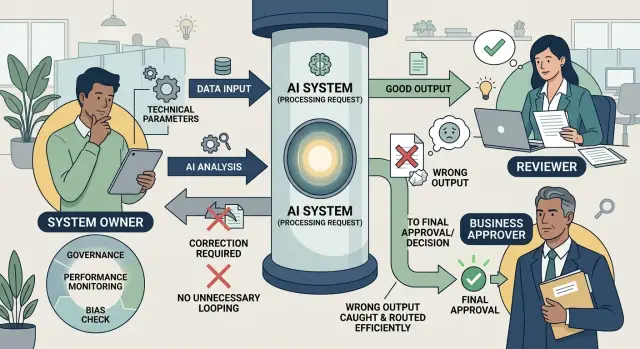
Table of Contents
Why teams argue after a bad AI result
Most arguments start because nobody answered one plain question before launch: who owns AI output once it enters a live business process? Teams often drop AI into an old workflow, keep the old job titles, and assume responsibility will sort itself out later. It rarely does.
The problem gets worse when each group touches the result in a different way. Operations may check the output for obvious mistakes. IT may own the tool, the prompt, or the integration. A manager may approve the final decision because the business risk sits with that team. On paper, everyone is involved. In practice, nobody owns the full path from generation to approval.
That gap only shows up when something goes wrong. An AI draft goes out with the wrong number, a customer record gets tagged badly, or a summary leaves out a detail that changes the decision. Operations says, "We only reviewed what we received." IT says, "The system worked as configured." The manager says, "I thought the checker would catch that." Each answer sounds reasonable on its own. Together, they create a loop where the mistake has no clear owner.
The delay costs more than the original error. People stop the process, reopen tickets, and argue over logs instead of fixing the record and moving on. A simple task can sit for hours or days while teams debate whether the model made a bad guess, the setup was wrong, or the approver missed something. That slows work, but the bigger problem is trust. Once people feel that AI mistakes turn into blame games, they stop relying on the process at all.
This is why AI accountability in operations cannot sit in a gray area. If the checker, the tool owner, and the business approver each assume someone else has final responsibility, the process breaks under pressure. The bad result is only the trigger. The real issue is that the business never decided, in plain language, who does what when the output is wrong.
The three roles to name before launch
Most ownership fights start because the team never named the people around the AI step. The model produced an answer, someone used it, and then nobody agreed on who should have stopped the mistake. If you want a clear answer to who owns AI output, name three roles before anyone turns the workflow on.
A usable setup is simple:
- One person reviews the output before anyone acts on it.
- One person owns the AI setup that produced it.
- One person approves the business action and accepts the risk.
The reviewer is the last human check. That person compares the AI output with facts, policy, or source records. If an AI draft says a customer qualifies for a refund, the reviewer checks the order history, the policy, and any missing details before the team sends money or makes a promise.
The system owner runs the AI review workflow itself. This person controls prompts, settings, model choice, data flow, guardrails, and logs. If the AI keeps pulling the wrong field, ignores a policy rule, or loses traceability, the system owner fixes the setup. They do not approve business risk just because they built the process.
The business approver makes the call to act. That person signs off on the result and accepts the business impact if the action turns out to be wrong. In a hiring flow, that might be the hiring manager. In purchasing, it might be the finance lead. They decide whether the reviewed output is good enough to use in the real world.
Keep role names tied to real people
Small teams often combine roles, and that is fine. A founder might own the system and also approve the final action. A team lead might review the output and approve it. The problem starts when everyone assumes this and nobody writes it down.
Put actual names next to each role in the SOP, ticket template, or internal doc. If one person holds two roles, say so in plain words. That small step prevents the usual mess where product blames operations, operations blames engineering, and the bad result keeps bouncing around without a clear owner.
What each role actually owns
When teams ask who owns AI output, the answer is usually split across three people, not one. Trouble starts when everyone assumes someone else will catch the bad result.
The reviewer owns the check inside the review step. That means they verify the output against the source, flag anything odd, and send it back when it fails the standard. Their job is not to redesign the tool or decide whether the business should act. Their job is to inspect what the AI produced before it moves forward.
The system owner owns how the tool behaves and how people use it. They set the prompt, rules, permissions, logs, fallback steps, and staff training. If the tool keeps making the same mistake, or if people do not know when to trust it, that sits with the system owner. They do not approve payments, send legal notices, or make customer promises just because the tool suggested them.
The business approver owns the decision to act on the output. If the AI drafts a refund decision, credit memo, contract summary, or risk flag, this person decides whether the company will use it. They own the business call and its consequences. They do not need to fix prompt logic, but they do need to reject weak output and stop unsafe actions.
Write the handoff points in plain language. One sentence per role is often enough:
- The reviewer checks accuracy against the source.
- The system owner fixes repeat failures and usage rules.
- The business approver decides whether the company acts.
That boundary matters most when risk rises. Someone must have clear authority to pause the process. In a low risk workflow, the reviewer may stop the item and return it for correction. In a higher risk workflow, the business approver may freeze the whole step until the system owner fixes the issue.
If an outside advisor or fractional CTO helps set up the workflow, name the internal owner too. External help can design the process, but an internal person should own it every day. If you skip that step, mistakes bounce between teams, and nobody fixes the same problem twice.
How to set the roles in a real workflow
Start with one workflow that has clear stakes and repeats often. Invoice approval works well. Refund replies also work. Pick something where a wrong AI result costs money, creates delay, or sends the wrong message to a customer.
Then mark the exact moment the AI does work. Be specific. Does it draft the reply, score the refund request, extract invoice fields, or recommend approval? If you cannot point to one clear action, people will argue later about who owns AI output and who should have caught the mistake.
Write the roles next to that action, not in a separate policy doc that nobody opens.
- Name the reviewer for normal cases
- Name a backup reviewer for days off and sick leave
- Name the system owner who can change prompts, rules, or model settings
- Name the business approver who can accept risk and make the final call above a set limit
The reviewer checks the output during daily work. For invoices, that might be someone in finance who confirms totals, vendor name, and payment terms. The backup does the same job when the main reviewer is out. If you skip the backup, work piles up or people approve things they do not fully understand.
The system owner is not the same person unless the team is very small. This person fixes the prompt, updates the extraction rules, changes thresholds, or turns the feature off. They own the tool behavior. They do not approve business risk.
The business approver role should have a clear limit. For example, the reviewer can approve invoice matches up to $2,000, but anything above that goes to the finance manager. In a refund workflow, the reviewer may send standard refunds up to a fixed amount, while unusual cases go to support leadership.
Before launch, run a few bad examples on purpose. Use a fake duplicate invoice, a refund request with missing details, or a reply with the wrong tone. Then ask one question for each case: who acts first? If the team answers in different ways, the roles are still too vague.
A simple AI review workflow fits on one page. If it needs a meeting to explain every time, it is still not clear enough.
A simple example from finance
A finance inbox makes this issue easy to see. A company gets supplier invoices by email, and an AI tool reads each file, pulls out the vendor name, total amount, tax, and line items, then suggests an account code before the invoice enters the accounting system.
The first human in line is the reviewer. This person does not need to rethink the whole invoice. They check the parts that most often go wrong:
- vendor name
- total amount
- tax value
- unusual line items
- the suggested account code
That review takes a minute when the invoice is normal. It takes longer when something looks odd, such as a missing tax field or a line item that does not match the supplier. The reviewer can correct obvious errors, but the reviewer does not rewrite the rules behind the tool.
That part belongs to the system owner. If the AI keeps tagging software subscriptions as office supplies, or confuses two vendors with similar names, the system owner fixes the mapping rules, the prompt, or the extraction logic. The same person watches for repeat errors. One bad invoice is a correction. Five similar mistakes mean the system needs work.
The business approver is the finance manager. That person decides whether the company should pay, especially when the amount is above a set limit. If the invoice is for $480, the reviewer may finish the check and move it forward. If it is for $18,000, the finance manager approves or blocks payment.
Now imagine the AI reads $1,250 as $12,500. The reviewer catches the number and corrects the record. If the invoice stays within the normal process after that fix, the finance manager still decides on payment only if the amount crosses the approval threshold. The system owner then checks why the read failed and updates the system so the same mistake does not repeat.
In this setup, who owns AI output is clear. The reviewer checks the invoice, the system owner fixes the tool, and the finance manager makes the payment decision.
What to do when the AI gets it wrong
When an AI output looks wrong, stop the process at the first safe point. Do not let the result move into a customer email, payment run, legal note, or database update just because the queue is moving fast. A short pause costs less than undoing a bad action later.
Then freeze the evidence. Save the prompt, the source input, the AI output, and the final action that a person took or almost took. Teams often save only the bad answer, then spend hours arguing about what caused it. Without the full trail, you cannot tell whether the problem came from the tool, the data, or the review step.
A simple incident record should capture:
- what the AI received
- what it produced
- who reviewed it
- what action the process took
- when the issue was caught
Next, check the cause in plain terms. Most failures come from three places: bad data, weak instructions, or rushed review. Bad data means the model got the wrong facts. Weak instructions mean the prompt left too much room for guessing. Rushed review means a person approved the output without enough time, context, or authority.
Clear roles settle who owns AI output when something breaks. The system owner changes the tool, prompt template, rules, or integration. The reviewer tests the same case again and confirms the fix on real examples, not one lucky retry. The business approver decides whether the team can restart the process, keep part of it manual, or pause it longer.
Keep those decisions separate. If the reviewer also decides when to restart, speed often wins over caution. If the system owner tries to approve business risk, technical confidence can hide an operational problem.
A good restart rule is simple. Restart only after the system owner has changed the setup, the reviewer has checked the fix, and the business approver accepts the remaining risk. If one of those steps is missing, the process stays paused or moves to manual handling.
That is what an AI review workflow should do under pressure. It should stop the error, preserve the facts, find the cause, and put each decision with the right person. When teams do that, mistakes stay small and ownership stays clear.
Mistakes that create ownership gaps
Ownership breaks down when teams try to keep things vague. They say the AI, the reviewer, the manager, and operations all share responsibility. That sounds safe, but it slows every decision. When a bad result appears, each person waits for someone else to act.
One common mistake is giving approval power to the wrong person. A reviewer can check whether the output matches a rule, a template, or a known pattern. That does not mean they can judge business impact. If the AI suggests a refund, a contract change, or a finance classification, the approver needs enough context to decide what the business should accept.
Another problem starts when teams expect the reviewer to repair the system. If the output goes wrong because of a weak prompt, a broken integration, or missing data, the reviewer should flag it and route it to the system owner. The reviewer should not spend half the day patching prompts or chasing API issues. Once that happens, the AI review workflow turns into hidden support work.
These warning signs show up early:
- Everyone is "responsible," so no one makes the final call.
- A subject matter expert reviews results, but a manager with no context approves them.
- Reviewers fix prompt issues instead of checking output quality.
- The process depends on one person with no backup for weekends or leave.
- The dashboard tracks speed, while correction time stays invisible.
Backup coverage matters more than teams admit. People take vacation. People quit. Someone gets sick on the last day of the month. If you do not assign a backup reviewer, backup system owner, and backup approver, work either stops or moves forward without clear judgment.
Metrics can hide the problem. A team may process 500 items a day and still waste hours fixing errors later. Track how often staff reopen cases, reverse approvals, or spend extra minutes correcting AI output. That is where you learn who owns AI output in practice, not just on paper.
A process is not fast if the first pass takes two minutes and the cleanup takes ten.
A short check before launch
If people still ask who owns AI output after reading the procedure, do not launch yet. A vague process works fine on a calm day, then falls apart on the first bad result.
A simple test works better than a long meeting. Hand the draft procedure to a new employee and ask them to explain three names: who reviews the AI output, who owns the system behind it, and who approves the business decision. If they guess, the document is still too fuzzy.
Run these checks on one real task, not a made-up example:
- Ask one person who has never seen the workflow to point to the reviewer, the system owner, and the business approver in the written procedure. If the role names are missing, or buried in notes, people will blame each other later.
- Ask the team when they must stop and get human help. The answer should be exact. "When it looks wrong" is weak. "If data is missing, the result conflicts with a rule, or the case falls outside normal range" is clear.
- Trace one output from start to finish. You should see the source data, the prompt or rule set, the AI result, the reviewer decision, and the final approval. If one step disappears, ownership disappears with it.
- Check the wording in the procedure. Replace loose labels like "ops" or "the team" with actual role names. People act faster when a document names a person or a role, not a crowd.
- Test two failure cases on purpose: one false positive and one false negative. Then ask who catches each one, who fixes the system, and who decides what to do with the affected case.
This takes less than an hour, and it saves weeks of finger-pointing. If your team can pass these checks without debate, the AI review workflow is probably ready for a pilot. If they cannot, fix the procedure first and keep the pilot small.
Next steps that keep ownership clear
Pick one live process, not five. Start with something common and low risk, like sorting incoming requests or drafting customer replies. On one short page, write three names next to three jobs: reviewer, system owner, and business approver.
That page should settle one practical problem. When the AI output is wrong, one person checks the content, one person fixes the prompt or tool, and one person decides whether the business can still use the result. If people still ask who owns AI output after reading it, the page is too vague.
Keep the rules short enough that a manager or operator can use them in a few seconds. Long policy documents sound serious, but most teams ignore them in daily work. A short note in the runbook or beside the workflow usually works better.
A simple starting checklist helps:
- Name one reviewer at each step where a person must check the output.
- Name one system owner who updates prompts, tools, permissions, and logs.
- Name one business approver who accepts risk and approves final use.
- Define what counts as a serious error and name who hears about it.
Then use that page for a month in real work. Do not wait until every edge case is mapped. Small gaps show up quickly when people use the process every day.
After the first month, review the page with the people doing the work. Remove rules nobody follows. Add only the rules that solve actual confusion. Then review it again after every serious error. If a bad result bounced between teams, the page missed something.
This is not about adding more process. It is about cutting arguments, reducing delays, and making fixes faster when something breaks. Clear ownership also makes training easier because new staff can see the path from AI draft to approved action without guessing.
If your team needs outside help, Oleg Sotnikov's Fractional CTO and startup advisory work can help map review, approval, and system ownership into your current workflow without adding heavy process.


