White-label frontend boundaries that stop app cloning
Learn how white-label frontend boundaries keep brand tokens, content rules, and feature switches separate so one app can serve many brands.
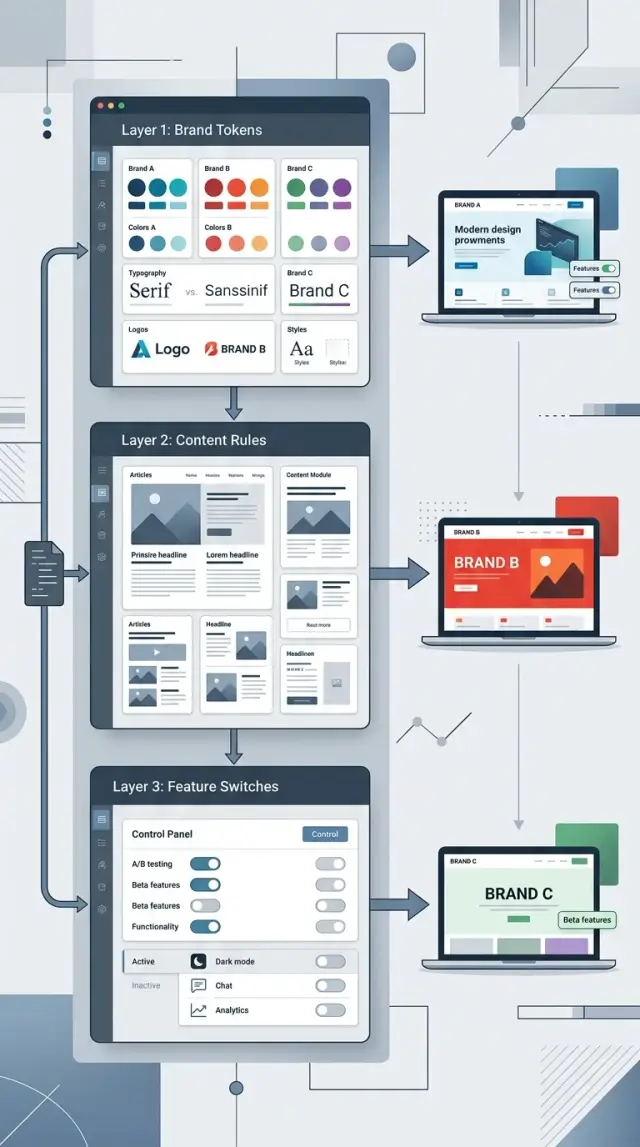
Table of Contents
Why white-label apps break
White-label apps rarely fail in one dramatic moment. They get weaker through small exceptions.
A customer asks for a different button style, a custom headline, or one extra step on a page. The request looks harmless, so the team puts it straight into shared code. A week later another brand wants something close, but not quite the same. Now the component has two special cases, then four, then a stack of conditions nobody wants to touch.
Design drift makes this worse. Instead of keeping colors, spacing, and type styles in one place, teams start dropping one-off values into pages and components. A quick fix for one brand becomes the default way of working. After a few releases, the app no longer has a clear visual system. It has a collection of local exceptions.
Content creates the same problem when teams mix copy with UI logic. A pricing card should decide how it looks and behaves. It should not also carry brand slogans, legal notes, and wording rules in the same file. Once copy lives inside components, even small text edits start to feel risky.
Urgency usually does the most damage. A brand reports a launch blocker, the team patches it fast, and everyone moves on. Nobody comes back to clean the condition, move the copy, or turn the style into a proper token. The app keeps shipping, but its structure gets weaker every month.
A simple example shows the pattern. Brand A wants a green checkout button. Brand B wants tighter spacing on the same page. Brand C wants different trial text. If each request lands directly in shared components, you do not have real boundaries. You have one app slowly turning into several versions of itself.
That is why release work starts to feel fragile. A change for one brand can break another brand you did not even test that day.
Decide what a brand can change
Good boundaries start with a short, plain list. If that list does not exist, every customer request sounds reasonable and the product slowly turns into custom work.
Start by naming the brand choices your product actually supports. Keep them concrete. In most apps, that means identity, approved copy, locale settings, support details, and access to existing modules or plans. That list becomes the contract.
You also need a second list: what does not change. Most teams skip this and regret it later. Page structure, component behavior, validation rules, account flows, and data models should stay the same across brands unless you are changing the product for everyone.
Ownership should be just as clear. Product decides what the app does. Design decides which tokens and component variants exist. Content decides tone, wording rules, and approval for text changes. Customers can choose from approved options, but they should not create new UI behavior through a branding ticket.
This is where control usually slips. Requests like "move this block only for Brand B" or "show a different onboarding step for this customer" sound small. They are not small if they need customer-specific page code. Once those exceptions get in, testing gets harder, bugs hide in odd branches, and releases slow down.
A useful rule is simple: turn brand requests into one of three things whenever possible - a token, a content setting, or a feature switch. If a request fits none of them, treat it as a product decision or say no.
That discipline matters more than teams expect. One extra condition feels cheap. Fifty of them turn a single codebase into maintenance work nobody wants.
Put design tokens behind a clear contract
Brand choices should live in tokens, not inside components. Colors, type sizes, spacing, border radius, shadows, and icons should come from one token set per brand. If teams skip that step, brand logic leaks into buttons, forms, and headers.
Token names should describe purpose, not who asked for them. Names like color.primary, text.muted, space.sm, and icon.success hold up over time. Names like brandABlue or retailClientFont do not. Purpose-based names still make sense when the fifth brand shows up.
A small token set might look like this:
color.primary
color.surface
text.default
text.inverse
space.sm
space.md
font.body
icon.check
Component code should stay blind to brand names. A button should ask for color.primary and text.inverse. It should never ask which customer is active. Once a component checks the current brand, the boundary is already leaking.
This also makes code review easier. If someone imports a brand file directly into a component, that is usually a mistake.
Defaults matter too. Give every new brand a full starter token set, even if it is close to the base theme. That keeps early work moving and stops developers from patching missing values inside page code.
Then make validation strict. If a brand is missing a required token, fail at build time or startup with a clear error. Silent fallbacks sound safe, but they hide bad setups until a customer sees a broken screen.
This is one of those areas where a little structure pays off fast. A clean token contract lets you change how the product looks without touching the logic that makes it work.
Separate content rules from page code
When copy lives inside React components or page templates, every wording change becomes a code change. That slows reviews, creates merge conflicts, and makes simple brand edits feel more dangerous than they should.
Page code should decide where content goes. Content files or a CMS should decide what appears there.
Put text, disclaimers, error messages, and help copy in a structured layer with a fixed schema. Group it by screen first, then locale, then brand. A billing page should have one source for its heading, button labels, help text, legal note, and empty-state copy instead of scattered strings across components.
In practice, a content record usually needs only a few things: a screen ID, locale, optional brand override, fallback text, and rule tags. Those rule tags matter more than teams expect. Some brands need a legal note on signup. Others must avoid certain words or support claims. If you store those rules next to the copy, the app can decide what to show without changing the layout.
Take a pricing screen. Brand A can use "Start free trial." Brand B must use "Request access" and show a finance disclaimer below the button. The page stays the same. The content rules change, and the frontend reads them as data.
Fallbacks need a clear order too. If a brand-specific string is missing, the app should know whether to use default brand text, locale default text, or a safe generic message. Without that order, teams end up with mixed branding on live pages.
This setup cleans up reviews as well. Legal, product, and marketing can check copy updates without reading layout code. Engineers stop opening pull requests for every sentence change. QA can test exact screens and locales instead of hunting for strings hidden in components.
If your app already mixes copy and UI, start with one screen that changes often, such as onboarding or billing. Move its text into a structured file, add fallback rules, and ban a few terms that should never cross brands. The benefit usually shows up within a sprint.
Control features with switches, not forks
A fork feels fast for a week, then it starts charging rent.
One brand asks for custom reporting, another wants a lighter checkout, and soon small edits spread across separate branches. That is how one app turns into several apps you now have to maintain.
Keep switches at the product level. A switch should answer a clear question such as "Does this brand have bulk export?" or "Can this brand use saved carts?" Put those answers in one place, close to brand or tenant config, instead of hiding them inside random components.
Names matter. Name each switch after something a customer can see or use. advancedReporting is clear. reportsV2 is not. Version names age badly, and internal project names do not tell anyone what the switch actually controls.
A clean setup usually has one config source for switches, one source of truth for defaults, one small helper the UI calls to check access, and one owner who deletes dead switches after a rollout.
Role rules are different from brand switches. A brand switch says whether a capability exists for that brand at all. A role rule says who can use it. Keep those ideas separate unless you have a good reason not to. If invoice export is off for Brand A, no role should see it. If it is on, role rules can decide whether only admins get access.
Old switches pile up fast. Teams add them during launches, pilots, or nervous client rollouts, then forget them. Six months later nobody knows whether newCheckoutFlow still matters, so nobody touches it. Set an end date for temporary switches and remove them once the rollout ends.
It also helps to track which switches each brand uses. That gives you a simple map of product differences. When sales asks for a new brand, the team can compare it to existing setups instead of guessing.
Fix the existing app in the right order
Most teams inherit a white-label app with brand checks scattered through buttons, forms, and account pages. You can clean that up without a rewrite, but the order matters.
Start by tracing every place where shared pages behave differently by brand. Search for brand names, custom CSS files, if blocks, and props like isBrandA. A quick map usually shows the same four leak points: styles, text, legal copy, and feature access.
Write each leak down in one table. Then move visual differences into tokens, copy into content config, and behavior differences into named switches. After that, add tests before the next brand goes live.
Tokens usually give the fastest win. If three brands use the same button component, that component should read from a token set, not from custom classes scattered across the app. Start with the obvious items first: color, spacing, type scale, radius, and logo placement. Leave layout rewrites for later unless they block reuse.
Content is usually next because text tends to stay buried in page code for too long. Marketing lines, onboarding hints, plan names, disclaimers, and footer copy often vary by brand. Put that copy in one content layer with clear names. When legal text changes, the team should update a config file, not open five components and hope they caught everything.
Feature control needs the same cleanup. A page full of checks like brand === "acme" gets ugly fast. Replace those checks with switches that describe behavior, such as showInvoiceDownload or allowTeamInvites. That one change makes product decisions much easier to read and test.
Checkout pages often show the problem clearly. One brand shows financing, another hides discount codes, and a third needs different invoice text. If those differences live in tokens, content config, and feature switches, the page stays shared. If they live inside the page itself, you are already cloning the app.
Do not wait too long to add tests. A few snapshot or UI tests around token loading, brand content, and switch rules can catch a lot before launch. The goal is simple: each new brand should add config, not fresh page logic.
A simple example with three brands
Picture one app with three customers using the same codebase. The team does not copy the app three times. It keeps one set of pages, one checkout flow, and one account area, then changes only what each brand is allowed to own.
Brand A is the easy case. It wants its own logo, colors, and slightly different button radius. Nothing else moves. The pages, field order, error handling, and checkout logic stay the same. In practice, Brand A gets a token file and an asset set, not its own branch.
Brand B looks similar at first, but its legal team cares about wording. The signup page needs stricter consent text, a longer privacy note, and more exact labels around account creation. The form component does not change. The content rules do. So the team stores that text in a brand content pack, with clear limits on what can change.
Brand C buys more than branding. It wants two extra modules, such as advanced reporting and team approvals. Those modules sit behind switches. When Brand C logs in, the app shows them. When Brand A or Brand B logs in, the same navigation stays hidden because the switches are off.
That setup is easy to reason about:
- tokens control colors, logo, spacing, and type styles
- content rules control approved text per screen
- feature switches control which modules appear
- shared flows control checkout, billing, login, and account settings
This is where boundaries stop the app from splitting into three separate products. A checkout bug gets fixed once. A tax update ships once. A security patch reaches every brand in the same release.
Release work gets simpler too. The team builds one app, runs shared tests on common flows, then checks a small brand matrix: does Brand A look right, does Brand B show the correct legal copy, and does Brand C expose only the paid modules? That takes far less time than merging changes across cloned apps.
If a fourth customer arrives, the team should add a new config, not a new codebase. That is usually the clearest sign that the boundaries make sense.
Mistakes that turn one app into many
Teams rarely decide to build five apps on purpose. It happens through shortcuts.
A new brand needs a different header, someone copies a folder, and the copy stays. A month later another customer wants a custom signup flow. Soon the team is no longer working on one product. It is babysitting a pile of near-identical versions.
Copying brand folders is the fastest way to lose control. At first it feels cheaper than designing a token system or a content layer. Then bug fixes land in Brand A but not Brand C. A simple button update turns into a search through cloned screens, styles, and config files.
Hard-coded brand names inside components cause the same damage more quietly. A component that checks if brand === "Acme" may solve one request today. After ten checks like that, the component no longer has one job. It becomes a bundle of private deals that nobody wants to touch.
Sales promises can make this worse. If sales can offer page-level exceptions for every deal, the frontend becomes a custom shop. One customer gets a different dashboard layout, another gets special copy on two forms, and a third gets a hidden field tied to a contract rule. None of that belongs in page code unless the product team plans to support it for future brands too.
Dead switches are another common problem. Teams add a flag for a launch or a pilot, then never remove it. After a few months nobody knows which switches still matter. Every release carries old decisions, and testing takes longer because the app still pretends to support paths that no customer uses.
The worst bugs usually appear when teams mix feature rules with billing logic. Access rules should answer "can this brand use this feature?" Billing should answer "who pays for what?" When one boolean tries to do both jobs, side effects show up fast. A pricing change hides a menu item. A trial account sees the wrong content. Support cannot explain why.
The warning signs are not hard to spot. The same page exists in multiple brand folders. Components check brand names directly. Old flags stay in config long after launch. Pricing code decides what the UI renders. Small customer requests require code branches instead of config.
If two or three of those feel normal, the app has already started to split.
Quick checks before you add a new brand
If a new brand still sends a developer into page files, the setup is not ready.
Start with the simplest test. Can someone change brand colors, button text, legal copy, and feature switches from config only? If the answer is "almost," page code still carries brand logic.
Previews matter just as much. The team needs one place to load Brand A, Brand B, or Brand C and see the full result before release. If people have to click through the app and guess what changed, mistakes slip in fast. Support teams also need a clear view of which config is live, or they waste time chasing the wrong issue.
A healthy setup usually behaves in a predictable way. Missing tokens fail fast instead of falling back to random defaults. Required content fields show a clear error before deployment. Shared flows run under every brand in one test pass. Feature switches turn things on or off without editing components. Support and product can read the active config without asking engineering.
A small example makes this obvious. Say a new customer wants a different accent color, a shorter signup form, and custom billing text. In a healthy app, the team updates tokens, content entries, and a switch for the shorter form. Nobody edits the signup page. Nobody forks the repo.
This is also where many teams learn that "configurable" and "safe" are not the same thing. If your app accepts partial configs and guesses the rest, quiet breakage follows. A loud build failure is much better than a live page with the wrong font, missing text, or a feature exposed to the wrong customer.
Next steps for a cleaner setup
Start with a one-page boundary document. Keep it plain. Write down only three things: which brand choices live in design tokens, which words and content blocks live in content rules, and which product differences live behind feature switches.
That small document does more than a long spec. It stops the usual argument where every team thinks its request is "just one exception."
Do not plan a full rewrite first. Pick one messy screen and clean it up end to end. A pricing page, signup flow, or dashboard header usually shows the real problems quickly. If that screen still needs brand-specific page code after the refactor, the boundary is not clear enough yet.
A good first pass is straightforward: move colors, spacing, fonts, and logos into tokens; move editable copy and legal text into content rules; move plan differences and brand-only features into switches; then delete any page code that tries to guess the brand on its own.
After that, assign one owner to each boundary. Design should not quietly change token rules while engineering hard-codes exceptions. Product should not slip content logic into components because it feels faster that day. Give tokens, content, and switches named owners so decisions stick.
Small teams can do this in a week if they stay honest about scope. Fix one screen, write the rule, test it on two brands, and repeat. That beats six weeks of planning followed by another layer of conditional code.
If the team keeps getting stuck, a fresh architecture review can save time. Oleg Sotnikov at oleg.is works as a Fractional CTO and startup advisor, helping teams clean up product architecture, infrastructure, and AI-first development workflows. That kind of outside review is useful when the app already ships, but nobody trusts the next brand launch.
A cleaner setup is usually less dramatic than people expect. One short document, one repaired screen, and clear ownership will tell you whether the rest of the app can follow the same pattern.
Frequently Asked Questions
What is the first rule for a white-label frontend?
Start by deciding what brands may change and what stays shared. Put brand choices into tokens, content settings, and feature switches. Keep page structure, validation, and core flows shared unless you want to change the product for every customer.
When does a brand request stop being branding?
If a request needs customer-specific page logic or a different user flow, treat it as product work, not branding. A new color or approved text fits branding. A custom onboarding step or different validation does not.
Why should components never check the active brand?
A component should ask for color.primary or a named switch, not a customer name. Once a button or form checks the active brand, brand logic leaks into shared code. That makes reviews, testing, and later changes much harder.
How should I store text for each brand?
Keep copy in a content layer, not inside components. Group it by screen, locale, and optional brand override, then let page code place it. That keeps text edits simple and lowers the risk of breaking UI code over one sentence.
What fallback order works best for brand content?
Pick one order and keep it consistent. A common setup uses brand text first, then locale default text, then a safe generic string. If you let the app guess, live pages end up with mixed wording.
How do feature switches differ from role permissions?
A brand switch answers whether a capability exists for that brand at all. A role rule answers who inside that brand may use it. Keep those rules apart so access stays easy to read and pricing logic does not leak into the UI.
Should I let one brand change a page layout?
Usually no. Small layout exceptions grow fast and turn shared pages into custom work. If several customers need the same change, add a supported component variant or change the product for everyone.
What should I fix first in an app that already has brand checks everywhere?
Start with the leaks you can move without a rewrite. Pull styles into tokens, move copy into content config, replace brand === checks with named switches, and then add tests around those boundaries. That order gives quick wins and lowers risk.
What tests matter most before I add another brand?
Test token loading, required content fields, and shared flows under each brand config. Add a few UI checks for legal text and enabled modules. The goal stays simple: new brands should add config, not page logic.
How do I know my app is turning into several apps?
Watch for copied brand folders, direct brand checks inside components, old flags nobody owns, and pricing code deciding what the UI shows. When small customer requests keep adding branches instead of config, the app has already started to split.


