When to use Redis: where caching helps and hurts
Learn when to use Redis by matching it to real workload patterns, cost, failure risk, and team overhead before you add another moving part.
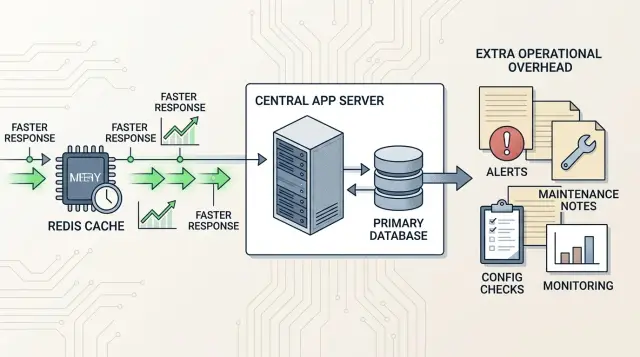
Table of Contents
What problem are you trying to fix?
Start with the slow path, not the tool. If a page takes 1.2 seconds to load, find the step that burns the time. It might be one heavy SQL query, an external API call, template rendering, or too many small queries in a row. That matters more than the broad idea of "application performance."
This is where teams often get Redis wrong. They ask about caching before they can point to one request, one job, or one screen that is slow often enough to matter. If you can't name that path, adding a cache usually gives you more code, more failure cases, and no clear gain.
Latency and throughput are different problems. A single request that feels slow to a user is a latency issue. A system that handles 50 requests well but starts failing at 500 has a throughput issue. Redis can help with both in some cases, but the fix is not the same.
If users keep waiting on the same expensive read, Redis can cut response time fast. If your app slows down because workers fight over CPU, lock rows, or call a third-party API too often, Redis may do very little.
Also check whether people actually feel the delay. A report that runs once a day in 8 seconds may be fine. A product list that opens on every session and hangs for 600 ms is more urgent, even if the raw number looks smaller.
Before you change the architecture, measure the database itself. Look at query time for the slow endpoint, CPU and memory during busy hours, repeated reads for the same data, request rate at normal and peak traffic, and any error spikes or connection pool waits.
A small SaaS app usually has one obvious pain point, not ten. Maybe the billing page runs the same join on every refresh. Maybe the dashboard pulls unchanged stats every few seconds. That's a real reason to add Redis. Vague fear about scale isn't.
If the database is calm, queries are indexed, and users don't notice a delay, caching adds tax. You still need eviction rules, cache invalidation, monitoring, and a plan for stale data. That work only makes sense when the slow path is real and measured.
Where Redis usually pays off
Redis earns its keep when your app keeps asking the same question over and over in a short window. If 5,000 users open the same dashboard, pricing table, or product page, pulling that data from PostgreSQL every time is wasteful. A small cache can cut read load quickly and shave noticeable time off each request.
It also works well for hot data that people read far more often than it changes. Think of a list of plans, feature flags, session data, or a computed summary that updates every few minutes. When writes are rare and reads are frequent, Redis is often a clean win.
A few patterns fit especially well. One is repeated reads of the same object or query result. Another is shared short-lived state across several app servers, where in-process memory stops being useful because each server sees only part of the traffic. Redis gives every server the same fast place to check sessions, temporary locks, one-time tokens, or who's connected right now.
Counters and rate limits are another strong fit. Redis is good at tiny read-write operations, so it works well for rules like "10 requests per minute per user" or tracking failed logins before a temporary block. The same goes for simple coordination, like making sure one task runs once instead of five times.
Background jobs can benefit too, though the fit depends on the workload. A small SaaS app often needs a quick queue for sending welcome emails, generating exports, or syncing data after someone clicks "save." Redis works best when jobs are short, frequent, and easy to retry.
A simple test helps. If the data expires soon, several servers need the same answer, and recomputing it costs more than storing it, Redis probably pays off.
Where Redis often turns into extra work
If your app has low traffic, your database has plenty of headroom, and page loads already feel fine, Redis usually adds more moving parts than speed.
A small SaaS app with a few hundred requests an hour is a common example. If PostgreSQL answers most reads in 10 to 30 ms and CPU stays low, caching those reads won't change much for users. You still need to run Redis, connect to it, monitor it, and debug it when something goes stale.
Correctness is another place where Redis can hurt. Data like account balances, inventory, permissions, coupon limits, or checkout prices has to stay right all the time. A stale value for even 30 seconds can lead to refunds, support tickets, or access bugs. Users notice wrong data faster than they notice a page that loads 80 ms slower.
A lot of slow screens don't need Redis at all. They need better SQL.
A missing index, a noisy join, or an N+1 query often causes the delay. Fixing the query can cut response time from 400 ms to 25 ms without adding invalidation rules. That's usually easier to keep working six months later.
Redis also struggles when cache hit rates are weak. If each user sees a different result, picks different filters, or asks for fresh data that changes every minute, the app keeps filling the cache with entries nobody reuses. In that case, Redis becomes a tax on writes, memory, and developer attention.
The extra work usually shows up in boring places. You have to keep cache entries fresh after updates, figure out why one server shows old data, set eviction rules before memory fills up, handle cold starts after deploys or restarts, and watch one more service in production.
That last part matters more than people admit. Every new service adds alerts, config, backups, dashboards, and odd edge cases at 2 a.m. If the database can handle the load, and a query fix or index solves the slow path, keep the stack simple.
How to decide step by step
Start with one slow action that users actually feel. Don't begin with "we should add Redis." Begin with one request, like loading a dashboard, product list, or search results page. If that action is already fast enough, caching won't fix anything important.
Then look for repetition. A cache helps when many people ask for the same data again and again, or when one person repeats the same request within a short time. It does little for requests that are unique every time.
A practical check looks like this:
- Pick one endpoint or page that feels slow.
- Measure how often the exact same request repeats in an hour.
- Decide how long the data can stay fresh without causing trouble.
- Write down what clears or replaces the cached value.
- Decide what the app should do if Redis is unavailable.
The repeat rate matters more than most teams think. If 1,000 requests arrive and only 50 could reuse the same cached result, your hit rate will stay low. In that case, Redis adds memory use, monitoring, and failure paths without much speed gain. If 800 of those requests ask for the same result, caching usually makes sense.
Do the math before you build. A page that takes 300 ms from the database and gets a 70% cache hit rate is a decent candidate. A page that takes 40 ms and changes every few seconds usually isn't.
Set two rules early. First, expiry: how long can data sit in cache before it's too old? Second, invalidation: what exact event clears it sooner, such as a price update, permission change, or new comment? If you can't explain both in one short note, the cache logic is still fuzzy.
Then plan for failure. Redis will go down at some point, even if only briefly. Your app should fall back to the database, serve slightly stale data, or disable a non-essential feature. Pick one on purpose and test it. If a short Redis outage breaks the whole product, you made it too central.
A simple example from a small SaaS app
Imagine a small SaaS app that sells one product with a few plans. Most visitors see the same pricing table, the same feature list, and the same product details all day. Even signed-in users often load the same plan data before they do anything else.
That's a good fit for Redis. The app still keeps its real product data in the main database, but it stores a short-lived copy of pricing and product records in cache. When traffic spikes after a newsletter send or a product launch, the app can answer most of those read requests from memory instead of asking the database the same question thousands of times.
The gain is usually easy to spot. Page loads feel steadier, and the database stops wasting work on repeated reads for data that barely changes. For a lean setup, that can delay an expensive database upgrade.
The order flow is different. When a customer starts a trial, upgrades a plan, or pays an invoice, the app should write that change to the main database first. After that, the team can clear or refresh the related cache entry. Redis helps with repeated reads, but it should not become the source of truth for orders.
That split matters. Product descriptions and pricing tables can survive a cache that's a few seconds old. Account balances and billing totals can't. If a customer opens the billing page and sees the wrong amount, support tickets show up fast.
In this kind of app, cache the mostly static reads. Keep orders, balances, invoices, and subscription state in the main database. Clear cached product entries when the team changes plans or feature text.
That's the basic pattern. Redis helps when many requests read the same data again and again, especially during short bursts of traffic. It becomes extra work when teams try to cache numbers that change often, affect money, or need exact consistency every time.
The costs that appear after launch
Redis often feels cheap on day one. The real bill shows up later, when the cache becomes part of normal production traffic and people start trusting it.
First, you need to run it properly. That means enough memory for the working set, backups if the data matters, and monitoring that tells you more than "the process is up." You need alerts for memory pressure, eviction rates, replication lag, and slow commands. If you skip that work, Redis can fail in quiet, annoying ways.
Cold starts catch teams by surprise. A restart, a deploy, or a failover can empty most of the cache. Then every request goes back to the database at once, and the app suddenly feels slower than it did before Redis. The cache helps only after it warms up again.
That warm-up period can hurt. A popular page can trigger thousands of misses in a few seconds. Several app servers can ask for the same missing value at the same time. The database takes the hit, not Redis. Users see timeouts right when traffic spikes.
This is the classic cache stampede. It happens in production all the time. You can limit it with request coalescing, stale reads, jittered TTLs, or prewarming, but each fix adds more rules and more code.
Then there's freshness. Invalidation bugs are boring until a customer sees old data after changing a price, updating a plan, or revoking access. Those bugs are hard to catch in testing because the app works most of the time. It fails only when timing lines up the wrong way.
Operations work grows faster than many small teams expect. One Redis instance is simple enough. Replication, failover, clustering, persistence settings, memory tuning, and version upgrades are not. Each extra piece adds another way for the system to misbehave.
At that point, Redis is no longer a quick speed trick. It's part of your infrastructure. If it saves 20 ms on common requests but costs hours every month in incidents, tuning, and stale data bugs, the math may not work.
Mistakes teams make with Redis
The most common mistake is simple: teams cache too much, too early. They wire Redis into every endpoint because it feels cheap and fast. Then they carry extra code and extra debugging for requests that were never slow in the first place.
A better pattern is narrow. Pick one hot path where the same expensive read happens again and again, such as a dashboard summary or a product list with heavy filters.
Another mistake is using Redis to hide bad database work. A slow query with no index doesn't become healthy because a cache sits in front of it. The app may feel faster for a week, then the cache misses pile up, invalidation gets messy, and the real problem is still there.
Teams also store data without any expiry plan. They add objects to Redis and assume they'll handle invalidation later. Later rarely comes. Then users see old prices, stale counters, or permissions that should have changed an hour ago.
Every cached item needs three clear rules: how it gets refreshed, when it expires, and which event deletes or updates it. If nobody can answer those in one minute, the cache will drift.
A more serious error is treating cached data as the source of truth. Redis is fast, but speed doesn't make it the owner of business state. If an order, subscription, or permission matters, your system needs one clear home for that data. Otherwise a restart or write race can leave Redis and the database saying different things.
Teams also skip failure drills until production breaks. They don't test what happens when Redis goes down, restarts empty, or returns errors for 30 seconds. Then one bad morning turns a cache into an outage.
Your app should survive a Redis problem in a boring way. Pages may get slower. They should not crash, double-charge users, or lock people out.
Quick checks before you add it
Before you add Redis, look at the traffic pattern, not the idea. Caching helps when the same read happens again and again and the answer doesn't change every second. If most requests are unique, Redis may just add one more thing to run, watch, and fix.
Open your logs or tracing data and look for repeated queries over a short window. Product lists, pricing tables, session lookups, and public profile pages often repeat. A one-off admin search usually doesn't. That difference matters more than average CPU use.
You also need to decide how fresh the data must be. If users can live with data that's a few seconds old, caching is often fine. If one wrong value causes support tickets or billing mistakes, the rules get harder fast.
Ask your team a blunt question: can we debug this at 2 a.m.? Redis isn't hard to start, but it does add failure modes. You need monitoring, memory alerts, eviction insight, and a clear way to tell whether bad data came from the database, the app, or the cache.
One more check saves a lot of wasted effort: test the app with Redis turned off. If performance falls apart, your app may be dependent on the cache instead of improved by it. That's fragile. A healthy setup still works without Redis. It just runs a bit slower.
Before you ship, confirm five things:
- The same reads happen often enough to get good cache hits.
- Users can tolerate slightly stale results.
- Your team can monitor memory, hit rate, and errors.
- The app still works correctly when Redis is off.
- A database index or query fix won't solve the problem faster.
That last check is easy to miss. Many slow pages don't need a cache at all. They need a missing index, a smaller query, or less data on the page.
What to do next
Add Redis only after you can point to one slow, repeated workload and name the win you expect. That might be a product list hit thousands of times per hour, a session store that needs fast reads, or a rate limit counter. If you can't describe the exact pressure, Redis will probably turn into one more thing to run, watch, and debug.
A good next move is small and boring. Pick one narrow use case and measure the baseline first. Write down expiry, eviction, and fallback behavior before you ship. Check whether an index, query rewrite, or precomputed table fixes most of the pain. After launch, review the result and keep Redis only if it still earns its place.
The written rules matter more than most teams expect. Decide how long data can stay stale, what happens on a cache miss, and what the app should do if Redis is down. If those answers live only in someone's head, invalidation gets messy fast.
It's also worth trying the simpler database fix first. Many apps don't have a caching problem. They have a missing index, a chatty API, or a page that asks the database the same question five times in one request. Fixing that often gets you most of the speedup without adding another service.
A small SaaS team can test this in a week. Measure one endpoint, add one cache with a clear TTL, watch hit rate and error rate, then compare cloud cost and response time. If the gain is tiny or the fallback path is ugly, remove it and move on.
If you're making this call inside a small company, outside help can save a lot of wasted time. Oleg Sotnikov at oleg.is works with startups and small teams on architecture, infrastructure, and practical AI-first development, and this kind of "do we actually need another service?" decision is exactly where experienced review pays off.
That's usually the real answer on Redis: use it for a narrow, repeated workload that you've measured, and skip it when a database fix or a simpler design solves the same problem.


