Weekly infrastructure update that people actually read
Learn how to write a weekly infrastructure update that focuses on cost changes, recent risks, and the next decisions non-engineers need to make.
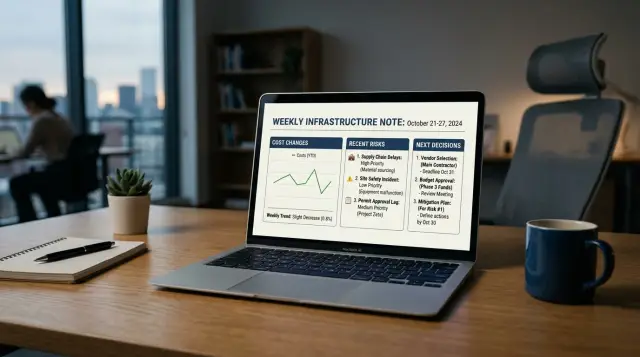
Table of Contents
Why most weekly notes get ignored
Most teams write these notes like a changelog. They fill them with patch versions, server names, error counts, and internal terms that make sense inside the engineering team. A founder, finance lead, or operations manager opens the note and cannot tell, in 20 seconds, whether the week got cheaper, riskier, or messier. After that happens a few times, they stop reading.
The bigger problem is not too much detail. It is detail without contrast. People do not want a full replay of the week. They want the difference between this week and last week. If cloud spend jumped by 12%, if a backup failed once, or if a vendor changed pricing, say that first. When teams bury the change inside a long status dump, readers have to do the comparison themselves. Most will not bother.
Abstract risk language also kills attention. Phrases like "we are monitoring performance" or "there is some concern around capacity" sound safe, but they say almost nothing. A concrete risk is easier to grasp: checkout pages slowed for 14 minutes on Tuesday, support got six complaints, and the same issue could return during the next campaign. That gives people a clear picture of impact.
Many notes also miss the simple questions non-engineers care about:
- What changed this week?
- Did it affect cost, customers, or delivery?
- What might go wrong next?
- Do you need a decision from me?
That last point matters more than most teams think. A weekly infrastructure update often asks for attention, but not for action. If leaders cannot approve spend, accept a trade-off, or choose between options, the note feels like homework with no payoff. People ignore messages that only inform and never help them decide.
A note earns attention when it respects the reader's job. They do not need every metric. They need the few changes that affect money, risk, timing, and the next call they may have to make.
What non-engineers need from the note
Non-engineers read a weekly infrastructure update for one reason: they want to know what changed, what it means for the business, and whether they need to act. If the note opens with server names, ticket counts, or tool chatter, most people stop reading almost at once.
Start with one plain sentence that sums up the week in business terms. A good opening sounds like this: systems stayed stable, cloud spend rose by $840 after a campaign spike, and the team needs approval to increase database capacity by Friday. That gives a founder, finance lead, or operations manager the picture fast.
Cost changes need real numbers. "Costs were a bit higher" is too vague to help anyone. "Hosting moved from $4,600 to $5,310, mostly because image processing jumped after the product launch" tells people whether the change matters, whether it is temporary, and whether they should worry.
Risk should work the same way. Most readers do not care about packet loss, noisy neighbors, or database replication lag unless those details change a business choice. They do care if checkout slowed for 18 minutes, support volume increased, or one backup failed and recovery testing moved to today. Put the business effect first. Technical detail can stay in a separate internal note.
Decision points should be easy to find. If someone needs to approve budget, accept a short delay, or choose between speed and cost, say that clearly. A short list is enough:
- approve a larger database plan this week
- delay a non-urgent release until backup checks finish
- accept a temporary spend increase tied to higher traffic
Leave out details that do not change a choice. Most non-engineers do not need alert counts, raw logs, or every incident step unless those facts affect money, timing, customer impact, or legal risk. The note earns attention when it respects time and makes the next move obvious.
How to write it each week
People read a note when they know what they will get and how long it will take. That means you need the same small routine every week, not a fresh format every Friday.
Start by pulling three inputs from the last seven days: spend changes, incidents, and open risks. Use the numbers you already have from billing, alerts, and your task tracker. If nothing changed in one area, say that in one short line and move on.
Then filter hard. Only keep items that changed this week or need a decision now. Old background detail makes the note feel longer than it is, and most readers stop at that point.
A simple weekly rhythm
Pick one day and stick to it. Tuesday morning works well for many teams because Monday is often noisy, but any fixed day is fine if you keep it consistent.
A simple flow looks like this:
- Gather the latest spend totals and any unusual jumps or drops.
- Check incidents from the week and note what is still open.
- Review current risks and remove anything that no longer needs attention.
- Write the note in the same order every time.
That order should be costs, risks, then decisions. Costs go first because they are concrete. Risks come next because leaders need to know what might break or slow down. Decisions go last because they turn the note into action.
Keep each part tight. Two or three short paragraphs usually beat a long bullet dump. Use numbers when you have them, plain words when you do not. "Cloud spend rose by 12% after adding a new database replica" is better than "costs increased due to infrastructure changes."
Finish by naming the next decision, the owner, and the date. If no decision is needed, say that too.
Send the note on the same day each week, even if the week was quiet. A regular weekly infrastructure update builds trust faster than a polished note that shows up late. If one number is still pending, send the note anyway and add a one-line update later.
How to report cost changes
People read cost updates when the numbers answer two plain questions: what changed, and will it keep changing? If your note does that in a few lines, non-engineers can act on it without asking for a second meeting.
Use the same simple pattern every week: last week, this week, and the difference. Put the number change next to the item, not buried in a paragraph. A line like "$820 to $910, up $90" is easier to scan than "costs increased slightly due to usage."
Then name the cause in plain words. Do not make people guess. If storage went up because the team kept extra backups during a release, say that. If AI API spend rose because customer support processed more tickets, say that too. The reason matters more than the raw number.
Separate one-time charges from normal ongoing spend. This prevents panic. A domain renewal, emergency contractor bill, or annual license true-up should sit in its own line. Otherwise people may think the higher total will repeat next week.
A short format works well:
- Cloud hosting: $820 last week, $910 this week, +$90. Temporary test environment for a product release. Ends this Friday.
- AI API usage: $460 last week, $520 this week, +$60. More support ticket summaries. Likely to continue unless volume drops.
- Domain renewal: $0 last week, $210 this week, +$210. One-time charge, not part of normal weekly spend.
- Monitoring tools: $142 last week, $145 this week, +$3. No action. Normal usage noise.
That last line matters. Ignore tiny swings unless they point to a pattern. Most weekly bills move a little. Reporting every small change trains people to tune out the whole note.
Be careful with savings claims too. A lower bill is only worth calling out when it will stick. If you shut down an unused server and save $180 every month, say so. If the bill dropped because traffic was quiet during a holiday, that is not a real win. Say it was temporary and move on.
This part of a weekly infrastructure update should help leaders judge trend, cause, and next action in less than a minute.
How to describe recent risks
Most risk updates fail for one reason: they sound like internal team talk. A line like "cache instability under investigation" tells a non-engineer almost nothing. In a weekly infrastructure update, people need plain language they can read in seconds.
Start by naming the problem the way a normal person would say it. "Backups ran late twice this week" is better than "backup pipeline degradation." "One server is close to full" is better than "storage pressure event." If a leader has to decode the note, the note failed.
Then make the impact concrete. Say who feels it and when. That could be customers, the support team, finance, or the product team. Add a time frame people can picture, such as "today," "during the next release," or "next month if usage keeps growing." This turns a vague warning into something people can judge.
Keep the current status to one clean sentence. People want to know if the system still works, if the problem is contained, and whether the team already started fixing it. Long explanations bury the point.
A good risk note also names the next action and the owner. Not a whole plan, just the next move. "Anna is replacing the failing disk tonight and will verify backups tomorrow morning" works well. It gives the reader confidence that someone owns the issue.
Do not stop there. Say what happens if the team waits. This part earns attention because it connects the risk to a real outcome. Maybe support tickets rise, a release slips, the cloud bill jumps, or users hit slow pages at busy hours. Keep it factual, not dramatic.
Compare these two lines:
"Database latency increased after Tuesday's deploy."
"Page loads are slower for customers in Europe during busy hours. The site still works, but response time is above our target. Max is rolling back one query change today. If we wait until next week, checkout drop-off may rise."
The second version is longer by a few words, but it is much easier to understand. That is the standard to aim for every week.
A short example of a good note
People read a weekly infrastructure update when they can answer four questions fast: what changed, what went wrong, what needs a decision, and what can wait. The note below does that without drowning people in tool names or server detail.
Week of May 12

Costs
Cloud spend was 14% higher than last week. Traffic jumped after a partner campaign, so compute and database usage went up with it. If traffic stays at this level, monthly spend will rise by about $1,200. No decision is needed today, but we are watching the trend.

Risks
One backup job failed on Tuesday night because the storage target timed out. The next scheduled run completed, and the team checked restore points, so data stayed safe. We changed the timeout setting and will watch the next few runs.

Decisions needed this week
We need approval to add 30 days of log storage. Current retention is too short for support and incident review. This will add about $180 per month. Please approve or reject by Thursday so we can set the new policy before the weekend.

Can wait
A new staging server is still on the list, but we can push it to next month. Current release work does not need it, and delaying it saves money this month.

Need a call?
Yes, if anyone wants to review the traffic trend or discuss the extra log storage cost. Otherwise, no meeting is needed.
This works because every part answers a plain business question. The cost change has a reason and an estimate. The backup issue says what happened, whether customer data is safe, and what the team changed.
It also makes one thing very clear: leaders need to decide on log storage this week. The staging server does not need attention yet. That split matters. When readers can see what needs a call now and what can wait, they stop treating the note like background noise.
Mistakes that make people stop reading
People ignore weekly notes when the note feels like work. If a reader has to dig for the point, they stop opening it.
One common mistake is turning the update into a full incident log. Leaders do not need every alert, restart, and ticket comment. They need the short version: what changed, what it cost, what risk remains, and whether anyone needs to act.
Another problem is hiding bad news inside long paragraphs. If cloud spend jumped 18% or a backup failed, say it early and in plain words. Most people can handle bad news. What they hate is finding out later that it was buried on line nine.
A note also loses trust when it lists tasks with no owner or date. "Investigate database slowdown" is not a plan. "Maria will review slow queries by Thursday" is a plan. Readers want to know who is doing the work and when they should expect an answer.
The same goes for facts and guesses. Keep them separate. If you know the cause of a cost increase, say so. If you only suspect the cause, label it as a working theory. Mixing the two makes the whole note feel shaky.
Decision requests often fail for a simple reason: the note asks for approval without giving options. "We need a decision on monitoring" puts the burden on the reader. A better version gives a small choice set, such as keeping the current setup for one more month, or moving to a cheaper setup with one known tradeoff.
A short weekly infrastructure update usually works better when each point answers one of these questions:
- What happened this week?
- What changed in cost?
- What risk needs attention now?
- Who owns the next action?
- What decision, if any, is needed?
If your note cannot answer those clearly, it is probably trying to do too much. Save the deep technical detail for the team that needs it. Everyone else needs a clean read they can finish in two minutes and remember afterward.
Quick checks before you send it
A good note does not need polish. It needs clarity. If a reader can scan it in under two minutes and still repeat the main points, you did the job.
Most teams send updates that sound tidy but say almost nothing. A final check fixes that. Read your note once like a busy founder or finance lead, not like the person who wrote it.
Use this test before you hit send:
- Cut anything that slows the read. If the note takes more than a short coffee sip to finish, trim it.
- Replace labels like "slightly up," "stable," or "minor issue" with numbers. "Cloud spend rose 11%" is clear. "Latency hit 420 ms for 18 minutes" is clear.
- Match every risk with a next action. If you mention a database warning, say who is checking it and when they will report back.
- Ask for decisions only when they matter now. If no one needs to approve budget, timing, or tradeoffs this week, do not add a fake question at the end.
- Hand it to one non-engineer, or read it aloud yourself. If the message turns fuzzy halfway through, rewrite the fuzzy part.
Numbers do more than make the note feel solid. They stop people from guessing. "Costs are a bit higher" invites debate. "Costs rose by $620 after backup retention changed" gives people something real to react to.
Risks need the same treatment. Do not stop at "there is a deployment risk." Say what might happen, how likely it feels, and what the team will do next. Even a short line works: "We saw two failed deploys on Tuesday. The team is testing the rollback script before Friday's release."
One more filter helps: can someone outside the team repeat three things after reading your weekly infrastructure update? They should be able to say what changed, what needs attention, and whether you need a decision. If they cannot, the note is still too vague.
That last edit often saves more time than the whole draft. It also makes next week's note easier to write.
Next steps for your team
A weekly infrastructure update only works if people learn its shape. Pick one simple format and keep it unchanged for four weeks. That gives leaders enough repetition to scan it fast and notice what changed.
Keep the note tight. Most teams do well with the same three blocks every week: cost changes, recent risks, and the next decision or action needed. If a section does not lead to a reply, approval, or course correction, it probably does not need to stay.
A practical four-week rollout looks like this:
- Week 1: send the first version and keep it short enough to read in two minutes.
- Week 2: keep the structure the same and tighten any vague lines.
- Week 3: check which parts got replies, questions, or decisions.
- Week 4: remove anything nobody uses and keep what gets action.
Do not judge the format by whether people say they "like" it. Judge it by behavior. Did finance reply to a cost jump? Did a founder approve a risk fix? Did a team lead answer the one decision you asked for?
That review matters more than polish. If readers always respond to cost movement but skip uptime details, move uptime into a shorter line. If nobody reacts to a long status paragraph, cut it.
This is also the point where many teams notice they need a stronger reporting habit, not a prettier template. A Fractional CTO such as Oleg Sotnikov can set up a simple rhythm around cost, risk, and next decisions, then trim the noise once real patterns show up. That kind of support is useful when the team has technical work happening every week but no clear way to turn it into decision-ready updates.
One small rule helps a lot: every note should ask for something only when a decision is needed. If no decision is needed, say what changed and stop there. People keep reading when they trust the note will respect their time.
After a month, you should know what earns attention, what gets ignored, and what your team can stop writing.


