Webhook delivery design for instant customer sync
Webhook delivery design affects retries, event order, and failure logs. Set these rules early so sync bugs do not turn into support work.
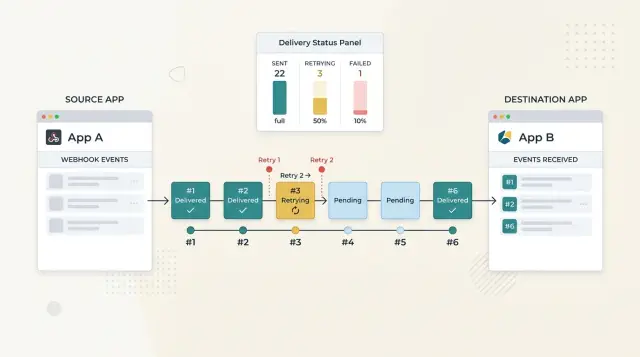
Table of Contents
Why instant sync fails in real life
Customers call something "instant" when the other system updates before they can refresh the page. In practice, they start noticing lag after a few seconds. A five-second delay feels broken when a payment clears, a seat count changes, or an order status flips.
Most webhook failures do not start with bad code. They start with normal network behavior. A receiver takes too long, returns an error, or finishes after the sender has already stopped waiting. That is why teams need to think through delivery rules before launch, not after the first support spike.
A single slow endpoint can do more damage than expected. If all events move through one shared queue, one customer timeout can hold everything behind it. Then one account has a problem, and many other accounts look out of date even though their systems work fine.
Timeouts are especially tricky because they can hide a successful write. Your sender may stop waiting after 10 seconds, mark the attempt as failed, and schedule a retry. The customer system may still finish the write at second 11. Now the same update can arrive twice, and both sides can honestly say they handled it correctly.
Missing updates cause a different kind of mess. When a subscription status, invoice state, or user permission does not sync, customers rarely assume an event got dropped. They open a ticket, ask for a manual fix, and start watching every change more closely.
That support load adds up fast. Someone checks logs by hand, someone replays the event, someone explains the mismatch to the customer, and someone else starts wondering whether other accounts have the same issue. From the customer's point of view, this does not look like a delivery problem. It looks like your product is unreliable.
Small delays are normal. Hidden delays are what turn background sync into account management work. If you do not choose retry rules, queue behavior, and failure visibility early, your support team will end up making those choices later, one ticket at a time.
Decide what "instant" means
Most teams say "instant" when they really mean "fast enough that customers do not notice." Put a number on that before you ship. Without one, every small sync delay turns into an argument about whether the system is working.
Set a normal delivery target in seconds. For many business flows, 3 to 10 seconds feels instant enough. If a payment, signup, or subscription change reaches the other system inside that window, most users will trust the sync.
Then set a second number: the longest delay you will allow before the product shows a warning. That number is usually much higher. You might aim to deliver most events in 5 seconds, but show a warning if a sync is still pending after 60 seconds.
Those numbers do different jobs. The first guides engineering. The second protects the user experience.
Users also need status, not silence. A small model is enough:
- Queued: your app accepted the change and will send it
- Sent: the endpoint accepted the webhook
- Failed: delivery stopped and needs attention
This matters because app success and sync success are not the same thing. A customer can update a subscription in your app, and that update can save correctly in your database while the webhook still waits in a queue or fails on the receiver side. If you show only "saved," people assume the other system already has the change.
That is where confusion starts. Sales sees one plan, billing sees another, and account managers end up explaining a delay nobody could see.
A better pattern is simple. Confirm the app action right away, then show sync status next to it. "Subscription updated" and "Sync pending" can live together without conflict. That small detail prevents a lot of back-and-forth later.
If your product needs near-instant updates across several tools, settle this early. A clear time target and visible status beat optimistic wording every time.
Choose the delivery contract
Customers do not care how your event bus works. They care about a clear promise: what you send, what can repeat, and how they can tell whether they already processed it. If that promise is vague, duplicate records and odd status flips show up in support chats.
For most products, at-least-once delivery is the right default. Say that plainly. A webhook can arrive twice, and a retry should use the same event identity as the first attempt. That gives customers a rule they can build around instead of guessing from behavior.
Each request should carry a few fields that stay stable across retries: a permanent event ID, an event timestamp, a resource version or sequence number, and a request signature.
The event ID lets a customer deduplicate safely. If their endpoint times out after processing your webhook, you will retry, and they may see the same event again. When the ID stays the same, they can store it and ignore the duplicate without guessing.
Timestamps and resource versions solve a different problem. Webhooks do not always arrive in the order you sent them. If a customer receives version 18 of a subscription and then version 17 a few seconds later, the older event should not overwrite newer data. A timestamp helps with audits. A version number gives a clearer rule for deciding which state wins.
Keep the payload small and easy to parse. Send the event type, the resource ID, the current version, and the fields the receiver usually needs right away. Do not dump every related object into each webhook. Large payloads break more often, take longer to inspect, and make schema changes harder.
Sign every request. Customers need a simple way to confirm that the webhook came from you and that nobody changed the body in transit. HMAC signatures are common because they are easy to verify and easy to rotate when secrets change.
A solid delivery contract does not hide failure. It gives customers enough structure to handle retries, ignore stale events, and trust the source on day one.
Set retry rules step by step
Bad retry rules turn a small outage into duplicate updates, angry customers, and support tickets. If customers expect instant sync, you need fast first retries, slower later retries, and a clear point where the system stops.
Start with short delays for errors that often clear on their own. A timeout, a temporary network break, or a brief overload on the receiver side can disappear in seconds. The first retry should happen quickly so a short wobble does not become a visible data mismatch.
A simple schedule often works well: retry after 10 seconds, then 30 seconds, then 2 minutes, then 10 minutes, then 1 hour. After that, slow down or stop based on the event type and how fresh the data needs to be. A billing update may still matter tomorrow. A typing-status event does not.
Most teams do better with a fixed retry window, such as 24 hours, than with endless retries that keep failing in the background. Endless retries feel safe, but they usually just hide broken integrations.
Be strict about which responses you retry. Retry when the receiver might succeed later: timeouts, HTTP 429, and 5xx responses. Do not retry 4xx errors like 400, 401, 403, 404, or 422 unless you know the receiver can fix the problem without a new event. Those usually mean the request is wrong, expired, or no longer allowed. Retrying them just creates noise.
When an event still fails after the retry window, move it out of the normal pipeline and into a replay queue. That keeps live traffic clean and gives support or operations a safe place to inspect, fix, and resend the event. The replay queue should keep the payload, response history, attempt count, and last error message.
One small detail saves a lot of pain: add randomness to retry timing. If one customer endpoint goes down and comes back, you do not want ten thousand retries hitting it in the same second.
Pick ordering rules customers can live with
Most teams want strict order until they see what it costs. If one event gets stuck, everything behind it waits too. That sounds tidy on paper, but customers usually care more about seeing the latest correct state than about perfect playback of every change.
A better default is to keep order only where it matters. Send events in order per customer, per account, or per record such as a subscription, invoice, or user profile. That gives you predictable behavior without turning one delayed webhook into a traffic jam for every tenant in the system.
Do not promise one global order for all traffic. It is expensive, fragile, and rarely useful. If customer A updates a billing profile, customer B should not wait because some unrelated event is still retrying.
When order matters, add a sequence number or version to each event for that record. The receiver can compare what arrived with what it already has. If event 42 arrives before event 41, the receiver can hold it briefly, fetch the latest state, or accept 42 and ignore 41 when it finally shows up.
That last option is often the simplest. Newer versions should replace older ones. A subscription.updated event with version 9 should win over version 8, even if version 8 arrives later. This rule cuts a lot of support pain because it stops stale data from overwriting fresh data.
Say this plainly in your docs and your product behavior. Ordering applies only within the same record. Newer versions replace older ones. Duplicate events may appear, and receivers should ignore repeats. After a gap, the receiver may fetch current state instead of waiting forever.
Write that contract before launch, not inside support replies after launch. When integrators build for reality, sync breaks less often.
Show failures before support hears about them
A webhook that fails quietly creates support work fast. Customers notice missing sync before your team does, then someone has to dig through logs, ask for endpoint details, and explain what happened with half the story missing.
You need one place that makes delivery problems obvious. A useful delivery log shows each event, when you sent it, which endpoint received it, the response code, and whether the attempt will retry or stop.
What support and customers should see
The view does not need to be fancy. For each customer endpoint, show the last successful delivery, the most recent failure, the next retry time, and how many attempts are still queued.
A short summary should also group failures by endpoint and by customer account. Repeated response codes such as 401, 404, or 500 should stand out. So should endpoints with a growing retry backlog or no recent successful deliveries.
Those patterns save time because they point to the real problem right away. If one customer changed credentials, you will see a cluster of 401 responses. If one endpoint is down, you will see retries pile up under the same account instead of chasing random missing updates.
Your team also needs alerts before the queue turns into a mess. Alert on retry backlog growth, high failure rates on one endpoint, or missing successful deliveries across many accounts. On a lean team, this matters even more. One hidden webhook issue can eat a full week of cleanup.
Support should not need engineering for every fix. Give them a safe replay action for a single event or a short time range, with clear limits. If the customer fixed their endpoint five minutes ago, support should be able to resend the missed events and confirm that delivery succeeded.
Keep replay history visible too. If support replays ten events and eight succeed, everyone can see progress right away. If they fail again with the same response code, the next step is obvious and the customer conversation stays short.
That is the real job of failed webhook visibility. It reduces guesswork, shortens support threads, and stops routine delivery problems from turning into account management work.
A simple example with subscription updates
A customer upgrades from Basic to Pro in your app at 10:03. Your app saves that new plan first, so your database stays the source of truth even if every downstream call fails.
Right after that, your system creates one event, such as subscription.updated, with an event ID and a version number for that customer. That gives you one clear record of what changed, when it changed, and which systems still need the update.
Billing gets the event first and returns 200 OK in a few seconds. CRM does not. It times out.
That should not roll back the upgrade or freeze the whole queue. The customer already changed plans, and billing already accepted the update. CRM just has a delivery problem.
A sane flow is straightforward. Your app marks billing as delivered. It marks CRM as failed on attempt 1. It schedules the next CRM retry, maybe one minute later. Meanwhile, unrelated events keep moving.
If the same customer changes something else before CRM recovers, you have two safe options. You can enforce per-customer ordering for CRM only, or you can include a version number and let CRM ignore older events if a newer one already arrived. Most teams prefer the second option because it avoids traffic jams.
Say the customer adds extra seats at 10:05. Billing receives that new event right away. CRM still has not processed the plan upgrade, but that does not need to block the seat update forever. When CRM comes back, it can apply the newest version and skip stale retries.
Support also needs a clear view of the problem. When the customer asks, "Why does my CRM still show the old plan?" support should not have to dig through logs.
They should see one row with the event ID, customer account, destination status, last error, attempt count, and next retry time. A note like "CRM timeout, retry in 47 seconds" saves real time and keeps the issue from bouncing between teams.
Mistakes that create account management work
Support teams pay for delivery mistakes long after the code ships. A weak setup turns small sync delays into refund requests, angry emails, and manual account fixes.
The first problem is language. If you tell customers a change happens in real time, they expect it now, not in 20 seconds and not after three retries. If your system usually updates fast but sometimes takes a minute, say that plainly. Clear timing beats a bigger promise every time.
Another common mistake is retrying forever and telling nobody. That sounds safe, but it hides broken integrations for days. A customer updates billing, access never changes, and your system keeps trying in the background while the account manager gets the first complaint. Put a limit on retries, mark the delivery as failed, and show that state where your team already works.
Strict ordering causes trouble too. Teams often decide every event must arrive in perfect sequence, then force all traffic through one locked queue. That can slow everything when one bad event gets stuck at the front. Most customers can live with a simpler rule: events for the same object should stay in order, but unrelated objects should not wait.
Hidden errors waste the most human time. If your team only sees "delivery failed," they still have to dig through logs, guess what happened, and ask engineering for help. Show the raw response code, response body, number of attempts, and next retry time. That alone can save hours.
A small example makes this obvious. A customer upgrades a subscription, but the receiving endpoint returns 500 for ten minutes. If your system keeps retrying silently, sales sees the upgrade, the product still shows the old plan, and someone on the account team has to explain the mismatch by hand.
A few basics prevent that mess: replay tools for a single event or a date range, tests for retries and duplicate delivery, a visible failed-event queue sorted by customer, and status notes that say whether an event is pending, delivered, retrying, or dead.
Launch without those basics, and account managers become the fallback system. That is expensive, slow, and usually avoidable.
Quick checks before launch
Webhook systems should survive ugly tests, not clean demos. Right before launch, the job is simple: break the flow on purpose and make sure the failure still makes sense to users and to your team.
Start with one customer endpoint. Make it return a 500, then make it time out, then make it respond too slowly. Check that your retry schedule follows the rules you set, that each attempt is recorded, and that your app does not show the sync as finished while delivery is still failing.
Next, send the same event twice with the same event ID. The receiving side should ignore the second copy or handle it safely. If one duplicate can create a second invoice, reopen a canceled plan, or send two emails, you have an expensive support problem waiting for a real customer.
Then test ordering on purpose, not by hope. Deliver version 3 before version 2 and inspect the final state. If the older payload can overwrite newer data, users will see records jump backward and stop trusting the sync.
Now check visibility. Open the customer view and the support view while those failures happen. A user should see a plain status such as pending, failed, or retrying, plus when the last attempt happened. Support should see more detail: event ID, response code, attempt count, and next retry time.
One more test matters more than teams expect: replay a single failed event. Do not rerun a whole batch just because one delivery broke. You want a clean way to retry one item, keep the audit trail intact, and confirm that the replay does not create duplicates or reorder newer updates.
These checks take less time than one messy support thread. If any of them fails, fix it before launch. Small delivery problems rarely stay small once account managers start explaining them by hand.
What to do next
A one-page spec beats a week of Slack messages and guesswork. Put your delivery rules, retry limits, ordering policy, timeout, and failure states in one place so engineering, support, and customer success use the same answers.
Keep that page plain. If an event can arrive twice, say so. If ordering only holds per object, write that down. If you stop retrying after a set window, make the cutoff obvious.
A careful first rollout stays small. Start with a few customer endpoints that behave differently, not just a clean test server. Send realistic events through the full flow, including retries and duplicate handling. Watch how often endpoints time out, reject payloads, or process events out of order. Then review failure logs with support before the wider launch so they know what customers are likely to ask.
After that, fix the two or three failure patterns that show up most often before you add more traffic. This step saves a lot of account management work later. A support team that can see retry history, last response code, next retry time, and final failure state can answer most questions quickly. Without that view, every missed sync becomes a debugging session.
It also helps to schedule one short review after the pilot. Look at actual failed deliveries, not just dashboard totals. If several customers all struggle with signature validation or slow processing, your docs or payload shape may be the real problem.
If you want an outside review, Oleg Sotnikov at oleg.is works with startups and smaller companies on architecture, infrastructure, and AI-first engineering as a Fractional CTO. A short review of your webhook design, failure visibility, and rollout plan can be much cheaper than cleaning up a launch after customers stop trusting the sync.
Frequently Asked Questions
How fast should a webhook feel to users?
Most teams should aim for visible delivery in about 3 to 10 seconds. Pick a second number too, such as 60 seconds, where your product stops staying quiet and shows that sync still waits or failed.
Should I promise instant sync?
No. Promise a clear time window instead of saying "instant" or "real time" if delays can happen. Users handle a short delay much better than a promise that sounds absolute and breaks under normal network issues.
What delivery guarantee should I use?
Use at least once delivery for most webhook systems. That means you may send the same event again on retries, so the receiver must detect duplicates and ignore them safely.
What fields should every webhook include?
Send a stable event ID, a timestamp, a resource version or sequence number, and a request signature. Those fields let the receiver verify the sender, drop duplicates, and stop older updates from overwriting newer data.
When should I retry a failed webhook?
Retry fast at first, then slow down. A simple pattern like 10 seconds, 30 seconds, 2 minutes, 10 minutes, and 1 hour works well for many business events, and a fixed retry window such as 24 hours keeps broken integrations from failing forever in the background.
Should I retry 4xx responses?
Usually no. Retry timeouts, 429, and 5xx because the receiver may recover soon. Treat 400, 401, 403, 404, and 422 as hard failures unless you know the customer can fix the problem without a new event.
Do I need strict ordering for all events?
Almost never. Keep order only where it matters, such as per customer or per record, and let newer versions win over older ones. That avoids one stuck event blocking unrelated traffic for everyone else.
How should I show sync status in the product?
Show app success and sync status as separate things. A good default is simple: the change saved, and sync sits in queued, sent, retrying, or failed until the other system confirms it.
What should support see when delivery fails?
Give support one clear view with the event ID, customer account, destination, response code, last error, attempt count, and next retry time. Add a safe replay action for one event or a short time range so they can fix normal delivery issues without asking engineering every time.
What should I test before launch?
Break the flow on purpose. Make an endpoint return 500, time out, respond slowly, accept duplicate event IDs, and receive version 3 before version 2. Then check that retries follow your rules, stale data does not win, replay works for one event, and both users and support can see what happened.


