Warm replica vs backup restore for practical failover
Warm replica vs backup restore: compare recovery speed, data loss risk, and running cost so your team can choose a practical default.
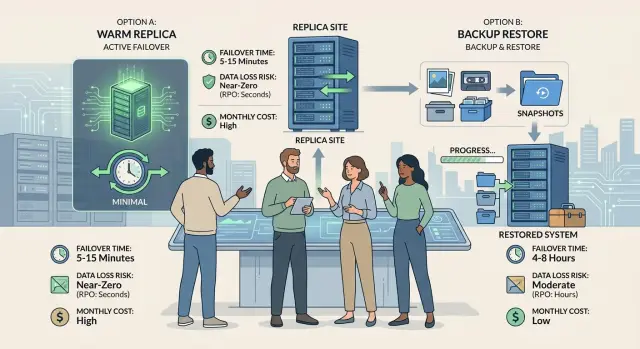
Table of Contents
Why this choice matters on a bad day
Recovery sounds simple in a planning document. Get the app back, restore the database, tell customers everything is fine. When something actually breaks, recovery gets much more basic: how fast your team can bring the service back, how much data is gone, and how much money you had to spend to make that possible.
That is why the warm replica vs backup restore decision matters. Both count as disaster recovery. Both can look fine in a spreadsheet. They feel very different at 2:13 a.m. when alerts fire, orders stop, and someone asks how long the outage will last.
Most teams do not struggle with this choice during architecture meetings. They struggle when pressure hits and every minute has a cost. A backup restore looks cheap until you need to find the right backup, verify it, rebuild the environment, and hope nothing is missing. A warm replica looks expensive until it cuts recovery from hours to minutes.
Most people care about the same three things first: how long the service stays down, how much recent data can disappear, and how much it costs to keep the recovery plan ready. Everything else comes after that. Once customers cannot log in, process orders, or trust the data, internal process and technical neatness matter a lot less.
There is no perfect setup for every company. A small internal tool can do fine with backups and a calm restore process. A product with paying users across several time zones often needs something faster, even if it costs more each month. The goal is not perfection. It is choosing a default that matches the damage your business can actually absorb.
Teams often overpay for protection they never use, or underprepare and learn the hard way. A sensible default sits in the middle: enough coverage for the real risk, without turning recovery into a second full-time system.
What a warm replica gives you
A warm replica is a second copy of your production system that stays close to the live one. It usually has the same app, database, and setup, but it does not carry full traffic all the time. Data keeps moving into it with a short delay, so if production fails, your team is not starting from zero.
That changes recovery in a very practical way. The servers already exist. The database already has most recent records. The app already knows how to run there. Instead of rebuilding machines, restoring large backups, and hoping every step works under pressure, the team mostly switches over and confirms the second system is healthy.
A warm replica does not remove all work. Someone still needs to switch traffic, promote the standby database if needed, and check that queues, scheduled jobs, logs, alerts, and outside services still behave the way they should. Even so, failover is usually much faster than a full restore because most of the waiting is gone.
The trade-off is the steady cost. You pay for extra compute, extra storage, replication traffic, and more monitoring. You also pay in team attention. Someone has to test failover, patch both environments, watch replication lag, and make sure the replica does not drift away from production.
For many teams, that cost is easier to live with than a slow recovery. If your product has steady customer activity, a warm replica often gives you a calmer default. You spend more each month, but you buy shorter outages and a lower chance of losing recent data.
A simple way to frame it: backup restore is a rebuild plan, while a warm replica is a near-ready spare. When something breaks at 2 a.m., the spare usually wins.
What backup restore asks you to accept
Backup restore means you recover after the failure, not during it. The team keeps snapshots, database backups, and file backups somewhere safe, then rebuilds the service when the live system cannot continue.
On paper, the path looks simple: provision fresh servers and storage, restore the latest usable backup, verify that the app and data still match, then switch traffic to the recovered system. In real life, each step takes time. Someone has to pick the right backup, check versions, confirm migrations, rebuild secrets and certificates, test logins and payments, and only then move users over.
This is why backup restore looks cheap in normal weeks. You do not pay to keep a second environment warm. You store backups, test them on a schedule, and avoid the steady bill for duplicate compute, database replicas, and extra monitoring. For small teams with tight budgets, that lower day-to-day cost is a real advantage.
The trade is waiting. If the production database dies at 2:15 p.m. and the latest clean backup is from 2:00 p.m., those 15 minutes of writes may be gone. Orders, messages, profile edits, and admin changes can disappear unless another system captured them. That is the real data loss risk.
Recovery time also stretches fast. Even a prepared team may need 30 minutes to a few hours to get everything back, and that assumes the backups are healthy and the restore script still works. If the team has to improvise, the outage gets longer.
Backup restore is often a reasonable default when downtime hurts less than ongoing infrastructure cost. It fits internal tools, early products, and systems where users can retry work. It is a poor fit for apps that take payments every minute, sync data in real time, or handle records people cannot easily recreate.
You save money up front. You also accept slower recovery and a real chance that the newest data will not come back.
How the trade-offs compare
When production goes down, the difference shows up quickly. A warm replica usually gets service back in minutes. A backup restore often takes hours because the team still needs to bring systems up, restore data, and confirm that the app actually works.
| Trade-off | Warm replica | Backup restore |
|---|---|---|
| Failover time | Usually minutes. A second copy is already running, so the team switches traffic and verifies the app. | Often hours. The team restores backups, starts databases and services, then tests logins, writes, and background jobs. |
| Data loss risk | Lower. You might lose only the newest writes that did not reach the replica yet. | Higher. You can lose everything since the last usable backup, plus changes users thought were saved during the outage. |
| Monthly cost | Higher. You pay for extra compute, replication, storage, and routine checks. | Lower on paper. Storage is cheap, and you keep most compute turned off until disaster hits. |
| Cost during an outage | Lower if downtime hurts revenue or trust. Short outages mean fewer refunds, fewer support tickets, and less manual repair work. | Often higher than teams expect. A cheap monthly setup can turn into a long, expensive outage. |
Data loss is where teams often misjudge the risk. With a warm replica, the missing data is usually the last few seconds or minutes of transactions and edits. With backup restore, the gap can be much larger. If the last clean backup ran at 2:00 a.m. and the outage starts at noon, everything written after 2:00 a.m. may need manual repair or may be gone for good.
Those are not abstract records. A customer may have updated billing details. A sales rep may have added notes to a deal. A support agent may have closed ten tickets. Users feel that work was saved, even if the system cannot recover it.
Cost needs the same honest look. One option shifts spending into monthly operations. The other shifts it into outage pain. Warm replicas cost more every month because you keep spare capacity ready. Backup restore costs less each month, but the team pays later with downtime, stress, overtime, and cleanup.
For many small teams, the default is straightforward. If an hour of downtime is annoying but survivable, backup restore can be enough. If an hour of downtime means lost orders, angry customers, or broken workflows, a warm replica is usually cheaper overall.
Pick a default in five steps
Most teams get stuck because they start with the technology. Start with the damage instead. Recovery is a business decision first and a technical one second.
-
Put a number on one hour of downtime. Count lost sales, support load, delayed work, and the time your team spends cleaning up after service returns. If one bad hour costs more than a month of extra infrastructure, a warm replica often makes sense.
-
Decide how much recent data you can lose. Be specific. Five minutes? One hour? A full day? If losing the last few orders, tickets, or customer updates would cause real damage, backup restore is a risky default.
-
Look at who will run recovery when people are tired. A plan that depends on your best engineer waking up at 2 a.m. and restoring everything without mistakes is weaker than it looks. Teams with thin coverage should favor the option with fewer manual steps.
-
Pick the simplest setup that stays inside your limits. If the business can handle a few hours of downtime and some recent data loss, backups may be enough. If you need short failover time and tighter data protection, pay for the replica.
-
Write down one default path. During an incident, debate wastes minutes. State who decides, what gets triggered first, and when the team switches from one recovery path to the other. A short runbook beats a clever diagram nobody reads.
One rough rule works well for small and mid-sized teams: if downtime is expensive, data is hard to recreate, and recovery depends on a sleepy human, choose the warm replica. If the service is internal, the workload is not urgent, and you can safely lose recent changes, backup restore is usually enough.
A simple example from a growing product team
Picture a small SaaS team with 12 people, a few thousand paying users, and customers across the US, Europe, and Asia. Their app supports daily work, so someone is always online. If the database goes down at 2 a.m. for the founders, it is still the middle of the workday for part of the customer base.
For this team, the choice stops being theory. It changes how long customers wait, how much data disappears, and how much money the company spends every month.
If the team ships updates every day and customer activity never really stops, even 15 or 20 minutes of downtime can create a chain reaction. Support gets flooded. Customers retry actions. The team scrambles to explain what happened. In that case, a warm replica is the safer default. The monthly bill is higher, but shorter failover protects revenue and reduces cleanup later.
Now picture a different team. They run a niche internal tool for a small group of business customers. Traffic is light. Most records change during business hours, and some days the database barely moves. If an outage happens at night, nobody notices until morning.
That team can live with backup restore. Recovery takes longer because someone has to pick the right backup, restore it, check the app, and reopen access. They may lose the most recent changes since the last backup, but that risk is acceptable because updates are infrequent and easy to recreate from email or spreadsheets.
The first team picks a warm replica because even short downtime hurts support, trust, and revenue. The second team picks backup restore because lower operating cost matters more than fast recovery, and the business can absorb a slower restart.
Mistakes that turn recovery into chaos
Teams often spend money on recovery and still freeze when something breaks. The problem is usually not the plan on paper. It is the gap between what the team bought and what the team actually practiced.
A warm replica looks safe until someone has to switch traffic for real. Many teams pay for standby systems, then never test DNS changes, connection strings, read and write mode, or startup order. During an outage, those small gaps turn into long delays.
Backups fail in a different way. A team says, "We can always restore," but nobody has timed a full restore into a clean environment. Restoring a database is only part of the job. The app still needs compute, config, network access, and a way to confirm that the data is usable.
The missing pieces are often outside the main database: background job queues, file storage, secrets, environment variables, third-party webhooks, API keys, scheduled jobs, and internal workers. If even one of those is out of sync, the app may come back in a broken state. Users can log in, but uploads fail. Orders appear, but emails do not send. That half-recovery wastes time because the team thinks the system is back when it is not.
Approval is another weak spot. When production is down, who decides to fail over? If the answer is "we'll figure it out," people wait, argue, or ask permission from someone who is asleep or on a flight. A good recovery runbook names one owner and one backup owner.
Cost fools people too. The cheapest setup often looks cheapest only before the first serious outage. One long restore can burn hours of engineering time, support time, missed sales, and customer trust. On the other hand, an untested warm replica is just a monthly bill with a false sense of safety.
That is why practical drills matter more than nice diagrams. Oleg Sotnikov makes that point often in his Fractional CTO work, and he is right. A recovery option counts only after the team has timed it, documented it, and repeated it under pressure.
Quick checks before you commit
A lot of teams spend weeks debating tools, then skip the plain questions that decide whether recovery will work. Before you choose between a warm replica and backup restore, write down what success looks like when production is down and customers are waiting.
Start with three simple statements. First, define recovery time in plain language: "we need the app back within 30 minutes." Second, define acceptable data loss just as clearly: "we can lose up to 5 minutes of orders," or "we cannot lose any paid transactions." Third, name the systems that come back first. Most teams do not need every service at once. They usually need the database, authentication, payments, and the customer-facing app before they need analytics, internal dashboards, or lower-priority workers.
Then run one drill with the people who would actually handle the outage, and time every step. Measure how long it takes to detect the issue, approve the plan, switch traffic, restore data, verify logins, and process one real user action.
This is where paper plans usually fall apart. A restore that looks like a 45-minute job can turn into two hours if someone has to hunt for the latest clean snapshot, rebuild secrets, or fix DNS and config by hand.
After that, compare the monthly bill with the cost of one outage. A warm replica costs more every month, but some teams recover that money the first time they avoid a long stop. Backup restore is cheaper to maintain, but the price shows up later if downtime blocks sales, support, or operations.
If you want a clear default, pick the option that meets your recovery time and data loss limits in a real drill, not in a spreadsheet.
What to do next
If your team still feels stuck, do not solve it with a huge policy document. Pick one written default that matches your budget and your real risk. Many teams do better when they start with a tested backup restore, then add a warm replica only for the systems that hurt revenue or support load when they fail.
Write the default in plain language. Name the service, the recovery target, the person who decides to fail over, and the person who runs the steps. If nobody owns those choices, recovery gets slow fast.
A short checklist is enough:
- Set one default approach for each system.
- Put a recovery drill on the calendar this month.
- Measure the slowest step and fix that first.
- Add a warm replica only where downtime costs more than the extra monthly bill.
The drill matters more than the diagram. One real test usually shows the weak spot quickly. Maybe restore takes too long because credentials are missing. Maybe DNS changes depend on one engineer. Maybe the data snapshot is fine, but the app config is not. Fix the first bottleneck, then run the drill again.
Keep the warm setup small at first. You do not need a second full copy of everything on day one. Protect the database, queue, or service that creates the biggest outage cost. Leave lower-risk internal tools on backup restore if the delay is acceptable.
If you want an outside review, oleg.is can be a useful place to start. Oleg Sotnikov advises startups and smaller companies as a Fractional CTO on recovery design, cost control, infrastructure, and practical AI-first operations. That kind of review is most useful when you already have a draft plan and want a clear answer on where to spend next.
Pick the owner, book the drill, and test the plan before you need it.


