Cloud VM vs container service vs bare metal for SaaS
Cloud VM vs container service vs bare metal: compare labor, observability, upgrades, and failure handling before you trust the monthly price.
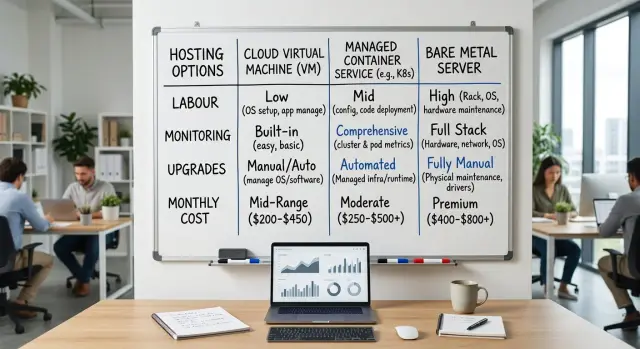
Table of Contents
Why the monthly bill is only part of the cost
A cheap server can get expensive fast if your team has to babysit it. When people compare a cloud VM, a managed container service, and bare metal, they often stop at the invoice. That misses the time spent on patching, backups, failed deploys, disk cleanup, and late-night restarts.
Even a steady SaaS needs regular care. Traffic might stay flat most days, but someone still has to update the OS, test backups, rotate secrets, watch storage growth, and keep a rollback ready. If one option saves $200 a month but adds six hours of manual work, it is rarely the better deal.
A lot of infrastructure cost hides in routine work. Logs, metrics, alerts, and backup checks take time to set up and keep useful. Some platforms handle more of that for you. Others give you more control, but they also give your team more chores. The bill can look lower while the real cost rises in the background.
Incidents expose the gap quickly. A bare metal server may look cheap until a disk fails and the recovery process lives in one engineer's head. A managed container service may cost more, but replacement, rollback, and scaling are often easier. During an outage, nobody cares which option won in a spreadsheet. They care about how fast the team can find the problem and recover.
Upgrades create the same kind of hidden cost. Database version changes, kernel patches, container runtime updates, and dependency bumps all need planning. If your setup makes safe upgrades hard, you pay for that later with longer maintenance windows and more risk.
Picture a small SaaS with calm weekday traffic and a few busy hours each afternoon. One hosting option is $150 cheaper each month, but every deploy needs manual checks and backups run from a shell script. Two messy incidents in a quarter can wipe out the savings.
Team time often costs more than a small gap in server pricing. Pick the option your team can patch, monitor, and upgrade without drama.
What changes between VMs, containers, and bare metal
The biggest difference is not where the app runs. It is who owns the routine work after launch.
A VM gives your team direct control of the operating system, package versions, runtime, firewall rules, and update schedule. That feels familiar, especially if your app needs custom settings or odd dependencies. The tradeoff is simple: your team also owns patching, hardening, backup checks, and the small OS problems that keep showing up every month.
A managed container service removes part of that server work. You usually spend less time on machine setup, node replacement, and basic scheduling. But the service adds its own rules for networking, storage, deployments, logs, and health checks. Some work disappears, and different work takes its place. When something fails, your team may need to check the app, the container image, and the service settings before you find the cause.
Bare metal is different again. You get fixed hardware and fewer hidden layers from the provider. For a steady SaaS, that can make performance easier to predict, especially for databases, queues, or long-running background jobs. At the same time, your team takes on more of the stack. You plan the operating system, security updates, failover, spare capacity, and hardware refresh timing instead of leaving those choices to a cloud vendor.
The daily split is fairly simple. On VMs, your team manages the server and the app. On a container service, your team manages the app and learns the service's limits. On bare metal, your team manages almost everything above the rack. In every case, someone still owns monitoring, alerts, backups, and recovery drills.
That is why the real comparison rarely shows up in the monthly bill alone. The bigger cost sits in the hours your team spends keeping the service healthy, updating it safely, and fixing odd issues before customers notice.
Map the work your team does every month
A steady SaaS can look cheap on paper and still drain your team every month. The missing cost is labor. If you want a fair comparison, count the work people do around the servers, not just the servers themselves.
Start with the tasks that repeat whether traffic is calm or messy. Most teams deal with some mix of patching, backups, deploys, rollback checks, and incident response. Add the small jobs too. They pile up fast.
Track the basics: OS and package updates, backup checks and restore tests, deploys and rollbacks, alerts and on-call time, manual health checks, and vendor support tickets.
Then write down who owns each task today. Do not stop at job titles. Name the person or team that actually gets paged, opens the ticket, approves the deploy, or checks the dashboard after a release.
Next, estimate time for two cases: a quiet week and a bad week. Quiet weeks show the baseline. Bad weeks show what the work really looks like when a failed deploy, noisy alert, and storage issue hit together.
This is often where the decision changes. A managed container service may cut some server chores, but your team can still spend hours on image updates, permissions, and support tickets. Bare metal may save money at higher usage, yet someone still has to deal with firmware updates, replacement parts, and late-night recovery when a host fails.
Put a rough dollar value on the time. Use a loaded hourly rate, not just salary. If an engineer spends 6 hours a month on routine upkeep and another 10 during one rough week each quarter, that cost belongs in the comparison just as much as the provider invoice.
A simple spreadsheet is enough. Once labor sits next to hosting cost, the cheapest option often looks different.
Check your monitoring and on-call needs
A low monthly bill stops looking cheap when your team cannot spot trouble early. Before comparing the three hosting models, decide how you will collect logs, metrics, and traces, where they live, and who keeps that setup working.
Each option changes this work in a real way. A container service may show cluster health out of the box, but your app traces, business events, and rollback signals still need setup. A VM gives you a familiar server, but you still need to watch disk space, backups, process restarts, and network drops. Bare metal gives you the most control, and it also gives you more ways to fail.
Customer pain usually appears before a server looks fully broken. Slow sign-in, stuck background jobs, rising API latency, and failed payments often show up first. If your team only watches CPU and memory, you will miss the moment when users start getting annoyed.
Your setup should answer a few questions quickly:
- Did the last deploy change error rates or response time?
- Are customers hitting slow pages, failed requests, or delayed jobs?
- Is disk usage moving toward a limit?
- Is the problem inside the app, on the network, or on the host?
Bad deploys are a good test. If a release goes wrong at 2:15 p.m., can someone spot it in five minutes and roll back before support tickets pile up? Tools like Sentry, Grafana, Prometheus, and Loki can give one clear view, but only if the team keeps them clean and useful. Otherwise, even good tooling turns into noise.
Shared infrastructure adds another wrinkle. On some VM or container setups, a noisy neighbor can eat I/O or network capacity while your graphs only look half-bad. Bare metal avoids that specific problem, but it does not save you from a full disk, a network flap, or a vague alert that wakes the wrong person.
Name the people who tune alerts and the people who answer them. If those are the same two tired engineers every week, choose the option that gives them fewer moving parts, not just a lower sticker price.
Plan upgrades before they become urgent
Upgrade work can change the result more than the monthly bill. Teams often price the server and forget the hours spent patching, testing, waiting, and fixing surprises.
Small delays stack up fast. An old OS can block security patches. An old runtime can stop a new library from working. A database that sat untouched for too long can turn a calm Tuesday change into an all-hands problem.
Keep one upgrade log for three layers: the operating system, the runtime, and your app dependencies. On a VM, that usually means OS packages, Docker or language runtimes, and the libraries your app uses. On a container service, you still need to track the base image, cluster version, and the packages inside each image. On bare metal, add firmware, RAID tools, and hardware support dates.
A steady SaaS gets safer when you can update one node at a time. If you run two app nodes instead of one, you can take one out of rotation, patch it, test it, and bring it back before you touch the second. That cuts the blast radius a lot. Single-server setups look cheap, but every upgrade becomes downtime or a gamble.
Leave spare capacity for maintenance windows. If your service normally uses 70% of CPU during weekday peaks, you do not have much room to drain one machine and keep response times stable. Many teams learn this too late, during the first urgent patch.
Write rollback steps before the first change, not after something fails. Keep them plain and short:
- Note the current version and the target version.
- Say how you restore the old image, package, or snapshot.
- Confirm where backups are and who checked them.
- Define the signal that tells you to roll back.
- List the quick checks that confirm recovery.
Postponed updates rarely stay isolated. Old dependencies can freeze feature work. Expired support can leave you without vendor help. A late jump across several versions can break deploy scripts, monitoring agents, or database extensions at the same time.
This is where the options split more clearly. Container services remove some host work, but they do not remove app and image updates. VMs give you control, but you own more patching. Bare metal can cut recurring spend for a steady workload, yet it adds hardware and firmware work that many small teams underestimate.
How to compare the options step by step
Start with measurements from your own app, not a pricing page. Pull 30 days of CPU, RAM, disk use, disk growth, and network traffic. Use the same time window for every option or the comparison gets fuzzy fast.
The choice gets much clearer once you split demand into two parts: the load that stays flat all week, and the load that jumps during work hours or after releases. Many SaaS products have a steady baseline and predictable weekday peaks. If that is your pattern, you may not need to pay extra for scaling that rarely matters.
Price the base setup first. Then add the safety margin you need for busy hours, failed deploys, and small surprises. For a VM, that might mean a larger instance or a second one ready to take over. For a container service, it might mean extra nodes and the platform fee. For bare metal, it might mean a second server, spare parts, or capacity you keep unused on purpose.
Do not stop at hosting cost. Add the hours your team spends every month on patching, backups, deploy fixes, resizing, image updates, and on-call issues. A setup that saves $400 a month but eats 15 engineer hours is often the more expensive one.
Include the bad day
Run one failure-day test for each option. Ask what happens if a server dies on Tuesday at 11 a.m., disk space runs out, or a release breaks production. Count both direct cost and team time:
- Engineer hours to find the problem and recover.
- Support time spent answering customers.
- Product work that slips because the team dropped everything.
- Refunds, credits, or stalled sales calls.
Then make one final check: can your current team run this without heroics? If you have two developers and no full-time ops person, the cheapest setup on paper may be the worst fit. For a steady SaaS, the best option is usually the one your team can keep healthy on a normal week and repair quickly on a rough one.
Example: a steady SaaS with weekday peaks
Picture a small SaaS product for finance or operations teams. The same customer base logs in every weekday, mostly from 8 a.m. to 6 p.m. Traffic is calm at night, and weekends are quiet. The team ships once a week, so they care about two things: uptime and fast rollback when a release goes wrong.
In that setup, raw compute cost rarely tells the full story. CPU and memory use may stay predictable, but logs, traces, and error events often grow faster than the app itself. A team can save $300 on hosting and then spend far more time chasing noisy alerts, pruning log retention, or fixing a slow rollback process.
A cloud VM often fits this pattern well when the app is steady and the team is small. One or two VMs are easy to understand, easy to debug, and easy to snapshot before a release. If something breaks on Wednesday afternoon, the team can usually revert quickly without sorting through too many moving parts.
A container service starts to make more sense when weekly releases are frequent enough that deployment speed matters more than setup simplicity. Rolling back is often cleaner. Scaling for business-hour peaks is easier too. But the team now owns more operational work around image builds, service definitions, secrets, and runtime debugging.
Bare metal can win on monthly cost when usage is stable and predictable. That is attractive for a steady workload like this. Still, the savings disappear fast if nobody on the team wants to handle hardware issues, kernel updates, or replacement planning.
One detail often tips the decision: monitoring cost. If log storage rises every month while compute stays flat, the app does not have a compute problem. It has a logging problem. A team that already knows how to tune retention, sample traces, and separate useful logs from noise may run containers or bare metal cheaply. A team without that habit usually does better with the simpler option, even if the server bill looks higher.
For this kind of weekday-heavy product, staff time matters more than hardware. Fast rollback, clean monitoring, and sane upgrade work usually matter more than squeezing out the last bit of compute savings.
Mistakes that skew the comparison
Teams often compare a cloud VM, a container service, and bare metal by looking at the first invoice. That sounds sensible, but it usually leads to the wrong choice. Infrastructure costs come from three places at once: rented capacity, support tools, and the hours your team spends keeping things boring and stable.
One common mistake is using list prices as if you will pay them forever. A steady workload often fits reserved instances, committed use discounts, annual contracts, or negotiated rates. If you compare bare metal against on-demand cloud prices only, the cloud side can look worse than it really is.
Another mistake is leaving out the side bills. Backups, snapshots, object storage, network egress, log retention, metrics, traces, alerting, and error tracking can add up quickly. A service that looks cheap at the compute layer can get expensive once you count recovery and monitoring.
Managed services fool people too. They remove some work, not all of it. Your team still owns deployment rules, incident response, scaling behavior, secrets, access control, cost checks, and capacity planning. If the app slows down at 2 p.m. every weekday, the cloud provider does not debug it for you.
Upgrades and rollbacks cause another bad comparison. Teams price the happy path, then forget the labor behind version bumps, image rebuilds, database changes, compatibility checks, and rollback drills. A platform that saves $400 a month is not cheaper if every upgrade burns two engineer-days and raises on-call stress.
Bare metal gets distorted in the other direction. The server price can look great for a steady workload, but only if you have room for failures. If one box carries too much traffic, you need spare capacity, a failover plan, tested backups, and a way to replace hardware without panic. Without that cushion, the low price is mostly an illusion.
A simple test helps: compare each option with real labor hours, real support tooling, and one bad week included. That is usually where the honest comparison starts.
A quick checklist before you decide
A steady SaaS does not need a fancy scoring model. It needs a few honest answers. If you cannot answer them in one short meeting, you probably need more data before you choose between a cloud VM, a container service, and bare metal.
Start with load. You need to know your normal week, not just your average month. Average numbers hide trouble. A service that looks calm on paper can still hit a painful peak during one busy hour, and that hour decides whether you need more headroom, faster scaling, or simpler capacity planning.
Then look at labor, because this is where many teams fool themselves. Ask who will patch the OS, runtime, and database, and when they will do it. If the answer is "someone will handle it on Saturday," the setup is already costing more than the bill suggests. For a small team, boring maintenance that fits into normal work hours is often better than chasing the lowest monthly price.
A short checklist helps:
- Measure normal traffic, peak-hour traffic, and how often that peak happens.
- Write down who patches each part of the stack and how long it usually takes.
- Check whether you can spot a bad deploy within a few minutes, not after customer emails.
- Test a rollback path before you need it.
- Ask if the same setup still makes sense after 12 months of growth.
Monitoring deserves a hard look. If deploys can fail quietly, your hosting choice is not the main problem. You need health checks, logs, alerts, and a simple way to compare before and after a release. Teams that keep tools like Grafana, Prometheus, Loki, and Sentry lean and well tuned usually spend less time firefighting.
If you want a second opinion before you migrate, Oleg Sotnikov at oleg.is helps startups and small businesses review infrastructure tradeoffs, tighten monitoring, and cut operational overhead without making the stack harder to run.
Last, think one year ahead. Maybe bare metal is cheap today, but will your team still like it after more customers, more deploys, and stricter uptime needs? Pick the option your team can run calmly, patch safely, and undo quickly when something goes wrong.
What to do next
Pick one service you already run every day and use that as the test case. A billing worker, API backend, or customer dashboard is enough. Do not start with your whole stack. One real service will show where the cheaper option on paper costs more time in practice.
Write down the current setup before you change anything. Include monthly hosting cost, who touches it, how often deploys fail, how many alerts fire, and how long routine updates take. If a senior engineer spends two hours every week fixing small infrastructure issues, count that. Those hours are part of the bill.
A simple 30-day trial works well:
- Move or model one service on the option you want to test.
- Track labor each week, not just cloud spend.
- Log every incident, alert, and manual fix.
- Note what felt easy to upgrade and what created risk.
After a month, review the notes with the people who actually operate the service. Finance sees the invoice, but engineers see the hidden cost. If the cheaper option caused noisy alerts, tricky deploys, or awkward upgrades, that matters more than a small monthly saving.
Keep the scorecard plain. You only need a few columns: direct cost, engineer time, incident count, recovery time, and upgrade friction. A simple spreadsheet is fine. The point is to compare hosting in a way that matches real work.
If your team is small, an outside review can save time. Oleg Sotnikov can pressure-test the tradeoffs, spot labor you may be missing, and suggest a next step that fits your product stage and team size. That kind of review is most useful before a migration starts, not after the new setup creates fresh operational pain.
Then make one decision, for one service, with one month of evidence behind it.
Frequently Asked Questions
What should I compare first when choosing between a VM, a container service, and bare metal?
Start with your real workload and your team's monthly chores, not the pricing page. Pull 30 days of CPU, RAM, disk, network, deploy issues, backup checks, and on-call time, then compare that labor next to the hosting bill.
When is a cloud VM the right choice for a SaaS app?
A VM fits well when your app stays fairly steady and your team wants a simple setup that is easy to debug and roll back. You get direct control of the server, but your team must patch the OS, check backups, and handle the usual server cleanup.
When does a container service make more sense than a VM?
Choose a container service when deployment speed, cleaner rollbacks, and easier scaling matter more than keeping the stack simple. You will spend less time on machine setup, but your team still has to manage images, service settings, secrets, and runtime issues.
When can bare metal actually save money?
Bare metal often works best when usage stays stable, performance needs stay predictable, and the monthly savings are large enough to justify more hands-on work. It stops looking cheap if your team has no appetite for hardware failures, firmware updates, or replacement planning.
How do I include team time in the real cost?
Count the hours people spend on patching, deploy fixes, backup tests, alert tuning, and incident response, then give that time a loaded hourly cost. A setup that saves a few hundred dollars a month can still lose badly if it eats engineer time every week.
What monitoring do I need before I pick a hosting option?
Watch the things customers feel first, not just CPU and memory. You should see deploy impact, error rates, slow pages, stuck jobs, disk growth, and rollback signals fast enough that someone can act before support tickets pile up.
How should I plan upgrades and rollbacks?
Keep one simple upgrade log for the OS, runtime, and app dependencies, and write rollback steps before you change anything. If you can run two nodes instead of one, you can patch one, test it, and keep the blast radius small.
What mistakes make this comparison look cheaper than it really is?
Teams often compare the first invoice and ignore side costs like backups, log retention, traces, egress, and engineer hours during a bad week. Another common miss is pricing the happy path and forgetting what happens when a deploy fails or a server dies in the middle of the day.
How can I test the options without migrating everything?
Try one service first, not your whole stack. Run a 30-day test, track direct cost, engineer time, alerts, incidents, recovery time, and upgrade friction, then review the notes with the people who actually operate it.
Should I get outside help before I migrate?
If your team is small or already stretched, an outside review can save you from a costly move. Oleg Sotnikov helps startups and small businesses check infrastructure tradeoffs, tighten monitoring, and cut operational work before a migration starts.


