Versioned API clients for Swift and Kotlin B2B apps
Versioned API clients help Swift and Kotlin teams ship server changes safely, keep older app versions working, and avoid forced upgrades.
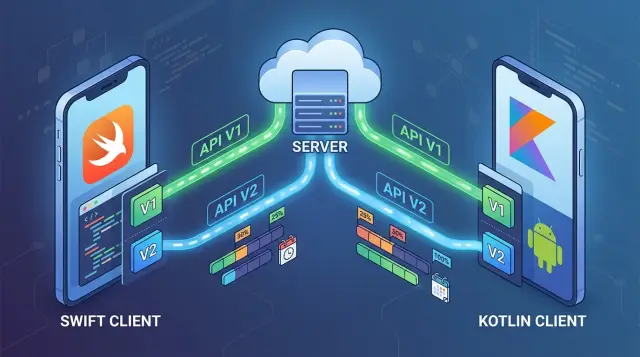
Table of Contents
Why this becomes a problem in long-lived apps
B2B apps usually stay in use far longer than teams expect. Consumer apps get frequent updates because users want new features. Business apps often sit on company phones, shared tablets, warehouse scanners, or employee-owned devices that nobody touches unless something breaks.
That delay matters. Many companies roll out updates through IT, change approval, device management rules, or simple habit. If a sales team, clinic, or logistics crew has 400 devices in the field, they won't update all of them on Tuesday because your backend changed on Monday.
That's where the trouble starts. The server team adds a required field, renames a status, changes an enum, or removes an old endpoint. The newest app build works in testing, but older builds still send the old payload or expect the old response. Users don't see a minor glitch. They get failed logins, missing orders, broken sync, or screens that never load.
Forced upgrades sound like a clean fix, but they usually create a bigger mess. Some customers can't update right away. Some devices stay offline for days. Some companies need internal approval before they install anything. If the app blocks access until they upgrade, your release becomes a support problem.
Gradual rollouts are much easier to live with. The server accepts old and new requests for a while, and the client knows which contract it's using. That's the practical reason teams invest in versioned API clients instead of hoping every customer stays current.
The cost of getting this wrong adds up fast. Support spends hours sorting tickets that all trace back to one API change. Engineers stop planned work to ship hotfixes. Product and account teams calm down angry customers. If the issue hits invoicing or field reporting, trust drops fast.
A rushed patch can fix today's outage, but it usually leaves a mess behind. It's cheaper to plan for mixed app versions before the first breaking change lands.
What to version in the client
Put version labels at the network edge, not across the whole app. In Swift and Kotlin, that usually means endpoint definitions, request models, and response models. Screens, use cases, and storage should stay mostly unaware of whether the server sent v1 or v2 data.
That separation matters because transport changes more often than business rules. A CustomerResponseV1 and CustomerResponseV2 can both map to the same Customer type if the meaning in the app stays the same. That keeps versioned API clients smaller and makes server changes less disruptive.
Auth, retries, logging, caching rules, and error handling should stay shared when possible. If every API version gets its own copy of those pieces, maintenance grows fast. Split them only when the protocol itself changes, such as a new auth method or a different error envelope.
A common mistake is versioning every helper around the client. Most teams don't need RetryManagerV2 or LoggerV3. They need new wire models when the contract changes, and shared support code everywhere else.
A new field doesn't always require a new model. If the server adds an optional field and old clients can ignore it, keep the same response type. If the app can use a sensible default when that field is missing, the same model often still works.
Create a new request or response model when the change can break behavior. Common cases include:
- a field becomes required
- a field type changes, like
idfrom integer to string - a field keeps the same name but changes meaning
- an enum gets a value the old client can't handle
- the success or error payload changes shape
Write those rules down before release work starts. A short table in the repo is enough: "new nullable field = same model", "renamed field = new model", "new required request field = new request version". That one habit makes it much easier to keep a backward compatible API without forcing every customer to upgrade on the same day.
A simple client structure for Swift and Kotlin
A clean setup starts with one shared networking layer and two thin version modules above it. The shared layer handles the boring work once: auth headers, retries, request signing, timeouts, logging, and error handling. That code should not know anything about /v1 or /v2 response fields.
Above that, keep each API version in its own module. In Swift, that can be a separate target or folder group. In Kotlin, it can be its own package or Gradle module. The idea is simple: when the server changes, you edit the version module, not the whole app.
One core, separate version modules
A setup like this works well:
NetworkCorefor HTTP transport and shared errorsApiV1for v1 requests, DTOs, and parsingApiV2for v2 requests, DTOs, and parsingDomainfor app models likeCustomer,Invoice, orOrderFeaturesfor screens, view models, and business rules
The shared core sends requests. Each version module builds its own endpoints and parses its own responses. If v1 returns full_name and v2 returns displayName, each module should decode that field in its own code. Don't build one giant decoder full of version checks.
Map everything to one app model
Your screens should not care which server version answered. They should work with one stable domain model.
For example, ApiV1Customer and ApiV2Customer can both map to the same Customer object used by the rest of the app. Once the app gets that domain model, the screen logic stays the same. The customer list, search, and detail view don't need separate v1 and v2 branches.
This also makes testing easier. You can swap V1CustomerClient or V2CustomerClient behind one interface, such as CustomerRepository, and run the same screen tests against both.
One rule saves a lot of pain: never share response models across versions, even when they look almost identical. Shared transport code is fine. Shared app models are fine. Shared wire models usually become a mess once the server starts changing.
How to roll out a server change step by step
When one endpoint changes, don't touch the whole client. Start with that single endpoint, keep the current path alive, and add the new path beside it. Small changes are easier to reason about, and they matter in business apps where some customers install new builds late.
A solid rollout usually follows the same pattern:
- Keep the current contract as v1. Don't rename it or quietly reshape it.
- Add v2 request and response models next to v1 in the Swift and Kotlin codebase.
- Route traffic to v1 or v2 with a server capability check or a feature flag.
- Ship one app build that can read both responses and map them into the same app model.
- Remove v1 only after usage drops and the old path stays quiet for a full release cycle.
That routing step does most of the work. If the app learns during startup that the server supports v2, it can call the new endpoint. If not, it stays on v1. A feature flag works too, especially when you want to turn the change on for one customer account at a time.
Keep the split low in the stack. Put it in the network layer or repository layer, not in the screen code. The UI should still receive one clean domain model. That's how versioned API clients stay boring to maintain instead of turning into a maze.
A small example makes this easier to picture. Say an approval app used to receive status: "approved", and the new server returns a richer object with status, reason, and changedBy. Add a v2 model for the new shape, keep the v1 model for the old one, and convert both into the same local ApprovalStatus object. QA can test both flows in the same build by flipping the capability or flag.
Don't rush cleanup. Watch request counts, customer version spread, and error logs first. Overlap time is what saves you from forcing every customer to upgrade on your schedule.
Handling old and new responses at the same time
When the server starts sending a new shape, the app should stay calm. In long-lived business apps, some customers run older builds for weeks or months, so mixed responses are normal. If a field is missing, treat that as a supported case, not as an exception.
In Swift, decode new transport fields as optional, then map them into app models with safe defaults. Kotlin works the same way with nullable properties and default values. If the server adds priorityLabel, the app can map nil or null to a sensible fallback such as normal or an empty label, depending on the screen.
That small choice prevents a lot of breakage. A sales rep opening an account record doesn't care whether the API sent five fields or six. They care that the screen loads and the data still makes sense.
Parse each shape on purpose
Teams often try to keep one parser for old and new payloads. It looks tidy at first, then turns into a pile of if checks and special cases. When response shapes differ in nesting, enum names, or pagination rules, write separate parsers or mappers for each version.
You can still share low-level helpers. The split should happen where meaning changes. If v1 sends customer.name and v2 sends profile.fullName, let each version map that on its own instead of forcing one parser to guess.
A few production habits help here:
- log which client version and parser handled each request
- track success and error rates for v1 and v2 separately
- tag analytics events by version so old and new flows don't mix
Separate analytics saves time when something breaks. If invoice_open_failed rises only for v1 responses, the team knows where to look. If both versions fail, the problem is somewhere else.
This is where versioned API clients earn their keep. They let the server change without pushing every customer into an urgent mobile upgrade.
A realistic rollout example
Billing is where this problem gets real fast. One customer installed your app three months ago and hasn't updated since. Their accounting team opens the invoice list in the old iPhone build written in Swift and the old Android build written in Kotlin. Another customer updated this morning and now uses the newest build on both platforms.
Last quarter's app only understands three invoice states: open, paid, and overdue. The new server release adds two more: partially_paid and pending_review. It also adds a short note that tells the user what to do next, such as waiting for finance approval.
If you change the response for everyone at once, the old app can break during a normal workday. It may show a blank status, sort invoices the wrong way, or fail to open the details screen. That's how teams end up forcing upgrades.
A safer approach keeps one backend and two response shapes. The old app sends API version 1. The new app sends API version 2. Both versions call the same billing service and read the same invoice records. The backend only formats the answer differently before returning JSON.
For version 1, the server maps the new states to values the old app already knows:
partially_paidbecomesopenpending_reviewbecomesopen- the new note field is omitted
- old date and amount fields keep the same names
The newest build gets the full response. It can show a badge for pending_review, a partial payment label, and the extra note under the status. The customer on the old build still gets a stable screen, even though the server changed underneath.
Support gets a cleaner picture too. If a ticket says "invoice status looks wrong", they can check logs for the app build and API version. If errors only happen on version 1, the team looks at the compatibility mapping. If only version 2 users report the issue, the team checks the new client code first.
That is the real value here. One customer can stay on last quarter's release while another uses today's build, and both keep working against the same backend.
Mistakes that force customer upgrades
Most forced upgrades come from small server changes, not huge rewrites. A team tweaks one field, removes one old response shape, or adds one quiet fallback. Then older app versions start showing the wrong data, and support gets flooded.
One common mistake is changing what a field means without changing the version. If status used to mean draft or sent, and now it means open or closed, old clients can still parse it but make the wrong decision. That's worse than a clean error because the app looks fine while doing the wrong thing.
Teams also delete old fields too early. In long-lived mobile deployments, some customers stay on the same app version for months because of device policies, internal testing, or slow rollout cycles. If the server stops sending a field the old app still needs, those users get broken screens even though they did nothing unusual.
Another trap sits in the client code. When screen logic depends on raw JSON names, every backend change leaks straight into the UI. A safer pattern is simple: map network responses into app models first, then let screens read those models. Swift API versioning and Kotlin API client code both get easier to maintain when the view layer never cares whether the server sent account_name or customerName.
Silent defaults cause a different kind of damage. Suppose the server adds a new enum value, and the client quietly maps unknown values to active. The app keeps running, but now it lies to the user. Good versioned API clients fail in a controlled way, log the mismatch, and show a safe fallback state that makes the problem visible.
Mixed app populations also need real testing. Many teams test the newest app against the newest server and call it done. Real users don't upgrade in sync. You need to test old app plus new server, new app plus old server behavior where it still applies, and partial rollout cases.
A simple rule helps: add before you remove, version before you reinterpret, and test the combinations customers actually run.
Quick checks before each release
A release can look fine in code review and still break a customer account the next morning. With versioned API clients, the safest habit is a short pre-release pass that checks real behavior, not just tests.
Start with the oldest app version you still support. Open the main customer flow and finish it end to end. If a field rename, enum change, or new required parameter blocks login, approval, report export, or any daily task, the release isn't ready.
Run that same flow against staging with both the old and new client contracts. Use realistic data, not perfect sample records. Teams often miss failures because staging data is too clean, while production has partial records, older states, and strange combinations that only show up in long-lived accounts.
Before you ship, confirm a few basics:
- the oldest supported app can still complete the main job without a manual workaround
- staging tests cover both versions with realistic accounts and older data shapes
- logs record the client version, endpoint, and a clear error reason
- support has a short note on the rollout and knows what customers may ask
- the team set a removal date for the old contract and wrote it into the release plan
The logging check matters more than many teams think. When a request fails, support should not need a developer to answer basic questions. If logs show v1 /orders failed because status is missing, the team can act fast. If logs only show bad request, everyone wastes time.
The support note can stay simple. A few lines are enough: what changed, who may notice it, what the safe reply is, and when the old behavior will go away. That small step cuts panic during rollout.
Set the removal date before release day, not after. Old contracts tend to stay forever when nobody owns the deadline. Then every server change gets slower, and the mobile app turns into a museum of past decisions.
What to do next
Start small. Pick the endpoints that break most often, especially the ones tied to login, billing, account setup, or status screens. If you make those safer first, you remove most of the pain without rebuilding the whole app.
Before the next sprint, write a short versioning rule your team can actually follow. Keep it plain. State when the server may add fields, when it must keep old fields, when a new endpoint is required, and how long each mobile client version stays supported. This takes an hour or two and can save days of cleanup later.
Then review ownership together. One mobile developer and one backend developer should approve every breaking API change before it ships. Product can join too, but the technical owners need a shared answer to a few simple questions: which app versions are still active, what old builds will receive, and how the rollout will stop if errors rise.
A practical first pass is enough:
- mark the unstable endpoints in one shared tracker
- log the client version on every API request
- add tests for both the old and new response shape
- keep v1 and v2 decoding separate instead of mixing rules into one large model
- put a real removal date on every old version
If your codebase already feels messy, don't try to fix everything at once. Start with one endpoint, add one versioned model, and release one safe server change. That's enough to prove the pattern. After that, versioned API clients stop feeling like extra process and start feeling like basic hygiene.
If you want an outside review, Oleg Sotnikov at oleg.is works as a Fractional CTO and startup advisor and helps teams with API design, infrastructure, and AI-assisted development workflows. That kind of second opinion is useful when you need to support long-lived Swift and Kotlin apps without forcing every customer to update at once.
A good next move is simple: pick one risky endpoint this week, define its compatibility rule, and make the next server release follow it.
Frequently Asked Questions
Why do B2B apps need API versioning?
Because business users often stay on old builds for weeks or months. If your server changes while field teams, clinics, or warehouse devices still run older apps, logins, sync, and status screens can fail fast.
What parts of the client should I version?
Version the network edge: endpoints, request models, and response models. Keep screens, storage, and business rules on one stable domain model so a server change does not spread through the whole app.
Should my screens know about v1 and v2?
No. Let the UI read one app model such as Customer or Invoice, not raw v1 or v2 payloads. Map each API version into that model in the repository or network layer.
When do I need a new request or response model?
Create a new model when the change can break behavior. Common cases include a required field, a new field type, a renamed field, a changed meaning, or a different success or error shape.
Can one app build handle old and new API responses?
Yes. Ship one app build that can parse both shapes, then map both into the same local model. A server capability check or feature flag can decide which endpoint the app should call.
Should I use a feature flag or a server capability check?
Use a capability check when the server can tell the app what it supports at startup. Use a feature flag when you want to turn the change on account by account or stop it quickly if errors rise.
How long should I keep the old API version alive?
Keep the old contract until usage drops and stays low for at least one full release cycle. Watch request counts, app version spread, and error logs before you remove anything.
What usually forces customer upgrades?
Teams usually break old clients by changing a field's meaning, deleting fields too early, or letting the UI depend on raw JSON names. Unknown enum values also cause trouble when the app quietly maps them to the wrong state.
How should I test versioned API changes before release?
Start with the oldest app version you still allow. Run the main flow end to end against realistic staging data, then check logs for client version, endpoint, and a clear error reason.
Do I need separate networking stacks for each API version?
Share one transport layer for auth, retries, logging, timeouts, and errors. Put ApiV1 and ApiV2 in separate modules or packages above that layer, and keep their wire models separate even if they look almost the same.


