Vendor outage planning for teams using multiple AI models
Vendor outage planning helps teams choose fallbacks, define degraded modes, and prepare clear customer messages before model APIs fail.
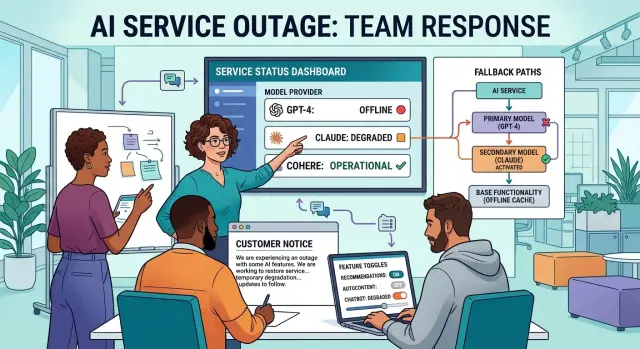
Table of Contents
What actually breaks during an outage
An API outage rarely looks like a clean, total failure. The first sign is often delay. Requests that used to finish in a few seconds start taking 15 or 30. Then some time out while others still return, which makes the problem look random.
That uneven behavior is what catches teams off guard. A chat reply may still work because it uses a short prompt, while summarization fails because it needs a larger context window. Classification may keep running, but structured output starts coming back malformed. Users do not see "one outage." They see a product that acts strangely in different places.
The pattern is usually familiar. Response times climb before hard failures appear. Retry logic adds more load and grows queues. Traffic shifts to a backup model and costs jump. Support hears about the issue before engineering does.
Costs can get ugly in less than an hour. If your router sends failed requests to a more expensive model, the system may stay online while margins disappear. A team can think, "we handled it," then find a painful bill the next day because fallback traffic ran all afternoon.
Uneven failure is often worse than a full stop. If one model powers search, another writes copy, and a third handles extraction, users get mixed results. They can still log in, click around, and finish some tasks, so they keep trying. That creates more requests, more retries, and more confusion. A partial outage often creates more support load than a clear banner that says a feature is down.
Customer messages usually start before internal alerts in many companies. Users notice slow answers right away. Support gets screenshots, refund requests, and "is it just me?" tickets while engineering is still checking dashboards. If support has no script and no clear status to share, every reply turns into a custom reply.
During an outage, speed, cost, feature quality, and customer trust fail on different timelines. If you only watch for total downtime, you miss most of the damage.
Map every place a model touches your product
The first step is boring, and that is exactly why teams skip it. You need a full map of every place a model call happens, not just the obvious chat prompt in the app.
Most products touch models in more places than people expect. A user might type a question, but the product may also run moderation, create embeddings for search, transcribe speech, rank results, and generate a reply. If one small step fails, the whole flow can break.
A simple support feature makes this clear. A customer uploads a voice note, your app sends it to speech-to-text, checks the text with a moderation model, stores embeddings for search, and only then asks the main model for an answer. If the speech vendor fails in one region, the user never reaches the final step.
Keep one shared document with the same fields for every flow: the user action or internal job that triggers the call, the vendor and exact model name, the region, the purpose of the call, what breaks if it fails, and the person who owns the integration.
Include background jobs too. Teams usually remember the chat feature and forget nightly summarization, auto-tagging, fraud checks, and search indexing. Those hidden jobs can pile up during an outage and create a second problem after the vendor comes back.
Ownership matters as much as the technical map. When an outage hits, someone needs to know where the credentials live, where retry rules sit, and who can change traffic fast. "The platform team owns it" is too vague. Put one name next to each integration.
If you work across several vendors, track the region even when the model name stays the same. One region may fail while another keeps working, and that detail can save an hour.
Teams often find a few forgotten model calls on the first pass. That is normal. The real problem is finding them during the outage instead of before it.
Choose your fallback order
A fallback order should be boring. If people need to debate it during an outage, you do not have one yet.
Start by ranking each provider on four things that matter in real use: output quality, speed, cost, and quota headroom. Do this with real workloads, not demos. A model that writes strong marketing copy may still do a poor job in support chat. A fast model may look cheap until retries pile up. Put numbers next to the ranking if you can. Even a simple 1-to-5 score keeps arguments shorter when something breaks.
Do not use one fallback chain for everything. Split it by task. Chat, search, coding, and image work fail in different ways, and they do not need the same backup. Your best coding model might be too slow for live chat. Your search model might be fine for retrieval but poor at summarizing messy user input.
A small startup might use rules like this: chat goes A, then B, then a smaller fast model. Coding goes C, then A. Search goes B, then a cached answer mode. Images go D, then a temporary upload disable with a clear notice. That is much better than pretending one vendor can cover every gap.
Your switch triggers should be simple too. Pick a few signals and stick to them: error rate above threshold, latency above a safe user limit for several minutes, or quota and rate limits close enough to threaten service.
Set one automatic rule and one manual rule. For example, auto-switch chat to the next provider if errors stay above 8% for 3 minutes or p95 latency passes 10 seconds. Then give one person on call the power to override that rule when the backup costs too much, performs badly, or starts failing too.
Clear order and clear triggers remove guesswork when pressure hits.
Plan degraded modes users can still use
When a model starts timing out, most teams try to keep every feature alive for too long. That usually makes the whole product feel broken. A better move is to shrink the experience on purpose and keep the parts that still help people finish a task.
Start with context size. Long prompts cost more, run slower, and fail first when a provider is under stress. Cut large history windows, trim attached documents, and drop nice-to-have background data before you touch the main user flow. If a support assistant normally reads the last 30 messages, it may do fine with 8 for a few hours.
Cut optional steps first
Extra model calls often cause more pain than the main answer step. Turn off reranking, extra tool calls, second-pass formatting, and any checks that add delay but do not protect users from harm. You can also skip automatic title generation, long summaries, and tone rewrites until the system stabilizes.
The fastest fix is often subtraction. One team can keep chat replies working by dropping web search, citation cleanup, and follow-up suggestions. Users lose polish, not the whole product.
Keep useful fallback output
If live generation gets shaky, show cached answers where that makes sense. Saved drafts, recent results, templates, and prior successful outputs can keep people moving. In many products, reading and editing old work is far better than staring at an error banner.
Be strict about what stays visible. Hide actions that cannot work safely without the model. If your app cannot classify, summarize, or suggest edits with enough confidence, remove that button for now instead of letting it fail halfway through. Silent failure frustrates people more than a temporary limit.
A simple rule helps: keep actions that are accurate enough, fast enough, and easy to explain. Cut the rest early. That gives support fewer complaints and gives engineers room to fix the outage without a pileup.
Write outage messages before you need them
Silence makes an outage feel worse than it is. If users see errors with no explanation, they assume everything is broken. A short, plain message can lower support volume fast and stop people from retrying the same action ten times.
Write two messages now and keep them ready to paste. One goes inside the product. The other goes to support for active tickets. Both should say what is affected, what still works, and what users should do next.
For the in-product notice, keep it tight. Users read this while they are already annoyed.
We are having issues with some AI responses right now. Search, saved work, and exports still work. New long-form generation may fail or take longer. Please retry later if a request does not complete.
Support needs a slightly fuller reply. It should sound calm, specific, and honest.
Thanks for flagging this. We are seeing failures in part of our AI workflow and the team is working on it now. Your existing data, saved projects, and manual editing are still available. Some generation requests may be delayed, shortened, or fail until service returns. We will send the next update by 3:00 PM UTC, even if the issue is still ongoing.
A few rules keep these messages useful:
- Say what still works right now.
- Name the user impact, not your internal drama.
- Give the next update time, not a repair promise.
- Do not guess at root cause.
- Do not blame a vendor in public copy.
Timing promises cause most of the damage. If you say "fixed in 20 minutes" and miss it, trust drops twice. It is better to say when users will hear from you again.
Good outage copy sounds boring. That is fine. During a bad hour, boring beats clever every time.
Run the switch without making it worse
The worst response is a panic reroute that hides the real problem and doubles your traffic bill. Before you touch routing, check three things: the vendor's status, your own app metrics, and any deploys or config changes from the last hour. A bad release can look exactly like a model outage.
If the trigger is real, name it clearly. Maybe error rates jumped above your threshold, latency crossed your limit, or the model started timing out in one region. Write down which rule fired, who approved the change, and which model goes next in your fallback order. That small pause prevents a lot of guessing later.
Do not move 100% of traffic at once unless the current path is fully dead. Cut load first. Pause batch jobs, lower concurrency, trim retries, and turn off features that call the model more than once per user action. This buys time and reduces the chance that you overload the next vendor too.
A careful switch usually looks like this:
- Send a small slice of traffic first, often 5% to 10%.
- Watch request failures, latency, and queue depth for a few minutes.
- Check cost per request and token use, not just uptime.
- Review a sample of outputs for quality drift or broken formatting.
- Increase traffic in steps only if the numbers stay stable.
Quality checks matter more than teams expect. The backup model may stay online but ignore a format rule, produce shorter answers, or fail on tool calls your app relies on. If support agents use the output directly, a "working" fallback can still create a mess.
Update customer messaging as soon as behavior changes. If users may see slower responses, shorter summaries, or limited features, say that in plain language. Do the same inside the company. Put the time of the switch, the trigger, the current traffic split, and the next review time in your incident notes so the next person on call does not start from zero.
Calm execution matters more than clever routing logic. Check first, reduce pressure, shift a little traffic, and keep writing down what changed.
A simple example with three model vendors
A support team runs one bot on three services. Vendor A handles live chat because it gives the best answers at normal load. Vendor B stores embeddings for retrieval, so the bot can pull account rules, return policies, and past fixes. Vendor C waits as backup chat.
At 10:15 a.m., Vendor A starts timing out during peak traffic. The bot still opens, but replies hang for 20 to 40 seconds. Agents start seeing duplicate tickets because customers ask the same question twice. Nothing is fully down, which makes the problem messier. People keep trying to use it.
The team does not switch everything at once. They cut the chat context from the last 20 messages to the last 8, remove a few low-value instructions, and keep retrieval on Vendor B. That reduces token load right away. Then they move part of new chat traffic to Vendor C. They start with about 30% of incoming conversations instead of pushing every session over at once. Active chats stay where they are unless they fail twice.
They also pause summary emails for resolved tickets. Those summaries are useful, but they do not help anyone in the middle of a support spike. Pausing them frees capacity for live replies, which customers notice first.
Support agents use a saved message: "Replies are slower than usual right now. You can still use chat, but some answers may be shorter while we work through the delay. If your issue is urgent, send your order number in the first message so we can route it faster."
That message sets expectations without guessing at a fix time. The team keeps the parts users need most, trims the rest, and avoids making the outage bigger with a rushed full reroute.
Mistakes that turn a bad hour into a bad week
Most outage pain comes from rushed decisions, not the outage itself. Teams often try to fix everything at once, and that is when a short disruption turns into days of cleanup.
A common mistake is treating one backup model like a universal spare tire. That sounds tidy, but models behave differently. One may summarize well and fail at extraction. Another may write decent answers but miss tool calls or structured output. If your product depends on several task types, you need a task-by-task fallback plan, not one model forced into every job.
Another problem is simple: nobody tests prompts on the backup model until the primary vendor fails. Then basic assumptions break. Output gets longer, JSON stops parsing, tone shifts, latency jumps, and internal tools start timing out. A backup is only real if your team runs it in normal conditions and keeps those prompts current.
Money can make a bad day worse too. During failover, usage often spikes because retries increase and slower models keep requests open longer. If cost limits stay off, the company can wake up to a painful bill on top of the outage. Put spend caps, rate limits, and alerting on every vendor before you need them.
Another bad move is giving customers an exact recovery time too early. People remember promises more than explanations. If you say "back in 30 minutes" and miss by three hours, trust drops fast. Say what still works, what is degraded, and when you will post the next update.
The most dangerous engineering mistake is changing prompts and routing at the same time. If quality drops, nobody knows why. Keep the move small: switch vendors first, keep prompts the same, compare outputs, and change prompts only after traffic is stable.
A calm team with a narrow plan usually recovers faster.
Quick checks for your next drill
A drill only counts if your team can do the boring parts fast at 2 a.m. The goal is not a perfect simulation. It is to prove that people can switch models, limit damage, and tell customers what changed without a long debate.
Run through a short scorecard before you call the drill done:
- For each model-powered task, name the first fallback and the second fallback. Do not stop at "use another vendor." Write the exact order for chat, extraction, ranking, coding help, or whatever your product depends on.
- Ask one person to find the support message and status update template. If they cannot find both in under two minutes, they are buried too deep.
- Confirm that your team can turn off nonessential features without a deploy. Feature flags, config switches, or admin controls matter more here than elegant code.
- Check that your dashboards split cost, latency, and error rate by model, not just by product area.
- Pick one person who can start the runbook after hours without waiting for a committee.
A small test makes this real. Say your main model handles user chat, a second model handles summaries, and a third handles tagging. Kill the main chat model in staging. Your team should reroute traffic, disable extras like long-form summaries, and publish a plain customer message in minutes.
If a drill feels too easy, make it harder next time. Add a cost spike, a slow fallback, or an after-hours start. That is usually where weak spots show up.
What to do next
Start with one user flow your customers rely on often. Pick something narrow, like a chat reply, a document summary, or a support draft. Write down the first model, the second choice, and the point where your product stops trying advanced features and switches to a simpler result. A short fallback order on paper is better than a perfect plan that only exists in meetings.
Then run a short drill with engineering, support, and product together. Keep it to 30 minutes. One person declares that a vendor is failing. Another person makes the switch. Support sends the customer update. Product checks what still works. You are testing whether people know who decides, who changes the config, and who owns the message.
A few habits make this much easier:
- Keep outage messages in the same place as the runbook.
- Save one message for slower service and one for reduced functionality.
- Name an owner for each action, plus one backup person.
- Write down how you will confirm the fallback is actually working.
Store the customer messages where the team already looks during incidents. If support has to hunt through docs, chat threads, or old tickets, you lose time and people start improvising. That usually creates more damage than the outage itself.
Put a date on the first drill before the week ends. Teams delay this work because it feels boring right up until a vendor fails at the worst time.
If you want an outside review, Oleg Sotnikov at oleg.is helps startups and small teams tighten AI failover plans, degraded modes, and infrastructure before an outage exposes the gaps. That kind of review is often useful when you need someone to look across product behavior, cost controls, and the way your team actually responds under pressure.
Frequently Asked Questions
What should we document before an outage happens?
Start with one shared map of every model call in your product, not just chat. Include the trigger, vendor, exact model, region, purpose, failure impact, and one owner so nobody wastes time hunting during an incident.
How do I choose a fallback order for multiple models?
Rank providers by real output quality, speed, cost, and quota room for each task. Then write a fixed order for chat, search, extraction, coding, and any other flow instead of using one backup chain for everything.
Can one backup model handle every AI feature?
No. A model that works for chat can still fail at extraction, tool calls, or strict JSON output, so a single backup often creates new problems while it keeps the service online.
When should we switch to a backup vendor?
Use simple triggers such as error rate staying above your limit for a few minutes, p95 latency crossing a user-safe threshold, or quota getting too close to the edge. Pair one automatic rule with one on-call owner who can stop or override the switch when the backup costs too much or performs badly.
What should we disable first when models start timing out?
Cut optional work before you touch the main task. Trim context windows, pause reranking, extra tool calls, title generation, long summaries, and anything else that adds delay without helping users finish the job.
How do we keep failover from blowing up our bill?
Slow down the blast radius before you reroute. Pause batch jobs, trim retries, lower concurrency, and watch cost per request after the switch because a more expensive fallback can burn margin fast.
What should we tell customers during an AI outage?
Tell people what is affected, what still works, and when you will post the next update. Keep the wording plain, avoid guessing at the cause, and do not promise a fix time you may miss.
How do we switch traffic without making things worse?
Move a small share of traffic first and watch failures, latency, queue depth, cost, and sample outputs for a few minutes. If the numbers stay steady, increase traffic in steps instead of sending everything at once.
What mistakes turn a short outage into a bigger mess?
Teams usually make it worse by changing prompts and routing at the same time, trusting an untested backup, or leaving retries and spend caps unchecked. Partial outages also hurt more when support has no ready message and users keep retrying broken actions.
How often should we run outage drills for AI vendors?
Run short drills often enough that people can do the boring parts fast under pressure. A good test proves your team can find the runbook, switch providers, disable nonessential features, and send a customer update in minutes.


