Usage limits for shared systems that users can understand
Usage limits for shared systems work better when you cap noisy actions, explain the rule in the product, and warn users before they hit a stop.
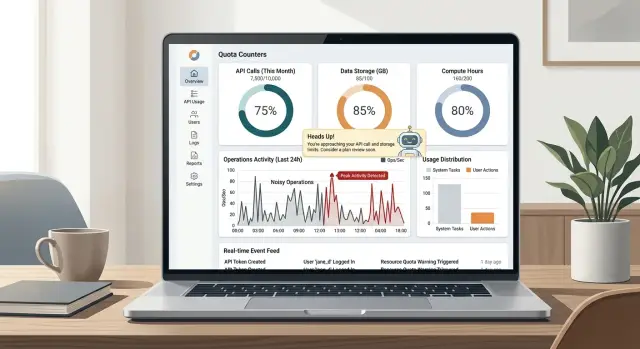
Table of Contents
Why random walls frustrate good customers
People rarely get upset because a product has limits. They get upset when the limit feels arbitrary.
Most users accept rules that match real cost. If one action uses a lot of compute, storage, or support time, a cap feels fair. That is the logic behind limits in shared systems.
The problem starts when very different actions count the same. Someone who opens a dashboard a few times should not hit the same wall as someone who runs large exports all day. When a light action and a heavy action use the same quota, the system feels careless.
That feeling spreads quickly. Users stop thinking, "I reached a fair limit." They start thinking, "The pricing is strange," or worse, "This product fails when I need it most."
The people who get hit are often your best customers. Surprise blocks usually land during normal work. These users are not abusing the product. They rely on it, trust it, and use it often because it has become part of how they get work done.
Picture two customers in the same app. One checks ten records and updates a note. The other runs ten full data exports with filters, file generation, and email delivery. If both use the same quota, the first customer feels punished for nothing and the second gets a hidden subsidy.
Random walls also create support problems. People contact your team because they want an explanation, not because they truly need more capacity. That is a warning sign. A good limit should be predictable enough that users can explain it to themselves.
Fair limits do two things at once. They protect the system, and they show customers what actually creates load. If a rule does neither, it feels less like a quota and more like a trap.
Find the actions that create most load
Most products do not struggle under normal clicks. They struggle when a small set of actions burns far more CPU, memory, storage, or queue time than everything else.
Start with real usage data, not guesses. Look for the actions that run longest, allocate the most memory, fill queues, or create storage spikes. That is where a sensible quota begins.
Cheap reads and heavy work should not sit under the same rule. A page view, search, or status check often costs very little. A write that updates many records, a full export, or a bulk job can cost hundreds or thousands of times more.
In most products, the expensive group is not hard to spot. It usually includes bulk imports, bulk edits, exports that build large files, report generation, data syncs, file uploads, media processing, search reindexing, or batch notifications.
Background work needs special attention. Many teams look at the first request and miss what happens after it. A single click can trigger retries, webhook bursts, cache rebuilds, emails, and follow up jobs that sit in a queue for minutes.
That chain reaction matters more than the button label. If one user action fans out into ten internal tasks, count the whole cost. Otherwise the expensive part stays hidden, and the limit feels random.
"Export all invoices" sounds like one action. Behind the scenes, it may scan a large table, build a file, compress it, store it, send a notification, and retry if a webhook times out. That is nothing like opening the invoices page.
This is where teams often slip. They cap requests per minute because that number is easy to track, even when the real pressure comes from a few noisy operations. In a shared app, separate light actions from expensive ones first. Then place quotas where the load actually comes from.
Set quotas around noisy operations
The rule is simple: count the action that creates the load.
If a user opens five screens to prepare one export, those clicks should matter very little. The export should matter. A quota feels fair when it tracks the expensive step, not the path that leads to it.
Broad limits usually annoy careful customers for exactly this reason. A team can behave reasonably and still hit a wall because the product counted harmless actions along with heavy ones. People read that as random punishment, and they are often right.
Separate the loud operations from everyday work. Imports, exports, bulk updates, report generation, API fan out jobs, and background rebuilds often need their own allowance. That keeps normal browsing and editing smooth while still protecting the system from tasks that fill queues, burn CPU, or lock databases for too long.
Reset periods should match real behavior. A per minute cap fits bursty API traffic. A daily allowance fits exports or sync jobs. A monthly quota can work for storage or total processed records. If the reset window does not match the job, users cannot plan around it.
Leave more headroom than feels comfortable at first. Real customers do not behave like tidy test accounts. They hire staff, run month end reports, import a backlog, or retry a failed job twice. If a limit breaks during those normal spikes, it is too tight.
Before you ship, test the numbers against your busiest legitimate customer. Ask one plain question: would this team hit the cap during a normal week? If the answer is yes, move the limit or split the allowance. A quota should block abuse and accidents, not regular growth.
A good rule of thumb is easy to remember. Everyday actions should feel almost unlimited. Expensive actions should be counted clearly, separately, and in a way users can predict.
How to set a quota
Start with cost, not guesswork. Measure one action from the first request to the last bit of background work. A simple click can trigger database reads, queue jobs, retries, file generation, and notifications. If you only count the first request, you will price the wrong thing.
Next, group actions by the load they usually create. Keep those groups small and easy to explain. Page views and basic searches may belong together. Exports, imports, and bulk updates often need their own bucket. Users do not need a full model of your backend, but they should feel that the limit matches the work.
Use real usage data to choose the first number. Look at healthy accounts, not edge cases and not your loudest customer. If most active teams run ten exports a day, a cap of ten is too tight. Give people room for busy days, then watch what happens.
Before locking the number in, ask a few blunt questions. Does this action hit storage, queues, or outside APIs? Does one click create more work a few minutes later? Will retries count against the same quota? Can a normal team hit the cap during a weekly rush? Will support have to explain this rule every day? If the answers make you uneasy, the quota is probably sitting on the wrong action.
Add soft warnings before hard stops. Show remaining allowance inside the product and warn people before they run out. A notice around 70 percent and another close to the cap is usually enough. When someone does hit the limit, name the action, show when it resets, and offer the next sensible option.
Then review the numbers after the first month. Check which accounts got blocked, what load they created, and whether the quota actually protected the system. If polite customers keep hitting the wall while the real noisy operations slip through, move the quota instead of simply raising the cap.
Explain the limit inside the product
A limit works best when people can see it right before they use it. If exports use far more server time than a normal page view, put the quota beside the Export button, not on a pricing page or buried in help text.
Say what counts in plain language. Say what does not count too. If scheduled exports count but previews do not, write that next to the control. If retrying a failed job does not use another credit, say so. People stay much calmer when the rules are clear.
Keep the current usage beside the action itself. A short line under the button is often enough: "12 of 20 exports used this month" or "3 batch runs left today." That works better than a generic banner because it answers the real question: can I do this now?
Tell users exactly when the counter resets. "Resets on May 1" is much clearer than "monthly quota applies." Better still, show both the cycle and the date. Many support tickets exist because users do not know whether "month" means calendar month, billing month, or the last 30 days.
Use labels that sound like normal speech. "Exports left this month" is clearer than "remaining monthly operation allowance." "API calls used today" is clear. "Heavy jobs left this week" is clear too, if you define once what counts as a heavy job.
A short reason helps. "This limit keeps shared capacity stable for everyone" is enough. A long policy paragraph next to a button usually makes things worse.
This is the point where a quota either feels fair or feels random. Show the number, name the reset, define the counted action, and give a brief reason. Do that well, and most good customers will not hit a wall they did not see coming.
Warn people before they hit the wall
People accept limits more easily when the product gives them time to react. A quiet warning at 70 or 80 percent works better than a sudden block at 100 percent. Teams can slow down, change plans, or ask for more capacity before work stops.
Show the warning where the work happens. If someone starts a long export, bulk import, or AI job, keep a live counter on screen so they can see how much quota the task will use. Guessing is what frustrates people.
The product should also offer a safe fallback. If the user is close to the limit, let them queue the task for later instead of forcing them to retry by hand. In shared systems, delay is usually easier to accept than failure.
For team accounts, visibility matters. Admins should be able to see who used the quota, when it happened, and which action consumed it. That avoids the usual blame game where everyone says they only clicked once.
When someone finally does hit the limit, keep the message calm and concrete. Say what happened, which action triggered it, when the limit resets, and what the user can do next. "Export limit reached. Your team used 50 exports today. Next reset: 2:00 AM UTC. You can queue this export now or contact your admin" is much better than "Request failed."
Strict rules do not bother people as much as vague ones do. If users can see the edge coming, most of the anger disappears before it starts.
A simple example from a shared app
Imagine a reporting app where teams open dashboards all day. Those views are cheap. They use cached data, load fast, and barely affect hosting costs.
Exports are different. One full CSV export can pull a large date range, join several tables, and keep the database busy much longer than dozens of dashboard views.
One customer team used the app in a normal way. People checked charts during the day, then an automated job ran big exports every night so finance could work from spreadsheets the next morning. The plan had a monthly cap based on page views, so the team kept reaching that cap by the middle of the month.
From the team's side, the rule felt arbitrary. They were not hammering the app with constant clicks. They were doing one expensive task on a schedule, but the product counted light actions instead of the action that created the real load.
The product team fixed the quota by stopping the page view count and counting exports instead. Regular browsing stayed open. Large exports got a clear monthly allowance.
That change made the limit easier to trust. Users could see an export counter on the export button, with the number left for the month before they clicked. A team lead could check the counter on the 20th and make a simple decision: wait until next month, export a smaller date range, or change the plan before the nightly job failed.
Once the rule matched the real cost, support tickets dropped. Customers finally understood why the cap existed.
Mistakes that push users away
A flat limit across every feature looks simple, but it usually feels unfair. Opening a dashboard, exporting 50,000 rows, and running an AI job do not cost the system the same amount. When they all share one cap, careful customers hit the wall while heavier actions still slip through.
Hidden counters make this worse fast. If people only learn about a quota after a block, they feel tricked. Show the counter where the action happens, say what resets it, and make the rule plain enough that nobody needs support to decode it.
Tiny quotas send the wrong message too. A customer can spend weeks building a routine around your product, then get blocked during payroll, month end reporting, or a live client call. That kind of surprise sticks longer than a short outage.
Warnings have to come early enough to help. A notice at 80 percent gives a team time to finish work, reduce waste, or ask for a higher limit. A notice at 100 percent is not a warning. It is a rejection screen.
One mistake annoys people more than almost anything else: charging them for retries after your own timeout or error. If your queue stalls and a user clicks again, they should not lose quota twice. The same applies when a job fails before it finishes. Counting failed jobs the same as completed jobs tells users that your bugs are their problem.
The safer rule is simple. Count expensive work, not every click. Forgive failures you caused. Show remaining usage before the block, and warn early instead of at the last second.
People accept limits when the rules make sense. They leave when the product acts like a slot machine, where every attempt costs something and nobody can see the meter.
Quick checks before you ship
A quota is ready when a new customer can understand it quickly, support can explain it in one breath, and heavy usage no longer spills onto everyone else. If any of those fail, the limit will still feel random even if the math is technically correct.
Open a new account and look at the product like a first time user. Within a minute, that person should know what counts, how much is left, when the quota resets, and what happens at the limit. If they need help docs or a support reply, the product is hiding too much.
Run a short prelaunch check. Make sure you meter the action that creates real cost, not the harmless click before it. Warn people early. Ask someone from support to explain the rule without notes. Test one very heavy account and one normal account at the same time. The heavy account should hit the quota first, and the normal one should still have a smooth experience. Then check the reset behavior. People should see when access returns, and the product should recover cleanly without manual fixes.
The cost test matters more than many teams think. A limit on clicks often punishes curious users while missing the real problem. If one report export burns as much compute as 500 simple views, count the export.
A small dry run catches a lot. Give the product to one person who knows nothing about the quota and one person on your team who knows every edge case. If both understand the rule and neither hits a surprise wall, you are close. If not, fix the explanation before you tune the numbers.
What to do next
Start with one noisy operation. Pick the action that creates the most load or the biggest bill, and place a clear quota there first. Bulk exports, large imports, and repeated AI jobs are common places to start. If you change every limit at once, people will not know what actually solved the problem.
Put your evidence in one view before you choose the number. Read support complaints, compare them with traffic spikes, and check which actions fail most often. When the same pattern shows up in all three, you have found a limit worth fixing.
Then rewrite the copy until a nontechnical teammate can explain it back to you without help. They should be able to answer four simple questions: what action hit the limit, how much quota is left or when it resets, what the user can do next, and when they should contact support or change plans.
Review the model every quarter. Usage changes, new features shift load, and yesterday's noisy operation can become normal traffic. A quota that made sense six months ago can feel arbitrary now.
Sometimes growth exposes deeper product and infrastructure problems, not just a bad counter. In that situation, an outside review can help. Oleg Sotnikov, through oleg.is, advises startups and smaller companies on product architecture, infrastructure cost, and AI first operations. That kind of review is most useful when support complaints keep rising, failed jobs pile up, or cloud spend grows faster than usage.
Frequently Asked Questions
Why do broad usage limits upset users?
Broad caps feel unfair when they punish light work and heavy work the same way. If a page view and a full export burn very different resources, one shared quota will frustrate careful customers and hide the real source of load.
What should I count instead of page views?
Meter the action that creates the real cost. In many products, that means exports, imports, bulk edits, report generation, file processing, sync jobs, or AI runs instead of simple views and clicks.
How do I find the noisy operations in my app?
Start with real usage data. Look for actions that run long, fill queues, use a lot of CPU or memory, hit outside APIs, or create storage spikes. Then trace what happens after the click so you count retries, follow-up jobs, and notifications too.
Should cheap reads and heavy jobs share one quota?
No. Cheap reads and heavy jobs should sit in different buckets. When you mix them, normal browsing starts to feel expensive even though the real pressure comes from a small set of costly actions.
How do I pick the right reset period?
Match the reset window to how people use the feature. Use short windows for bursty API traffic, daily limits for jobs like exports or syncs, and monthly limits for storage or total processed records.
How much headroom should I leave?
Give people room for normal busy days. Test the cap against a legitimate heavy customer, not a tidy demo account. If a normal team hits the limit during payroll, month end, or a backlog import, the cap is too tight.
What should users see inside the product?
Put the counter next to the action itself. Tell users what counts, what does not count, how much they have left, and the exact reset time. A short reason helps, but keep the copy plain and short.
When should I warn people about a limit?
Warn early, not at the last second. A notice around 70 or 80 percent gives teams time to slow down, wait for the reset, or ask for more capacity before work stops.
Should retries and failed jobs use quota?
Do not charge people twice for your own failure. If your timeout, queue issue, or job error forces a retry, forgive that attempt or merge it into one charge. Users should not pay quota for broken runs.
How do I test a quota before I launch it?
Run a dry test with one normal account and one heavy account. The heavy account should hit the cap first, the normal one should keep working, and both should understand the rule without help. If support still has to explain the limit every day, fix the rule or the copy.


