Type-safe environment config for TypeScript app deploys
Type-safe environment config helps TypeScript apps catch missing or bad env vars at startup, so broken deploys stop early instead of turning into UI bugs.
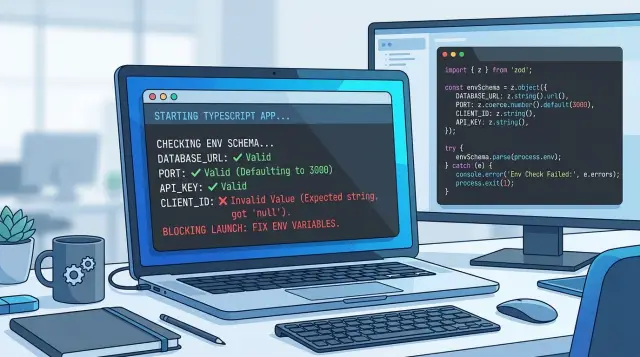
Table of Contents
Why env mistakes turn into odd app bugs
Most env mistakes do not crash an app right away. They create small, confusing failures that look like product bugs. That is why teams lose time chasing UI issues when the real problem sits in a missing or wrong variable.
A common case is a missing API URL. The page loads, the button works, and then the spinner never stops because the app keeps calling nowhere useful. To a user, it looks like the app is slow or broken. To the team, it can look like a network problem, a state bug, or a bad release.
Wrong feature flags cause a different kind of mess. One bad value can hide part of the app for some users, show an unfinished screen, or turn off a paid feature by accident. If the flag comes through as a string like "false" and the code treats any string as true, the bug gets even stranger.
Bad defaults make this harder to catch. Local development often has fallback values that keep the app running, even when the real config is incomplete. Everything looks fine on a laptop. Then production uses a different env setup, and the app starts acting weird in ways nobody saw before release.
Users usually spot these problems before logs make the cause obvious. They report that search returns nothing, login hangs, or one section vanished after an update. The app still responds, so nothing looks fully down. That half-broken state is often worse than a clean failure because it sends people and teams in the wrong direction.
Type-safe environment config helps because it treats config as part of the app, not as loose text outside it. If a value is missing, empty, or shaped wrong, the app should stop at startup. A loud failure is easier to fix than a quiet one that reaches customers first.
What your app should read from env
Keep env for values that change by deploy or carry sensitive data. If a value stays the same in every environment and has no security risk, keep it in code. That simple rule makes config smaller and easier to trust.
Write down every value the app needs before it can start and handle a real request. For a typical TypeScript app, that often means the database URL, app origin, API endpoint, session secret, email provider token, payment provider secret, and a small set of feature flags. This inventory gives your type-safe environment config a clear boundary.
It helps to label each variable by the kind of data it holds:
- Secrets like session tokens, API secrets, and private keys
- URLs like the public app URL, webhook target, and database host
- Numbers like the port, timeout, and retry limit
- Booleans like debug mode, signups enabled, or mock payments
These labels are practical, not cosmetic. Every env value starts as text. "3000" is still a string until your app parses it as a number. "false" can turn into a nasty bug if your code treats any non-empty string as true.
Defaults need the same care. Some save time and cause no harm. A local default for PORT=3000 is usually fine. A default for DATABASE_URL, JWT_SECRET, or a payment secret is a bad idea. If a missing value could send traffic to the wrong place, weaken security, or hide a bad deploy, make the app refuse to boot.
Old variables cause more trouble than most teams expect. They stay in hosting dashboards, old .env files, and CI settings long after the code stops reading them. Then someone changes a real variable, sees ten similar names, and picks the wrong one. Delete unused names from code, examples, and deploy settings as soon as you confirm nothing reads them.
A short, current env list beats a huge "just in case" list every time. If a variable does not affect startup or runtime behavior, it probably does not belong there.
Split server and browser config early
One bad habit causes a lot of env trouble: treating every variable like all code can read it. A type-safe environment config setup works better when you split values by runtime on day one. Server code can read secrets. Browser code can read only values that are safe to expose.
That split sounds obvious, but many apps blur it. A developer imports one shared config file into UI code, the bundler pulls in more than expected, and suddenly a secret sits one mistake away from the client bundle. Even when nothing leaks, the app still breaks in strange ways because browser code tries to read values that exist only on the server.
A simple rule helps:
- Keep database URLs, API secrets, signing keys, and private service tokens on the server only.
- Expose only public values to the browser, such as a public app URL, a safe analytics ID, or a public API base path.
Clear names make this easier to police. Public names should look public. Private names should look private. If your stack supports a public prefix such as NEXT_PUBLIC_, use it consistently. If not, pick one pattern and stick to it.
Use two config modules
Put server values in one file and browser-safe values in another. UI code should import only the browser file. Backend code can import both when needed, but the browser should never touch the server module.
This is where small structure choices save real time. Keep serverEnv.ts in a server-only folder. Export a small clientEnv.ts object for the UI. If someone imports the wrong file in a React component, your lint rules or build setup should stop it before deploy.
A quick example: a pricing page may need PUBLIC_APP_URL to build a callback link. It does not need DATABASE_URL or STRIPE_SECRET_KEY. If a component can even see those names, the project is too open.
Teams that split config early usually debug less. When a variable has one clear home, you know where to validate it, who can use it, and whether it is safe to ship to the browser.
Validate config at startup
Every env var starts as a string. If different parts of your app convert those values on their own, small mistakes spread fast. A missing URL turns into a broken redirect. A bad timeout turns into random loading issues. A "false" flag can even act like true if you parse it the wrong way.
Put all env vars in one schema file and load it before the app does anything else. That gives you type-safe environment config in one place, with rules you can read in a minute.
Keep parsing in one file
A small schema works better than many ad hoc checks across the codebase. Parse numbers, booleans, and URLs once, then export the typed result.
import { z } from "zod";

const boolFromString = z.enum(["true", "false"]).transform(v => v === "true");

const envSchema = z.object({
  NODE_ENV: z.enum(["development", "test", "production"]),
  PORT: z.coerce.number().int().min(1).max(65535),
  APP_URL: z.string().url(),
  DATABASE_URL: z.string().url(),
  ENABLE_SIGNUPS: boolFromString,
  REQUEST_TIMEOUT_MS: z.coerce.number().int().positive(),
});

const result = envSchema.safeParse(process.env);

if (!result.success) {
  console.error("\nInvalid environment config:\n");
  for (const issue of result.error.issues) {
    console.error(`- ${issue.path.join(".")}: ${issue.message}`);
  }
  process.exit(1);
}

export const env = result.data;
Run this before the server listens on a port, before workers start, and before scheduled jobs run. If validation fails, stop the process right there. Do not let the app serve traffic and hope the problem shows up later in logs.
Make the error block obvious
A good startup error should help the person on call fix the deploy in one edit. Print the variable name, what format you expected, and keep the message short. Five blunt lines beat fifty lines of stack trace.
A real example: if APP_URL is set to myapp instead of a full URL, the app should exit at boot. That is much better than letting users click around until redirects start failing in odd places.
Make startup errors easy to fix
Bad startup checks fail twice. First they stop the deploy. Then they waste half an hour because nobody can tell what broke. If your app uses type-safe environment config, the error report should point straight to the fix.
Start with the variable name. Do not throw Invalid environment and call it done. Say exactly which setting failed, whether it is missing or malformed, and where the app expected to use it. A message like DATABASE_URL is missing saves time. Config validation failed does not.
The next part is format. People often know a value is wrong, but not what "right" looks like. Show the expected shape in plain words: a full URL, an integer, true or false, a non-empty string, a public base domain, or a comma-separated list. That turns a dead-end error into a quick edit.
A good report usually includes:
- the variable name
- the reason it failed
- the expected format
- a safe example when possible
- whether the app can start without it
Secrets need extra care. Never print full tokens, passwords, or private keys in logs. If you want to prove a value exists, mask it. Show only a short prefix or the length, like STRIPE_SECRET_KEY=sk_live_****. That gives enough context without creating a second problem.
Group all startup errors into one report. Teams hate the loop where the app fails on one variable, gets redeployed, then fails on the next one. Validate everything at startup and print the full list once.
Environment validation failed:
- DATABASE_URL: missing, expected a PostgreSQL connection URL
- NEXT_PUBLIC_API_BASE: invalid, expected an https URL
- SESSION_TTL_MINUTES: invalid, expected an integer greater than 0
- STRIPE_SECRET_KEY: present but masked, format check failed
This matters even more in CI and staging, where one clear report can save a whole deploy cycle. When Oleg sets up AI-augmented delivery workflows for teams, this kind of error handling is the difference between a fast rollback and a long afternoon of guesswork.
A simple deploy example
A team renames PAYMENT_URL to PAYMENT_API_URL during a cleanup pass. The code changes go out, the schema changes go out, and local development works because everyone updates their .env file.
Staging is where the mistake shows up. One old secret stays in place, so the app no longer has PAYMENT_API_URL when the new build starts.
With startup validation, the release stops before the server accepts traffic. The deploy fails in a few seconds, which is exactly what you want. A broken release in staging is cheap. A broken checkout flow in front of users is not.
The log should point to one thing and one thing only:
Environment validation failed
- PAYMENT_API_URL: required value is missing
That message saves a lot of wasted time. No one needs to click through the app, guess whether the payment provider is down, or inspect random UI errors. The team reads the log, adds the missing variable in staging, and runs the deploy again.
The fix is small. The effect is huge.
Without validation, this kind of mistake often looks like a front-end bug. A user opens the billing page, clicks "Pay", and sees a spinner that never ends or a vague "Something went wrong" message. The real problem is not in the button, the form, or the API client. The app started with bad config and kept going anyway.
That is why type-safe environment config pays off even in small apps. It turns a messy bug hunt into a clear setup error.
Teams that deploy often feel this difference fast. Instead of finding config problems through broken screens, support tickets, or half-failed test runs, they catch them at startup. One missing variable causes one failed deploy, one clear log entry, and one quick fix before users notice anything.
I would take that kind of failure every time.
Common mistakes that hide config problems
A lot of config bugs stay hidden because the app reads process.env everywhere. One file treats PORT as a number, another keeps it as a string, and a third quietly falls back to a default. The app still starts, but parts of it behave differently depending on which file ran first and what each developer assumed.
That gets worse when teams convert values by hand in random places. One person writes Number(process.env.TIMEOUT || 5000). Another checks process.env.FEATURE_X === "true". A third parses JSON from an env var and catches the error with an empty object. Each line looks harmless on its own. Put together, they make bugs hard to trace.
Empty string fallbacks are one of the worst habits. process.env.API_URL || "" does not fix a missing value. It hides it. Then the app builds a broken request URL, the browser shows a vague network error, and someone starts debugging the UI instead of the config.
A few patterns should make you suspicious:
- Reading env vars directly inside pages, services, and utility files
- Repeating string-to-number or string-to-boolean parsing in multiple places
- Using
"",0, orfalseas silent fallbacks for required settings - Validating only the web app, while workers, cron jobs, and scripts skip checks
Workers and scripts often get ignored because they feel secondary. They are not. A background worker with a missing queue URL can fail for hours before anyone notices. A migration script with the wrong database name can do real damage fast. Every entry point should load the same environment schema and fail at startup.
The client should not guess missing server config either. If the browser needs a public API base URL or analytics ID, pass a checked value into the client build. Do not let frontend code invent defaults for settings that belong on the server. That turns one config bug into two.
A type-safe environment config setup fixes most of this by forcing one source of truth. Parse once, validate once, export a typed config object, and use that everywhere. If something is missing, the deploy should stop before users ever see the app.
Quick checks before every release
Release bugs often start with one small env mistake. A missing API URL, PORT="abc", or a flag set to yes in one place and true in another can show up as a broken button, a blank page, or a timeout that makes no sense at first.
A release check should treat type-safe environment config like code, not like loose notes in a dashboard. Keep one file that defines every required variable, its type, and any default value. If a setting matters, it belongs there.
A short release pass usually catches most problems:
- Keep all required variables in one schema or config module, not scattered across app files, CI jobs, and deploy notes.
- Parse numbers and booleans with the same rules everywhere. If
0,1,true, andfalseare allowed, document that once and reuse it. - Run startup checks in local, test, and production. If config is wrong, the app should stop before it serves traffic.
- Show variable names in errors, but never print the secret values.
Missing JWT_SECRETis enough. - Delete old variables from docs, sample env files, and hosting settings when code stops using them.
The parsing rule matters more than many teams expect. If one script treats "false" as false and another treats any non-empty string as true, you get bugs that only appear in one environment. Pick one parser and use it everywhere.
Dead variables cause a different kind of mess. People keep copying them into new projects, then nobody knows which settings still matter. Ten minutes of cleanup before a release can save an hour of guessing during an incident.
This is one of the cheapest checks you can add. When startup env checks fail fast, deploys fail loudly and early. That is much better than finding out from a user who sees a weird UI bug after launch.
Next steps for a safer setup
A safer setup starts with the env vars that hurt most when they are wrong. Check the values behind login, billing, and email first. If a payment secret is missing or an auth callback URL is wrong, users do not get a clear error. They just see strange behavior, and your team starts chasing the wrong bug.
Keep the first pass small. Pick the vars that control:
- auth providers and callback URLs
- billing secrets and webhook signing keys
- email sender addresses and API tokens
- public app URLs used in emails or redirects
Once that works, use the same validation everywhere your code starts. Many teams validate env only in the web app, then forget background jobs, CLI scripts, test runners, and migration tools. That gap causes messy releases. The app boots fine, but the worker crashes an hour later because one queue URL was never checked.
Treat config edits like code edits. Put schema changes in pull requests. Ask who uses the new var, where it is set in each environment, and what should happen if it is missing. A short review often saves half a day of debugging.
It also helps to keep one plain file that lists every required variable, which service owns it, and where it is used. New team members move faster with that than with notes buried in chat.
Add the same type-safe environment config rules to every entry point: web server, worker, cron job, test setup, and local scripts. Then remove one variable on purpose. If the error is clear, you are in good shape. If the app still starts, you found a hole worth fixing.
If your team wants a second opinion, Oleg Sotnikov can review the setup as a Fractional CTO or advisor. That kind of review is usually less about fancy tooling and more about finding the weak spot that keeps causing broken deploys.


