Using two AI models for one task without wasting money
Using two AI models can cut cost and keep quality steady when you split planning, drafting, and checks across the right tools.
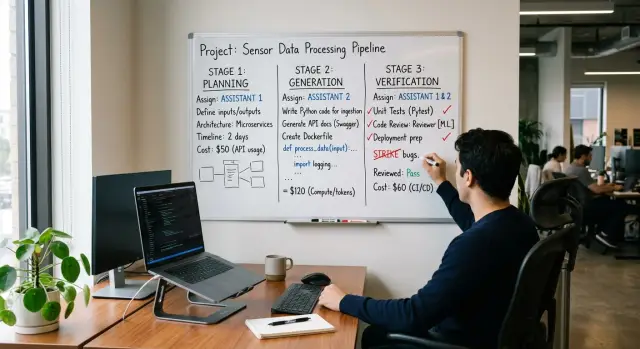
Table of Contents
Why one model for every step wastes money
Most teams start with one model for everything because it's simple. One chat, one API key, one prompt style, one habit. The same model reads the ticket, plans the work, writes the code, adds tests, and reviews the result.
That default feels clean, but it burns money fast. An expensive model ends up spending tokens on routine work that doesn't need much judgment. It writes boilerplate, repeats patterns from the codebase, fixes small lint issues, and fills out test cases that follow an obvious shape. You're paying premium rates for work a cheaper model can usually handle.
The opposite mistake hurts too. Some teams move everything to a fast, low-cost model to cut spend. That can work for drafting, but review is different work. Review needs patience, context, and a better eye for edge cases. A weaker model can miss a race condition, a bad migration, a security gap, or a test that looks fine but proves almost nothing.
Then the cost shows up later. Developers spend extra time fixing avoidable bugs. Pull requests bounce back and forth. Production issues cost more than the tokens you tried to save. Cheap generation plus weak verification isn't cheap once people have to clean up the result.
Two models often work better because engineering work isn't one job. Planning, generation, and verification each need different strengths. One model can think through the approach and check risk. Another can turn that plan into routine code without eating a large budget.
You don't need a huge stack or a complex orchestration layer to do this. For many teams, the first useful split is simple: let the stronger model plan and review, and let the cheaper one write the first draft. In AI-first setups like the ones Oleg Sotnikov builds for clients, that kind of routing often cuts waste before the team changes the rest of its process.
What each model should do
Teams overspend when they ask the strongest model to handle every step. These jobs are not the same. Planning needs judgment and broad context. Code generation needs speed and steady output. Verification needs a skeptical read and enough reasoning depth to catch edge cases.
Planning turns a request into a small spec. It names the files to touch, lists risks, and defines the tests that should exist before the work is done. Generation writes or updates the code from that plan. Verification checks the result against the plan and looks for bugs, gaps, and side effects.
A cheaper model works well for generation when the task is narrow and the rules are clear. If the plan already says which files to edit, what a function should return, and which tests to add, a fast low-cost model usually does fine. It can handle routine handlers, UI wiring, repeated patterns, and basic test scaffolding.
Planning is where a stronger model often earns its cost. Use it when the request is fuzzy, touches many files, or depends on tradeoffs. Give it the feature request, the relevant code, and the constraints. A better model can read more context at once and produce a plan that a cheaper model can follow without guessing.
Verification also deserves the stronger model when failure would hurt. That includes auth changes, billing logic, data migrations, concurrency, permissions, and anything else that can quietly break production. Good verification needs reasoning more than typing speed. The model should compare the code to the plan, check whether the tests prove the behavior, and ask, "What did this change break that nobody asked about?"
For small edits, one cheaper model can do all three jobs. For anything messy or risky, split the work: use the stronger model for planning and verification, and the cheaper one for generation. That keeps cost down without lowering the bar.
A simple split that works in practice
A practical pattern looks like this: one model plans, another writes, then the first model checks. You don't need an elaborate loop. You need clear handoffs.
Start with the planning model. Give it the feature request, the current code context, the deadline, and hard limits such as language, framework, performance needs, and files it may touch. Ask for a short plan, not code. The plan should name the job, list assumptions, break the work into a few steps, and call out risks.
Then pass that plan to the drafting model. Its job is narrow: write the first draft that follows the plan. It should not rethink the scope unless it finds a direct conflict. That keeps the cheaper writing pass focused on output instead of spending tokens on broad reasoning.
Send the draft back to the checking model. That model should review for missed edge cases, bad assumptions, test gaps, security issues, and changes that drift from the original scope. This catches a lot of waste before a person even opens the diff.
The handoff format matters more than most teams expect. Keep one shared structure for every step so nothing gets lost between prompts. A simple handoff usually includes the task summary, scope and constraints, plan steps, the draft output or diff, and any open questions or risks. If both models read and write the same shape, the chain stays clean. Teams that skip this often pay for the same thinking twice.
You also need a stop rule. Without one, the models can keep arguing with each other and run up cost for tiny gains. A practical rule is one planning pass, one draft, and one review pass. Run one more cycle only if the checker finds a real issue, such as a broken test, a security risk, or a missing requirement.
This pattern works because it mirrors how good people work. One person frames the job, another gets a draft moving, and a careful reviewer looks for holes before merge.
How to set it up step by step
Start with one task small enough to finish in a day or two. Good examples include adding a CSV export, fixing a retry bug, or writing tests for one endpoint. If you test this on a huge feature, you won't know whether the split failed or the task was simply too big.
Write the planning prompt first. Give the model the ticket, the relevant files or file names, the constraints, and the exact shape of the answer you want back. A useful plan is short and concrete: scope, files to touch, risks, test cases, and the order of work.
Then write a separate draft prompt for the model that will produce code or text. Tell it to follow the plan exactly, not rethink the whole task. That keeps the faster model focused on execution instead of using tokens on broad analysis.
The review prompt comes last, and it should act like a strict checker. Ask the review model to look for factual mistakes, missed edge cases, broken assumptions, and formatting problems. If the task is code, ask it to verify that the change matches the plan, handles failure paths, and doesn't ignore tests or docs.
A simple example makes this clearer. Suppose the task is "add CSV export to the admin users page." The planning model decides where the button belongs, which API route changes, what permissions matter, and which tests to add. The draft model writes the code from that plan. The review model checks whether the export respects filters, handles empty results, and returns the right columns.
Track the same numbers every time you run the flow:
- total cost
- total time
- number of rewrites
- review comments found before merge
- defects found after merge
Run this on five to ten similar tasks before you judge it. One run can mislead you. A small team that cares about speed and cloud spend will learn more from a week of careful comparison than from a month of opinions.
Example: one feature request from start to review
Take a small API change: the product team wants an "archived" filter on the projects list. Right now, /projects returns only active items. Support keeps getting tickets from admins who need to find old projects without opening the database.
This is a good test case because it's small, easy to check, and easy to repeat. One stronger model handles planning and review. One lighter model writes the first draft of the code and tests.
The planning model gets the request, a short note about the current endpoint, and the coding rules. It should return a brief task list plus acceptance checks, not code. A solid plan might look like this:
- Add an optional
archivedquery parameter toGET /projects - Keep current behavior when the parameter is missing
- Accept
trueandfalse, and reject other values - Update the query so filtering happens in the database
- Add tests for default behavior,
archived=true,archived=false, and invalid input
That plan is enough for the drafting model. It doesn't need to think through the whole feature from scratch. It can focus on writing the handler change, the query update, and the tests. This is where the split usually saves money: drafting often burns more tokens than planning, so the cheaper model does the longer pass.
Now the stronger model comes back for review. It compares the draft against the plan and looks for gaps. In this example, it might catch two common misses.
First, the draft added the filter but forgot to test the missing-parameter case, so nobody proved that old clients still get the same result. Second, the draft accepted any string and treated unknown values as false, which hides bad requests instead of rejecting them.
A good review pass also checks assumptions in plain language. If the request doesn't say whether archived projects should be sorted with active ones, the reviewer should flag that and ask for a decision. That's cheaper than shipping a guess and fixing it later.
If your team can run this flow on three or four feature requests in a week, you'll know quickly whether it fits your work. Small, repeatable changes tell you more than a big demo task.
How to tell if the split actually helps
A split only pays off if your team finishes work with less spend, fewer loops, and less cleanup. A cheap prompt on one step doesn't matter much if the next step burns tokens fixing the damage.
Start with the full task, not one API call. Track total tokens across planning, code generation, review, and repair. If you only watch the price of a single prompt, you'll miss the real cost.
Retry count tells you where the setup breaks. One extra planning pass is usually fine. Three review rounds on the same ticket means the handoff is weak, the prompts are vague, or the wrong model owns that stage.
Read the review notes, not just the pass or fail result. If the same comments show up every run, you've found a pattern: missing tests, poor error handling, wrong file layout, or code that ignores the plan. Fix that pattern first. Swapping models too early often wastes more money.
Human cleanup matters just as much. If an engineer still spends 20 minutes renaming functions, patching edge cases, or rewriting comments before the code can ship, the workflow is still expensive. Count that time as part of the cost.
A small scorecard is enough for each completed task:
- Cost: total tokens and total API spend for the whole task
- Speed: time from request to code ready for final human approval
- Accuracy: retry count, repeated review comments, and cleanup minutes
Keep the scoring simple. A 1 to 5 rating works if your team uses it the same way every time. After 10 to 20 similar tasks, the pattern gets clear.
If cost drops a little, speed stays flat, and accuracy gets better, the split works. If cost drops but retries and cleanup go up, you didn't save money. You just moved the work around.
Mistakes that burn money fast
The most common mistake is simple: both models do the whole job. One model plans, the other writes, and then both get the full ticket, full codebase, and full review cycle anyway. That doubles cost without giving you much back.
A split works only when each model has a clear lane. If the stronger model handles planning, let it produce the plan, constraints, and edge cases once. Then hand that output to the cheaper model for code generation. Don't pay twice for the same reasoning.
Review can get expensive just as quickly. A reviewer should inspect the diff, check tests, and compare the result with the plan. If you let the review step rewrite whole files from scratch, you turn a cheap safety check into a second generation pass.
This often happens on small tasks. A model finds one style issue, rewrites half the module, creates new differences, and triggers another review. Now you're paying for churn, not progress.
Most of the waste comes from a few habits:
- sending the full task to both models instead of splitting roles
- asking the reviewer to produce replacement code rather than review comments
- changing prompt format every run
- re-reviewing tiny edits again and again
- starting with a huge task that hides bad routing
Prompt drift is a quiet budget leak. If one run uses a checklist, the next uses free text, and the third uses JSON with different field names, the second model spends tokens just figuring out what it received. Keep the structure stable. Teams often save more from consistent inputs than from model price alone.
Tiny edits can trap you in a loop too. If the code passes tests and the reviewer only wants naming tweaks or comment changes, stop after a short second pass. A human can decide whether the suggestion matters. Endless polish is still expensive, even with a cheap model.
Start with a contained task. A small API endpoint, a bug fix, or one admin screen gives you a clean signal. If the split fails there, it will waste even more money on a large migration.
A quick check before you adopt it
Run one real task through the full split and score the result with five blunt questions. If two answers are weak, don't roll it out yet.
Start with the plan. It should define the job in plain language, set scope, name the files or systems to touch, and say what stays out of scope. When the plan leaves room for guesswork, the drafting model usually fills that space with extra code you never asked for.
Then read the draft against the plan, line by line if needed. The draft should follow the plan, not invent bonus refactors, helper tools, or side features. That's where this setup often goes wrong: the second model gets too much freedom, and freedom gets expensive.
The review pass needs more than a style check. Make the reviewer look for factual mistakes, missed edge cases, weak assumptions, and thin tests. If it only says the code "looks good," that pass didn't earn its cost.
Use a short checklist:
- Did the planning output make scope clear enough for quick human approval?
- Did the draft stay inside that scope?
- Did the review catch real risks, edge cases, and test gaps?
- Did you record total cost and total time for the whole run, including retries and cleanup?
- Would a human trust the final result after one careful read?
That fourth point matters more than most teams expect. Count the entire run, not just model tokens. If a cheap draft creates 20 minutes of cleanup, it wasn't cheap.
A small test makes this obvious. Give the split a bug fix with one acceptance rule and one edge case. If the planner is clear, the draft stays narrow, and the reviewer catches the weak spot, you probably have a setup worth keeping.
If the result still feels noisy or hard to trust, fix the plan template first. Better planning usually saves more money than swapping models again.
Next steps for your team
Don't roll this out across every repo at once. Pick one task your team repeats every week, such as writing a small API endpoint, fixing broken tests, or turning a ticket into a first-draft PR. Repetition makes the trial fair and makes weak spots easy to spot.
Set up one split and keep it boring. One model plans the work in a short outline. Another writes the code. Then a reviewer model, or the planner again, checks the result against the ticket, tests, and style rules. If you change the handoff every run, you won't learn much.
Save the prompts that produce steady handoffs. Keep the planner prompt, coder prompt, and reviewer prompt in the same place as your team docs or scripts. After a few runs, you may notice that a small prompt change affects cost and quality more than swapping one model for another.
A simple trial looks like this:
- Choose one repeatable task
- Run the same flow ten times
- Track time, token spend, and human cleanup
- Keep only the prompts that stay stable
Ten runs tell you more than one good demo. Look for plain numbers: how often the code passes tests, how many review comments repeat, and whether engineers spend less time rewriting model output. If the split saves five minutes but adds twenty minutes of checking, drop it.
Teams often overbuild this stage. You don't need a complex router, a big dashboard, or six models arguing with each other. A small script and a spreadsheet are enough to test whether the split actually lowers cost for your team.
Once you find one version that works, write it down as a team habit. Give it a name, keep the prompts versioned, and decide when a human must step in. That turns a neat experiment into a process people can trust.
If your team needs help designing an AI-first engineering workflow, oleg.is is a useful reference point. Oleg Sotnikov works as a Fractional CTO and startup advisor, helping companies build practical AI-augmented development setups without piling on unnecessary tooling.
Frequently Asked Questions
When does it make sense to use two models instead of one?
Split the work when the task feels fuzzy, touches several files, or carries real risk. Let one stronger model plan and review, and let a cheaper model write the first draft.
For a tiny edit with clear rules, one low-cost model can often handle the whole job.
Which parts should the stronger model handle?
Give planning and review to the stronger model. Those steps need better judgment, wider context, and a sharper read on edge cases.
That matters most for auth, billing, migrations, permissions, concurrency, and anything that can break production quietly.
What should the cheaper model do?
Let the cheaper model write routine code from a clear plan. It usually does fine with handlers, UI wiring, repeated patterns, and basic tests when the scope stays tight.
Keep its job narrow so it spends tokens on output, not on rethinking the feature.
Can one low-cost model handle the whole task?
Yes, if the edit is small and obvious. A typo fix, one narrow test update, or a simple endpoint change often does not need a split.
Once the task gets messy or risky, bring the stronger model back for planning and verification.
What should I include in the handoff between models?
Write one stable handoff format and use it every time. Include the task summary, scope, constraints, files to touch, plan steps, draft diff, and open questions.
If you change the format on every run, the models waste tokens figuring out the input instead of doing the work.
How many rounds should I allow before I stop?
Set a hard stop rule before you start. One planning pass, one draft, and one review pass works well for most tasks.
Run one more cycle only when the reviewer finds a real problem, like a broken test, a security gap, or a missed requirement.
How do I know if the split actually saves money?
Track the whole task, not one prompt. Record total cost, total time, retry count, review comments, and human cleanup time.
If spend drops but retries and cleanup go up, you did not save money. You just moved the effort to a different step.
What mistakes make this setup expensive?
Teams usually waste money when both models do the whole job. They also waste money when the reviewer starts rewriting files instead of checking the draft.
Prompt drift hurts too. Keep the structure steady and avoid sending full codebase context to every step when the task only needs a small slice.
What is a good first task for a trial run?
Start with something small enough to finish in a day or two. A CSV export, a retry bug, a filter on one endpoint, or tests for one route gives you a clean signal.
Skip large features at first. Big tasks hide whether the model split failed or the scope was just too wide.
Do I need a complex toolchain to try this?
No, you can start with a simple script and a spreadsheet. What matters most is clear prompts, clean handoffs, and basic tracking.
If the split works on repeatable tasks, you can automate more later. Do not build a big system before you prove the workflow saves time and money.


