Cloudflare Turnstile vs reCAPTCHA vs hCaptcha for SaaS
Cloudflare Turnstile vs reCAPTCHA vs hCaptcha: compare friction, privacy trade-offs, and abuse control for SaaS sign-up and login flows.
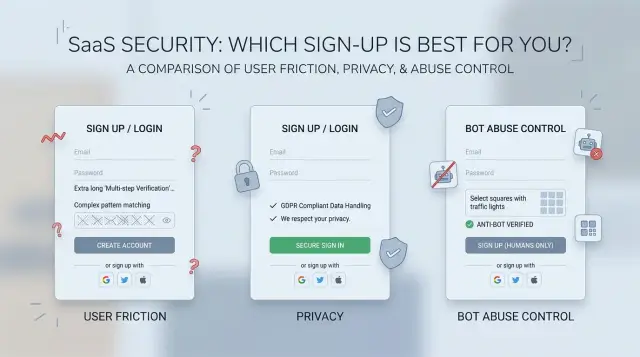
Table of Contents
Why sign-up checks frustrate good users
Most people hit a sign-up or login screen with one goal: get in fast. They don't want image puzzles, repeated retries, or vague error messages. If the check feels annoying, many leave before they even see your product.
That problem hurts sign-up flows the most. A new visitor has no reason to be patient with your app yet, so even a small delay can push them away. Someone starting a free trial on a phone, in a taxi, or between meetings won't spend much time on a security step that feels random.
Login screens are even less forgiving. Existing users already have a task in mind, and extra friction breaks momentum. If they need to solve a challenge just to check a dashboard, approve an invoice, or answer a support request, the security layer becomes the thing they remember.
Bots don't attack every flow the same way either. Sign-up pages attract fake account creation, referral abuse, free trial farming, and throwaway email spam. Login pages attract credential stuffing and password spraying. Those are different problems, so one blunt rule for every visitor usually backfires.
This is the part teams often miss when comparing Cloudflare Turnstile vs reCAPTCHA vs hCaptcha: the strictest gate isn't always the safest choice for a SaaS product. A harsh challenge may block more bots, but it can also cut real conversions and increase support tickets from locked-out users.
A simple example shows the trade-off. Say a founder adds a hard CAPTCHA after seeing 200 fake sign-ups in one week. Bot volume drops, but trial starts fall by 12% because real people hit the same wall. That's a bad deal if most of those fake accounts never had any chance of becoming paid customers.
Good protection feels almost invisible to normal users and much harder for abusive traffic. If a check slows down everyone, it solves one problem by creating another.
What each option asks users to do
In a SaaS sign-up or login flow, the best check is the one a real user barely notices. That's where these three tools feel different.
Cloudflare Turnstile tries to make the decision in the background. In many cases, a person enters an email and password, clicks continue, and never sees a puzzle at all. Turnstile looks at browser and request signals quietly, then decides whether to allow the step, ask for a simple checkbox, or block the attempt. For clean traffic, it often feels like there is no CAPTCHA in the flow.
reCAPTCHA depends on which version you use, but many users still know it as the box that says "I am not a robot" and then turns into image tasks. A normal sign-up might start with one click. If Google wants more proof, the user may need to pick traffic lights, bikes, or crosswalks before the form goes through. In login flows, that extra step often appears after unusual behavior, like many failed attempts or a sign-in from a new device.
hCaptcha does almost the same job from the user's side. Many SaaS teams use it as a reCAPTCHA replacement because the flow feels familiar: checkbox first, image challenge if needed. The prompts differ, but the experience is close enough that most users treat it as the same kind of hurdle. If your sign-up page already has a lot of fields, one more visual task can feel heavier than expected.
In practice, the difference is simple. Turnstile often asks for nothing visible. reCAPTCHA often asks for a click and sometimes an image puzzle. hCaptcha often does the same.
That matters more on login than many teams realize. People tolerate a little friction when they create an account. They get much less patient when they are trying to sign in quickly, especially on mobile, during checkout, or after already failing a password once.
If your product depends on fast access, Turnstile usually asks the least from good users. reCAPTCHA and hCaptcha can still work well, but they more often make people stop and prove they are human.
Where friction shows up in real flows
Most teams notice friction too late, after conversion drops on forms that looked fine in testing. The trouble often appears on phones, weak networks, shared Wi-Fi, VPNs, and older browsers, not on a developer laptop.
First-time sign-up on mobile is where users have the least patience. A person taps "Create account," enters an email, picks a password, and then gets an image puzzle that loads slowly or resets after one mistake. Turnstile often feels lighter here because many users pass without solving anything. reCAPTCHA and hCaptcha can add more visible work, especially when traffic looks unfamiliar or risky.
Returning users hit a different kind of friction. They already know your product, so any extra check feels harsher. A login block after a device change, hotel Wi-Fi, or a new IP can feel like a bug, not a security step. That's why SaaS login bot protection should stay quiet for normal logins and get stricter only when behavior looks off.
Friction also stacks up in recovery flows. Password reset already asks users to switch between your app, email, and back again. If you add a puzzle before the reset form and then another check after the email link, people drop out fast. Email verification creates the same problem. One small delay is fine. Three small delays in a row feel broken.
The biggest gap between these tools often shows up in very ordinary moments: a mobile sign-up with spotty signal, a normal login from a new device, a password reset after too many failed attempts, or a user who clears cookies and blocks trackers.
Puzzle loops are the worst case. A user solves the challenge, gets another one, then another, and leaves. False blocks hurt too. They don't just stop bots. They lock out paying users, trial users, and support staff testing accounts.
A quick test helps. Run each option on a phone, on home Wi-Fi, on mobile data, in private browsing, and after clearing cookies. If one tool adds even 10 to 20 seconds to common flows, that delay will show up in sign-up flow friction long before your team sees it clearly in analytics.
How privacy trade-offs differ
All three tools judge risk by looking at signals around the request. That usually includes IP address, browser details, device hints, timing, and behavior on the page. Before you pick one, ask a plain question: what data does this tool need to decide that a signup or login is human?
That matters because "security data" and "tracking data" are not the same thing in a user's mind. A customer usually accepts a short security check if it protects their account. They react differently if the same check feels tied to a larger ad system or cross-site profiling.
reCAPTCHA often gets the most scrutiny here. Many teams already use Google services, so adding one more Google script can feel normal inside the company. Users don't always see it that way. Some will read it as another layer of Google data collection, even if your goal is basic abuse control.
Cloudflare Turnstile is often easier to explain to privacy-conscious teams because it aims to reduce visible challenges and relies on lighter checks in many cases. That can lower the sense that the page is watching the user too closely. hCaptcha also appeals to teams that want reCAPTCHA alternatives for SaaS, especially when they want more distance from Google.
What to review before legal signs off
Your legal review should match your market, not just your tech stack. If you sell into the EU, handle health data, or work with security-sensitive B2B buyers, privacy questions come early. Procurement teams may ask what signals your bot check collects, where that data goes, how long it stays there, and whether it supports cross-site tracking.
A short internal checklist helps. List every user signal the tool may collect. Ask whether cookies or persistent identifiers are involved. Confirm where data is processed and stored. Then check what your privacy notice needs to say.
User trust is the part teams often forget. If a signup form suddenly throws a challenge with no context, people assume something odd is happening. A short note such as "We use this check to stop fake signups and protect accounts" can calm that concern.
For most SaaS teams, the best choice isn't the tool with the strongest privacy pitch. It's the one you can explain clearly to users, defend in a legal review, and run without making honest customers feel suspicious on day one.
How each option blocks abuse
Bots don't attack sign-up and login pages in the same way. New account abuse usually comes from scripts that fill forms at scale. Login abuse is different: attackers test stolen passwords, guess weak ones, or hammer one account until they hit a limit.
That difference matters more than brand loyalty. The best choice depends on whether you mostly fight fake sign-ups, credential stuffing, brute force attempts, or some mix of all three.
Turnstile leans hardest toward silent checks. It looks at browser behavior and related signals, then lets many real users pass with no puzzle at all. That works well against basic scripted sign-ups, especially when bots don't fully mimic a normal browser. When Turnstile sees more risk, it can ask for extra proof instead of challenging everyone.
reCAPTCHA gives you a stronger score-first model. It can score requests quietly and let your app decide what happens next. You can allow low-risk attempts, slow medium-risk ones, and challenge or block the worst traffic. That helps when abuse hides inside normal traffic, such as credential stuffing with real browsers and stolen passwords.
hCaptcha often fits teams that want a more obvious challenge wall. It can stop cheap automation fast because many bots still fail visible tasks. The cost is higher friction. That trade can make sense on a sign-up page flooded with throwaway accounts, but it can annoy real users on login pages.
None of these tools solves brute force or credential stuffing on its own. CAPTCHA helps, but login defense still needs rate limits, failed-attempt thresholds, IP and device checks, and step-up actions like MFA or email verification when risk rises.
If simple scripts create fake accounts, Turnstile keeps friction low and hCaptcha can block harder with more visible checks. If login abuse blends into normal traffic, reCAPTCHA usually gives finer control because the score can trigger MFA, cooldowns, or a challenge. If attackers just pound a form from obvious sources, any of the three can help, but throttling and temporary blocks do most of the work.
Start with your logs, not a tool preference. If abuse is noisy and simple, visible challenges can work. If abuse hides inside normal sessions, silent scoring with careful escalation usually works better.
A simple SaaS example
Picture a small B2B SaaS tool with a 14-day free trial. A company signs up to test team reporting, invites a few coworkers, and starts using it the same day. Most real users move fast. Fake accounts do too, but for different reasons.
Abuse usually shows up in two places: trial sign-up and login. Those moments don't carry the same risk, so they shouldn't get the same challenge.
Sign-up from a new device
A person opens the sign-up form on a new laptop, enters a work email, creates a password, and starts a trial. This is usually a low-risk moment. You want to stop obvious bots, but you don't want to throw image puzzles at a real buyer before they even see the product.
Cloudflare Turnstile is often the best fit here. It can check the request quietly in the background, so many people never see a challenge at all. That keeps sign-up flow friction low, which matters when a free trial depends on speed and a smooth first impression.
reCAPTCHA can also work for this step, but the experience may vary more. Some people pass through with no trouble, while others get a harder check. hCaptcha can block abuse well, yet it is more likely to interrupt the form with a visible task. That trade-off makes more sense if fake trial creation is already a daily problem.
Login after several failed attempts
Now imagine the same account a week later. The real user types the wrong password twice. That alone shouldn't trigger much. But if the account gets ten failed attempts in a minute, or the attempts come from several IP addresses, the risk is much higher.
This is where a tougher check makes sense. A light option like Turnstile may still be enough if attacks are rare and your rate limits already do most of the work. If bots often try stolen passwords, reCAPTCHA or hCaptcha can make more sense after repeated failures because the extra friction appears only when the situation looks suspicious.
A practical setup is simple: use Turnstile on first-time trial sign-up, add a stronger challenge only after repeated login failures or unusual traffic, and pair any CAPTCHA with rate limits, email verification, and account alerts.
That approach matches real SaaS behavior. Low-risk moments should stay easy. High-risk moments can carry more friction because blocking an attacker is worth more than adding one extra second at login.
How to choose one step by step
Start with your abuse, not the vendor page. A SaaS team usually deals with only a few real problems: fake trial accounts, credential stuffing on login, bulk password reset requests, or spam sent through invite forms. Write down which of those hurts your product today and how often it happens. If you skip this step, the Cloudflare Turnstile vs reCAPTCHA vs hCaptcha decision turns into guesswork.
Then map every place where a human might hit a challenge. Most teams think about sign-up and forget login, password reset, magic link requests, and account recovery. Those smaller flows often break first because people use them when they are already stressed.
A good process is boring, and that's fine. List the abuse patterns you see in logs, support messages, and fraud reports. Match each pattern to a user flow such as sign-up, login, reset, or invite. Test the challenge on mobile and desktop, with slow connections and private browsing turned on. Track completion rate, support tickets, and how much bot traffic still gets through. After a week or two, tighten or relax the checks.
A simple test setup beats long debate. Put one option on part of your traffic, keep the rest on your current flow, and compare drop-off at each step. If mobile sign-ups fall by 8% but bot traffic only drops a little, that trade is probably bad.
Privacy deserves its own review. If your buyers care about tracking, legal review, or data minimization, include those concerns early. It is much easier to reject a tool before rollout than to replace it after users complain.
Keep one fallback plan ready. False blocks always show up somewhere, often after a rules change or a traffic spike. Give your team a backup such as email verification, manual review for suspicious sign-ups, or a temporary switch to a lighter check so real users can still get in.
Mistakes teams make
When teams compare Cloudflare Turnstile, reCAPTCHA, and hCaptcha, they often reach for the strictest option first. That feels safer, but it usually starts with a guess instead of real abuse data. If you haven't measured fake account rates, credential stuffing attempts, proxy traffic, and support complaints, you don't know whether the extra friction is worth it.
Another common mistake is using the same challenge on every screen. Sign-up, login, password reset, invite acceptance, and admin access don't face the same risk. A new account from an unknown device may need more checks. A returning user with a normal history usually should not. When every screen gets the same wall, real users pay for a problem they didn't cause.
Mobile users get ignored more often than teams admit. A challenge that works on a laptop can turn clumsy on a small screen, especially on weak 4G, crowded public Wi-Fi, or an older phone. Extra scripts, retries, and image puzzles add seconds at the worst moment. In SaaS, those seconds matter.
Teams also change login flows and forget to test the bot check again. A new SSO button, a modal redesign, or a changed redirect can trap users in a loop, hide the error state, or fire the challenge twice. These bugs are easy to miss in staging and even easier to ship. Every auth change needs a quick real-world test on desktop and mobile, including a slow connection.
The most misleading dashboard is the one that shows only bot blocks. A rising block count can look like success while human conversion slips in the background. Watch both sides together: sign-up completion rate, first-try login success, password reset completion, and support tickets about account access.
If bot blocks rise and user success drops, the setup is too aggressive. Start with the lightest control that matches the abuse you actually see, then tighten only on the risky steps. Good protection stays out of the way for normal users. If people keep noticing it, the setup probably needs work.
A quick checklist before you ship
A bot check can look fine in staging and still hurt conversion on real devices. The widget itself gets too much attention. What matters is what happens after launch: do real people get in, and do bad actors slow down or just move elsewhere?
Before rollout, record a baseline for at least a few days. Track sign-up completion, login success, password reset completion, and the share of sessions that reach the challenge step but don't finish. Then compare the same numbers after launch, split by device type and browser. Mobile usually shows problems first.
Keep the pre-launch check short. Compare sign-up completion before and after rollout, not just total traffic. Test login success on real phones, slow connections, and private browsing. Read support tickets and chat messages for loops, repeated challenges, and blocked access. Watch nearby steps such as password reset, invite accept, and checkout to see if abuse shifted there. And set a rollback trigger before launch, such as a drop in conversion or a spike in failed logins.
Support messages matter more than many teams expect. A small rise in "I can't log in" or "it keeps asking again" often shows a real issue before dashboards make it obvious. Read the wording people use. If several users mention VPNs, mobile browsers, or office networks, you may have a false-positive pattern.
Abuse adapts fast. If fake sign-ups drop but password reset abuse jumps, you didn't fix the problem. You moved it. Review results after 48 hours and again after one week. If the control blocks bots and leaves normal users alone, the numbers should make that clear.
Next steps for your team
Pick one flow first. For most SaaS teams, that means sign-up, not every form across the product. A small test is easier to judge, and it keeps you from changing three things at once.
Run the new check for a short, fixed period, such as two weeks. Keep the rest of the flow stable so you can tell whether the CAPTCHA changed real user behavior or only blocked junk traffic.
Track a few numbers every week instead of going by gut feel: sign-up completion rate, fake account rate, login failure rate tied to challenges, support tickets that mention being blocked, and manual review time for suspicious accounts.
Those numbers tell you more than screenshots of a CAPTCHA ever will. A tool can look clean in a demo and still hurt conversion if it triggers too often on mobile, shared office networks, or privacy-focused browsers.
Write down rules before you ship. That removes a lot of internal debate later. For example, if fake sign-ups rise above your normal range for two weeks, tighten checks on sign-up and password reset. If completion rate drops sharply or support tickets climb, relax the challenge and review the trigger rules.
A simple rule set works better than constant tuning. Most teams don't need daily changes. Weekly review is enough unless you're under active attack.
If results look good, expand to the next flow. Login is usually next, then password reset, then higher-risk actions such as trial creation or invite sending. Move one step at a time so you know what changed and why.
Some teams get stuck because the choice feels bigger than it is. You're not picking a forever tool. You're picking the least annoying way to block abuse in one real workflow.
If your team wants an outside review, Oleg Sotnikov at oleg.is works as a fractional CTO and startup advisor and can help sort out auth friction, abuse controls, and the infrastructure around them. That kind of second opinion can save a few weeks of trial and error when sign-up friction, bot traffic, and implementation details are all tangled together.
Frequently Asked Questions
Which option usually causes the least friction on sign-up?
For most SaaS sign-up flows, start with Cloudflare Turnstile. It often lets normal users through without a visible puzzle, so trial starts feel faster. If fake account abuse is already heavy, hCaptcha or reCAPTCHA can block more aggressively, but they usually add more friction.
Is Turnstile enough to protect a login page?
No. CAPTCHA helps, but it should not carry login security alone. Add rate limits, failed login thresholds, email alerts, and MFA when risk rises. Turnstile works well when attacks are light and you want a quiet check for normal logins.
When does reCAPTCHA make more sense than Turnstile?
Pick reCAPTCHA when you want more control over suspicious traffic on login. Its score-based approach fits cases like credential stuffing, where attackers blend into normal sessions. It makes more sense after repeated failures or odd traffic than on every first visit.
Why would a SaaS team choose hCaptcha?
Use hCaptcha when fake sign-ups hurt you every day and you accept more visible checks to slow them down. It can stop cheap automation fast. The trade-off is simple: real users will notice it more, especially on mobile and during login.
Should I use the same CAPTCHA on sign-up, login, and password reset?
No, and that is a common mistake. Keep sign-up light for clean traffic, then tighten checks on higher-risk moments like repeated login failures, password reset abuse, or invite spam. Different flows carry different risk, so they should not all feel the same.
What should I measure after I add a bot check?
Start with sign-up completion, first-try login success, password reset completion, and support tickets about blocked access. Then compare those numbers before and after rollout. If bot blocks rise but human success drops, your settings are too strict.
How do the privacy trade-offs differ?
Teams often question reCAPTCHA more because users may connect it with broader Google data collection. Turnstile usually feels easier to explain to privacy-focused buyers, and hCaptcha often appeals to teams that want distance from Google. Before you ship, check what signals the tool collects, where it processes them, and what your privacy notice should say.
How should I test these tools before a full rollout?
Look at the flow on real phones, mobile data, home Wi-Fi, private browsing, and after clearing cookies. A short test on part of your traffic works better than a long internal debate. If one tool adds even a small delay to common flows, users will feel it.
What should I do if real users get stuck in CAPTCHA loops?
Do not leave them stuck. Give support a fallback such as email verification, manual review for suspicious sign-ups, or a temporary lighter check. Then review logs and support messages fast, because challenge loops often show a bad rule or a browser issue.
What is the best default choice for a small B2B SaaS?
For a small B2B SaaS, Turnstile is usually the safest default. It keeps sign-up smooth, and you can add tougher checks only after repeated login failures or unusual traffic. That setup protects common flows without putting a wall in front of every new buyer.


