Turborepo vs Nx vs plain workspaces for growing teams
Turborepo vs Nx vs plain workspaces: compare caching, task graphs, setup effort, and team size so you can pick the simplest repo setup.
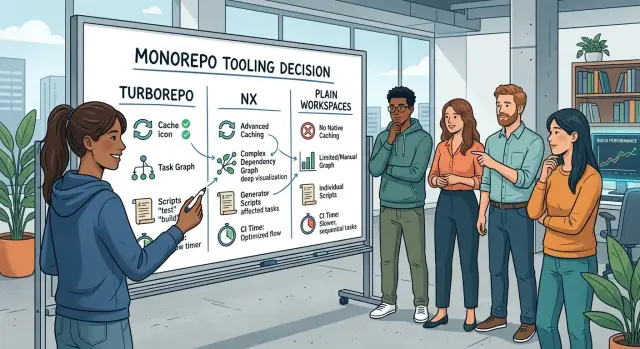
Table of Contents
Why this choice gets messy fast
A monorepo often starts small. One app, one shared package, a few npm scripts, and everything feels easy.
Six months later, each package has its own build, test, lint, and dev commands. Some scripts overlap. Some are old. Nobody is fully sure which ones still matter.
The trouble usually shows up in CI first. One developer can ignore an extra 20 seconds on a laptop and move on. A team notices fast when every pull request rebuilds everything, runs the same tests twice, and burns through CI minutes all day.
That is where the choice between plain workspaces, Turborepo, and Nx gets blurry. Teams rarely stop and ask, "What is actually slow?" They react to the pain they can see. If CI feels slow, they add caching. If scripts feel messy, they add a task runner. If package boundaries feel loose, they add rules. Sometimes that helps. Sometimes it just adds another layer on top of a setup nobody has cleaned up.
A small example makes the problem obvious. Say you have a web app, an admin app, and a shared UI package. One person adds custom shell scripts in the root. Another adds package-level scripts that do almost the same thing. CI glues them together with its own commands. Now you have three places to debug one build problem.
Plain workspaces already fix part of this. They keep packages in one repo and one dependency graph. For some teams, that is enough for a long time. Other teams need cache-aware builds or a tool that understands task order across packages. The mistake is choosing the bigger tool before proving there is a real reason for it.
That choice sticks around for years. A tool changes more than build speed. It shapes folder rules, script names, CI setup, and how new teammates learn the repo. Pick the wrong level of complexity and the team carries that extra weight for a long time.
What plain workspaces already fix
Plain workspaces solve more than many teams expect. They let apps and shared packages live in one repo and connect to each other without manual linking, awkward local publish steps, or copy-paste code. If package A depends on package B in the same repo, the workspace tool handles it.
That removes a lot of daily friction. A new developer can clone the repo, run one install at the root, and get the apps and shared packages in one pass. There is no separate install flow for every folder, and no guessing about which local package version somebody forgot to update.
Basic scripts also go a long way when the repo has clean boundaries. If each app owns its build, tests, and start command, plain workspace scripts stay readable. A shared UI package, an API client, and two apps can work just fine with simple package-level commands like build, test, and lint.
For many teams, workspaces are enough when shared packages change less often than apps, builds finish quickly, one package does not trigger work across the whole repo, and people understand which package owns what.
In that kind of setup, extra tooling can feel heavier than the problem. You add config, special commands, and more rules, but daily work barely changes. Simple is often better, especially for a small team that wants fewer moving parts.
A common example is a startup with one web app, one admin app, and a shared types package. One root install works. Local packages resolve correctly. Scripts stay readable. If each build takes a minute or two and the packages do not depend on each other in tangled ways, plain workspaces already cover the job.
That does not mean the repo will stay simple forever. It means added complexity should earn its place. If builds are still short and mostly independent, workspaces already fix the first pain most teams feel.
What Turborepo changes
Turborepo usually leaves your repo shape alone. Most teams keep the package scripts they already use, such as build, test, lint, and typecheck. Turborepo sits on top of those scripts, runs them across packages in the right order, and parallelizes work when it can.
The biggest shift is caching. If the inputs for a task did not change, Turborepo can reuse the old result instead of running that task again. You stop paying the same build cost over and over for unchanged code.
That sounds small until you feel it every day. A build that takes 4 minutes the first time may take only a few seconds on the next run if you changed one small file. That saves real time, especially when developers rerun the same checks many times before a merge.
A cache hit usually depends on plain things: the files in the package, files in packages it depends on, the command itself, and any environment variables the task declares. When those inputs stay the same, the old result can be reused.
Remote cache makes this much more useful for a team. If CI already built and tested a package, another developer can reuse that result locally instead of doing the same work again. The same works in reverse. A developer can push a commit and CI can reuse work that already ran on that machine. Less repeated work means faster feedback.
Turborepo often fits teams whose repo already works but feels slow and a bit messy. Maybe each package has its own scripts, people run slightly different commands, and CI repeats too much work on every pull request. In that case, Turborepo often gives a speed boost without asking the team to rethink the whole repo.
Picture a repo with a web app, a shared UI package, and an API client. You change a text file in the app. With plain scripts, the repo may still rebuild more than it should because nobody cleaned up the old commands. Turborepo can skip most of that and run only what the change actually touched.
What Nx changes
Nx gives the repo a clearer map. It builds a project graph, which means it tracks which app, package, and library depends on which other parts. That sounds abstract, but the result is simple: the tool can tell what a change is likely to affect before you run a pile of scripts.
That matters once the repo stops being small. If someone edits a shared UI package, Nx can see that the web app depends on it while an internal worker service does not. You stop guessing which builds and tests need to run.
The affected commands are where this becomes useful in daily work. Instead of rebuilding everything after every commit, Nx narrows the work to projects connected to the change. A small edit in one library might trigger tests for two apps and skip the other twelve. Over a week, that can save a lot of waiting.
Where the extra structure shows up
Nx usually asks teams to describe the repo more clearly. Projects need consistent names, clear targets, and declared dependencies. Hidden relationships, one-off scripts, and "it works on my machine" habits tend to break the model.
That extra structure helps larger repos stay tidy. New packages follow the same patterns. CI becomes easier to reason about. People can look at the graph and understand how the repo fits together without reading every package by hand.
There is a cost, though. Setup takes more effort than plain workspaces, and the team has to keep the repo honest. If developers bypass Nx, wire scripts in random ways, or leave dependencies unclear, the graph gets less useful.
A small team with three packages may find that overhead annoying. A growing team with many apps, shared libraries, and separate owners often feels the opposite. In that case, Nx can bring order to a repo that would otherwise drift into script sprawl.
How caching and task graphs affect daily work
Caching feels great when it works. You change one file, rerun the command, and the repo skips work it already knows is unchanged. That can save a few seconds on a small repo or several minutes on a busy one.
The catch is simple: caching only helps when tasks behave the same way every time. If a build script writes the current timestamp into an output file, pulls in a changing env var, or depends on files it never declared, the cache misses. Then people stop trusting the tool, because the same command is fast on Monday and slow on Tuesday.
A task graph matters when one package affects many others. Say the team updates a shared UI package. If the repo knows that two apps, one test suite, and a docs package depend on it, it can run only the tasks touched by that change. Without that graph, teams often fall back to blunt commands like "build everything" or "test everything." That gets old fast.
Stable tasks usually share a few traits. They read from clear inputs, write to clear outputs, avoid random or time-based changes, and use the same command locally and in CI.
Bad scripts cause two kinds of pain. First, they kill cache hits, so local runs get slower and CI bills climb. Second, they create strange failures. A script might pass when run alone, then fail in the full pipeline because it secretly depended on another task running first. That wastes more time than a slow build.
These problems usually travel together. When developers wait longer on their laptops, CI usually runs longer too. When CI runs longer, teams read more logs and retry more jobs. When retries pile up, debugging gets harder because nobody knows whether the problem is real or just a brittle script.
That is why teams with disciplined scripts often get more out of caching than teams with bigger repos. The tool matters. Clean task inputs matter more.
How to choose step by step
Most teams should start with observation, not a new tool. If you do not know what runs every week, what takes too long, and what breaks most often, this choice turns into guesswork.
Write down the tasks the team actually runs. Keep it concrete: install, lint, type check, unit tests, app builds, package builds, preview builds, release steps, and CI jobs. A repo with two apps and a shared UI package has very different needs from a repo with ten packages, several build targets, and heavy CI.
Then time those tasks before changing anything. Measure local runs on a normal developer machine, not the fastest laptop in the company. Measure CI too. If a clean install, test run, and production build already finish fast enough, a new tool may add more config than time saved.
After that, map the real dependencies between packages. Teams often assume everything depends on everything else. Usually that is not true. Draw a small diagram or a plain table. If a change in one package should not rebuild four unrelated apps, you have found a real reason to care about caching or task-graph tooling.
A practical path looks like this:
- Stay with plain workspaces if scripts are still readable and most people understand how the repo runs.
- Pick Turborepo if repeated builds and CI runs waste time, but your package boundaries already make sense.
- Pick Nx if you need caching, stricter project boundaries, generators, and tighter control over how tasks relate.
- Pause if nobody can name the exact pain. "The repo feels messy" is too vague.
A small team example makes this easier. If you have one web app, one worker, and two shared packages, plain workspaces may be enough for months. If CI rebuilds the same packages again and again, Turborepo starts to pay off. If the team keeps crossing package boundaries, creating odd imports, and arguing over build rules, Nx may save more time.
Choose the smallest tool that fixes today's problem. Add more only when you can point to the wasted minutes.
A simple team example
Picture a team of six. They run one Next.js app for customers, one API for internal and public data, and two shared packages: a UI library and a small package with types and helpers. Most days, a developer changes the app and one shared package, then pushes a branch and waits for CI.
At first, plain workspaces feel completely fine. Installs are simpler, local imports are cleaner, and shared packages stop turning into copy-paste mess. If the app builds in 20 to 40 seconds and tests finish quickly, adding more tooling can feel like paying rent on a house you barely use.
That is the part people often miss. If builds still take seconds, workspaces already solve the annoying part: one repo, shared code, and fewer scripts to babysit.
Now the team grows. A small change in the shared types package triggers builds for the app, the API, and a couple of test jobs. CI goes from under 2 minutes to 8 or 10. Developers open pull requests, then wait long enough to lose focus.
This is where Turborepo often makes sense first. The team keeps the repo structure it already has, adds task definitions, and gets build caching without a big rewrite. If only one app and one shared package changed, CI can skip work it already knows is unchanged. That can cut several minutes from each pull request.
Nx starts to pay off in a slightly different version of the same team. Imagine the repo grows into three apps, two APIs, shared design rules, shared lint rules, and a stricter release process. Now the problem is not only speed. The team also needs clearer boundaries, dependency rules, and better control over what can depend on what.
A simple rule works well:
- Use plain workspaces when the repo is small and builds stay fast.
- Try Turborepo when CI gets slow but the structure still feels manageable.
- Pick Nx when many apps share rules, dependencies, and team-wide conventions.
Most teams do not need the biggest setup on day one. They need the smallest tool that removes today's delay without creating tomorrow's maintenance job.
Mistakes that cost time
Teams waste the most time when they solve the wrong problem first. A repo with a handful of packages and a few annoying scripts usually does not need the most complex tool right away. Before picking sides, measure the pain you already have: slow CI, repeated builds, hard releases, or too many broken package scripts.
Cache gets too much credit when the real issue is messy scripts. Caching only works well when tasks do the same work from the same inputs. If a script reads the current time, writes files into random folders, depends on undeclared env vars, or calls a live API during build, cache hits will be rare or unsafe.
A quick smell test helps:
- Build output changes when code did not change.
- Tests depend on local machine state.
- Scripts fetch data during build.
- Packages read files outside their own folder.
Package boundaries cause another slow leak. Teams say they have separate packages, then apps import internal files from each other, shared code turns into one giant utils folder, and every small edit touches half the repo. At that point, task-graph tools cannot do much because the dependency shape itself is sloppy.
Copying a big example config is another trap. The setup may look polished, but if nobody on the team can explain why one task depends on another, small changes turn into long debugging sessions. Simple config that people understand beats clever config that only one person can fix.
Remote cache in CI sounds cheap until you check storage, access rules, and cache misses across branches. Decide who can read cached artifacts, whether pull requests should share them, and what happens when secrets affect build output. Skip that work and remote cache adds both cost and confusion.
The boring choice often wins: clean scripts, clear package boundaries, and only enough tooling to remove a real bottleneck.
Quick checks before you commit
Most teams do not need another layer of tooling. They need proof that the repo wastes time in the same places every week.
If you are stuck between these options, watch what people do for two or three days. The friction usually shows up fast.
- CI keeps rebuilding and retesting packages that did not change, so pull requests sit in a queue for the same work again and again.
- Developers jump between packages and run the same scripts by hand because the repo gives them no single command they trust.
- Ask one teammate to explain package boundaries in two minutes. If they cannot do it without a long detour, the repo structure is still fuzzy.
- When a build fails, the output points at the whole repo instead of one package or one task, so people start guessing.
- Nobody wants to touch the config after setup because it already feels fragile or harder than the code it manages.
Those signals matter more than feature lists. A team can live with a basic monorepo setup for quite a while if scripts are consistent, package ownership is clear, and CI stays reasonably fast.
A simple rule helps. If you answer "yes" to one or two checks, plain workspaces with cleaner scripts may be enough. If you answer "yes" to three or more, you probably need caching or task-graph tooling. That is where Turborepo or Nx starts to earn its keep.
Be honest about maintenance too. Extra tooling saves time only if someone on the team will keep the config tidy as the repo grows. If no one will do that, pick the simpler setup and revisit the choice in a month or two.
The best choice is usually the one your team will still understand on a tired Thursday afternoon.
Next steps for your repo
Pick the smallest change that solves the problem the team feels this week. If people mostly lose time to repeated scripts and messy package links, plain workspaces may be enough. If CI keeps rebuilding the same code, caching is probably worth testing.
Do not change the whole repo at once. Make one branch, move one app and one shared package, and run normal work on it for a few days. That tells you more than a long debate, especially when the choice still feels abstract.
Write down a scorecard before the trial starts:
- CI minutes for a normal pull request
- Local install and build time
- Effort needed to explain the tool to a new teammate
- Number of custom scripts you still need
- Time needed to undo the experiment if it goes badly
Those numbers keep the discussion honest. A tool that saves 4 minutes in CI but adds daily confusion may not be a win for a small team. Your monorepo setup should pay for itself.
Keep the test short and boring on purpose. One branch, one week, a few common tasks. If developers can feel the benefit without reading a long guide, that is a good sign. If the tool needs constant fixing, the repo may not need it yet.
If the choice still feels fuzzy after that, an outside review can help. Another engineer can often spot things the team has stopped noticing, like package boundaries that do not match the product or caching rules that add complexity without much speed.
Oleg Sotnikov at oleg.is works as a Fractional CTO and startup advisor, and this is the kind of problem he helps teams sort out. If you need a second opinion on repo structure, infrastructure, or a practical move toward AI-first development, a short review can save you from a long migration you did not need.
Frequently Asked Questions
Do I need more than plain workspaces?
Start with plain workspaces if your repo stays easy to explain, builds finish fast enough, and people know which package owns what. Add more tooling only when you can point to repeated wasted time, usually in CI or in cross-package builds.
When should I choose Turborepo?
Pick Turborepo when your repo structure already makes sense but builds and CI keep rerunning the same work. It usually helps teams that want caching and better task ordering without changing how the repo is organized.
When does Nx make more sense than Turborepo?
Nx fits better when speed is only part of the problem. If you also need stricter package boundaries, a project graph, and tighter control over what changes affect which apps, Nx usually gives more value than a lighter tool.
Will caching fix slow CI on its own?
Not by itself. Cache only helps when your tasks use stable inputs and produce the same output for the same code. If scripts pull live data, depend on hidden env vars, or write random files, cache misses will keep showing up.
Why do my cache hits keep missing?
Most misses come from messy scripts, not from the cache tool. Check whether your build reads undeclared files, uses timestamps, depends on local machine state, or changes output even when code stays the same.
Can a small team stick with plain workspaces?
Yes. A small team can stay on plain workspaces for a long time if installs are simple, package scripts stay readable, and builds finish in seconds or a couple of minutes. You do not need a bigger setup just because the repo has more than one app.
Is moving from workspaces to another tool a big migration?
Usually no. Many teams can add Turborepo on top of existing package scripts and test it on one branch. Nx often needs more cleanup because it works better when you name projects consistently and declare dependencies honestly.
How can I tell if my package boundaries are weak?
Watch for imports that reach into another package's internal files, shared folders that turn into a dumping ground, and small edits that rebuild half the repo. Those signs usually mean the package split looks neat on paper but not in real work.
What should I measure before I change monorepo tools?
Measure normal pull request time, local install time, local build time, and how many scripts people run by hand because they do not trust one command. Also check how long it takes a teammate to explain the repo without guessing.
When should I ask for an outside review?
Bring in another engineer when the team cannot name the real bottleneck, config already feels fragile, or every option starts to look equally bad. A short review often costs less than a long migration that fixes the wrong problem.


