Traffic replay before an infrastructure move: what to test
Traffic replay helps you test a new environment with real request patterns before a move, so you spot cache, auth, and rate limit issues early.
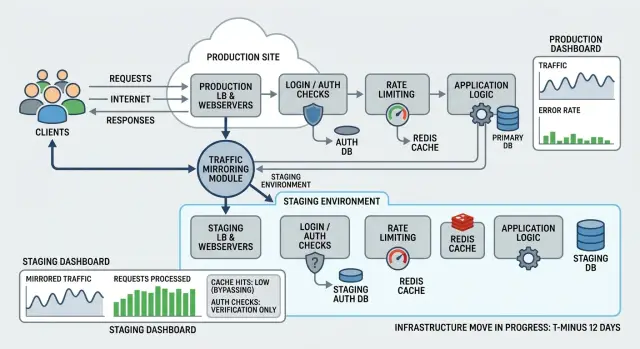
Table of Contents
Why moves break in small ways
Most infrastructure moves fail at the edges, not in the big obvious parts. The app still starts, the database still answers, and health checks stay green. Users notice something smaller: a page loads slowly, a login sends them back to the sign in form, or an API call gets rejected for no clear reason.
Caches cause a lot of this trouble. When you change a host, proxy, CDN, or DNS setup, you often change how requests get grouped and how responses get stored. A cache that worked well in the old setup can suddenly miss too often, store the wrong version, or stop caching because one header changed. Add a few hundred milliseconds to every request and people feel it fast.
Auth problems often start the same way. Cookies depend on exact rules for domain, path, security flags, and cross site behavior. A move can change any of those by accident. Headers can also disappear or get rewritten when a new proxy sits in front of the app. Then things get messy. Users log in and get logged out on the next page, or an internal API starts returning 401 errors even though the application code did not change.
Rate limits create a different kind of surprise. In the old setup, traffic may have arrived from many client IPs. In the new one, a proxy or gateway may make requests look like they come from fewer sources. That changes how the system counts traffic. Limits that looked safe before can fire much sooner, especially on login endpoints, search, or public APIs.
These issues usually show up as login loops, slower page loads after cache misses, blocked API requests, or random bursts of 429 and 403 responses.
A small mismatch in headers, cookie scope, or request routing can trigger all of that. That is why traffic replay matters before a move. It tests the patterns your users create every day instead of relying on neat test cases that miss the ugly details.
What traffic replay does
Traffic replay copies real production requests and sends them to a separate environment while production keeps serving users. The live system stays in charge of every response. The replayed copy exists only for testing.
That sounds simple, but it changes the quality of your test. Synthetic checks usually cover the happy path. Real traffic carries the weird stuff too: old cookies, mobile app retries, missing headers, odd query strings, and requests that arrive in bursts at awkward times.
When you mirror those requests into the new stack, you can see how it behaves under patterns your users already create. You can compare status codes, timing, cache behavior, logs, and error rates without putting anyone at risk.
This is where traffic replay pays for itself. It often finds problems that basic staging tests miss:
- cache rules that look fine until an uncommon URL bypasses them
- auth checks that fail on older tokens or awkward session flows
- rate limit settings that block normal retry behavior
- routes, headers, or background calls that nobody included in the move plan
It also shows whether the new environment handles normal paths and ugly ones with the same consistency. A service may pass ten clean test requests and still fail when a real client sends duplicate requests, stale session data, or a payload shaped by an old app version.
Replay does not prove the new environment is perfect. It helps you find gaps before real users hit them. That is a better goal. If mirrored traffic exposes a 2 percent failure rate on requests with expired cache entries, you can fix it now instead of learning about it during the move.
Used well, production request mirroring turns live traffic into a dress rehearsal. Production stays safe, but the test gets much more honest.
Set up a target that cannot hurt users
A replay target should behave like production in the ways you want to test, but it should never touch real users, real money, or real vendors. If a replayed request tries to charge a card, send an email, or push a message, the target should stop it every time.
Start by putting hard blocks around anything that causes side effects. The simplest rule is this: reads are usually fine, writes need extra care.
Turn off payments, email, SMS, chat messages, and webhook delivery. Send outside API calls to test accounts, sandbox endpoints, or local stubs. Replace personal data when you can, especially email addresses, phone numbers, and tokens. Keep replay logs separate so production logs stay clean.
Third party calls cause a lot of trouble during traffic replay. A staging app might still hold a live API key, or a background worker might send events after the main request finishes. Check both the request path and the async jobs behind it. If your app talks to Stripe, Twilio, Slack, or an email provider, make sure every one of those paths points to test systems only.
Mask data with care. You still want realistic request shapes, so keep field formats the same when you can. A fake email like [email protected] is better than removing the field entirely. That way auth checks, cache behavior, and validation rules still run in a realistic way.
Keep replay logs apart from production logs and metrics. If you mix them, dashboards get noisy, alert rules fire for the wrong reason, and debugging gets messy fast. Give replay traffic its own log stream, its own tags, and ideally its own error tracking project.
A checkout replay makes the risk obvious. If the target keeps live payment settings, one mirrored request can create a real charge attempt. If it keeps live email settings, the same request can send a duplicate receipt. Good isolation stops both problems before a migration test turns into an incident.
Choose the requests worth replaying
Do not start by mirroring everything. Start with the requests that mix user state, permissions, caching, and timing. Those are usually the first things to break during an infrastructure move.
Login flows belong near the top of the list. A replayed login can expose session cookie issues, missing headers, token refresh bugs, and clock drift between services. Search is another strong candidate because it touches indexes, filters, caches, and query limits all at once.
Checkout paths deserve extra attention, even if you replay them only in a safe mode. They pull together pricing, inventory, tax rules, user sessions, and outside calls. API writes matter too, especially the ones that save profiles, carts, settings, or draft records. Those requests often look fine in logs while quietly failing on validation, permissions, or database timeouts.
Pages that depend heavily on cache are worth replaying even when they seem simple. A home page, product page, dashboard, or search results page can behave very differently when cache headers, CDN rules, or shared session data change. Background callbacks matter for the same reason. Queue consumers, webhooks, and internal callbacks often depend on headers, retries, or IP rules that staging misses.
A good sample includes both the common path and the annoying path. Replay the normal login, but also the expired session. Replay a normal search, but also a search with filters, odd characters, and no results. Replay checkout for a standard order, then test a coupon, a large cart, and a user who returns after a timeout.
Skip any endpoint that can create a real side effect. Do not replay live payment captures, shipment creation, email sends, SMS sends, inventory updates, or partner callbacks against real systems. Route those requests to mocks, strip the dangerous parts, or replace them with safe test doubles.
If you only have time for a small replay set, pick the flows that make money, control access, or change data. That small set usually finds more real problems than a huge dump of low risk requests.
How to run it step by step
Start small. A tiny sample of live requests tells you more than a full synthetic test, and it is much easier to read when something goes wrong.
Pick a narrow slice first, such as anonymous GET requests for a few busy endpoints. Avoid login, checkout, writes, and anything that could create or change user data until the target proves it can handle simpler traffic cleanly.
A practical first run looks like this:
- Capture a small percentage of real requests, often 1 percent or less.
- Send a mirrored copy to the new environment with strict rate caps.
- Store both responses so you can compare them directly.
- Group mismatches by type before you start fixing anything.
- Raise the volume only after the numbers stay steady.
Keep the replay slow on purpose. Traffic replay is not a stress test on day one. You want clear signals, not a noisy flood of errors that hides the first real problem.
Compare more than status codes. Two systems can both return 200 and still behave differently. Check latency, cache headers, auth headers, response size, redirect behavior, and error rates. If one side takes 80 ms and the other takes 900 ms, that gap matters even before users complain.
When you find problems, fix one class at a time. If auth is failing, pause work on cache misses and rate limit noise until auth is stable. Mixed failures waste time because every new test run produces a different mess.
A simple rhythm works well. Run a small replay for 15 to 30 minutes, review mismatches, sort them into cache, auth, routing, and rate limit issues, fix one group, and run the same slice again. Increase traffic only if the results stay clean.
Be strict about the increase. If 1 percent looks good for a full test window, move to 5 percent, then 10 percent. If errors jump after the increase, roll back to the last clean level and inspect that change. That usually shows the real limit faster than guessing.
Watch cache, auth, and rate limits closely
Most bad moves start with small errors, not a full crash. Users see slower pages, random logouts, or short bursts of 429 responses long before anyone calls it an incident.
With traffic replay, watch the busiest endpoints first. Compare cache hit and miss patterns between the current stack and the new one. A page can still return 200 and still do far more work if cache behavior changed. That usually shows up as higher database load, longer tail latency, and a few routes getting worse under pressure.
Busy read endpoints need extra attention. Search, catalog, dashboards, and public API reads often look healthy in light tests and then fall apart when cache misses pile up. If the new environment has different cache keys, TTL rules, or proxy headers, you may miss the cache far more often than before.
Auth needs one full trace, request by request. Start with the first anonymous page load, then the login request, session or token creation, the first authenticated call, and the later session refresh. Do not stop at "login worked." Many auth issues appear 10 or 20 minutes later when a session refresh fails.
Small request differences cause a lot of pain:
- a proxy drops or rewrites forwarded headers
- a secure cookie gets the wrong domain or path
- the app sees http instead of https
- a rate limiter groups many users under one IP
- a backend rejects a header the old stack passed through
Count status codes by route and by user state. Watch 401 and 403 responses before login and after login. If those counts rise in the new environment, the app may no longer trust the same cookies, tokens, or headers.
Watch 429 and 5xx responses just as closely. A spike in 429 often means the limiter now reads client identity differently. A spike in 5xx after cache misses usually points to backend load, not some random bug.
One simple example explains why replay is useful. If the old proxy sent "X-Forwarded-Proto: https" and the new one does not, the app may set cookies incorrectly. Login works once, then the next authenticated request fails. Traffic replay catches that before users do.
A simple example
A small SaaS team plans to move its API behind a new proxy. The app looks simple on paper: users sign in, load a dashboard, and make a steady stream of API calls in the background. The team spins up a separate target environment and runs traffic replay against it while real users keep using the current stack.
At first, the replay looks fine. Public pages load fast, product data comes back, and cached responses match what the team expects. If they stopped there, they might assume the move is safe.
Then they check the login flow. The first request after sign in works, but the token refresh call starts failing a few minutes later. Users would not notice it right away. They would log in, click around for a bit, then get thrown out when the session tries to renew.
The replay makes the bug easy to spot because the pattern repeats. The new proxy forwards the request, but it handles cookie scope differently. One cookie stays tied to the old domain rules, so the refresh endpoint never gets what it needs. The team fixes the cookie settings before the cutover and reruns the same traffic until refresh works every time.
A second problem shows up in rate limiting. The old setup counted requests by client identity in a way that matched real users. The new proxy groups too many requests under one shared IP. That looks harmless in a test with a few calls, but replayed production patterns tell a different story. Busy office networks and mobile carriers suddenly look like one noisy client, and the proxy starts returning 429 errors.
The team changes the limit rules to use a better identifier and adds an exception for trusted internal paths. After that, cached pages still work, login refresh stays stable, and normal bursts stop tripping the limiter.
That is why production request mirroring works so well. It catches the problems that only appear when real request timing, cookies, and traffic shape hit the new path.
Mistakes that hide real problems
A replay can look clean and still tell you very little. Teams often run traffic replay, see lots of 200 responses, and assume the move is safe. Then the real cutover happens, sessions expire too often, cache hit rates drop, or a rate limiter starts blocking normal users.
One common mistake is replaying only GET requests. That feels safer, but it cuts out the requests that usually expose the worst issues. Writes touch queues, locks, database limits, background jobs, and permission checks. If you skip them all, you miss the places where the new setup behaves differently. You do not need to replay dangerous actions against real systems, but you do need safe substitutes that exercise the same code paths.
Timing matters more than many teams expect. Night traffic is often quieter, more predictable, and less mixed. A test at 2 a.m. may never trigger the bursts that fill caches, trigger auth refresh flows, or hit rate limits. If your product gets a lunch rush, end of day sync jobs, or Monday morning login spikes, test during those patterns too.
Another trap is looking only at success rates. If 99.9 percent of requests succeed but the slowest 5 percent get much slower, users will feel it right away. Compare response times, cache misses, auth failures, and retry volume. A move can keep the same error rate while still making the app feel broken.
The most dangerous mistake is letting replay traffic trigger real side effects. A test should never send customer emails, charge cards, create duplicate orders, or fire webhooks to partners. Put hard blocks in place before you start. Route outbound calls to fakes, disable payment actions, and mark replay requests so downstream services can ignore them.
If you want honest results, make the test look real where it matters and fake where it can hurt people. That balance catches problems early without creating new ones.
Quick checks before the move
A move usually fails in ordinary places first. Login tokens expire too soon, cached pages stay stale, retries hit rate limits, or monitoring mixes replay traffic with real user activity.
Run a short pass before you switch anything. Traffic replay helps, but only if you check the parts that users notice in the first few minutes.
- Start with a clean browser session and do a full sign in, a few normal actions, a page refresh, some idle time, and a logout. Session cookies, token refresh, and logout flows often break after proxy or domain changes.
- Change data that should appear on a cached page, then reload that page from another window or account. If the old value stays visible for too long, your cache invalidation rules do not match the new stack.
- Force a retry on one or two slow requests. Watch for 429 responses, repeated background jobs, or duplicate records. A retry should not create a second invoice, send a second email, or queue the same task twice.
- Tag replayed requests so logs, traces, and alerts show them clearly. If your team cannot tell mirrored traffic from real traffic in a few seconds, debugging will get messy during the move.
- Hold the new stack at expected load for a while, not just one burst. CPU, memory, database connections, queue depth, and error rate should level out instead of climbing.
A small example makes this easier to judge. A user logs in, opens an account page, changes a profile field, refreshes the page, and sees the old value because the cache did not clear. Then the browser retries a slow save request and the API answers with 429, even though normal user traffic would stay under the limit. Both issues look minor on their own. During a real cutover, they turn into support tickets fast.
If you work with a lean team, keep the pass short and strict. One clean auth flow, one cache change test, one retry test, one observability check, and one sustained load run will catch a lot. If any of those fail, fix them before the move instead of hoping production traffic behaves better.
What to do next
Turn the replay results into a short written record while the details are still fresh. Note each gap, what triggered it, how often it showed up, and what you changed to fix it. Keep the notes practical. If the issue affects login, cached content, API quotas, or billing, treat it as a move stopper until the team verifies the fix.
Then run traffic replay again after every config change. Small edits often cause the next problem. A cache rule can hide a header issue. An auth change can trigger a rate limit. A new IP rule can break internal calls. Teams get into trouble when they test once, keep tweaking settings, and assume the old result still counts.
Before the cutover, settle a few decisions and write them down:
- the exact cutover window
- the rollback rules and the trigger for using them
- the person on call who can make fast decisions
- the logs and dashboards the team will watch in the first hour
Keep that plan short enough that anyone involved can read it in a minute. During a move, speed matters more than a polished document.
Sort the remaining issues by user impact. A wrong cache header may slow pages or raise costs. A broken token refresh can lock people out. Fix the problems that block access, corrupt state, or create noisy throttling first. Leave cosmetic differences for later.
If you want a second review before the move, Oleg Sotnikov at oleg.is offers Fractional CTO and startup advisory help for migration planning, infrastructure reviews, and cutover prep. A short outside review of replay design, safe test targets, auth flows, cache behavior, and rate limits can be cheaper than one bad migration night.
Frequently Asked Questions
What is traffic replay?
Traffic replay copies real production requests and sends them to a separate test target while your live system still serves users. You use it to spot cache, auth, routing, and rate limit problems before a cutover.
Why is traffic replay better than basic staging tests?
Staging checks usually cover neat, expected flows. Real traffic carries stale cookies, odd headers, retries, and bursty timing that simple tests often miss.
Can traffic replay hurt real users?
Yes, if you isolate the target well. Block payments, email, SMS, webhooks, and other write actions so replayed requests never touch real users or outside vendors.
Which requests should I replay first?
Start with busy read paths such as public pages, dashboards, search, and API reads. After that, test login, token refresh, and safe versions of write flows that matter to revenue or account access.
Should I replay checkout, email, or payment requests?
No, not against live systems. Route those calls to sandboxes, mocks, or stubs so you exercise the code path without charging cards, sending receipts, or changing inventory.
How much traffic should I mirror at the start?
Begin with a very small slice, often 1 percent or less, and add strict rate caps. Raise the share only after the same test window stays clean at the current level.
What should I compare besides status codes?
Look at latency, redirects, response size, cache headers, auth headers, and error rates by route. Two responses can both return 200 and still behave very differently for users.
How do I catch login and session problems before the move?
Trace the full flow from the first anonymous request through login, the first authenticated call, idle time, and token refresh. Many auth bugs show up later, when cookies or refresh tokens no longer match the new proxy or domain rules.
Why do caches and rate limits often break after an infrastructure move?
A proxy or CDN change can alter cache keys, forwarded headers, client IP handling, or cookie scope. That can turn normal traffic into cache misses, random logouts, 401 errors, or bursts of 429 responses.
What should I check right before cutover?
Run one short, strict pass before the switch. Verify sign in, a cached page update, a retry path, clean replay tags in logs, and steady load over time; if any of those fail, fix them before cutover.


