Trace sampling across services without blind spots
Trace sampling across services helps you keep errors, slow paths, and AI calls visible without storing every trace or blowing your budget.
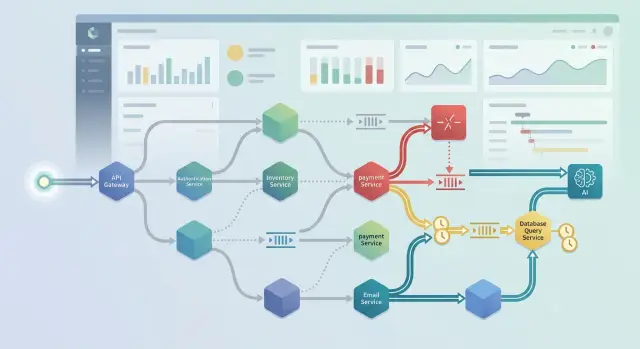
Table of Contents
Why traces disappear when traffic grows
A tracing setup can look fine in staging, then fall apart the week traffic picks up. The problem is rarely tracing itself. Teams cut sample rates to control cost, and the missing trace is often the one request that explains the outage, timeout, or bad user experience.
That hurts most when errors are rare. If one request in 2,000 fails and you keep only a small slice of traffic, luck decides whether you see it at all. You may still have logs and metrics, but the full path through services, databases, queues, and external APIs is gone.
Volume creates a quieter problem too. One noisy service can eat most of the tracing budget. A chatty edge service, auth check, or background worker may produce far more spans than the rest of the stack. Then the system keeps lots of ordinary traces and drops the unusual ones. You pay for data, but lose the request you needed.
Retries make the story harder to follow. A user sends one request, but the system may trigger three internal retries, one queue handoff, and a delayed worker. If trace context does not move cleanly across those steps, the request turns into separate fragments. Each fragment may look harmless on its own. Together, they explain why the user waited 18 seconds.
AI calls often disappear first. Many teams add tracing around the web request and database, then forget the model call, prompt builder, vector search, or tool invocation. That creates a blind spot. An AI feature can add most of the latency and cost, especially when a request fans out to more than one model or retries after a timeout.
On lean infrastructure, this gets more painful because every sampled span has a price. That is why sampling needs rules, not one global percentage. If every service samples on its own, the overall picture breaks fast. You do not get one complete trace. You get scraps, and scraps are hard to debug when customers are waiting.
What every service should add to a trace
A trace only works if every service keeps the same identity for the request. The edge service should create the trace ID once, then pass it through every API call, worker message, and background step. If one service drops it, the timeline breaks into fragments, and you lose the part you usually need most.
Each service should add the same small set of facts whenever it handles a request. Keep it plain and consistent. Fancy tags do not fix missing basics.
Record the service name and the exact endpoint or operation. Record the result, such as success, client error, or server error. Record the start time and total duration in milliseconds. Mark whether the step was a retry, a queue hop, or an external call. Add context only when it changes how you read the trace, such as tenant, region, or model name.
Service name sounds obvious, but teams often skip it or use names that change every few weeks. Pick one stable name per service. For endpoints, record the route pattern, not the full URL with user IDs or random tokens.
Status and duration do most of the work when you scan a trace. You can spot a 500 in one line. You can also see whether a request spent 40 ms in auth and 4,200 ms waiting on an AI model.
Retries need their own marker. Without it, a slow request can look normal even though the system tried the same step three times. Queue hops matter for the same reason. If an API call becomes a job, add that fact to the trace so the delay does not disappear between services.
External calls deserve clear labels too. A database query, payment provider call, and model request should not all look the same. For AI observability, record the model name when it changes behavior or cost. Region and tenant tags help too, but only when they explain something real, such as one region running slower or one tenant sending much larger prompts.
Clean metadata makes every sampling rule work better. Every span should say what happened, where it happened, and why that step took time.
Rules that keep errors, slow paths, and AI calls visible
A cheap tracing setup fails when it treats every request the same. Most requests are boring. A few show where money leaks, where users wait, or where a release went sideways. Those are the traces to keep.
Start with a hard rule: keep every trace that ends with an error. Do not sample those down. A rare bug in one service often starts two or three hops earlier, so the full trace matters more than the final stack trace.
Do the same for slow requests. Pick one latency threshold people can remember, then keep everything above it. For many teams, that might be 1 second for user facing APIs and a higher number for background work. The exact number matters less than using one clear line across services.
AI calls need their own rule. A routine cache read or simple database lookup can live with a lower sample rate. Model calls cannot. They cost more, vary more, and fail in stranger ways. If one customer request hits an LLM, a vector store, and a reranker, that trace is more useful than ten healthy cache hits.
A simple policy usually works:
- Keep 100% of traces with any error status.
- Keep 100% of traces above the latency threshold.
- Sample AI related traces several times higher than standard reads.
- Raise sampling for new releases, payment flows, and fragile endpoints.
- Cut sampling hard for health checks, polling, and noisy cron traffic.
Release windows deserve a temporary bump. If you ship a new search flow on Friday, collect more traces for that path for a day or two. The extra cost is usually small, and it can save hours when something odd appears only under real traffic.
Health checks and polling deserve the opposite treatment. They create volume, repeat the same path, and hide the traces you actually want to inspect. Keep just enough to confirm they work.
That is how a sampling policy stays useful on a budget: keep everything unusual, keep more of what is expensive, and spend very little on noise.
Build the policy step by step
Start at the edge. Put the first sampling decision at your API gateway, ingress, or first public service, and pass that decision downstream. This caps volume early and stops each service from making its own random choice.
A small base rate is enough at first. Sample 2% to 5% of ordinary traffic so you always have a steady background view without filling storage on busy days.
Then add rules after the request finishes and you know the status code and duration. Keep all server errors. Keep requests that cross a latency threshold. Keep AI calls that fail, time out, retry, or cost more than usual, even if the original request started in the low rate sample.
Small teams often make this too clever too soon. Write one rule for each case and give every rule a clear priority. If a request matches two rules, decide which one wins before rollout.
A policy like this is easy to reason about:
- Sample 3% of normal requests at the edge.
- Keep 100% of 5xx responses.
- Keep 100% of requests slower than 2 seconds.
- Keep 100% of failed or slow AI model calls.
- Keep the trace decision consistent across every downstream service.
That last rule matters more than people expect. If the frontend drops a trace but a worker or AI proxy keeps part of it, you get fragments. Those fragments eat budget and still leave you guessing.
Set the budget in numbers you can watch, not in gut feel. Pick a daily span limit or storage limit, such as 15 million spans per day or 40 GB per day. If you only say "sample lightly," the policy will drift until somebody gets a surprise bill.
After that, review a full week of traffic. One day is too noisy. Look for routes that stay just under the slow threshold, error bursts from one service, and AI calls that create huge traces because of retries or fan out.
Tune one thing at a time. Raise a slow threshold, lower a default sample rate, or exempt a noisy health check. Then watch the next week and see if the traces you keep still answer real debugging questions.
Keep async jobs and fan out requests in view
Async work breaks traces more often than HTTP does. A clean request trace can vanish the moment your app puts a job on a queue or hands work to a cron task. Sampling only works if you carry the trace context with the message, not just with web headers.
When an API call creates a background job, save the trace ID, span ID, and a small set of labels with the message metadata or payload. Then let the worker continue that trace as a child, not as a new root. Do the same for scheduled jobs. A cron run can start its own root trace, and every job it creates should link back to that run.
Fan out needs the same care. If one request sends work to three workers, calls a model API, and posts a webhook, keep those branches under the same parent span. You want one trace that shows the split, the slow branch, and the retry that burned 12 seconds. Without that parent child link, each branch looks normal on its own and the real bottleneck stays hidden.
Background workers also need more context than web requests. A worker that handled 1 item and a worker that handled 5,000 should not look the same in tracing data. Record batch size, queue lag, retry count, and job type when that fits your privacy rules. Those fields explain why a run took 40 ms on Tuesday and 9 minutes on Friday.
Treat model calls and webhooks as separate spans, even inside a worker. Give the model span its own timing, model name, token count, and timeout result. Give the webhook span its own endpoint label and retry history. When costs rise or latency spikes, those spans show whether the queue, the model, or the callback caused the problem.
Keep some successful background work too. If you sample only failures, you lose your baseline. Even a 1% to 5% sample of healthy jobs can show normal queue delay, normal batch sizes, and where fan out usually settles.
A simple example from one customer request
A customer opens the billing page and asks the built in AI helper, "Why did my invoice change this month?" One click starts more work than most teams expect.
The app checks identity with the auth service, loads invoice data from billing, pulls a few related records from search, and sends the customer question plus account context to the model API. On a quiet day, you might sample only a small share of these requests and still learn enough.
This request is different. Billing stalls for 2.7 seconds because one database query drags. The model call also fails on the first try, waits a moment, and succeeds on the second. If you rely on random sampling alone, this trace might vanish even though it explains both a slow screen and a higher AI bill.
A simple policy keeps it:
- Keep any trace with an error or retry.
- Keep any trace where a billing span runs longer than your slow threshold.
- Keep any trace that includes a model API call.
- Keep the whole trace, not just the matching span.
That last rule matters most. If you save only the slow billing span, you miss the chain around it. You cannot see that auth finished in 40 ms, search returned fast, billing caused the page delay, and the AI retry added another 900 ms. The full picture shows one user problem, not four separate events.
This is where sampling stops feeling abstract. One retained trace can answer several questions at once: why the page felt slow, why token usage rose, whether the retry logic worked, and which team should fix the first bottleneck.
Good rules also help you stay on budget. You do not need every normal billing request and every short AI prompt. You need the ones that cross a threshold, retry, or fail. A small set of well chosen traces usually tells a clearer story than a giant pile of random ones.
If your team runs lean, this kind of rule set pays off fast. You store less noise, and the traces you keep are the ones people actually open during an incident.
Mistakes that create blind spots
Most blind spots start with a rule that feels neat and cheap. Then traffic grows, one team changes a default, and the trace breaks in the middle.
The first mistake is letting each service sample on its own. The API keeps a trace, the worker drops it, and the database span never shows up. You end up with fragments that look fine by themselves and tell you nothing as a whole. Good sampling needs one shared decision early in the request, and every downstream service should follow it.
A flat 1% rule causes a different problem. It sounds fair, but it treats a healthy 120 ms request the same way as a failing checkout or a 9 second timeout. Rare failures disappear. Slow paths vanish right when you need them. Keep fast, healthy traffic at a low rate if you need to protect your distributed tracing budget, but always keep errors and requests that cross a clear latency limit.
Teams often overcorrect with AI calls. They decide every model call must stay, because those spans are expensive and hard to debug. That part makes sense. The mistake is dropping the user request around the AI span. Then you can see token counts and model latency, but not what triggered the call, which service prepared the prompt, or what happened after the answer came back. When an AI span stays, its parent request should stay too.
Queues, retries, and cache misses also slip through the cracks. Many slow requests do not fail on the first HTTP hop. They fan out into a job queue, retry three times, miss cache, and hit the database under load. If you do not carry the trace context into that path, the trace looks clean while the user waits.
A few checks catch this early:
- Make one sampling decision at the edge and pass it to every service.
- Keep all errors, timeouts, and requests above your slow threshold.
- Keep the parent trace when any child AI span is kept.
- Propagate trace IDs through queues, retries, and cache fallback paths.
- Test rule changes against storage growth and alert volume before rollout.
Threshold changes can create blind spots too. If you move the slow limit from 2 seconds to 5 seconds, storage drops fast, but you may hide a bad regression. If you lower it too far, you flood storage and train people to ignore alerts. Run a short trial, compare what you catch, and check what it costs before you lock the rule in.
Quick checks before you ship
A sampling policy can look fine in a dashboard and still fail the first time real traffic hits it. A short release check catches the gaps that cost you hours later.
The goal is simple: keep the traces you actually need and drop the noise. Before release, send a few test requests on purpose. One should fail, one should run slow, and one should pass through every major hop in your system.
- Trigger a known error and confirm you can find the full trace in a few minutes, not after a long search through logs.
- Follow one request from the API to any background job, queue worker, webhook, and model call. If the trace breaks at any handoff, fix propagation before launch.
- Add delay to one dependency and check whether the trace shows the exact span that caused the slowdown. A slow trace is not very useful if it only says "request took 9 seconds".
- Create or deploy a new service from the same template and verify that it carries the same service name pattern, environment tag, version tag, and sampling rules as the rest.
- Run a short traffic burst and watch trace volume, storage, and ingestion rate. Your tracing budget should stay inside the limit while errors and slow requests still get kept.
AI calls deserve their own quick pass. A model request can be fast one minute and expensive the next. Make sure the trace shows prompt assembly, model latency, retries, and any fallback path. If a worker calls more than one model, keep that chain visible.
One missed handoff is enough to create a blind spot. A request enters cleanly, then disappears inside a job runner or an AI helper, and the team starts guessing. That is the moment to stop the release and fix the trace, because production traffic will only make the gap harder to spot.
If these checks pass, the policy will usually hold up under pressure.
Next steps for a lean tracing setup
Do not roll this out everywhere on day one. A good tracing policy usually starts on one busy request path, then grows after you check what you actually kept.
Start with three rules:
- Keep every trace that ends in an error.
- Keep traces for requests slower than your p95 target.
- Keep traces that include an AI call.
Those rules catch most of the failures that matter without storing every trace. Errors show breakage fast. Slow requests show user pain before an outage. AI calls need their own rule because cost, latency, retries, and prompt problems can hide inside an otherwise normal request.
Pick one path that gets steady traffic, such as signup, checkout, or document processing. Run the policy there for a week. Watch two numbers: how many traces you keep, and how often those traces explain a real problem without extra digging. If engineers still jump to logs for every incident, the rule is too loose or the spans are too thin.
Then compare the kept traces with incidents from the last month. You want a direct match. If a payment timeout, queue delay, or bad model response happened last month, you should be able to point to the trace that would have survived under the new policy. If you cannot, fix the rule before you expand it.
After that, copy the policy to the next busy path, not the whole system. Small steps make it easier to see which service adds noise, which one misses context, and where your tracing bill starts to climb.
If you want a second opinion at that stage, Oleg Sotnikov at oleg.is reviews trace budgets, service boundaries, and AI call paths as a Fractional CTO. That kind of review is most useful when traces are already flowing, but you still need to keep the ones that explain real incidents and cut the ones nobody reads.
Frequently Asked Questions
Why do traces disappear when traffic goes up?
Traffic exposes weak sampling rules. A flat sample rate drops rare failures and slow paths right when volume rises, and one noisy service can eat most of the budget. Keep all errors, keep slow requests, sample AI paths higher, and cut noisy health checks and polling hard.
Should each service sample traces on its own?
No. Let the edge service make one trace decision and pass it through every API call, queue message, and worker. If each service flips its own coin, you get broken traces and pay for fragments that do not explain the full request.
What should every span include?
Keep the basics small and consistent. Add a stable service name, the route pattern or operation name, the result status, and total duration in milliseconds. Mark retries, queue hops, and external calls, then add tenant, region, or model name only when that changes how you read the trace.
What base sample rate should I start with?
Start with a low background rate, usually 2% to 5% of normal traffic. That gives you a steady view without filling storage too fast. Then override that base rate with rules that keep 100% of errors and slow requests.
How do I pick a slow request threshold?
Pick one number people remember and apply it per request type. For user-facing APIs, many teams start around 1 to 2 seconds; background jobs can use a higher limit. Keep everything above that line, then review a full week and adjust if you keep too much noise or miss real pain.
Why should AI calls have a higher sample rate?
Model calls vary more than cache reads or simple database lookups. They add latency, retries, fan-out, and cost in the same request, so a random low sample rate misses too much. When you keep an AI span, keep the parent request too, or you lose the reason that call happened.
How do I keep queue jobs and workers in the same trace?
Carry the trace context with the message, not just with HTTP headers. Save the trace ID and span ID in queue metadata or the payload, then let the worker continue the same trace as a child. Do the same for cron runs and fan-out branches so one request still reads like one story.
Should I store only the slow or failed span?
Keep the whole trace. A single slow billing span or failed model call tells only part of the story, while the full trace shows what happened before and after it. That full path usually tells you whether auth, billing, retries, or an external call caused the real delay.
What mistakes create the biggest blind spots?
Teams usually break traces in predictable ways. They let each service sample alone, they use one flat 1% rule for everything, they keep AI spans but drop the parent request, or they lose trace context on retries, queues, and cache fallbacks. Threshold changes can hurt too if you change them without a short trial.
What should I check before I ship a new sampling policy?
Send three test requests before release: one that fails, one that runs slow, and one that crosses every major hop. Make sure you can find the full trace fast, follow it through workers and model calls, and see the exact slow span after you add delay to a dependency. Then run a short traffic burst and confirm the trace budget stays inside your limit.


