Trace IDs across systems for faster support and fixes
Trace IDs across systems help teams follow one request through apps, queues, AI tools, and support logs so they can find failures fast.
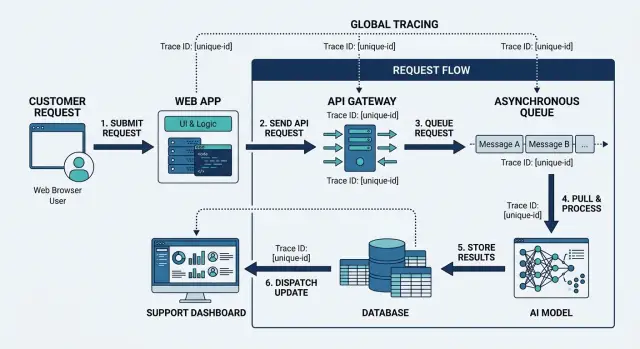
Table of Contents
Why one failure turns into a long search
A support ticket often starts with a vague report: "It failed" or "I never got the result." Support can see the customer, the time, and maybe a screenshot. Engineering sees logs, queue jobs, API calls, and model responses. Each tool shows one slice of the same event, and none of those slices line up by themselves.
That gap wastes time fast. Support may have a ticket number and a user ID. The backend has a request ID. A queue worker creates its own job ID a few seconds later. If an AI model gets involved, the provider adds another identifier. One customer action turns into four or five records that all describe the same failure in different ways.
Teams then fall back to guesswork. They search by timestamp, scan logs around that minute, and try to match records by payload shape or user account. That can work when traffic is low and the bug is obvious. It falls apart when many similar requests hit the system at once.
The pattern is familiar. Support finds the ticket and user account. One engineer checks app logs for that window. Another opens the queue dashboard and hunts for a matching job. Someone else checks model call logs or a vendor console. Then the team argues about which record belongs to the real failure.
Queues make this worse because they hide where the problem started. The original web request may succeed, then a worker fails later on another machine. By then, the clean path is gone. You only see a failed job with a local ID, not the story behind it.
Model calls add another layer of confusion. A prompt may get rewritten, retried, or split across tools before the result comes back. If your team uses more than one model, or routes requests through an internal service first, the trail gets messy fast.
That is why trace IDs across systems matter. Without one shared identifier, support and engineering are not investigating one incident. They are sorting through a pile of partial clues and hoping they picked the right pile.
What a trace ID actually gives you
A trace ID is one reference for one request. You create it when the request starts, then attach that same value to every step that follows. It sounds minor. It changes a lot.
Without that shared reference, every team searches by time, customer name, email, order number, or hunch. Those clues help, but they also pull in noise. One trace ID cuts through that and points to one path through your system.
Used well, trace IDs group logs, retries, and errors under one reference. They show whether a failure started in the app, a queue worker, an external API, or an AI call. They let you compare the first failure with later retries instead of treating each event like a separate problem. And they give support and engineering the same handle to search.
That last part matters more than most teams expect. Support does not need to translate a customer story into technical language every time. They can copy one ID into the ticket, and engineering can search for the exact same value in logs, traces, queue records, and error reports. Nobody spends 20 minutes arguing about which request matched which customer action.
A good trace ID also shows sequence, not just existence. You do not only learn that five errors happened. You see that the app accepted the request, a worker picked it up, one retry fired, a model call timed out, and the final response failed. That order usually tells you where to fix the problem.
This matters even more when the system partly works. A request may succeed in one service and fail later in another. If every retry and follow-up job carries the same ID, the trail stays intact. You can rebuild the full story in minutes, even when several tools and teams touched the request.
For support, the trace ID is a case number for the exact incident. For engineering, it is the shortest path from symptom to cause.
Where the ID should travel
An ID only helps if it survives every handoff. If it disappears when work moves from the app to a queue, or from a model call to a support note, the trail is broken.
Start at the edge. The browser, mobile app, or partner request should send the trace ID with the first API call. Put it in request headers, log context, and any error payload you keep for troubleshooting. If a user reports a problem, support should be able to ask for that ID or pull it from the session record.
The API should keep that same value as it calls other services. Do not create a fresh ID for every internal hop unless you also keep a clear parent-child link. For day-to-day support debugging, one shared identifier is usually the fastest way to follow a request across systems.
Queues are where many teams lose the trail. Messages are often treated like a fresh start. They are not. When the API publishes a job, the message should carry the trace ID in its metadata. When a worker picks up that job, it should log the same ID, pass it to downstream services, and include it in retry and dead-letter records.
AI workflows need the same discipline. If your app calls a model, then a tool, then another model, each step should record the same ID. The same goes for database writes. Save it with audit rows, background task records, and error events so an engineer can answer simple questions fast: which request wrote this row, which model response triggered it, and which worker handled the follow-up.
Support systems matter too. If the only place the ID exists is in engineering logs, support still has to ask someone technical for help. Put the trace ID into ticket fields, internal notes, chat handoffs, and incident records. Then support can say, "Request 7f3a... failed after the queue retry," instead of pasting screenshots and guesses.
One identifier should appear in the user request, service logs, queue metadata, model and tool calls, database activity, and the support record that starts the investigation.
Create the ID at the first touch
Create the trace ID before your system does anything else. If you wait until the database call, the queue job, or the AI model step, you already lost part of the story. Support needs one reference that starts at the first contact and stays with the request all the way through.
That first contact depends on the product. It might be an HTTP request hitting your app, an API gateway receiving a call, a webhook entering your backend, or a form submission from a customer. Pick that edge and create the ID there every time.
Keep the format short enough for humans to read and repeat. A long UUID works for machines, but it is annoying on a support call. Something like RF7K-29QX or ORD-84M2P9 is often easier to use, as long as it stays unique enough for your traffic.
Store it in the request context right away. Do not leave it sitting in one controller or one log statement. Your app should treat it like basic request data, the same way it treats the current user, account, or session. Once it lives in context, every log line, model call, queue message, and support note can carry the same value without extra work.
Customers should see it when that helps. If a payment fails, show a short reference ID on the error screen. If a request succeeds but may need follow-up later, include the same ID on the confirmation screen or receipt page. That tiny step can cut a support exchange from ten messages to two.
This is where trace IDs across systems either work or fall apart. If the ID starts late, every team builds its own partial trail. If it starts at the edge, one search can rebuild the whole path in minutes.
A simple rule works well: if a human can report the problem, a human should be able to read the ID.
How to pass it from start to finish
A trace only helps if the same ID survives every hop. Use one trace ID for one customer action, then copy it forward without changing it. If you mint a new ID in the middle, the trace stops being useful fast.
Write the ID into the very first request log. Do it as soon as your app, API, or webhook receives the call, before it touches a database, a queue, or a model. That first log line gives you the start of the trail, even when the request dies early.
Then carry the same field into every queue message. Put it in the payload or message metadata, and treat it like a required field, not a nice extra. If a worker pulls that message, it should read the trace ID first and load it into its own logging context before it starts retries, validation, or follow-up jobs.
AI-heavy flows need the same discipline. When your worker calls a model, save the trace ID next to the model name, prompt version, latency, and any error text. If the model triggers a tool call, pass the same ID again so the tool logs match the original request. That is the difference between real request tracing and a pile of disconnected logs.
Support records matter too. When a case opens, save the trace ID next to the order number, user ID, or conversation record. Support can then hand engineering one short string instead of a long retelling of what the customer saw.
One rule keeps this clean: preserve the original trace ID for the full path, and add separate IDs only for child work. A batch job, retry attempt, or tool step can have its own job_id or step_id, but the parent trace ID should stay the same.
Teams often miss this in queue message correlation. They log the inbound request, then forget the ID when async work starts. A simple check catches it. Open any failed incident and see whether you can follow one ID from the first request log to the worker logs, model calls, tool calls, and the support ticket without guessing.
A simple example with a failed refund
A customer opens your app after seeing a double charge and taps "Request refund." The app sends the refund request to your API. At that first touch, the API creates a trace ID like trc_9a7f2c and attaches it to the request, the refund record, and the log entry for that call.
The API accepts the request and puts a refund job on a queue. The same trace ID goes into the queue message metadata, so the worker that picks up the job does not create a new identity for the same case. That small choice matters later.
A few seconds after that, a worker reads the message and sends the case to a model. Maybe the model checks whether the refund looks like a duplicate charge, a billing error, or possible abuse. The worker passes the same trace ID in the model call, logs the request start time, and waits for the result.
Then the model step stalls. The provider does not answer in time, or your timeout is too short for this kind of request. After 30 seconds, the worker gives up, marks the job as failed, and writes the timeout event with the same trace ID.
Now support gets a message from the customer: "My refund still says pending." Without a shared ID, support starts guessing. They search by email in one place, order number in another, and maybe a queue job ID in a third.
With trace IDs across systems, support searches one value and sees the full chain:
- The API accepted the refund request at 10:14:03.
- The queue stored the job at 10:14:04.
- The worker started the model call at 10:14:08.
- The model call timed out at 10:14:38.
- The refund stayed in "pending review" instead of moving forward.
Engineering can use that same ID to pull the exact worker logs, inspect the timeout, and check whether retries fired or stopped too early. Support can tell the customer what happened in plain language, and engineering can fix the right step first. One search replaces ten guesses.
Mistakes that break the trail
Most tracing setups fail in small, boring ways. The usual problem is not missing logs. It is a broken chain, where each system tells a different part of the story and nobody can join them quickly.
One common mistake is creating a fresh ID in every service. That feels tidy, but it ruins request tracing. If the API has one ID, the worker creates another, and the model call gets a third, support cannot follow one path. Keep one main trace ID for the whole journey. If a service needs its own local ID, store that in a separate field.
Retries cause another mess. A queue job fails, retries ten minutes later, and the code logs the retry with a new ID. Now the first failure and the retry look like unrelated events. Keep the same trace ID across retries, then add a retry counter or attempt number. That tells you both facts: it is the same job, and it ran again.
Teams also hide the ID inside free text only. A support note like "payment issue for trace abc123" is better than nothing, but it is weak. Text gets edited, copied badly, or missed by search. Put the ID in a real field in logs, queue payloads, support tickets, and admin screens. Machines search fields better than humans search sentences.
Another easy way to break the trail is showing one ID to support while engineering logs a different one. Then support asks about case 8F2K, while the logs only know request 19C7. Use the same visible identifier everywhere a person might touch the issue: the error screen, the ticket, the internal dashboard, and the logs.
Scheduled jobs and batch imports often get ignored because no user clicks a button to start them. They still need IDs. A nightly sync should get a run ID, and each item inside it should carry either that run ID or a child ID that points back to it. Otherwise, failed records look random.
A short checklist helps:
- Create the trace ID once at the first real entry point.
- Pass it through every call, job, retry, and tool.
- Store it in structured fields, not only in message text.
- Show the same ID to support and engineering.
- Give scheduled work its own trace path.
Teams running lean AI-first operations depend on this kind of consistency. One missing field can turn a 5-minute fix into a half-day search.
Quick checks before rollout
A rollout fails when the ID works in logs but nobody else can use it. Before you ship, test the path like a real support case, not like a developer reading one service at a time.
Start with the customer-facing screen. The person handling a ticket should see one clear identifier and copy it in one click. If support has to open dev tools, inspect headers, or ask engineering to find the right value, the system is not ready.
Then test search. Paste that same ID into your app logs, queue viewer, background job logs, error tracker, and any admin tools your team uses. Engineering should find the full story in minutes. That is the whole point: one search term, one timeline, less guessing.
A short pre-launch pass catches most breaks:
- Start one request in the UI and confirm the same ID appears in the API log, the queue message, and the worker log.
- Force a retry and make sure the retry keeps the original trace ID. Store the retry count separately.
- Trigger an alert and check that the ID appears in the alert text or attached event data.
- Send the request through any AI step and record the ID in metadata, logs, or spans without writing private customer details next to it.
- Hand the ID to someone outside engineering and see if they can follow the trail without help.
Retries deserve extra attention. Many teams create a new ID when a job runs again, and that breaks the story in half. Keep the main trace ID the same from the first customer action to the final outcome. If you need more detail, add an attempt number or a child job ID.
AI calls need their own review too. Record the trace ID with the model name, request time, latency, and result status. Do not attach raw personal data just because the model call failed. Support needs enough context to investigate, not a copy of private content.
One small drill makes this real: ask support to pick a recent failed action and walk it through every tool. If they get stuck anywhere, fix that before rollout.
Next steps for your team
Start with a plain map of the full request path. Put it on one page and follow a single customer action from the first click to the final result: browser or app, API, background jobs, queues, AI calls, database writes, admin tools, and the support screen your team uses when something goes wrong.
That exercise usually finds the problem fast. Most teams do not lack logs. They lack one shared path that shows where the same request changes hands.
Pick one trace ID format and make one person own the rollout. If every team invents its own version, the trail breaks early and stays broken. A simple UUID is enough for most cases, as long as everyone passes the same value forward instead of creating a fresh one halfway through.
Keep the rollout small at first. Choose one real customer flow, such as signup, checkout, or refund, then test it end to end. Start the action with a new trace ID. Confirm the same ID appears in app logs, queue messages, worker logs, AI tool calls, and support notes. Force a failure on purpose so the team can trace the issue without guessing. Write down every place where the ID disappears, changes, or gets buried.
Fix those gaps before you build dashboards or weekly reports. Fancy views do not help if queue message correlation fails or support cannot search the same ID engineering sees. Clean plumbing first, then reporting.
Once the path works, give support a simple lookup routine. One ID should let them answer basic questions in minutes: where the request started, what touched it, where it failed, and whether the customer needs a retry or a manual fix.
If your team wants an outside review, Oleg Sotnikov at oleg.is works with startups and small businesses on AI-first development, infrastructure, and support workflows. This is the kind of problem that is much easier to fix early, before each team builds its own tracing habits.
Frequently Asked Questions
What is a trace ID?
A trace ID is one short reference for one customer action. Your app creates it at the first request and carries it through logs, queue jobs, model calls, database writes, and the support ticket.
Why not just search by time and user ID?
Time and user data pull in noise when many similar requests hit at once. One trace ID points to one path, so support and engineering stop guessing which log or job belongs to the case.
Where should we create the trace ID?
Create it at the first touch, such as the browser request, mobile API call, webhook, or gateway entry. If you wait until a worker or model step starts, you lose the start of the story.
Should every service generate its own ID?
No. Keep one parent trace ID for the whole request and add local job_id or step_id fields only when you need extra detail. If each hop makes a new ID, the trail breaks.
How should queues handle the trace ID?
Put the same trace ID in the queue message metadata or payload, then load it into worker logs before the worker does anything else. That lets you connect the API request, the queued job, retries, and dead-letter records without guessing.
What should we do with retries?
Keep the original trace ID across every retry. Store the attempt number in a separate field so you can see both facts at once: it is the same request, and it ran again.
Do AI calls need the same trace ID?
Yes. Pass the trace ID into model calls, tool calls, and any internal AI service, then log it with the model name, latency, and result status. That gives you one trail even when prompts get rewritten or split across steps.
Should support see the trace ID?
Yes, if humans need to report or investigate the issue. Show a short readable ID on error or confirmation screens, and save the same value in the ticket so support can hand engineering one exact reference.
What data should we store with the trace ID?
Store the trace ID in structured fields next to the facts you already need, like user ID, order number, status, latency, and error text. Do not attach raw private content just because a request failed.
How do we test the rollout?
Run one real flow end to end, force a failure, then search the same ID in every place your team uses. If support cannot follow the request from the customer screen to logs, queues, AI steps, and the final error without help, fix the gap before rollout.


