Token budgets by workflow step that lower AI spend
Token budgets by workflow step help teams cap retrieval, generation, and review separately, so they cut waste without breaking useful AI flows.
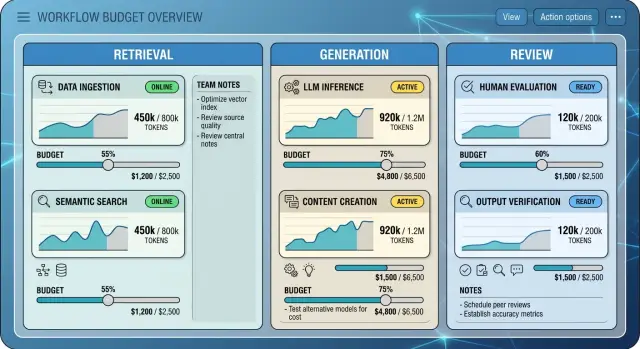
Table of Contents
Why one monthly cap fails
A single monthly limit tells you what you spent, but not why you spent it. When all token use rolls into one number, the real source of cost stays hidden.
That looks neat on a dashboard, but it leads to bad decisions. A team sees the total rising, gets told to cut usage, and trims the most visible part of the workflow instead of the most wasteful one.
Review often gets cut first. It happens after generation, so some teams treat it like polish. In practice, review can catch weak answers, prevent retries, and stop bad outputs before they turn into support tickets, rework, or another expensive model call.
The waste usually starts earlier. Retrieval may pull too many documents. Generation may use long prompts when short ones would do. A monthly cap hides those differences, so people remove the safety check and leave the leak alone.
A simple example shows the problem. Imagine a team spends $5,000 a month on an AI workflow for internal reports. They only see one total, so they remove the review pass and save $700. A month later, staff spend hours fixing messy drafts, and generation costs barely move because the real problem was retrieval sending too much text into every request.
Now look at the same workflow with separate budgets:
- Retrieval: $1,800
- Generation: $2,500
- Review: $700
That view changes the conversation fast. The team can see retrieval is oversized, review is modest, and the obvious cut was not the smart one.
Separate budgets for each workflow step work better than one blunt cap. They show where spend creates value, where it gets wasted, and what you can trim without breaking a flow people rely on every day.
Map the workflow before you set limits
Most teams overspend because they budget the final answer and ignore the steps around it. One user request often triggers several calls, and each one burns tokens for a different reason.
Start with a plain map of the full path. Write down what happens after a user asks something, where the system looks for context, when the model writes the answer, and whether a person or another model checks the result before anyone sees it.
If the map fits on a sticky note, you probably missed part of the cost. Retries, fallback prompts, safety checks, and second-pass edits often sit in the background and quietly add spend.
A useful map should show five things: what starts each step, where outside context or internal documents come in, which step writes the main response, which step reviews or approves it, and how often each path runs in a normal week.
That last part matters more than most teams think. One path may run on every request, while another only runs when the first answer looks weak or a customer asks for a human check.
Retrieval deserves its own box on the map. It can look cheap per call, but it often runs every time, and it may pull far more text than the model needs. If your system grabs ten documents for a short question, that waste adds up fast.
Generation is easier to spot, so teams often blame it first. Sometimes they are right. Sometimes the bigger problem is that the system writes a draft, rewrites it, and then asks another model to polish it when the first draft was already good enough.
Review needs its own box too. A second model review on every answer sounds safe, but many teams only need deep review for a small share of requests. Budgeting review separately lets you keep quality checks where they matter without paying for them on routine work.
Step-based budgets work best when you map normal traffic, not ideal traffic. Count a real week, note how often each branch runs, and the waste usually becomes obvious.
Set a budget for retrieval
Retrieval often looks cheap because each search step feels small. In practice, it can eat a lot of tokens before the model writes a single useful line.
Count every part of retrieval, not just the final chunks sent to the model. That includes search queries, result summaries, selected chunks, and any chat history you carry forward. Teams often miss the history part, and that alone can double the prompt size in longer sessions.
For routine lookups, a small default cap works well. Most everyday tasks do not need 20 documents and a long back-and-forth thread. If the job is simple, give retrieval a tight budget and force the system to choose the best few sources first.
A practical starting point is simple. Count tokens from search results before reranking, count the chunks that reach the prompt, count reused chat history, set one low default cap for normal requests, and allow a higher cap only after the first pass fails.
That last rule matters. Hard cases do need more room. A contract question, a bug spread across several logs, or a product decision with conflicting notes may need a second retrieval pass with a larger allowance. Don't give every request the expensive path from the start.
Cut noise before you raise the cap
A lot of retrieval waste comes from context that rarely changes the answer. Old meeting notes, repeated policy text, boilerplate docs, and stale snippets often sneak into prompts because they are easy to attach. Remove them first. You will usually get the same answer for fewer tokens.
Track the misses too. If the model gives a weak answer because it lacked one missing document or one recent note, log that case. Review those failures every week. If the same gap shows up again and again, add that source to the default retrieval set instead of raising the budget for everyone.
This is where many teams save real money. A lean retrieval budget cuts waste fast while still leaving room for harder work when the first pass proves it needs more context.
Set a budget for generation
Generation costs rise fast when every task gets the same output allowance. A two-sentence reply should not share a budget with a product spec or a first draft of a proposal.
Split generation into task buckets. Most teams need at least two: short routine outputs and longer drafting work. This is often where the savings show up first.
Routine work needs tight limits because it happens all day. Chat replies, ticket summaries, status updates, and rewrite requests can usually stay short without hurting quality. Long drafting work needs more room, but only for the few tasks that truly need it.
A reasonable starting range looks like this:
- Chat or support reply: 80 to 150 output tokens
- Internal summary: 150 to 300
- Sales email or short draft: 300 to 600
- Proposal, memo, or spec draft: 900 to 1,800
These numbers are not magic. They give you a clean first pass. After that, adjust them based on what people actually use.
Prompt cleanup matters just as much as the cap itself. Teams waste money when they paste the same long instructions into every generation step, even for small tasks. Move fixed rules into a shared system prompt or reusable template, then keep each task prompt short and specific.
Watch output length by task type, not by team mood. If a reply bot keeps using 280 tokens for questions that users answer in one line, cut the cap. If product drafts keep stopping too early and people rerun them three times, raise the limit for that task instead of lifting the ceiling for everything.
Keep exceptions rare. If people can click "long answer" on every request, your budget becomes a suggestion. Require a reason for larger generations, log it, and let a manager or tech lead review the pattern once a week.
Teams that control AI costs well usually do one simple thing: they keep routine generation on a short leash and reserve bigger outputs for tasks that really need room, such as architecture notes, incident write-ups, or first-pass product documents.
Set a budget for review
Review is where teams often overspend. They send every output through a second model, even when the first task is low risk and easy to check.
A review budget should protect you from costly mistakes, not add a tax to every request. Save review tokens for actions that could create real damage or real cleanup work.
Review usually earns its keep when the AI will:
- Send something to a customer
- Change a record, price, or payment status
- Write code that may reach production
- Answer a legal, security, or policy question
For small tasks, skip the full second pass. A short internal note, a rough tag on a support ticket, or a quick summary for a human to glance at often does not need another model call.
When you do review, keep the prompt short. Long reviewer prompts waste tokens and often make the model ramble. Plain rules work better: check factual claims against the source, flag missing fields, reject unsafe actions, and return only pass, fail, or one short reason.
Software teams see this quickly. If an agent suggests a database migration or writes deployment code, review makes sense. If it reformats a changelog or drafts a commit summary, the second model often costs more than the mistake.
Track what the review step actually catches. Log the task type, review cost, fail rate, and whether the review found a real problem or just rewrote the answer in different words. After two or three weeks, the pattern is usually clear.
Some review steps look careful but do almost nothing. If a reviewer misses serious errors, or blocks safe work over trivial wording, cut it. Review should act like a gate on expensive or risky moves, not a ritual that sits on top of everything.
A good review budget is usually smaller than teams expect. Tight rules, narrow use, and clear logs beat a blanket second opinion every time.
How to set the numbers step by step
The numbers should come from real usage, not guesses. If you set limits too early, people work around them. If you set them too high, the waste stays hidden.
Start with one week of token logs. A full week usually catches weekday patterns, batch jobs, and the odd spike from a big prompt or retry loop. Pull the raw counts for input and output tokens, then keep the model name, team, feature, and timestamp next to each call.
Next, sort every call into three buckets: retrieval, generation, or review. Retrieval covers search, chunk lookup, embeddings, and context assembly. Generation is the main answer or draft. Review is the second pass, such as critique, scoring, rewrite, or guardrail checks.
Use the usual range, not the average alone
Averages hide waste. One bad prompt can skew a whole feature, so start with the middle of the data. Check the median and the upper end of the usual range for each bucket. If generation for a support reply usually lands between 2,000 and 4,000 tokens, do not size the budget around the rare 12,000-token outlier.
Set soft caps before you block anything. A soft cap can trim context, shorten outputs, switch to a cheaper review pass, or ask the user to narrow the request. That keeps useful flows alive while you learn where the real pain is.
Add alerts before hard stops. If a workflow crosses its limit, the team should see it in a dashboard, daily report, or chat alert before users hit blocked requests. Quiet failures cost more than extra tokens because people lose trust and stop using the tool.
A simple rollout looks like this:
- Pull a week of logs and clean obvious noise
- Tag each call as retrieval, generation, or review
- Find the usual token range for each bucket
- Set soft caps and watch failures, retries, and quality drops
- Change one limit, then wait a few days before touching the next one
That last step matters. If you lower retrieval and review at the same time, you will not know which change caused weaker answers. Small moves make the budget easier to trust.
A simple team example
A support team handling 4,000 account questions a month often burns tokens in retrieval, not in the answer itself. Most tickets are simple: password resets, invoice copies, email changes, or subscription dates.
In one case, the bot pulled 12 documents for every ticket before it wrote a reply. That sounded safe, but it was wasteful. For common questions, the model usually needed only two or three short snippets to answer well.
The old flow also sent every draft through a review step. That made sense for refunds and billing changes, where one bad answer can create real cost. It made no sense for basic account questions.
After the team mapped the workflow, they split the budget by step instead of using one monthly limit. Retrieval got the first fix. Common cases dropped from 12 documents to 3, while refund and billing cases kept deeper retrieval and a review pass.
The before and after was simple:
- Before: 12 documents retrieved for every ticket, one answer pass, one review pass on all tickets
- After: 3 documents for common tickets, one answer pass, review only for refunds and billing changes
The numbers changed quickly. Average tokens per routine ticket fell from about 2,900 to about 950. Monthly spend dropped by a little over 55 percent. Median answer time went from 8 seconds to 4.5 seconds because the model had less context to read.
The team watched error rates for two weeks. Routine account answers stayed almost flat, moving from 3.1 percent to 3.3 percent. Refund and billing errors improved because review stayed in place for the cases that needed more care.
That is the point of separate budgets. The team cut waste where the bot was lazy with context, not where the answer needed caution. Users got faster replies, finance saw lower spend, and support managers did not have to shut the bot down to stay on budget.
Mistakes that keep wasting tokens
Teams usually lose money in small, boring ways. Model price matters, but daily habits often matter more.
One common mistake is using the same limits for every task. A quick classifier, a retrieval step, and a long drafting step do not need the same context size or output cap. When teams force one rule on all of them, simple tasks get too much budget and harder tasks still break.
Chat history is another leak. Many teams keep adding every message to every new turn, even when half that history no longer helps. After a while, the model keeps re-reading old context and billing for it every time. A short summary of prior decisions usually works better than dragging the full thread forward.
Review can also get out of hand. Some teams review every answer twice by default: one pass for accuracy, another for tone, then maybe one more for formatting. That only makes sense when mistakes are expensive. For routine support replies, internal notes, or simple summaries, that pattern burns tokens without much payoff.
Retrieval waste is less obvious, but it adds up. If the system pulls whole documents instead of small chunks, the model sees far more text than it needs. A user who asks one narrow question does not need a full handbook, contract, or product spec in the prompt. Tighter chunking and cleaner search often cut more cost than changing models.
The last mistake is cutting so hard that quality drops. Then people rerun prompts, ask follow-up questions, or fix weak drafts by hand. That hidden cost can wipe out the savings.
A quick audit helps:
- Compare token use in retrieval, generation, and review
- Find tasks with long histories but short outputs
- Check whether second-pass review changes much
- Watch for retries after stricter limits
If retries go up, the budget is probably too tight in the wrong step.
Quick checks before rollout
Before you push new limits to the whole team, test the basics first. Good step-based budgets fail in clear, visible ways. Bad ones fail quietly, and people only notice when output gets worse or work slows down.
Start with reporting. If one report cannot show tokens for retrieval, generation, and review as separate numbers, you cannot tell which step wastes money. Teams often blame generation first, then find out retrieval pulls too much context or review keeps running extra passes.
A short pre-launch checklist is enough:
- Split token reporting by step, not just by total spend
- Give easy tasks tighter caps than research-heavy tasks
- Show users a clear message when a cap stops one step
- Re-test answer quality after every budget change
- Trigger alerts for spikes, retry loops, and repeated reviews
The second check matters. A quick rewrite or short summary should not get the same cap as a long research task. If every request gets the same ceiling, simple work eats budget that should stay available for harder jobs.
Visibility matters too. When a cap stops part of the workflow, people need to know what happened. "Review stopped after reaching its token limit" gives them a reason. A vague failure message only creates support tickets and guesswork.
Do not trust cost cuts until you test quality on real tasks. Pick a small set of prompts your team uses every week. Compare speed, cost, and answer quality before and after each change. If costs drop 20 percent but people need two extra retries, you did not save much.
Alerts close the loop. Set them early for odd jumps in retrieval volume, repeated review runs, or sudden spend from one team or feature. Catching waste in the first hour is much cheaper than finding it on the monthly bill.
What to do next
Start with the workflow your team uses every day. Pick one that runs often enough to give you real numbers quickly, like support replies, document search, or draft review. Do not begin with your hardest workflow. Begin with the one that is boring, repeated, and easy to measure.
For the first test, use only two metrics. Pick one cost metric, such as average tokens per task or cost per completed task. Pair it with one quality metric, such as acceptance rate, edit time, or the share of answers that need a retry. That keeps the test honest. Cheap output that nobody uses is still waste.
A good first pass is plain:
- Cap retrieval so it pulls only the context people actually read
- Cap generation so answers stay as long as they need to be, not longer
- Cap review so humans spend attention on risky work, not every single item
- Write down the starting numbers before you change anything
Then leave it alone long enough to learn something. Two weeks of real usage usually tells you more than a day of careful testing. People behave differently once deadlines, messy input, and repeat work show up.
At the end of those two weeks, check the numbers and a few real outputs side by side. If cost drops but quality slips, fix the step that caused the problem instead of raising every limit. If quality stays steady, tighten one step a little more and test again.
If your team is already spending real money on AI and small prompt tweaks are no longer enough, an outside review can help. Oleg Sotnikov at oleg.is works as a fractional CTO and startup advisor, and he helps companies review AI workflows, infrastructure, and automation choices so they can cut waste without slowing down useful work.
Run one workflow, measure one cost number and one quality number, then decide based on actual usage. If it works, copy that pattern to the next workflow.
Frequently Asked Questions
Why is one monthly AI cap usually a bad idea?
One monthly number hides the source of waste. When costs rise, teams often cut the most visible step, like review, instead of fixing oversized retrieval or bloated prompts.
Split budgets by step so you can trim the leak without breaking a workflow people use every day.
Which workflow steps need separate token budgets?
Most teams should track retrieval, generation, and review on their own. If retries, fallback prompts, or second-pass edits happen often, log those too so they do not disappear inside a total.
How do I map a workflow before I set limits?
Write down the real path from user request to final answer. Include search, context assembly, draft creation, review, retries, fallback logic, and any chat history you carry forward.
If you miss one branch, you miss part of the bill.
How do I choose the first token caps?
Pull one week of token logs and tag each call by step. Use the median and the upper end of the usual range, not the average alone, because one bad prompt can skew the math.
Set soft caps first, then change one limit at a time so you can see what caused the result.
What is a good way to budget retrieval?
Keep the default retrieval budget low for routine work and allow a larger second pass only after the first pass fails. Count search results, selected chunks, and reused chat history, because history often adds more tokens than teams expect.
Before you raise the cap, cut stale notes, repeated policy text, and whole documents that rarely change the answer.
How should generation budgets change by task?
Give short tasks short limits and reserve bigger outputs for work that truly needs room. A chat reply may fit in 80 to 150 output tokens, while a memo or spec draft may need 900 to 1,800.
Also clean up prompts. If you paste long instructions into every task, the cap will not save much.
When does a review step actually earn its cost?
Review pays off when the AI talks to customers, changes records or payments, writes code that may reach production, or answers legal, security, or policy questions. For low-risk notes and rough summaries, a second model often costs more than the mistake.
Keep the reviewer prompt short and ask for pass, fail, or one short reason.
Should I start with soft caps or hard stops?
Use soft caps first. They can trim context, shorten output, switch to a cheaper review pass, or ask the user to narrow the request without killing the whole flow.
Add alerts before hard stops. Quiet failures damage trust faster than extra tokens do.
How can I tell when a cap is too tight?
Watch for more retries, weaker answers, longer edit time, or users asking follow-up questions to fix missing details. Those signs usually mean you tightened the wrong step or cut too far.
If a draft stops too early, raise generation for that task. If answers miss facts, check retrieval before you touch anything else.
What should I test first, and when should I get outside help?
Pick a boring, high-volume workflow first, like support replies, document search, or draft review. Track one cost number, such as cost per task, and one quality number, such as acceptance rate or retry rate, for about two weeks.
If you already spend real money on AI and the waste still looks unclear, an outside review from someone like Oleg Sotnikov can spot expensive patterns faster.


