TLS termination at CDN, load balancer, or app: how to choose
TLS termination affects security setup, logs, client IP data, and daily work. Compare CDN, load balancer, and app options before traffic rises.
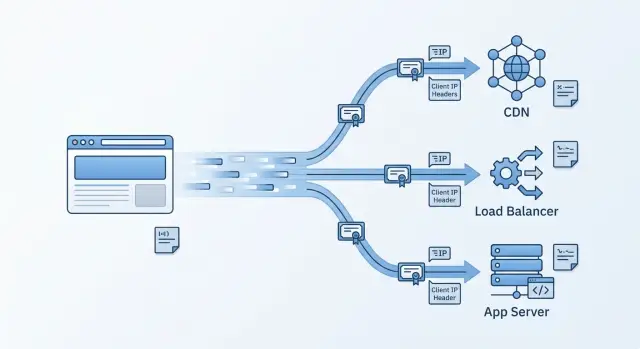
Table of Contents
Why this choice matters before traffic grows
Where you end TLS affects far more than encryption. It changes what your app can see, what your team can trust, and how much routine work piles up later.
A simple example makes this clear. If TLS ends at a CDN, your app may see the CDN as the direct client unless you pass the right headers and log them correctly. That changes rate limits, fraud checks, geo rules, and basic support work. When a customer says, "I got blocked" or "I can't sign in," the answer often sits in the real client IP, request path, and edge logs.
This choice also gets harder to change after launch. Moving the TLS endpoint later often means touching DNS, proxies, certificates, firewall rules, redirects, and cookies at the same time. Even small changes can create odd bugs, like broken webhooks, confusing health checks, or logs that no longer match what users saw.
Cost matters, but team time usually hurts more. One setup may save a little money each month and cost hours during incidents. Another may cost more on paper and make renewals, failover, and traffic spikes much easier to handle.
So this is not just a network decision. It shapes logging, security rules, support speed, and how messy the next outage feels. Most of the tradeoff comes down to three things: who owns certificates, who sees the real client, and who carries the operations burden.
What TLS termination means
TLS termination is the place where HTTPS traffic gets decrypted so a system can read it, inspect it, or route it. Until that point, anything in the middle sees unreadable encrypted traffic.
That decryption point usually sits in one of three places: at the CDN edge, at the load balancer, or inside the app.
The term causes confusion because people often hear "termination" and assume traffic stays unencrypted after that. Sometimes it does. Often it does not.
A request can be encrypted from the browser to a CDN, decrypted there, checked or routed, and then encrypted again before it goes to the origin. The same pattern works with a load balancer. So TLS termination tells you where traffic first gets opened, not whether the rest of the path is plain HTTP.
It helps to think in two hops. One hop is browser to edge. The other is edge to origin. In a CDN setup, the CDN often handles the public certificate and the first TLS handshake. In a load balancer setup, the balancer does that. In an app setup, your server or local reverse proxy handles certificates and HTTPS directly.
That sounds like a small wiring choice. It is not. It affects certificate handling, logging, security boundaries, and daily operations. Small teams often ignore it early, then feel the pain once traffic grows or more services show up.
When CDN termination makes sense
CDN termination makes sense when users are spread across regions and you want faster first contact with your site. The CDN handles the TLS handshake close to the visitor, which usually cuts latency and takes some connection work off your origin.
It also lowers routine certificate work. In many setups, the CDN issues, renews, and rotates public certificates for you. Cipher updates often happen there as well. For a small team, that is a real benefit. You spend less time dealing with renewals and more time watching the app.
The catch is the next hop. "The CDN handles TLS" is not the end of the story. You still need to decide what happens between the CDN and your origin. Some teams decrypt at the edge and send plain HTTP to the origin. That can work on a tightly controlled private network, but many teams prefer re encrypting traffic so it stays protected the whole way.
Header trust is the part that trips people up. Your app needs to know which headers came from the CDN and which ones to ignore. Client IP, scheme, and host often arrive in forwarded headers or vendor headers. If your app trusts those values from every source, anyone can fake them.
Lock that down early. Accept forwarded headers only from known CDN ranges or from the next trusted hop behind the CDN. Then make sure logs, rate limits, and security rules use the real client IP rather than the CDN node address.
CDN termination is a good fit when you want edge performance, caching, and less day to day certificate work. It works best when you also keep origin security clean and header trust strict.
When load balancer termination fits better
Load balancer termination is often the practical middle ground. It makes sense when you already run more than one app instance, or know you will soon.
You manage certificates in one place, and every service behind the balancer gets the same HTTPS entry point. That cuts repeated work and reduces the odds that one forgotten instance ends up serving an expired certificate.
It also keeps app containers and deployments simpler. The app can listen on HTTP inside a private network without carrying certificate files, renewal jobs, or TLS settings in every image. Replacing a container becomes easier because you are swapping app code, not app code plus certificate state.
This setup helps when traffic needs routing rules before it reaches the app. The load balancer can route by hostname, path, or port, send one domain to an API and another to a dashboard, and keep internal services off the public internet. That gives you tighter control at the edge of your stack without changing every app.
Good request metadata matters just as much as encryption. The balancer should pass the original scheme, host, and client IP in a consistent way. If that part is sloppy, redirects loop, rate limits hit the balancer instead of the visitor, and logs stop being trustworthy.
For many small teams, this is the sweet spot. You get central certificate management, simpler app instances, and clean routing without pushing TLS work into every service.
When app termination is the right call
App termination can be the right choice when you run one service on one server, or on a very small number of servers, and want the fewest layers possible. The app handles HTTPS itself, or a small reverse proxy on the same machine does it and passes HTTP over localhost.
For an early product, that can be easier to reason about than adding a CDN or separate load balancer too soon. Internal tools, early SaaS products, private APIs, and prototypes with steady traffic often work fine this way.
The benefit is directness. One team can keep certificates, server settings, and app behavior in one place. Debugging also feels simpler because you can trace a request from the public port to the app without jumping across several systems.
The downside appears as soon as you add more instances. Every server now needs certificate files, renewal automation, monitoring, and consistent TLS settings. If renewal breaks on one machine, users may see certificate errors on only part of the fleet. Those partial failures are annoying to detect and even worse to explain.
Imagine a customer portal running on two virtual machines behind DNS round robin. App termination can still work, but the team now has to rotate certificates on both machines, keep redirects and ciphers aligned, and inspect logs on each box when something fails. That is manageable for a while. It rarely stays pleasant.
Choose app termination when simplicity right now matters more than future flexibility. Once traffic, regions, or service count grow, the extra control often stops feeling worth the work.
How certificate handling changes in each setup
Certificate work gets easier or harder depending on where you terminate TLS. Traffic flow matters, but ownership matters just as much.
If the CDN handles TLS, you usually manage one public certificate set at the edge. That is often the lightest option for a small team. Renewals happen inside the CDN, and alerts usually show up in the provider dashboard or by email.
If the load balancer handles TLS, certificate ownership moves closer to your own stack. You still keep certificate count low, often one certificate per service or domain group, but your team owns more of the renewal path. That is a solid middle ground because you keep central control without copying certificates to every app node.
App termination is the hardest to keep tidy. Each node may need its own certificate, private key, renewal job, and monitoring. That gives you flexibility, but it also creates more ways to fail. One missed renewal on one node can break only part of the system, which makes the outage harder to spot.
Domain patterns also change the picture. Wildcard certificates help when you create many subdomains under one domain. SAN certificates fit a fixed set of names, but they get awkward if that list changes often. Customer custom domains need extra care because issuance, validation, and renewal can grow fast.
Whatever model you choose, assign one clear owner for renewals. That owner can be the CDN, the load balancer layer, or the app team, but it should never be vague. Decide where alerts go as well, whether that is your monitoring stack, email, an on call tool, or all three.
Then test the renewal path before you trust it. Use a short lived certificate in staging, make sure renewal actually runs, and confirm that expiration alerts reach a real person. This is boring work right up until it prevents downtime.
How client IP and logs stay accurate
If you terminate TLS at a CDN or load balancer, your app no longer sees the visitor's IP by default. It sees the proxy in front of it. That sounds minor, but it affects rate limits, fraud checks, geo rules, audit trails, and any support case where you need to trace one request.
The usual fix is straightforward: pass the original address in proxy headers. Most setups use Forwarded or X-Forwarded-For, along with X-Forwarded-Proto and X-Forwarded-Host. Your app should read those values only after you define which proxy hops it trusts.
That trust step matters more than many teams expect. If the app trusts forwarded headers from any source, a client can fake an IP, host, or scheme with a direct request. Restrict trust to known proxy addresses or private network hops that sit in front of the app. Then the app can treat those headers as real.
Scheme and host need the same care. If the app loses the original https scheme or public hostname, redirects break quickly. Users land on a secure page and bounce to http, or the app builds callback URLs with an internal host. Both problems look random until you inspect the headers.
A short test catches most mistakes. Send one normal request and confirm the app logs the real client IP. Trigger a cache hit and see whether logs still show the same IP and host. Force a retry or failover path and compare the headers again. Then send a blocked request and make sure security logs still keep the original address.
This is worth doing before traffic grows. Once several proxies, cache rules, and security filters sit in the path, bad logs become painful to untangle.
How to choose
Start with ownership, not technology. Teams often pick a layer because it feels standard, then end up with manual renewals, unclear logs, and security rules scattered across too many places. A plain setup your team can run every week is usually the better choice.
A simple decision process helps:
- Write down who handles certificates today. If one person renews them by hand, app termination will turn into a chore quickly.
- Count every service that needs HTTPS now, then add the ones you expect soon. One public app is easy. A public app, two APIs, an admin panel, and preview environments are not.
- Mark where you need caching, bot filtering, WAF rules, or rate limits. If you want those controls before traffic reaches your servers, a CDN is often the right place to terminate TLS.
- Check whether your app records the real client IP and original scheme. If it only sees the CDN or balancer address, debugging and security review both get slower.
Choose the simplest termination point that keeps certificate work small, logs clear, and security rules easy to find. For many small teams, that means CDN or load balancer first rather than TLS in every app instance. Keep app termination for cases where you truly want HTTPS handled on the server itself and are ready for the extra hands on work.
Mistakes that create pain later
Small setup choices often stay invisible until the first outage, security review, or traffic spike. TLS termination is one of those choices. Get the trust boundaries wrong early, and you can spend months fixing logs, redirects, and certificate sprawl instead of shipping product.
One common mistake is trusting every forwarded IP header that reaches the app. If your server accepts any X-Forwarded-For value from the public internet, a user can fake their source IP. That breaks rate limits, audit logs, fraud checks, and sometimes access rules. Your app should trust these headers only from proxies you control.
Another mistake is ending encryption at the CDN and sending plain HTTP to the origin without a clear reason. Teams do this because it feels simpler. It is simpler until someone needs to inspect a shared network, a misrouted request leaks data, or a compliance review asks why private traffic moves unencrypted inside your stack.
Other problems show up again and again. Certificate renewals live in three places and nobody owns the whole process. The app loses the original scheme, so HTTPS requests trigger redirect loops. Pages load over HTTPS but still fetch scripts or images over HTTP. Cookies miss the Secure flag, or bad proxy headers make the app think the request was not encrypted.
These bugs look small in staging and ugly in production. A login flow fails only behind the proxy. Logs show the load balancer IP for every visitor. Renewals work for months, then one forgotten certificate expires on a Friday night.
The fix is plain: pick one owner for certificates, define which proxy headers the app trusts, and keep encryption to the origin unless you have a clear reason not to.
A quick check before you commit
Before you lock in a design, test it like the person who will have to fix it at 2 a.m. A setup that looks clean in a diagram can get messy fast when certificates expire, logs lose the real client IP, or nobody can say where traffic is still encrypted.
Use one sample request and walk it through the whole path.
- Confirm that app logs show the real client IP, not only the CDN or load balancer address.
- Count how many places hold certificates. One renewal point is easy. Ten app servers with local certificates are not.
- Draw the request path on one line: browser, CDN, load balancer, app. Mark where TLS starts and ends.
- Ask one on call engineer to trace a request from browser to app logs. If they need three dashboards, two guesses, and a lot of tribal knowledge, the setup is too hard to support.
This check takes less than an hour and often saves days later. Teams usually regret hidden complexity more than a small performance tradeoff.
If two options look equal, pick the one with fewer certificate touchpoints and clearer logs. Traffic growth adds enough problems on its own.
A simple growth path
A small SaaS often starts with one server. The app handles HTTPS itself, and that is usually fine at the beginning. You keep TLS close to the code, install one certificate, and debug everything in one place.
That stays simple until traffic climbs. Then the same box handles app work, TLS handshakes, renewals, and logs. It can still work, but every change touches production.
A common path is straightforward. Start with one app server and direct HTTPS on the machine. Add a load balancer once you run two or more app instances. Put a CDN in front when you need edge caching, DDoS filtering, or faster delivery for users in many regions.
The second step often comes sooner than teams expect. As soon as you add another app instance, the load balancer gives you one public entry point and keeps certificate handling in one place instead of many. Later, a CDN can take over TLS at the edge when you need global reach or want to block junk traffic before it reaches the origin.
Each move needs a small audit. Check forwarded headers so logs still show the real client IP. Check secure cookies so login flows behave the same behind proxies. Check origin certificates so the connection from CDN to origin stays encrypted and trusted.
Teams that recheck those details at each stage usually grow without nasty surprises.
What to do next
Do not choose the termination point from habit. Draw the full request path on one page: browser, CDN, load balancer, ingress, app, and anything else in between. Bad setups often start with one hidden hop that nobody wrote down.
Then send one real request through that path and inspect what each layer receives. Check the TLS state and the headers that matter most, such as X-Forwarded-For, Forwarded, X-Forwarded-Proto, and any CDN client IP header. If your app logs the proxy IP instead of the user IP, fix that now, before alerts, dashboards, and rate limits depend on bad data.
Also write down who owns certificate renewal, access logs and retention, emergency changes during an outage, and the proxy settings that affect the origin. That note looks small, but it prevents confusion later.
If this decision can affect cost or uptime, a second opinion is often cheap compared with a migration after launch. Oleg Sotnikov at oleg.is works with startups and small teams on architecture, infrastructure, and Fractional CTO decisions, and TLS boundaries are exactly the kind of early choice that can get expensive when they are vague.
A good next step is simple: map the path, test one request, assign ownership, and fix anything unclear while the system is still easy to change.
Frequently Asked Questions
What does TLS termination actually mean?
TLS termination is the point where a system decrypts HTTPS traffic so it can inspect or route the request. That point can sit at the CDN, the load balancer, or the app server.
It does not always mean the rest of the path uses plain HTTP. Many teams decrypt at one layer, then encrypt again on the next hop.
What is the best default for a small team?
For most small teams, a load balancer is the safest default once you have more than one app instance. It keeps certificates in one place and makes routing simpler.
If you run one small service on one server, app termination can stay fine for a while. If you need caching, bot filtering, or global edge performance early, start with CDN termination instead.
When should I terminate TLS at the CDN?
Choose CDN termination when you want faster first contact for users in many regions, edge caching, or traffic filtering before requests hit your servers. It also cuts routine public certificate work because the CDN often handles issuance and renewal.
You still need to protect the origin and trust only the right proxy headers. If you skip that part, logs and rate limits get messy fast.
When does load balancer termination make more sense?
A load balancer fits well when you run several app instances or expect to add them soon. You get one HTTPS entry point, one place for certificates, and simpler app containers.
This setup also helps when you route traffic by host or path, like sending one domain to an API and another to a dashboard.
Is app-level TLS termination ever the right choice?
App termination works best when you run one service on one server and want the fewest moving parts. It keeps everything close together, which makes early debugging easier.
Once you add more servers, the work grows fast. Every machine needs matching certificates, renewals, and TLS settings, and partial failures get harder to spot.
How do I keep the real client IP in logs?
Your app needs to trust forwarded headers only from proxies you control. In practice, that usually means your CDN ranges, your load balancer, or private network hops in front of the app.
Then log X-Forwarded-For, Forwarded, X-Forwarded-Proto, and X-Forwarded-Host in a consistent way. Test normal requests, blocked requests, and failover paths so you know the app still sees the real client.
Should I encrypt traffic all the way to the origin?
In most cases, yes. Re-encrypt traffic from the CDN or load balancer to the origin unless you have a very clear reason not to.
Plain HTTP on the next hop can look simpler, but it creates risk inside your own stack and raises hard questions during audits or incident reviews.
Which setup makes certificate management easiest?
CDN termination usually means the least certificate work because the provider handles the public certs at the edge. Load balancer termination keeps certificate count low while leaving more control in your stack.
App termination creates the most overhead because each server may need its own certificate, renewal job, and monitoring. That is where small misses turn into strange partial outages.
What mistakes cause the most trouble later?
Teams often trust forwarded headers from any source, and that lets users fake client IPs or hosts. They also forget the original scheme, which leads to redirect loops, bad callback URLs, and cookie problems.
Another common mistake is spreading certificate ownership across too many places. When nobody owns renewals end to end, an expired cert usually shows up at the worst time.
How should TLS termination evolve as my product grows?
A simple path works well for many products. Start with app termination on one server, move TLS to a load balancer when you add more instances, and add a CDN when you need edge caching, DDoS filtering, or better reach across regions.
At each step, recheck forwarded headers, secure cookies, and origin encryption. Those details decide whether the move feels smooth or painful.


