Ticket specs for humans and AI that teams can actually use
Ticket specs for humans and AI help teams turn vague requests into clear tasks with acceptance rules, edge cases, and non-goals.
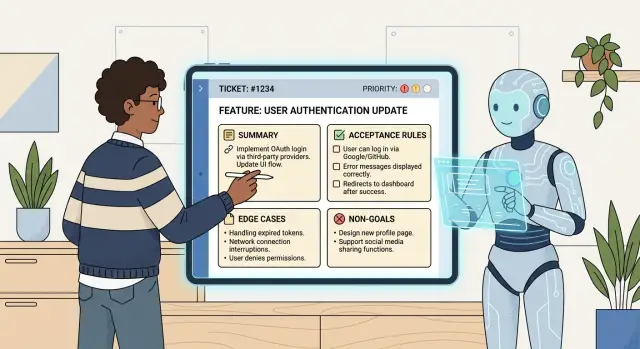
Table of Contents
Why vague tickets slow work down
A vague ticket feels quick to write. It rarely stays quick for the team.
When someone writes "fix checkout," each reader fills in the blanks differently. A developer may think the payment form breaks on mobile. A designer may think the button copy is wrong. A product manager may mean users drop off before they pay.
That mismatch shows up fast. People ask follow-up questions, wait for answers, guess, or build the wrong thing and redo it. A ticket that took 10 seconds to write can burn hours in chat, review, testing, and cleanup.
Scope gaps make it worse. If the ticket does not say what part of checkout changed, what must stay the same, and what counts as done, the work spreads. Someone fixes the card form, QA finds a coupon issue, support asks about guest checkout, and one small request turns into three mixed together.
AI tools react to the same gaps. In ticket specs for humans and AI, the weak spot usually is not the model. It is the prompt hidden inside the ticket. Thin requests invite guessing. Sometimes the guess is fine. Often it is expensive. The tool changes extra logic, misses an edge case, or writes code that matches one person's assumption instead of the team's actual intent.
A good ticket does one job: it describes one clear change. It says what is wrong, what should happen instead, and where the edges are. That does not require a long document. A short ticket with a concrete goal, a few acceptance rules, and clear non-goals is usually enough.
What a compact ticket should include
A compact ticket needs to answer three things fast: what problem exists, what should change, and how the team will know the work is done. If a new teammate or an AI coding assistant has to guess any of that, the ticket is still too thin.
Start with the user problem in one plain sentence. Focus on what goes wrong for a real person, not the internal task. "Users submit the form twice because the success state is easy to miss" says much more than "Improve form UX."
Then describe the change in simple language. Name the screen, action, and result. Skip background unless it changes the work. Most good tickets cover the same few points: the user problem, the change itself, acceptance rules a tester can verify, edge cases only when behavior changes, and non-goals that keep the work from growing mid-build.
Acceptance rules do most of the heavy lifting. They turn "done" into something a person can test. Instead of "show a better error," write "If the code is expired, the user sees 'Code expired' and the resend button becomes active after 30 seconds."
Edge cases need restraint. Add them when the product behaves differently for empty states, duplicate clicks, expired sessions, or missing permissions. Do not dump every unlikely thought into the ticket just to look thorough.
Non-goals matter just as much. They stop nearby issues from sneaking in. A short line like "No redesign of the checkout page" or "No changes to email templates" can save days of extra work.
How to draft the ticket in ten minutes
Start with the moment that triggers the change. Name the click, form submit, API call, scheduled job, or support action first. If the trigger is vague, the ticket drifts before anyone writes a line of code.
Put the expected result next. Keep it plain: who sees what, what changes, and when it happens. Clear ticket specs for humans and AI often read like a short cause-and-effect note.
A compact draft usually needs five parts:
- The trigger: "When a signed-in customer clicks Save on the profile form..."
- The result: "...the system updates the profile and shows a success message without leaving the page."
- The limits: roles, record states, validation rules, and what happens on error.
- Two or three acceptance rules that someone can test in a minute.
- Non-goals and one open question, if something still blocks delivery.
The limits matter more than most teams think. Write down who can do it, when they can do it, and what happens when the input is wrong. "Add export" is weak. "Admins can export paid invoices for the selected month; guests cannot; if there are no invoices, show an empty-state message" is much easier to build.
Acceptance rules should prove the change works, not describe how the team built it. For the export example, that could be: an admin can download a CSV for one month, the file includes only paid invoices, and the system shows a clear message when no data exists.
End the ticket by saying what you are not doing. That one habit cuts a surprising amount of rework. If the ticket covers CSV export, say it does not include PDF export, email delivery, or historical backfill.
Leave one open question only if it blocks a real decision. "Should canceled invoices count as unpaid or stay out of the export?" is worth asking early. Otherwise the developer guesses and the tester argues over behavior later.
Ten minutes is enough if you stay strict. Action first, result second, limits after that, a few testable rules, then non-goals.
How to write acceptance rules people can test
Good acceptance rules describe something a person can see on screen or in the output after the change. If someone has to debate whether the work is done, the rule is too soft.
Write what changes for the user, not how the team built it. "Use a new API route" is an implementation note. "The Export button downloads a CSV file with 25 rows when 25 orders match the filter" is a rule a tester can check.
A small example shows the difference. If the summary says "Add invoice export," do not repeat it as "Users can export invoices." That adds nothing. Write the result in a way a tester, developer, or AI coding agent can verify in one pass.
- Success case: Clicking "Export invoices" downloads a CSV file named "invoices-yyyy-mm-dd.csv".
- Failure case: If no invoices match the filter, the system shows "No invoices found for this date range" and does not download a file.
- Permission case: Users without the "Finance" role can see the button disabled with the text "You do not have permission to export invoices".
These rules work because they name the exact button label, file type, filename pattern, and user message. They also separate normal use from error handling and access control, which is where vague tickets often break.
Keep each rule short. One rule should check one thing. If a sentence needs "and" three times, split it. People scan these lines during planning, implementation, review, and QA.
This matters even more when AI uses the same ticket. A human can ask follow-up questions. A coding agent usually treats vague wording as permission to guess.
A simple test is to hand the ticket to someone who did not write it. If they can tell you what success looks like, what can fail, and who can use it, the acceptance rules are probably tight enough.
How to add edge cases without bloating the ticket
Clear tickets do not try to predict every odd thing a user might do. They cover the cases that change behavior, confuse users, or create support work.
A useful rule is simple: add an edge case only if it changes what the person sees, what the system saves, or who can take the action. If none of that changes, leave it out for now.
Most product work repeats the same patterns. Empty states matter because users need a next step. Duplicate clicks matter because people double-tap slow buttons. Bad input matters because real users paste broken emails, extra spaces, and the wrong formats. Permission differences matter because teams often assume access rules are obvious when they are not.
You do not need ten tiny variations. Group them by type: empty or missing data, repeated actions, invalid input, permission differences, and outside failures that actually change the flow.
Take "Invite a team member." You do not need every possible email mistake. One line like "If the email is empty, malformed, or already invited, show an inline error and do not create a new invite" covers most bad input. Another line like "If the user clicks Invite twice, create one invite only" handles duplicate actions without extra detail.
Role differences deserve a direct note. If admins can send invites but regular users can only view the team page, say that plainly. Do not expect engineers or AI tools to infer it from the screen.
Outside failures belong in the ticket only when the user flow changes. If the email service fails and the invite stays pending with a retry option, write that down. If a background retry handles it and the user sees nothing different, the ticket does not need three lines about mail server errors.
Rare cases can wait. If a weird input shows up once a year and the first release can safely reject it, skip it. Five clear edge-case groups beat twenty low-value exceptions.
How non-goals stop scope creep
Scope creep usually starts with one harmless sentence: "while you're in there..." Non-goals stop that before work begins. They tell the team what stays untouched, so nobody assumes extra work is included.
This matters in ticket specs for humans and AI because gaps invite silent assumptions. One engineer updates the API. Another also changes copy, tracking, and old data. That is how timelines slip.
Keep non-goals short and direct. They work best as limits, not essays. "No mobile changes." "No data import." "No copy rewrite." "No analytics updates." "No migration of old records."
Those lines save time because they remove guesswork. They also make review easier. If someone opens a pull request with a dashboard redesign when the ticket says "no design changes," the mismatch is obvious.
Future ideas belong in a follow-up note, not inside current scope. If a request sparks three more improvements, capture them under "Later" or "Follow-up ticket." Do not mix them into the current work where they read like hidden requirements.
A simple format works well: one sentence for what changes, then a short block for what does not. If the ticket says users can reset a password from email, the non-goals might say it does not change account settings, email branding, login page layout, or support workflows. That keeps the team focused on the reset flow instead of drifting into a broader auth cleanup.
If it feels awkward to write the non-goals, the scope probably is not settled yet. That is useful signal, not wasted effort.
A realistic example of a ticket rewrite
"Make password reset better" sounds simple, but people read it in different ways. A designer may think about new screens. An engineer may change token logic. QA may only test the happy path. That is how a small request turns into rework.
A tighter version gives one clear user action and a few rules that people can build and test.
Bad ticket:
Make password reset better.

Rewritten ticket:
Summary:
A user can reset their password by entering their email on the login screen and using a reset link sent to that email.

Acceptance rules:
- If the email belongs to an existing account, the system sends a reset email and shows a confirmation message.
- If the email does not belong to an existing account, the system shows the same confirmation message.
- The reset link expires after 60 minutes.
- If the user opens an expired or already used link, the system shows an error message and lets the user request a new link.
- After a successful reset, the new password works and the old password no longer works.

Non-goal:
- No redesign of the login page.
That rewrite is short, but it removes most of the guessing. The user action is obvious: enter an email, get a link, set a new password. The success case is clear. Two common edge cases are covered too: expired links and wrong email input.
The neutral confirmation message matters more than many teams expect. If the system says "email not found," it exposes which accounts exist. One acceptance rule prevents that mistake early.
The non-goal matters just as much. "No redesign of the login page" stops the ticket from turning into a design project. The team still has room for small implementation choices, but the scope stays tight.
Short, concrete tickets usually beat long descriptions full of loose intent.
Mistakes that create rework
Rework usually starts before anyone writes code. A ticket looks short, everyone nods, and each person fills the gaps differently. That is where clear software tickets fail most often: the request sounds obvious, but the rules live in someone's head.
One common mistake is putting three jobs in one ticket: fix a bug, add a feature, and clean up old code. It feels efficient. It rarely is. Review gets harder, testing gets messy, and nobody knows which part caused the problem. If one part can ship without the others, split it.
Another mistake is writing "same as before" when nobody has defined the old behavior. People remember flows badly. AI tools do even worse when the reference is missing. If the new screen should match an older one, copy the exact rule into the ticket.
Chat creates rework too. One decision happens in a meeting, another in a message thread, and a third during standup. By the time work starts, the ticket is already wrong. Put the final decision in the ticket, even if it repeats what people already said.
Some words sound useful but mean almost nothing. "Fast" needs a number. "Simple" needs a boundary. "Clear" needs a user-facing result. "Works" needs testable conditions.
Teams also skip the dull parts, then those parts return as bugs. Permissions, validation, and error messages are easy to forget because they are not part of the happy path. They still decide whether the work is done.
"Add export button" is a good example. It looks complete, but it leaves real questions open. Can every user export, or only admins? What happens when there is no data? Which format should download? What message appears if export fails?
Those details are not polish. They are the work. If the ticket does not answer them, the team will answer them later under pressure.
A quick check before you send it
Read the ticket once as if you joined the project this morning. If the change still makes sense after one pass, the draft is probably clear enough. If you stop to decode terms, hunt for missing context, or guess what "done" means, fix the ticket before handoff.
A good last pass checks three readers: a teammate, QA, and the AI tool. A teammate should be able to explain the change in one or two plain sentences. QA should know how to test it without asking what counts as success or failure. An AI coding tool should have enough detail to start without inventing fields, states, or error handling that nobody asked for.
One short sentence about scope saves a lot of churn. Add a boundary such as "This ticket does not change email templates" or "Mobile layout is out of scope." That line stops the usual extras people tack on once work starts.
Then cut soft language. Words like "improve," "support," or "handle better" often hide missing rules. Repeated acceptance rules do the same thing. If two lines mean the same thing, keep the sharper one.
For a fast final pass, replace vague verbs with observable results, check that each acceptance rule can pass or fail, keep only the edge cases that change the build or the test, name one thing the ticket will not cover, and delete any sentence that only repeats another.
If you can hand the ticket to a new teammate, a tester, or an AI coding tool and all three would come back with roughly the same plan, it is ready.
Put one format in place with your team
Pick one ticket format and make it the default this week. Keep it small enough that people will actually use it. A solid baseline has six parts: goal, context, acceptance rules, edge cases, non-goals, and open questions.
Then test the format on real work, not a made-up example. Take two or three recent tickets that caused back-and-forth, rewrite them, and ask a blunt question: "Could someone build this without chasing the author for missing details?" That review usually exposes the weak spots quickly.
The template should stay the same whether the task goes to a developer, designer, QA person, or AI coding assistant. People and AI need the same boundaries, the same success checks, and the same list of what is out of scope.
A short template is enough:
- Goal: what should change for the user or the business
- Context: what exists today and why this work matters now
- Acceptance rules: what must be true when the work is done
- Edge cases: what often breaks or gets missed
- Non-goals: what this ticket will not include
Once you have the template, add one review habit. If a ticket has no testable acceptance rules, send it back. If it has no non-goals, ask for them. That can feel strict, but it saves time later. Teams lose far more time to unclear tickets than to writing one extra paragraph.
If your team is trying to tighten specs and build around AI-assisted development, Oleg Sotnikov at oleg.is works with startups and small businesses on this kind of Fractional CTO setup. The useful part is not more process. It is a ticket format and delivery workflow people will actually keep using.
Frequently Asked Questions
Why are vague tickets such a problem?
Because short and vague are not the same thing. A ticket like fix checkout saves a minute up front, then costs hours in follow-up questions, wrong assumptions, and rework. A useful short ticket names the problem, the change, and what done looks like.
What is the smallest ticket format that still works?
Use a compact format with five parts: the user problem, the change, a few acceptance rules, edge cases that change behavior, and non-goals. If a new teammate can read it once and explain what to build, you wrote enough.
How many acceptance rules should a ticket have?
Most tickets need two or three strong rules, not ten weak ones. Write rules that a tester can check fast, like what message appears, who can use the feature, and what happens when no data exists.
Which edge cases should I include?
Only add them when they change what the user sees, what the system saves, or who can take the action. Empty states, duplicate clicks, bad input, permission differences, and failures that change the flow usually belong there.
Should I put implementation details in the ticket?
Start with user-facing behavior, not internal build notes. If implementation choices affect scope or risk, add a short note. Otherwise, let the team decide how to build it as long as the ticket makes the result clear.
Why do non-goals matter so much?
They draw a hard line around the work. A simple note like No mobile changes or No redesign of the checkout page stops people from adding nearby tasks just because they seem related.
When should I split one request into separate tickets?
Split the work when one ticket mixes different outcomes, like a bug fix, a feature, and cleanup. If one part could ship without the others, give it its own ticket so review and testing stay simple.
What should I do when one detail is still unclear?
Leave one open question only if it blocks a real decision. Put it in the ticket so nobody guesses. If the question does not change the build right now, move it to a follow-up instead of slowing the whole task.
How do I make a ticket usable for AI coding tools?
Write the ticket so the tool does not need to invent missing rules. Name the trigger, the expected result, the limits, and failure cases. AI tools move fast, but they still guess when the ticket leaves gaps.
What is a quick final check before I hand off a ticket?
Read it once like you joined the project today. After that pass, you should know what changes, who can use it, what can fail, and what stays out of scope. If any of that feels fuzzy, tighten the ticket before you send it.


