Terraform workspaces vs separate state files for isolation
Terraform workspaces vs separate state files affects client isolation, access control, drift, and recovery. Learn how to pick the safer setup.
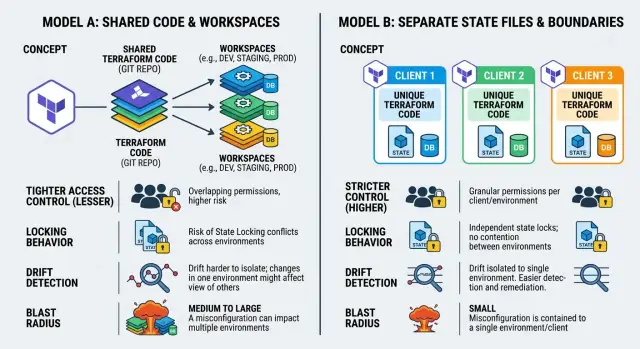
Table of Contents
What are you trying to isolate?
Before you choose between workspaces and separate state files, define what actually needs to stay apart. Teams often say "clients," but that can mean very different things. Sometimes they want cleaner naming. Sometimes they need a hard boundary so one engineer, one secret, or one bad apply cannot spill into another customer's environment.
Those are not the same problem.
Workspaces are easier to run because they keep one codebase and one backend pattern. That saves time. It does not answer the harder question: if someone runs apply in the wrong place, what can Terraform still reach?
Write down the boundaries that matter most:
- state data
- secrets and variables
- cloud permissions
- approval flow for changes
- audit and drift records
If two clients share code but must not share any of those things, you are not picking a naming method. You are choosing a security boundary.
Blast radius matters more than folder neatness. Ask the blunt version: if a provider credential is wrong, a module changes, or someone selects the wrong workspace, can Terraform touch another client's resources? If the answer must be "no," treat that as a fixed rule.
Drift belongs in this decision too. If one client's drift warnings get mixed into a shared review process, people miss things. That usually happens when separation exists in names but not in access, approvals, or state storage.
Audit rules often settle the argument quickly. Some clients need separate access logs, separate approval history, and separate secret stores because of contracts or compliance checks. Softer isolation usually creates more work later. You end up proving separation by hand because the setup never enforced it.
A small agency can accept lighter boundaries for internal test stacks. Client environments are different. If you manage five paying customers, each one expects credentials, infrastructure, and change history to stay in its own lane. Start there.
How Terraform workspaces isolate
Terraform workspaces create separate state snapshots inside one backend. Client A can have one state, and client B can have another, even if both use the same Terraform code. That gives you isolation at the state level. It does not give you full isolation across the whole setup.
The code is still shared. The backend is still shared too. If your team uses one remote backend, everyone works against the same storage system and usually the same access model. A workspace only tells Terraform which state snapshot to read and update.
That is the real scope of a workspace. It separates records of what exists. It does not separate ownership of the code, backend, or the habits of the people running commands.
In practice, that means a few things:
- each workspace has its own state snapshot
- the same configuration can apply to every workspace
- backend access often covers all workspaces, not just one
- a wrong workspace choice can point a plan at the wrong client
Permissions are where many teams get surprised. If someone can read and write the backend, that person often has broader access than expected. In many setups, you do not grant access per client workspace with much precision. You grant access to the bucket, account, or backend project, and that can expose every client state inside it.
The day-to-day risk is simple. Someone runs terraform workspace select client-b by mistake, or forgets to switch back after a previous task. The plan still looks familiar because the code is the same. Now the change targets the wrong client.
A small agency can live with this if it has tight naming rules, careful reviews, and very few operators. Even then, workspaces depend on people getting the context right every time. If you need hard client boundaries for access, auditing, or plain peace of mind, workspaces alone usually do not give enough separation.
What separate state files change
Separate state files move isolation from a label inside one setup to a real boundary in storage and access. Each client gets its own state location, usually a different backend path, object prefix, or even a separate bucket.
That sounds like a small plumbing change, but it affects who can read state, who can apply changes, and how much damage one mistake can do.
With this model, each client state becomes its own unit. You can give one team access to Client A without exposing Client B's resources, outputs, or secrets stored in state. You can also set locking, retention, and audit rules per client instead of sharing one policy across every workspace.
The biggest gain is a smaller blast radius. If someone runs a bad plan against one client, the mistake stays inside that client's state. They do not risk touching another client because Terraform has no shared state snapshot to point at by accident. Drift is easier to contain too. When one client's stack drifts, you inspect and fix that one state instead of sorting through a mixed setup.
This layout changes daily work in a few places. You need a backend path or bucket for every client. IAM rules have to attach to each client state, not just the whole repo. Locks should work per client so teams do not block each other. You also need a naming pattern that makes the target obvious.
That last part matters more than people expect. Separate state files give you cleaner isolation, but they also ask for more structure. Someone has to define folder names, backend naming, environment labels, and review steps. If you skip that, teams start copying backend configs by hand, and small mistakes pile up.
My bias is simple: if clients need different permissions, billing lines, or compliance boundaries, separate state files are usually worth the extra setup. You pay for that with more configuration and a stricter process. In return, you get a harder wall between clients.
Compare the trade-offs that matter
This choice usually comes down to one question: do you want a soft boundary or a hard one?
Workspaces are lighter to operate. Separate state files are harder to set up, but they put up a firmer wall when someone makes a mistake.
Permissions come first. If the same backend, repo, and pipeline can touch every workspace, your isolation is only as strong as your process. A developer who can run apply in one place can often reach another workspace too. Separate state files make it much easier to give Client A access to only Client A. That matters when clients, contractors, or support staff should not even be able to read another state.
Drift is the next pressure point. With workspaces, drift checks often live in one shared pipeline, which is easy to maintain. The downside is blurry ownership. Everyone assumes someone else will handle the warning. Separate state files make ownership clearer because each client can have its own job, schedule, and alert path. The trade-off is duplication. If you copy the same checks five times and forget to update one, drift can sit there for weeks.
Failed applies tell you a lot about blast radius. In a workspace setup, a bad apply can still hit the wrong client if someone selects the wrong workspace, uses the wrong variables, or runs a shared pipeline with weak guardrails. Recovery is more tense too, because the same code path often controls many environments. Separate state files limit the damage. If one client breaks, you fix one state, one lock, and one recovery path.
Manual work adds up faster than teams expect. Workspaces reduce setup at first. You keep one backend pattern, one codebase, and fewer moving parts. That feels efficient in the first week. A few months later, the repeated human steps start to bite: selecting the right workspace, checking the right variables, confirming the right account, and double-checking the plan target.
Separate state files ask for more work up front, but they can remove weekly friction if you template them well. Each client gets a named backend, clear credentials, and a dedicated pipeline. The team spends less time asking, "Am I in the right place?"
A simple rule works well here. If different people need different access, separate state files are safer. If one trusted team manages all clients and moves fast, workspaces can be fine. If failed applies must stay contained to one client, separate state files win. And if your team keeps making context mistakes, stop relying on workspace selection.
Use this decision path
Start with the boundary you cannot afford to break. If one client must never be able to see another client's resources, outputs, or state data, treat that as a hard rule, not a preference. In that case, separate state files usually make more sense. Separate cloud accounts or projects often follow for the same reason.
A simple decision path helps:
- Ask who needs isolation. If the answer is legal, contractual, or security-driven client separation, choose separate state. Workspaces separate state snapshots, but they do not create a strong human safety barrier on their own.
- Check the cloud boundary. If each client already has its own AWS account, GCP project, or Azure subscription, keep the Terraform boundary just as clear. One state per client matches the real environment and keeps access rules simpler.
- Decide who runs
planandapply. If one small internal team runs everything through a controlled CI pipeline, workspaces can stay manageable. If different engineers, contractors, or clients run changes, separate state reduces risky overlap. - Be honest about naming discipline. Workspaces ask your team to keep variable files, backend settings, naming, and provider settings clean every time. Some teams do. Many do not, especially when work gets rushed.
- Pick the option with fewer easy mistakes. If one wrong workspace, one wrong variable, or one copied command can touch the wrong client, the setup is too fragile.
This usually leads to a practical split. Use workspaces when the same trusted team manages very similar stacks and accepts the extra care that command context requires. Use separate state files when client access, billing boundaries, compliance rules, or plain human error matter more than convenience.
If you are unsure, lean toward stronger isolation. Extra files are annoying. Cross-client mistakes are worse.
Example: an agency with five clients
A small agency uses one Terraform module to roll out the same stack for five clients. The infrastructure is similar each time: network, app servers, database, monitoring, and a few client-specific settings. Reusing the code makes sense. The trouble starts when the agency tries to isolate every client with the same state pattern.
Three clients are fine with a shared ops model. The same small team applies changes, reviews plans, and handles routine fixes. For those clients, workspaces can be acceptable if the team is disciplined. The module stays the same, the backend stays the same, and each client gets its own workspace.
The other two clients want tighter control. They ask for separate approvals, separate credentials, and a cleaner audit trail. That changes the answer. Once different people need different access, separate state files make life much easier. The agency can lock down each state file, split backend permissions, and lower the chance that one rushed change touches the wrong client.
That matters because the team already made that mistake once. One engineer ran a plan in the wrong workspace and did not notice until resource names looked odd. Nothing broke badly, but the warning was clear. After one workspace mix-up, the risk is no longer theoretical.
A mixed model fits this kind of agency well. Keep separate state files for the two stricter clients, with separate backend permissions for each. Use workspaces for the three clients that accept shared operations, and keep workspaces for internal sandboxes and short-lived test environments.
That is how this choice usually works in real life. It is less about elegance and more about damage control. Workspaces are fast when the same people manage everything. Separate state files take more setup, but they create sharper boundaries.
Common mistakes that cause trouble
Teams get into trouble when they treat Terraform workspaces like locked rooms. They are not. A workspace helps separate state within the same backend, but it does not give each client a hard security wall. If the same people, repo, and backend credentials can touch every workspace, one bad apply can still hit the wrong client.
Naming causes more mess than most teams expect. A string like client-a-prod looks fine until someone adds prod-client-a-eu and another person reads it differently. When client names and environment names live inside one loose pattern, people select the wrong workspace, write brittle automation, or build exception rules nobody remembers six months later.
A small, boring naming rule saves time. Keep client identity and environment identity as separate fields in code, variables, or backend paths. If someone needs to read a workspace name, each part should be obvious.
Local credentials are another weak spot. Many teams build careful CI rules, review plans in pull requests, and require approval before apply. Then one engineer runs terraform apply from a laptop with broad cloud access and bypasses the whole process.
That usually fails at the worst moment, often when a client wants a quick fix. If you want clean client isolation, restrict write access to CI and use short-lived roles. Local access should stay read-only, limited, or blocked.
Backend policies often drift into copy-paste mode. A team sets one broad policy for the first client, then reuses it for the next four because it is faster. Now every client state file sits behind the same loose permissions, and nobody can explain who can read, lock, or modify what.
The usual warning signs are familiar:
- one engineer can unlock or change every client state
- one backup rule covers all clients, even when the risk is different
- one state path pattern gets reused in projects that need stricter separation
The last mistake is easy to ignore until release day: nobody tests recovery. State backups exist, but no one has practiced a restore. Locks pile up, a state file gets stuck, and the team starts guessing under pressure.
Run a restore drill before you need one. Test how your team will recover a prior state version, clear a stale lock, and confirm that the right people have access. For agencies, consultants, or Fractional CTO setups handling several clients at once, this matters more than perfect folder structure. The model that works is usually the one that makes mistakes harder to make and easier to contain.
A short checklist
The right choice usually shows up in daily work, not in architecture notes. If a setup looks clean on paper but gets messy when someone restores state, rotates access, or runs a plan against the wrong client, it will cause trouble.
Check five things before you commit:
- Remove one client's access on paper and walk through the steps. If you must touch shared roles, shared backend settings, or shared CI jobs to cut that client off, isolation is weak.
- Ask how an engineer selects the right client before running
planorapply. If the answer is "remember to switch workspace first," expect at least one bad day. - Run a restore exercise. If one client's state gets damaged, can your team restore only that client quickly, with a clear backup path and no guessing?
- Test the setup with a new teammate. If they need a long call to understand naming rules, hidden exceptions, or state layout, the design is too clever.
- Check the audit trail. You should be able to show who changed state, when they changed it, and which client they touched.
A good isolation model passes all five without excuses. If two or three answers sound like "usually" or "it depends," take that as a warning.
What to do next
Start with a plain inventory. Write down each client, each environment, who should have access, and what breaks if someone applies the wrong change. That one page usually makes the answer clearer than another round of debate.
Then run a small failure test on paper. Pick one model and ask: if a developer targets the wrong client, what can they read, what can they change, and how hard is recovery? You do not need a lab for this. A 15-minute thought exercise will expose weak spots in permissions, naming, and state boundaries.
A simple planning sheet should cover four things:
- clients and environments you manage today
- who can plan, apply, and read state for each one
- what happens if the wrong state gets changed
- how you would restore service after a bad apply
If the answers feel fuzzy, the setup is not ready to scale. Simplify now, not after client number six arrives.
Naming rules deserve more attention than most teams give them. Decide early how you will name backends, state files, workspaces, folders, and variables. Keep the pattern boring and strict. If you mix prod, production, and client nicknames, someone will eventually select the wrong target.
It also helps to choose one default path for new work. If most clients need strict separation, make separate state files your default. If one team manages many near-identical environments with the same access rules, workspaces may be enough. Mixed models can work, but only when you define them on purpose.
Before you commit, write down the exact recovery steps for a bad apply. Include who gets notified, how you confirm drift, how you restore state, and who approves the retry. If that process looks slow or confusing, the isolation model is too loose or the operating rules are too vague.
If the current setup already feels messy, get a second set of eyes before you add more clients. Oleg at oleg.is works with startups and small teams as a Fractional CTO, helping with infrastructure and architecture decisions when systems need to stay lean and reliable.
Make the decision, document it, and use the same pattern for the next client. Consistency keeps mistakes small.
Frequently Asked Questions
What do Terraform workspaces actually isolate?
Workspaces split the state snapshot for each target, but they do not split the repo, backend, or operator access. If the same backend credentials can reach every workspace, a person can still point Terraform at the wrong client.
When do separate state files make more sense than workspaces?
Choose separate state files when clients need different access, separate approvals, cleaner audit history, or stronger damage control. They take more setup, but they make it much harder for one mistake to cross into another client.
Are Terraform workspaces safe enough for client environments?
They can be fine for client work if one small trusted team manages everything through tight CI rules and the clients accept shared operations. If clients expect strict separation, workspaces alone usually feel too loose.
Do separate state files mean I also need separate cloud accounts or projects?
Not always, but it often helps. If each client already lives in its own AWS account, GCP project, or Azure subscription, matching that with separate state keeps access and recovery much cleaner.
Which option handles drift better?
Separate state files usually make drift easier to own because each client can have its own check, schedule, and alert path. With workspaces, drift often sits in one shared pipeline, and people miss warnings because ownership feels blurry.
How can I lower the risk of applying changes to the wrong client?
Put apply behind CI, use short-lived roles, and make the target obvious in the pipeline. If people run Terraform from laptops with broad access, you invite workspace mix-ups and cross-client mistakes.
Can a mixed model work for an agency with several clients?
Yes, and that often works well. You can keep workspaces for internal test stacks or low-risk clients, then use separate state files for clients that need tighter permissions, separate billing, or stricter audits.
What naming approach helps avoid mistakes?
Keep the pattern boring and strict. Separate client name and environment name, and use the same format for folders, backend paths, variables, and pipeline names so nobody has to guess what a target means.
Who should be allowed to run plan and apply?
Limit write access as much as you can. A small group should run apply, and everyone else should stay read-only unless they truly need more. That keeps approvals clear and shrinks the chance of a rushed mistake.
How should I test recovery before I commit to one model?
Run a simple restore drill before you trust the setup. Pick one client, restore a prior state version, clear a stale lock, and confirm the right people can do the work without touching another client's state.


