Terraform drift checks in GitLab CI that catch console edits
Terraform drift checks in GitLab CI help teams spot console edits before they spread, review the difference, and clean up state and code fast.
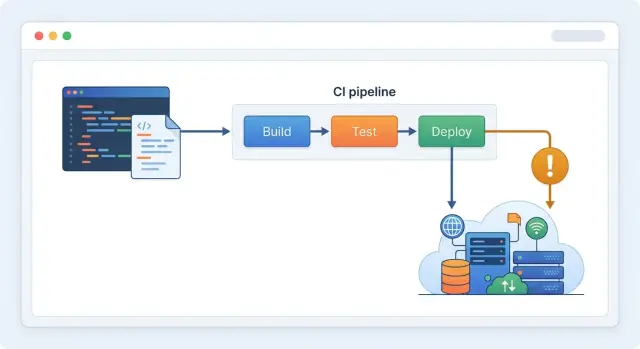
Table of Contents
What drift looks like day to day
Drift rarely starts with a big mistake. It starts with someone opening the cloud console to fix one small problem fast.
A developer increases an instance size before a launch. An ops person adds an inbound rule so a vendor can connect. A founder changes a DNS record during a late night incident. Every change feels temporary, and almost everyone plans to clean it up later.
Later usually never comes.
That is why infrastructure as code drift is so annoying. The system keeps running, so nobody feels the pain right away. There is no pull request, no review thread, and often no note in the ticket. A week passes, then three, and the manual change starts to look normal.
The examples are usually boring. A security group rule gets added for testing. A database gets more storage for a busy week. Someone changes an environment variable in the cloud panel. An autoscaling limit moves during an outage. A managed service setting gets flipped to stop alerts.
One change does not look serious. A few of them across staging and production are enough to make the code lie.
That is when trust breaks. The Terraform files describe one setup. The cloud account has another. Nobody knows which version reflects the real decision.
Reviews get messy after that. A pull request shows a Terraform plan with unexpected changes, but the reviewer has no context. Is Terraform removing a bad hotfix, or wiping out a setting production now depends on?
Even careful teams start guessing. One person approves because the diff looks harmless. Another blocks it because the plan feels risky. Both reactions come from the same problem: the code stopped matching reality.
Nothing is on fire, but normal work slows down. Instead of asking whether a change is good, the team first has to figure out what already happened.
Why console edits break trust in the code
Console edits usually happen under pressure, not because the team is careless. A server runs hot, a queue backs up, or a deadline is close, so someone changes one setting in AWS, GCP, or another dashboard because it feels faster than opening a merge request.
The edit itself is not the real problem. The real problem starts when Terraform still describes the old state.
A tiny change can create a long trail of confusion. If an engineer increases a database size in the console during an incident, the next Terraform plan may try to shrink it back, ignore a related change, or bury the one important difference inside a noisy diff. Now the team has to stop and ask a basic question: which version should they trust?
That doubt spreads fast. Reviews slow down because every plan needs extra checking. Releases feel risky because a routine apply can bring back an old setting by accident. Rollbacks get harder because the code no longer reflects what production is actually running.
Drift also leaves risky changes out in the open. A public IP rule opened for just an hour can stay there for weeks. A larger instance can keep raising cloud spend every day. A deleted alert can leave a service failing quietly until users complain.
Most teams miss this at first because the app still works. That false sense of control is what makes console edits in Terraform dangerous. Future changes become harder to predict, and small teams feel it fastest. When the same person handles product work, support, and infrastructure, one ad hoc edit can waste half a day.
This is where Terraform drift checks in GitLab CI help. They catch the mismatch early, before infrastructure code turns into a story nobody fully believes.
What a GitLab drift check actually does
Terraform works best when three versions of the truth match: the code in your repo, the state file, and the live resources in your cloud account.
The state file is Terraform's memory. It records what Terraform last created or changed. If someone edits a security group rule in the cloud console, the live resource changes first. The code and the state still describe the old setup. That gap is drift.
A GitLab CI infrastructure check gives you a regular place to look for that gap. Instead of waiting for the next big infrastructure change, the pipeline runs terraform plan in a clean job. Teams often run it on merge requests so every infrastructure change starts with a fresh reality check. Many also run it on a schedule, because manual fixes do not wait for the next merge.
During a drift run, terraform plan does more than read your .tf files. It talks to the provider, reads the current resource settings, refreshes Terraform's view of those resources, and compares the result with your code. It does not change anything by itself. It only shows what Terraform would do if you applied right now.
That is enough to answer the questions that matter. Did someone edit a live resource by hand? Did a resource disappear or change outside Terraform? Does the current state still match the code in Git? Would Terraform update, replace, recreate, or destroy anything?
If the plan shows unexpected changes, stop there and clean it up. Sometimes you import a missing resource. Sometimes you revert a console change. Sometimes you update the code because the manual fix was the right call. The point is to decide while the change is still fresh, not two weeks later when nobody remembers why it happened.
For most startups, a daily scheduled check is enough. If several people still touch the console, run it more often.
Set up the job step by step
A drift check works best as its own CI job. Keep it separate from apply, test, and formatting jobs so the result stays easy to read. When this job fails, the team should know one thing fast: something changed outside Terraform.
Start with terraform init in CI using the same backend your normal workflow uses. Pull backend settings and cloud credentials from GitLab CI variables, not from hardcoded values in the repo. If CI points at the wrong state or the wrong account, the check tells you the wrong story.
Then run a plan with detailed exit codes. For drift checks, -refresh-only keeps the signal clean because Terraform compares real infrastructure with the current state and code without mixing in new planned changes from your branch.
drift_check:
  stage: validate
  image: hashicorp/terraform:1.6
  rules:
    - if: '$CI_PIPELINE_SOURCE == "schedule"'
    - if: '$CI_PIPELINE_SOURCE == "merge_request_event"'
  script:
    - terraform init -input=false
    - terraform plan -refresh-only -input=false -detailed-exitcode -out=drift.tfplan || export TF_EXIT=$?
    - test "${TF_EXIT:-0}" = "0" -o "${TF_EXIT:-0}" = "2"
    - terraform show -no-color drift.tfplan > drift.txt
    - exit ${TF_EXIT:-0}
  artifacts:
    when: always
    paths:
      - drift.tfplan
      - drift.txt
The exit codes are simple. 0 means Terraform found no changes. 2 means it found drift. 1 means the job hit an error, so fix the pipeline before you trust the result.
Store both the binary plan file and a plain text version as artifacts. The binary file helps if someone needs to inspect it later. The text file gives reviewers something they can read quickly in the pipeline output.
Run this job on schedules and on merge requests. Scheduled runs catch console edits that happen on a random Tuesday afternoon. Merge request runs catch drift before someone layers more infrastructure code on top of it.
Keep the first version simple. One scheduled drift check every morning catches most surprise edits. If your platform is busier and several people still touch cloud settings, run it more often.
Choose rules for fail, warn, and cleanup
Most teams get better results when they sort drift by environment instead of using one blanket rule.
A tag mismatch in a dev stack is annoying, but it is not the same as a manual change to production networking or access rules. Production, shared infrastructure, secrets, IAM, public networking, and anything tied to cost or security should fail the pipeline immediately. Disposable environments such as demo stacks or short term test branches can warn instead.
Every environment also needs a named owner. Do not leave drift cleanup to whoever notices it first. Give dev and staging to the engineer or team that uses them every day. Give production to a specific person who can approve fixes. If an outside Fractional CTO helps run the stack, name an internal backup too. Someone has to own the follow up when that person is offline.
When drift appears, allow only two outcomes. Either you update Terraform so the code matches the real change, or you revert the manual change so reality matches the code. Do not keep a third state where everyone agrees to fix it later. That is how infrastructure as code drift turns into background noise.
Emergency console edits need an expiry, not a free pass. If someone changes a setting during an outage, set a short deadline to clean it up. Twenty four hours is a good default for many teams. The incident may justify the edit, but it does not justify leaving it undocumented for a week.
A simple policy is enough. Allow manual changes only during an incident or approved maintenance. Record who made the change and why. Set an expiry time for the exception. Open a merge request to codify or revert the change. Close the exception only after the drift check passes again.
Clear rules beat fancy logic in the pipeline every time.
A simple startup example
Picture a five person startup with one production environment. The team uses Terraform for the network, database, and firewall rules. On most days, that setup feels small enough to manage without much ceremony.
Then a founder needs quick access for a contractor helping with a customer issue. Instead of waiting for an engineer, the founder opens the cloud console and adds a new IP address to a firewall rule. The app keeps running, the contractor gets in, and everyone moves on.
The problem starts the next day. Terraform still says the old rule is the source of truth, but production now has something else.
A nightly drift job in GitLab CI catches it. The pipeline does not apply changes. It only checks the current state and compares it with the Terraform code. At 2 a.m., the job fails and shows that the firewall rule in production allows one extra IP that does not exist in the repo.
That is enough for the team to act quickly. If the console edit solved a real ongoing need, they add the rule to Terraform and commit it. If the founder only needed temporary access, they remove the IP from the console and run the check again.
The important part is speed. They fix the mismatch before the next deploy, so Terraform does not try to undo or replace something by surprise.
That routine is simple, and it scales. Leave emergency access in place only long enough to solve the problem. By the next workday, either commit the change to Terraform or roll it back in the console. Require a clean drift check before the next production deploy.
One small console edit stays small because the team deals with it while the context is still fresh.
Mistakes that create noise
A drift check should tell you something useful. Too many teams train themselves to ignore it because the job fails for messy reasons that have nothing to do with real drift.
One common mistake is using the same variable set for every environment. Dev, staging, and production rarely stay identical for long. Instance sizes change, feature flags differ, and naming rules drift apart. If one shared set feeds every plan, the pipeline flags expected differences as if they were mistakes. Give each environment its own variables and keep those differences explicit.
Another noisy habit is adding ignore rules just to keep the pipeline green. Some fields really are noisy, but every ignore rule should have a written reason. If nobody can explain why a field is excluded, remove the exclusion and fix the real issue. Blanket ignore rules make console edits easier to hide.
Ownership matters too. When a drift job fails and nobody owns the cleanup, the failure becomes wallpaper. A red pipeline sitting for three days teaches the team that drift does not matter.
Mixing drift checks with apply jobs creates another kind of confusion. A drift check should answer one question: does real infrastructure still match the code? An apply job does something else. When both happen in one step, people cannot tell whether the pipeline found a problem or changed the environment on its own.
Cleanup cannot be optional either. If someone edits a security group in the cloud console, the team should either codify that change in Terraform or revert it. Leaving the mismatch in place means the code stops being reliable.
The fix is not complicated. Use separate variables for each environment. Add ignore rules only when you can explain them. Assign every failed drift job to a real owner. Run drift checks and apply jobs in different stages. Clean up confirmed drift quickly.
Teams that do this usually see fewer alerts, and the alerts they do see are worth reading.
Checks before you merge
A drift job only helps if it behaves like your real apply job. If the check runs with different variables, a different state backend, or stale secrets, it can miss real problems or report noise. That is how teams stop trusting the result.
Terraform drift checks in GitLab CI should use the same inputs you use for normal infrastructure changes. The drift job should read the same variable files, the same secrets, and the same workspace or environment name. If production uses one set of values and the drift job quietly uses another, the plan describes the wrong system.
Before you rely on the check, make sure a few basics are true. The drift job should load the same variables and secrets as the apply job. It should point to the correct remote state backend for that environment. The pipeline should run often enough to catch console edits before they pile up. A real person should own each alert and close it. The team should test the cleanup path in a safe environment before production forces the decision.
Small mismatches can waste hours. If a staging job reads one backend but production drift checks read another by mistake, the pipeline stays green while the real production account drifts away. The team only notices when the next apply wants to replace more than expected.
The ownership rule matters just as much as the code. If a drift alert appears on Monday, someone should decide on Monday who will fix it and how. Good teams do not leave it sitting in chat for a week and hope it sorts itself out.
Next steps for a cleaner Terraform workflow
Start small. Pick one environment, usually staging, and run the drift check there first. If the team can keep one environment clean for a few weeks, rolling the same process into production gets much easier.
The goal is simple: your code and your real infrastructure should match. When they do not, people waste time guessing which version tells the truth.
A small rollout usually works better than a big policy rewrite. Run Terraform drift checks in GitLab CI on one environment first. Decide who fixes drift and how fast. Write down which console edits are never allowed. Review the results every week until the noise drops.
Keep the cleanup playbook short enough to use under pressure. A good version fits on one page: confirm the drift, check whether the live change was intentional, either import it into code or remove it, then rerun the pipeline. If the playbook is longer than the fix, people will skip it.
Old habits usually cause the same drift again and again. Someone changes a security group in the console because it feels faster. Someone increases a database size during an incident and forgets to update Terraform later. Someone clicks through a dashboard setting because the pipeline is red and they want it green right now. Call out those habits directly and replace them with a rule the team can actually follow.
If your team wants outside help setting this up, Oleg at oleg.is does this kind of work as a Fractional CTO and startup advisor. He helps small teams put GitLab CI, Terraform, and lean infrastructure workflows in place without turning them into another layer of admin.
When this process works, drift stops being a recurring mystery. It becomes a small, visible cleanup task, and your infrastructure code stays believable.
Frequently Asked Questions
What is Terraform drift?
Terraform drift means your .tf code, Terraform state, and live cloud resources no longer match. It usually starts when someone changes a setting in the cloud console and never updates the code.
Why do console edits cause problems if production still works?
Because the app can keep running while the code tells the wrong story. The next terraform plan or apply can surprise the team by undoing a hotfix, keeping a risky setting, or hiding the one change that matters inside noisy output.
What does a GitLab CI drift check actually do?
It runs terraform plan in CI and compares your code with real infrastructure. The job does not change anything on its own; it shows whether someone changed live resources outside Terraform.
Why should I use terraform plan -refresh-only for drift checks?
Use -refresh-only when you want a clean drift signal. It focuses on differences between Terraform and real infrastructure instead of mixing drift with new changes from a branch.
What do the Terraform exit codes mean in a drift job?
0 means Terraform found no changes. 2 means it found drift. 1 means the job failed, so fix the pipeline or credentials before you trust the result.
How often should I run drift checks?
For most small teams, run it once a day and on every merge request. If several people still touch the console or you handle frequent incidents, run it more often.
Should drift checks fail the pipeline or just warn?
Fail fast in production, shared infrastructure, IAM, secrets, public networking, and anything tied to security or spend. In short-lived dev or demo environments, a warning can work if one person still owns the cleanup.
What should we do when a drift check finds changes?
Decide right away whether the live change was correct. Then either update Terraform to match it or revert the console edit so reality matches the code.
How do I stop drift alerts from getting noisy?
Keep the drift job separate from apply, use the same backend and variables as your normal workflow, and avoid broad ignore rules. Give each environment its own inputs and assign every alert to a named owner, or the pipeline turns into background noise.
How should a small team roll this out for the first time?
Start with one environment, usually staging, and run a simple scheduled check. Once the team handles drift quickly and keeps that environment clean, copy the same process to production.


