Tenant setup flows for complex B2B products that scale
Tenant setup flows help B2B teams collect branding, roles, SSO, and imports in stages, so onboarding stays clear and support work stays low.
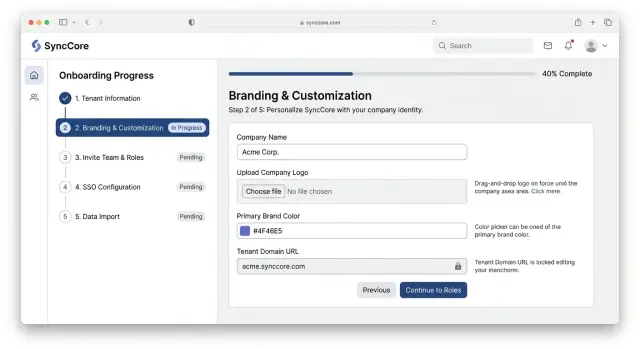
Table of Contents
Why setup turns into custom work
Setup turns into custom work when the product asks for everything at once.
A new admin logs in and gets a wall of questions about branding, roles, SSO, domains, and imports before they can even see the product working. Most people do not have all of those answers on day one. They stop, guess, or ask for help.
Sales can make this worse without meaning to. One account hears, "We can set up your teams later." Another hears, "We will import your users for you." A larger customer gets promised SSO in the first week, while a smaller one starts with email login. If the product only supports one fixed path, every exception becomes a support ticket or a private checklist.
SSO and imports usually cause the biggest delays. They matter, but they should not block basic access unless there is a hard security rule. When a team cannot log in until SSO is finished, or cannot test the product until a full import is clean, onboarding stalls. People start booking calls just to get past one step.
Support ends up filling the gaps. The team explains fields that should have been obvious, fixes broken CSV files, changes roles by hand, and repeats the same advice on every call. None of these issues looks huge on its own. Together, they turn tenant setup flows into custom work.
The pattern is familiar. Sales promises a smooth start. The admin hits ten decisions in a row. IT delays SSO. The import file has missing columns. Support patches the account so the customer can move forward. The product did not fail on one screen. It failed because the path assumed every account would be ready for the same setup at the same time.
Decide what belongs in the first session
Good tenant setup flows do not try to finish everything in one sitting. The first session should get one admin to a usable starting point. It should not force them through every policy, contract, and edge case before they can even look around.
A simple test helps: if the admin completes this step today, can they invite one teammate, see their workspace, and understand what to do next? If yes, that step probably belongs in the first session. If not, move it later.
For most B2B onboarding, the first session only needs a few basics:
- workspace name and basic branding
- the first admin account
- a simple role setup for early users
- a short list of what can wait
Billing, legal review, procurement, and security approvals often matter, but they do not always help someone start using the product. When possible, let those tracks run beside product setup instead of blocking it.
Optional settings create a lot of support work. Custom domains, advanced role rules, long notification settings, and large data mapping screens can wait until the customer has some context. People make better choices after they have seen the product with their own team and a little real data.
Saving progress is part of the flow, not a nice extra. Admins get pulled into meetings, need details from coworkers, or have to wait on SSO setup and CSV files. If they return two days later and find an empty form, the setup already feels harder than it is.
The first session should end with momentum. One person gets in, the account exists, and the next step is obvious.
Split setup into stages people understand
When setup asks for everything at once, teams stall. Someone needs a logo, someone else needs approval rules, and IT still has questions about SSO. A better path keeps the first session small enough to finish and makes the rest easy to understand.
Start with the parts people can answer right away. Account name, logo, time zone, and a few brand details help the workspace feel real without creating delay. That visible result on day one matters more than a perfect setup plan.
After that, move to people and daily control. Add the first admins, assign simple roles, and set any approval steps that affect normal work. Most teams do not need every edge case on day one. They need a safe default that lets the right people log in and get started.
SSO should sit on its own branch, not in the middle of the main path. Some buyers want it early. Others need their IT team to handle it later. Let them continue with email login or temporary access while you show what SSO needs, who usually owns it, and how long it tends to take.
Leave bulk imports for a later stage. Data work gets messy when people still debate field names, cleanup rules, or what belongs in the system at all. It is usually better to import a small sample first, then bring in the full dataset when the structure is clear.
A staged rollout often follows a simple order:
- Create the account and apply basic branding.
- Invite the first users and set simple roles.
- Choose the login method, with SSO as an optional guided branch.
- Import a sample, then plan the full data load.
Mark each step clearly with labels like "Required now" or "Can wait." That small choice cuts confusion fast.
It also helps to define a clear first usable state. Keep it small. The account should feel real even if some parts still wait. In many products, that means one admin with working access, a starter role set, a branded workspace, and one sample record or import. Once customers reach that point, they can move forward without your team doing the setup for them.
Gather branding and account basics
Good setup starts with details people recognize right away. Ask for the company name and logo early, because those two items make the account feel real and help users confirm they are in the right place.
Keep this step small. If the product does not use email domains for login rules, routing, or workspace matching, do not ask for them yet. A field that might help later creates hesitation now.
Regional settings need the same care. Let the admin choose time zone, language, and date format before the first invite goes out. If you skip that, teams notice it fast when due dates shift, reports show the wrong day, or emails arrive in the wrong language.
A live preview helps more than extra help text. Show the workspace name, logo, default language, and a sample date exactly as users will see them. One quick preview catches common mistakes like a stretched logo, the wrong company name, or "04/05/2026" shown in a format the team reads differently.
That matters more than it sounds. A UK finance team and a US parent company may share one product, but they do not read dates the same way. If the admin sees that preview before launch, they can fix the problem in seconds instead of answering support tickets all week.
This step should feel like setting up a room, not filling out paperwork. Ask for the basics, explain why each field exists, and leave the rest for later.
Set up roles without a permissions maze
Most teams do not need a huge permissions grid on day one. They need a simple way to give the right people the right access and start working. If you ask them to define 40 permission rules before they invite a single teammate, setup slows down and support tickets pile up.
Start with a short set of roles that match real jobs in the product. In many B2B onboarding flows, four roles are enough at first:
- Admin for billing, settings, and user access
- Manager for team workflows and approvals
- Contributor for daily work
- Viewer for read only access
Those names only help if customers already understand them. A finance lead, support manager, or warehouse supervisor should be able to look at a role and say, "Yes, that is me." If people need a training call to understand the difference between two roles, the model is too complex.
Keep the first version broad. Good role-based access starts with clear boundaries, not tiny exceptions. An admin can invite people, change basic settings, and keep the account moving even if you have not solved every special case yet. That is better than blocking the whole tenant because one department wants a rare approval path.
Add finer controls later, after teams have used the product for a bit. Real usage shows where you need more control. Maybe managers should export reports but contributors should not. Maybe only one group can edit a certain record type. Those choices are easier when you can point to actual behavior instead of guesses made during setup.
A simple rule works well here: launch with roles people understand, then add more detail only where customers hit real friction.
Add SSO without blocking progress
SSO often slows onboarding because product teams and IT teams move at different speeds. If you make SSO a hard gate, the whole rollout can stall for days or weeks.
A better approach is to let the customer start with a small temporary login method while SSO is still in progress. Give admins enough access to explore the product, set up branding, and test a few workflows. Keep that access limited and time bound so security does not feel like an afterthought.
The request form matters more than many teams expect. Most admins do not want a wall of identity terms on day one. Ask in plain language: which sign in system do you use, which email domains should use it, who can approve the change, and who can join a test?
When you need technical details, ask for them only when they are needed. A short sequence works better than one big form. First collect the basics. Then ask for metadata, certificates, or redirect values after the customer knows who owns that work on their side.
Clear ownership prevents the usual back and forth:
- The customer IT admin creates the app in the identity provider and shares the required values.
- The customer product admin picks test users and confirms which teams need access first.
- Your onboarding team maps attributes, checks role assignment, and confirms fallback access.
- A named approver signs off before SSO becomes required for everyone.
Do not skip the test step. Turn on SSO for two or three users first, not the whole company. Check sign in, sign out, role mapping, and what happens if a user gets locked out.
In a good setup flow, SSO is a stage, not a wall. If pilot users can log in, land in the right account, and keep the right role, the full rollout is usually calm.
Make data imports feel manageable
A big import screen can scare people before they even start. Most admins do not know if their data is clean, complete, or in the right shape. If the first step asks for the full dataset, support tickets pile up fast.
Start with a small sample file. Give people a template with 10 to 20 example rows and real column names. That lets them test the format, map fields, and catch obvious mistakes before they upload thousands of records.
Check the file before the import starts. Tell the admin if a required column is missing, if a date format does not match, or if two fields contain the same kind of data. A quick preflight check saves far more time than a failed import after ten minutes of waiting.
Error messages need to point to the exact row and the exact fix. "Import failed" is useless. "Row 48: contract_start must use YYYY-MM-DD" gives the admin something they can correct in seconds.
A good data import process usually does four things well:
- shows a sample file with realistic values
- validates columns before processing starts
- lists row errors in plain language
- lets admins re-upload only the failed rows
Large imports should not be all or nothing. Let admins bring data in parts, such as companies first, then users, then historical records. That reduces risk and makes testing easier.
This also helps complex B2B onboarding. A team can finish account setup, invite users, and start learning the product while the rest of the data comes in over time. That is much better than blocking the whole rollout on one messy spreadsheet.
A simple rule helps here: import enough data to prove the system works, then let the customer add the rest in batches.
A simple example of a staged rollout
A mid sized distributor signs up on Monday. In the first session, the person owning the account uploads the company logo, picks brand colors, names the workspace, and creates the first admin. That takes about 20 minutes. The team now has a real account to review instead of a blank shell.
That admin does not wait for every technical task to finish. They invite two team leads, one from operations and one from sales, and give them only the access they need to test their part of the product. Early use usually cuts confusion later.
At the same time, IT works on SSO setup. They connect the identity provider, test a small user group, and make sure sign in works with the right role mapping. If SSO takes a few extra days, the rollout still moves forward because the first admin can keep things going with temporary logins.
Operations works on the data import process in parallel. Instead of loading everything at once, they start with a sample file, maybe 100 customers, 20 products, or one month of orders. That small import exposes missing fields, duplicate records, and naming problems before the full dataset creates a bigger mess.
By the end of the first week, the customer has branded the account, invited a few leads, tested access, and reviewed real data inside the product. The second week is for the full import, wider access, and final checks. This is what good tenant setup flows look like in practice: the account goes live in stages, not through one big launch that puts every risk on the same day.
Common mistakes that create support work
Support work grows fast when the product asks customers to do too much, too soon. Bad setup flows usually do not fail because a feature is missing. They fail because the order feels wrong.
The most common mistake is a long first form. Teams pack branding, user roles, SSO details, import settings, notification rules, and billing into one page because it looks complete. For the customer, it feels like homework. People skip fields, guess, or stop and ask support to "just set it up for us."
SSO causes another avoidable mess. If you force SSO before anyone can log in, you turn a useful security feature into a blocker. Many companies need a day or two to get the right IT person involved, collect metadata, or confirm domain ownership. Give them a safe fallback so the account can keep moving.
Data imports often break trust for a simpler reason: the rules show up too late. A customer uploads a CSV, gets six errors, and only then learns that date format, required fields, and duplicate handling follow strict rules. That feels careless. Show a sample file, field rules, and a quick pre check before upload.
The last problem is internal. Support teams often invent a new path for each customer because the product leaves gaps. One customer gets a spreadsheet template. Another gets a private checklist. A third gets a manual import from the success team. That may save a deal this week, but it slowly builds a second onboarding system outside the product.
A simple test helps: can two different customers finish the same stage in the same way, with only small differences in their data? If not, support is acting as your setup layer, and that gets expensive fast.
Quick checks and next steps
Most tenant setup flows fail for a simple reason: each screen asks people to make too many decisions at once. A better flow gives every stage one job. If a step mixes branding, user roles, SSO, and data mapping, admins slow down, make guesses, and open support tickets.
A quick review usually shows where the friction sits. Pull up the last few onboarding calls, demos, or support threads. Look for the same pauses every time. If three customers ask where to start, or whether they can come back later, the product is sending a mixed signal.
Use a short checklist:
- Give each stage a single goal that people can describe in one sentence.
- Let admins save progress and return later without losing work.
- Check where support still fills gaps by hand.
- Move one manual task into the product every sprint.
That last point matters more than many teams expect. Small fixes add up fast. A progress marker, a draft state, or a better import template can save hours every month. It also makes the product feel calmer for new customers.
One practical test works well. Ask an admin to stop halfway through onboarding and come back the next day. If they cannot tell what is done, what is left, and what needs another teammate, the flow still depends on memory and support help.
Some products stay stuck in custom ops even after several redesigns. When that happens, the problem is usually bigger than one screen. The product needs a cleaner structure across roles, identity, data, and handoffs. If you need help untangling that, Oleg Sotnikov at oleg.is does this kind of Fractional CTO and startup advisory work for teams that want onboarding to scale without turning every new tenant into a custom project.


