Tenant level rate limits for partner integrations at scale
Tenant level rate limits help you protect shared API capacity, set fair customer tiers, and grow partner traffic without one-off rules.
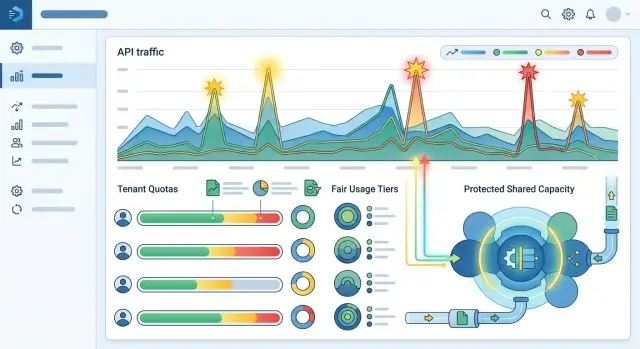
Table of Contents
Why shared partner traffic turns into a problem
Shared partner traffic becomes a problem when one account stops behaving like the average case your system was built around. Most teams plan for a steady flow of API calls, webhook deliveries, and sync jobs. Real traffic is noisier than that. One partner lands a big customer, turns on a new import, or retries too aggressively, and suddenly a large share of workers, database connections, or queue space disappears for everyone else.
You usually notice it in small ways first. Response times creep up. Retries pile on. A dashboard that looked calm at 9:00 looks crowded at 9:15 because one tenant sent ten times its normal volume. Nothing is broken on its own, but the shared system gets slower for everyone using it.
That creates a real tension between fairness and growth. You want larger customers to grow, and you do not want rate limits to punish success. But shared capacity still needs protection because smaller tenants expect the service they paid for. If one fast-growing tenant can grab most of the pool whenever it gets busy, everyone else pays for that spike with more latency.
That is why tenant limits are a business rule, not just an ops setting. They decide how much room each tenant gets before it starts affecting neighbors. Without that boundary, teams drift into manual exceptions. Support tells one partner, "you can burst a little higher." An engineer adds a custom threshold for a large account. Sales asks for another exception during launch week.
Those exceptions feel harmless for a while. Then nobody remembers which tenant has which ceiling, why it changed, or when it should expire. Support tickets stack up because one partner gets throttled unexpectedly while another seems to get special treatment. Engineers end up reading old Slack threads instead of fixing the actual issue.
This problem is rarely theoretical. It shows up in nightly catalog syncs, broken retry loops, partner migrations, and customers that outgrow your defaults faster than expected. On the server side, success and overload can look almost identical. Clear limits help you tell the difference.
What tenant limits actually control
A tenant limit puts a ceiling on one account's share of a shared system. In most products, the tenant is the customer account, workspace, or partner account, not an individual user.
That matters because a partner can spread traffic across many users, API tokens, or servers. If you only limit by user or IP, a large account can still send enough combined traffic to slow everyone else down.
Each limit type answers a different question:
- User limits control how much one person can do.
- IP limits control how much traffic comes from one network source.
- Token limits control how much one credential can do.
- Tenant limits control how much the whole account can consume.
A partner integration often needs all four, but they solve different problems. If one partner has 40 store locations, 12 tokens, and a fleet of workers, the tenant limit catches the full load after all of those requests add up.
It also helps to separate burst limits from steady limits. A burst limit allows short spikes, like a sync job that starts at the top of the hour. A steady limit controls sustained usage over minutes, hours, or a day. You might allow 200 requests in 10 seconds but cap the same tenant at 20,000 requests per hour. That lets normal batch jobs finish without letting one account sit on a big slice of capacity all afternoon.
This protects more than a single endpoint. A busy tenant can fill worker queues, use too many database connections, churn the cache, and trigger retries across several services at once. Per-endpoint limits still help, especially for expensive actions like exports or search, but they are not enough on their own. One account can stay under each endpoint limit and still overload the system through total volume.
A good tenant limit is easy to describe. It measures the full account, allows short spikes, and stops long runs that eat shared capacity.
Choose the right thing to count
Good limits start with one plain question: what exactly are you counting?
Many teams default to requests per minute because it is easy to measure. That works only when requests cost roughly the same. In partner integrations, that is often false. One request might fetch a small status update. Another might start a large sync, write thousands of records, or kick off a slow background job. If those two actions count the same, the limit looks fair on paper and feels random in production.
Pick the unit that matches the resource that runs out first. If your gateway or app servers feel pressure first, count requests. If worker queues back up, count jobs. If bulk imports push database load, count records. If one feature drives cloud spend far more than others, count estimated cost.
A simple rule of thumb works well:
- Count requests when traffic itself is the bottleneck.
- Count jobs when async work fills your workers.
- Count records when data volume drives storage or writes.
- Count cost when feature usage varies a lot.
Keep the model easy to explain to customers and to your support team. If a partner asks why they hit a limit, someone should be able to answer in one or two sentences. Complex formulas with weights, hidden multipliers, and special exceptions turn every limit discussion into an account review.
Simple rules also age better. A partner can plan around 10,000 imported records per hour. It cannot plan around a score that mixes request type, payload size, region, and time of day.
Use the same counting logic across partners unless you have a real technical reason not to. Shared rules are easier to monitor, document, and defend. They also stop quiet custom deals from turning into permanent code paths nobody wants to maintain six months later.
For example, if one partner sends only a few API calls but each call starts a long enrichment job, request limits will miss the real pressure. In that case, job-based limits are cleaner. They protect shared capacity without punishing lighter tenants that make more frequent but cheaper calls.
Set tiers without special cases
Custom limits feel helpful in the moment, but they usually turn into a mess. Support has to remember special cases, engineers keep extra branches in their heads, and customers start asking why someone else got a better deal. A small tier model is easier to explain and much easier to run.
Most teams need only three or four tiers. Each tier should have a clear ceiling for sustained traffic, burst size, and any daily or monthly quota that matters for your integration. Keep the numbers simple enough that sales, support, and engineering all describe them the same way.
A basic model might look like this:
- Starter for new or low-volume partners
- Growth for steady production use
- Scale for larger customers with higher sustained traffic
- Enterprise for customers with proven demand and approved capacity planning
That gives bigger customers more room without custom code for each account. When a customer outgrows its tier, move it up. Do not patch in one extra rule like "double the burst for this tenant" or "ignore limits on weekends." Those exceptions spread quickly, and each one makes incidents harder to untangle.
Tier changes should follow a short approval rule. A move from Growth to Scale might require recent traffic data, payment status, and a quick check from whoever owns platform capacity. Write down who can approve each step. Keep it boring.
You do not need much paperwork. A short record with the current tier, the reason for the change, recent traffic, the approver, and the review date is enough. That record helps during difficult conversations too. If a partner asks for more headroom, you can point to the same policy every time instead of arguing from scratch.
Roll it out in steps
Start with a map, not a limit. Write down which endpoints, jobs, and background tasks pull from the same shared capacity, because partner traffic rarely touches just one part of the system. A burst of imports can slow webhooks, search, or report generation even if those paths look separate on paper.
Then look at real traffic. Pull a few weeks of data and study normal volume, short spikes, and the moments when the system already struggled. Timeouts, queue growth, and bursts of errors tell you more than average requests per minute ever will.
A practical rollout usually follows the same pattern. Group traffic by shared resource, not just by API route. If two endpoints hit the same table or worker queue, treat them as one pool. Measure normal windows, heavy windows, and the worst spikes for each tenant. Set the first limit below the point where the platform starts to wobble. Leave room for other customers, internal jobs, and unexpected bursts.
Be clear about what happens when a tenant hits the cap. Return a standard 429 response. Say which limit was hit and when retrying makes sense. After launch, watch logs, latency, and support tickets closely. Change limits slowly so you can tell what fixed the problem and what created a new one.
The first version should feel a little conservative. If a shared queue starts struggling at 1,000 requests a minute, do not give one partner 950 because they asked for it. Give them room to grow, but keep enough spare capacity for everyone else.
Error messages matter more than many teams think. "Rate limit exceeded" is not enough. Tell the partner whether it should retry in 10 seconds, wait for the next minute window, or slow down a batch job.
After launch, expect a few surprises. One partner will retry too aggressively. Another will send traffic in large scheduled bursts. An internal script might count against the same pool by mistake. Review what happened, adjust in small steps, and keep the rules simple enough that support can explain them without reading code.
A simple example with one fast-growing partner
Imagine a partner that sends online orders for eight retail clients through one integration. Seven of those clients are small chains with steady traffic. One client is growing quickly and now sends far more orders than the rest.
On a normal weekday, the partner sends a smooth flow of new orders. During a holiday sale, traffic jumps hard for a few hours. Once a month, the large client also runs a backfill job to sync old orders that never made it into the system.
- Normal day: 8,000 new orders across all retail clients
- Seasonal spike: 45,000 orders in a short window
- Bulk backfill: 300,000 historical orders for the largest client
Without tenant caps
If you only limit traffic at the partner level, the biggest client can consume most of the shared capacity. The partner still stays under its global limit, but the small retail clients wait behind the flood.
Support pain follows quickly. A small store sees delayed imports even though its own volume never changed. The partner blames your API. Your team sees a busy system, but the real issue is uneven traffic inside one shared integration.
The backfill job makes it worse. It can fill queues, increase retries, and slow fresh orders from every other retail client tied to that partner.
With tiered caps
Now give each retail client its own quota inside the same integration. Small clients might get 5 requests per second, mid-size clients 15, and the large chain 50, with a short burst above that.
The rules stay the same for everyone. Each tenant gets a tier, and the limiter reads that tier from config. You do not write a special branch for the large chain. You assign it a higher quota.
On a normal day, everyone moves smoothly. During the seasonal spike, the large customer gets more throughput because its tier allows it, but it still cannot crush shared capacity. During the backfill, the large client can keep syncing old data at its own capped rate while fresh orders from smaller clients keep flowing.
That is the practical win: bigger customers can grow, smaller customers stay protected, and your team avoids custom code for every success story.
Mistakes that create support pain
The worst tickets often start with "your API is down" when the real problem is a bad limit rule. Most of the frustration around tenant limits comes from rules that looked fine in a design doc and failed under real traffic.
A common mistake is limiting by IP address. That sounds simple until several customers share the same office network, VPN, cloud NAT, or partner gateway. One noisy account can burn the budget for everyone behind that address. The customer who gets blocked may have sent only a handful of requests, so support ends up arguing with someone who is telling the truth.
Limits that are too low create a second problem: retries. Client SDKs retry. Cron jobs retry. People retry by hand. A limit that blocks the first burst can turn a small spike into a longer one because every failed call comes back a few seconds later. If your system expects retries, your limit has to leave room for them.
Another mistake is mixing exceptions into billing or account logic. A partner gets a custom quota during a launch, another gets a hand-edited flag after a sales call, and a third keeps an old override after changing plans. Support then has to inspect code, config, and contract notes just to explain one 429 response. That setup gets ugly fast.
When a block happens, the error should explain it. A generic message forces the customer to guess, and the guess is usually "the platform is broken." A useful response should say which tenant hit the limit, which limit it hit, when the client can retry, and where current usage is visible.
Teams also forget background work. Imports, exports, sync jobs, reconciliation tasks, and webhook replays often hit the same database, queue, or downstream API as live partner traffic. If you protect only the front door and ignore those workers, the system is still exposed. Customers then see random slowdowns even though they stayed within the quota you published.
Sometimes one partner behind a shared corporate gateway is enough to expose all of these problems at once. Their daytime sync starts, their users retry failed actions, and your backfill job runs during the same hour. Support gets a flood of tickets that look unrelated. Usually they are the same problem wearing different clothes.
Checks before launch
A limiter that looked fine in testing can still cause trouble on day one. People need to know who hit the cap, when it happened, whether it was a short burst, and what they should do next.
Start with tier assignment. Pick a sample of tenants from each sales plan, each partner type, and any older contract group. Make sure your rules place them in the right quota tiers. Old imports, renamed tenants, and manual overrides cause more trouble than the limiter itself.
Then test your logs the way a tired on-call engineer would. For every throttled request, logs should show the tenant, partner, endpoint or operation group, current count, limit, reset time, and request ID. If your team has to open three tools to answer one ticket, the setup is not ready.
Your dashboards should separate short bursts from steady pressure. Those patterns need different responses. A burst often points to poor retry behavior. Steady overuse usually means the tenant has outgrown its tier.
Customer messages deserve care too. "Rate limit exceeded" is vague. Tell people which quota they hit, when it resets, and whether they should slow down, retry later, or ask for a higher tier. Clear messages cut ticket volume quickly.
The on-call team also needs a simple rulebook:
- Raise a tier if usage stayed high for days and the tenant fits the plan rules.
- Do not raise it for retry storms, broken loops, or one bad deploy.
- Check whether the tenant spread traffic across more endpoints than expected.
- Leave a note on every manual change so sales and support see the same story.
If those checks pass, the limiter should feel boring in production. That is exactly what you want. No surprises, no mystery throttling, and no special code path for the loudest customer.
What to do next
Start small. One shared request pool can protect the system, and a small set of tiers gives larger customers more room without custom code for every partner deal. For most teams, that is enough for a first rollout people can understand.
Keep the first version plain. Give every tenant a default allowance, add one higher tier for growing accounts, and reserve one larger tier for partners with steady volume. If you start with too many exceptions, you will spend more time explaining the rules than enforcing them.
Let the system run for a few weeks, then look at real traffic instead of guesses. Usage data usually tells a simpler story than internal debate does. Many teams expect they need ten different rules, then find that only a few tenants ever come close to the limit.
A short review should answer a few questions: which tenants hit limits often, whether those spikes are short or sustained, how much traffic comes from retries or client bugs, and whether a higher tier matches real business value.
Write the policy down in plain language. Sales should know what they can promise, support should know what to say when a tenant gets throttled, and engineering should know exactly what to build. If the policy does not fit on one page, it is probably too complex.
That policy should spell out what counts toward the quota, how burst traffic works, what happens when a tenant crosses the limit, and who can approve a tier change. Clear rules cut down on surprise escalations. They also make the system feel fair, which matters more than many teams expect.
If you want a second opinion before rollout, Oleg Sotnikov at oleg.is can review quota design, guardrails, and rollout plans as a Fractional CTO advisor. His experience running lean production systems at scale makes that kind of review useful when you need stronger capacity protection without slowing healthy customer growth.
A plain first version, a short review cycle, and a policy everyone can follow will take you farther than an elaborate quota model built too early.
Frequently Asked Questions
What is a tenant rate limit?
A tenant rate limit caps how much one customer account can use from a shared system over a set time window. It protects other tenants when one account sends a sudden spike, runs a big sync, or retries too hard.
Use it at the account or workspace level, not just per user or token. That way you control the full load that one customer creates across all of its users, apps, and workers.
Why are IP or token limits not enough?
IP and token limits catch only part of the traffic. One large partner can spread requests across many IPs, tokens, or users and still overwhelm shared workers, queues, or database connections.
Tenant limits solve that by counting the whole account. Keep IP and token limits if they help with abuse or bad clients, but do not rely on them alone for fairness.
What should I count for the limit?
Count the thing that runs out first. If web traffic hurts your app servers, count requests. If async work fills workers, count jobs. If imports strain writes and storage, count records.
Start simple and pick one unit you can explain in one sentence. If customers and support cannot understand the rule, you will spend too much time arguing about it.
How are burst limits different from steady limits?
A burst limit lets a tenant go higher for a short spike, like a sync that starts on the hour. A steady limit stops one tenant from sitting on a large share of capacity for a long time.
Most partner integrations need both. Short bursts keep normal batch work moving, while steady caps protect everyone else during long imports or retry storms.
How many quota tiers should I start with?
Start with three or four tiers. That gives you enough room for new accounts, normal production use, larger customers, and planned high-volume tenants without turning every deal into custom logic.
Keep the numbers easy to remember. If sales, support, and engineering describe the tiers differently, the model is already too hard to run.
What should a good 429 response include?
Return a 429 and tell the client exactly what happened. Name the tenant or quota bucket, show when the window resets, and say whether the client should retry soon, wait longer, or slow the batch down.
A vague error pushes customers to guess, and they usually guess that your API broke. Clear messages cut support tickets fast.
How do I roll out tenant limits safely?
Pull a few weeks of traffic first and find where the system already struggles. Group endpoints and jobs by shared resource, then set the first cap below the point where queues, latency, or errors start climbing.
Roll out slowly, watch logs and support tickets, and change numbers in small steps. The first version should feel a little strict, not risky.
When should I move a customer to a higher tier?
Raise a tier when the tenant shows steady demand over time and matches your plan rules. Do not raise it just because a broken loop, retry storm, or one launch day created a spike.
Write down who approved the change, why they approved it, and when you will review it again. That keeps quota changes boring and easy to explain later.
Do background jobs and syncs need tenant limits too?
Yes. Background jobs often hit the same queue, database, or downstream API as live traffic. If you protect only the front door, imports, exports, replays, and reconciliation jobs can still slow the whole system.
Count that work in the same capacity model or give it its own pool with a clear cap. Otherwise customers will stay inside the published quota and still see random slowdowns.
What mistakes create the most support tickets?
Most support pain comes from bad scoping and messy exceptions. Teams limit by IP, set caps too low, forget retries, or add one-off overrides after sales calls and never clean them up.
The fix stays simple: limit at the tenant level, keep a small tier model, log every throttle clearly, and avoid hand-made rules for single accounts.


