Temporary support access with auto expiry for customer tenants
Temporary support access keeps emergency tenant help under control. Use short grants, clear reasons, approvals, and a clean closeout after each case.
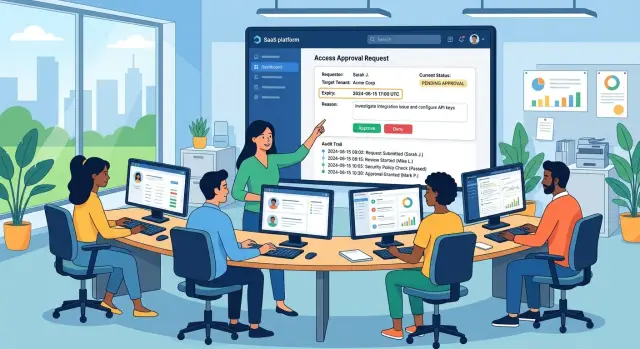
Table of Contents
Why emergency access stays longer than it should
A support ticket comes in, a customer is blocked, and someone needs access right now. In that moment, speed wins. Nobody wants to argue about wording or approvals while a customer cannot log in, see data, or finish work.
That pressure creates a predictable mess. Someone gets broad access, fixes the problem, and jumps to the next ticket. The urgent part ends, but the cleanup does not happen because it no longer feels urgent.
Small teams run into this all the time. One person may handle support, operations, and admin work in the same day. When roles blur, the last step often has no owner. Nobody removes the grant after the case closes.
Then memory takes over, and memory is weak. A month later, someone spots an old role and cannot tell who approved it, why it was needed, or whether the customer agreed. That is how temporary support access quietly becomes normal access without anyone deciding that on purpose.
The same patterns keep showing up. Teams grant more access than the task needs. The ticket does not say who asked for it. No expiry is set when the request starts. The person who fixes the issue is not the person who removes the role. None of that looks dramatic on its own. Together, it leaves old permissions sitting around for months.
One leftover role can expose a lot. A support engineer may still have access to tenant settings, billing details, user records, or private business data long after the incident ends. Even if nobody misuses that access, the risk is still real. Old permissions turn ordinary mistakes into customer data incidents.
There is also a trust problem. If a customer asks, "Who accessed our tenant last week, and why?" vague answers do not work. "We think it was for an incident" makes a small access issue sound much worse.
Most teams do not need a large security project to fix this. They need a short grant, a clear reason in plain language, and one person who owns removal. If any of those are missing, emergency support permissions tend to stay around far longer than anyone meant.
What a temporary grant needs
A good access request should read like a small work order. If someone opens it later, they should immediately understand who needs access, where they need it, what they need to do, and when the access ends.
Start with the tenant. Support teams often work across many customer environments, so the request has to name one tenant by ID or account name. If a login can jump across every tenant, it is too broad for a problem affecting one customer.
Tie the role to the task, not to the person's job title. If an engineer only needs to inspect logs or restart a stuck sync, give that narrow permission. Do not hand out full admin rights because it feels faster. A few extra minutes of setup costs less than fixing a mistaken change in the wrong account.
The end time should exist before anyone approves the request. Pick a hard stop such as 30 minutes, 2 hours, or until the end of the current shift. Better yet, let the system remove the grant automatically. Manual cleanup sounds fine in a calm meeting. It fails at 2 a.m.
One person should own the request from start to finish. That person explains why access is needed, confirms the scope, and checks that the grant is gone when the work ends. Shared ownership usually means no ownership.
The reason field matters more than people think. "Investigate failed invoice export for tenant ACME-042" is enough. "Support issue" is useless. A short, specific reason keeps the request grounded and makes later reviews much faster.
In practice, every grant should capture the same few details: the tenant, the named person receiving access, the limited role or allowed actions, the reason tied to the incident, the expiry time, and the owner. If that cannot fit into a few clear fields, the access is probably too broad.
How to set a short-lived grant
Support access should start only after someone confirms the customer problem. A vague report like "it is broken" is not enough. Ask what failed, who saw it, and what support now needs to check.
That first check matters because weak requests lead to bad access decisions. If a billing export fails for one user, nobody needs admin rights to the whole customer tenant. The team needs enough access to inspect the broken part and nothing more.
A simple rule helps here: treat every grant like a small change request. Before anyone logs in, five things should already be clear. You should know the exact tenant, the task to perform, the smallest role that allows it, the expiry time, and the named approver.
Teams usually get sloppy when choosing the role. "Admin" feels easy, but it creates risk and makes cleanup harder. Read-only access is enough for many checks. In other cases, a billing role, audit role, or user management role is enough. Full admin access should be rare.
Set the expiry the moment you create the grant. Do not rely on memory later. For most support work, 1 to 4 hours is enough. A full day is already too long for many tasks. Several days is how emergency support permissions turn into standing access.
The reason should read like a note another person can understand six weeks later. "Need access" says nothing. "Investigate failed SSO login for Acme tenant after IdP certificate update" tells the next reviewer exactly why the grant existed.
Approval needs a real name too. "Support team" or "manager approved" is not enough. If your process allows approval after login, people will use that shortcut every time.
A good default is simple: keep the initial window short, then extend it only if the session is still active and the work clearly is not finished. It is much easier to add one more hour than to explain why a support engineer kept access all weekend.
Teams that run lean operations, including AI-heavy support setups, usually do better when this step is dull and predictable. Clear scope, clear reason, clear owner, short timer. That is enough more often than not.
What to record every time
Good records are what make temporary access stay temporary. Two weeks later, another person should be able to see why access existed, who used it, and when it ended without asking around in chat.
Start with the customer problem in plain language. Write what broke, how it showed up, and why support could not solve it without entering the customer tenant. "User sync failed after role changes" is useful. "Need admin access" is not.
Then name the exact tenant. Teams still waste time when they record only the customer company name and forget the tenant ID, region, environment, or account label. If the customer has both test and production tenants, say which one you touched.
You also need a clear people trail. Record who asked for access, who approved it, and who actually used it. Those may be three different people. If one person filled two of those roles, note that instead of leaving gaps.
Time matters just as much as identity. Write when access started and the exact time it should end. Avoid vague phrases like "for today" or "until fixed." A real end time forces a decision and makes auto expiry access easy to verify.
The last part is scope. One line is enough if it is specific. State what the support person may change and what they must leave alone. For example, they may restart a failed integration, inspect logs, and correct one mapping rule, but not edit billing settings or create new users.
A short ticket entry often works better than a long one:
- Customer issue: SSO login fails for new users after IdP group update
- Tenant: acme-prod-eu
- Requested by: Dana Lee from customer success
- Approved by: Ravi Patel, on-call engineering manager
- Used by: Mina Chen, support engineer
- Access window: 14:05 to 14:35 UTC
- Allowed actions: review auth logs, test group mapping, update one SSO mapping rule only
If your team records this every time, support access audit trail reviews get easier. You can close incidents faster, spot weak approval habits, and prove that temporary support access did not quietly become permanent access.
A simple incident example
A customer reports that several invoices disappeared right after a billing update. They send screenshots, but screenshots only show the symptom. They do not show whether the invoices failed to sync, landed in the wrong state, or never reached the tenant at all.
The support engineer starts with normal checks. They review the ticket history, compare the billing update time with recent system events, and ask which invoices went missing. That still is not enough. The team cannot confirm the cause from shared images alone, so they request temporary access to one customer tenant.
A team lead approves read-only access for one engineer, for one tenant, for two hours. The request says exactly why: "Check invoice records after billing update and confirm sync issue." Nobody gets broad admin rights, and nobody gets open-ended access just because the case feels urgent.
Inside the tenant, the engineer checks invoice records, sync history, and timestamps around the update. The cause shows up quickly. One field format changed during the billing update, and invoice sync stopped for a small batch of records. The screenshots pointed to the problem, but they did not explain it.
The engineer adds notes to the case and logs out as soon as the check is done. They do not keep the session open while handling other tickets. They do not extend access "just in case." That habit sounds small, but it prevents a lot of sloppy access from piling up.
The case record should answer a few basic questions without guesswork: who approved access, which tenant was opened, why the team needed access, when it started and ended, and what the engineer confirmed during the session.
At the two-hour mark, the system removes the grant automatically. No one has to remember to clean it up. That is the whole point of auto expiry access. The safe outcome should happen by default, even on a busy day.
Support can then close the case with a short summary for the customer, while engineering fixes the sync bug separately. The customer gets help, the engineer gets the access they need, and the account does not stay exposed after the emergency ends.
Mistakes that turn temporary access into permanent access
Permanent access usually starts as a shortcut. A support engineer needs to fix a customer problem fast, finds an old admin role that still works, and reuses it. The case is solved in 20 minutes. The access stays for six months.
That habit is common because full admin rights remove friction. Nobody has to think about scope, time limits, or what the person actually needs to do. But reused admin roles turn temporary support access into standing permission, and standing permission invites mistakes.
Expiry dates fail for a simpler reason too. People often choose a date that feels safe instead of a date that matches the work. If the task should take an hour, a seven-day grant is not cautious. It is just easy. Long expiry windows also fade into the background, so nobody checks them.
Busy teams also skip the reason field. That sounds minor until someone reviews an old exception and sees only "support" or nothing at all. Without a clear reason, nobody knows what happened, who approved it, or whether the access still makes sense.
Shared support accounts make things worse. If three people can sign in as the same user, your audit trail stops being useful. You may know that someone entered the customer tenant, but you do not know who changed a setting, exported data, or left the session open.
Most damage comes from the same few habits: generic admin roles that never get cleaned up, expiry dates picked out of habit, blank reason fields, skipped weekly reviews, and shared accounts that hide the person behind the action.
Weekly review matters because old exceptions pile up quietly. One missed Friday check can turn into a month of forgotten access, especially around holidays, incidents, or staff changes. A 10-minute review can catch expired grants, vague records, and accounts that nobody should still use.
A practical rule works well here: make every emergency grant personal, time-limited, and tied to one ticket or case. If the team cannot explain who got access, why they needed it, and when it ends, the access is already too loose.
Check before you close the case
Do not close the technical task until you check the tenant itself. A solved ticket with leftover access is still unfinished work.
Start with the outcome. Make sure the customer issue is actually fixed, not just hidden for the moment. If the user can sign in again, run the report, or finish the blocked action, record that result in the case notes.
Then remove everything support added during the incident. Teams often add broad customer tenant access under pressure and later forget one extra role, service account permission, or admin flag. That is how temporary access turns into background access.
A short closeout check is usually enough:
- Confirm the customer can complete the action that failed before.
- Check every role or group added during the case.
- Verify that the grant expired, or revoke it now.
- Save notes with names, times, and the reason for access.
- Flag repeat requests that point to a product problem.
The expiry check deserves special attention. Do not assume auto expiry access worked just because a timer was set. Open the access record and confirm the grant is gone. If it is still active, remove it before you move on.
Write the notes while the details are fresh. You do not need polished language. You need a record that says who asked for access, who approved it, what scope support used, what changed in the tenant, and when the access ended.
Patterns matter too. If the same tenant needs emergency support permissions every month for the same problem, the access process is not the real issue. The product may have a bug, a missing admin control, or a workflow that keeps pushing staff into manual fixes. Someone should own that root cause.
One rule sums this up well: nobody closes the case until they can answer two questions without guessing. Did the fix work for the customer, and is every extra permission gone? If either answer is unclear, the case should stay open a little longer.
Next steps for your team
If your process still depends on memory, chat messages, or one senior engineer who "just knows the drill," write it down now. Keep it short enough to fit on one page. People follow simple rules during a live incident. They skip long documents.
Your team rule should answer four questions: who can ask for access, who can approve it, how long it can stay open, and where the reason gets recorded. Put the default time limit in writing. Short limits remove debate.
Use the same fields in every request, ticket, or internal form. The two that matter most are the reason and the expiry time. If the reason is vague, stop the request there. If there is no end time, the grant should not go live.
You also do not need perfect tooling on day one. If your admin panel cannot yet handle expiry and reason fields, put them in the support ticket and review them by hand. That is still much better than giving access with no time limit and no usable record.
For the first few weeks, review old grants once a week. Keep it brief. Open the list, close anything that should be gone, and note any team that keeps asking for exceptions. That is how the habit sticks.
If you want an outside review of the process, Oleg Sotnikov at oleg.is works with startups and small teams as a Fractional CTO advisor. His work often focuses on practical AI-first operations and lean engineering processes, which fits this kind of access workflow well.
When the rule is simple, the fields are required, and someone checks old grants each week, emergency help stays fast without turning into permanent access.
Frequently Asked Questions
Why should support access expire automatically?
Because people forget when the urgent part ends. Auto expiry removes access on time even when the team gets busy, changes shifts, or jumps to the next ticket.
How long should a temporary grant last?
For most support work, 1 to 4 hours is enough. Start with the shortest window that fits the task, then extend it only if the engineer is still working and the case truly needs more time.
What should every access request include?
Include the tenant, the named person getting access, the exact role or allowed actions, the reason tied to the incident, the end time, and the owner. If you cannot fit the request into a few clear fields, the scope is probably too broad.
Do support engineers need full admin access?
Usually no. Many cases only need read-only access or a narrow role for billing, logs, or user management. Give full admin rights only when the task truly needs them.
Who should approve emergency access?
Pick one named approver, not a team name. The approver should confirm the tenant, the scope, and the time limit before anyone logs in.
What makes a good reason field?
Write one plain sentence that explains the problem and the task. "Investigate failed SSO login for Acme tenant after IdP certificate update" works well because another person can understand it weeks later.
Are shared support accounts okay for this?
No. Shared accounts ruin the audit trail because you cannot tell who entered the tenant or changed something. Give each person their own short-lived grant instead.
What should we record after the work is done?
Before you close the case, record who asked for access, who approved it, who used it, which tenant they opened, when access started and ended, and what they checked or changed. That record should answer customer questions without guesswork.
What if the engineer needs more time?
Extend the grant for a short, defined window and note why. Do not leave the old access open all day or all weekend just to avoid a second approval.
Do small teams need special tools to start?
No. You can start with your ticket system or an internal form if it captures the reason, scope, owner, and expiry time. Better tools help later, but clear rules and weekly reviews fix a lot right away.


