Temporal vs Inngest vs plain queues for product workflows
Temporal vs Inngest vs plain queues all solve different workflow problems. Compare retries, visibility, and team ownership before you commit.
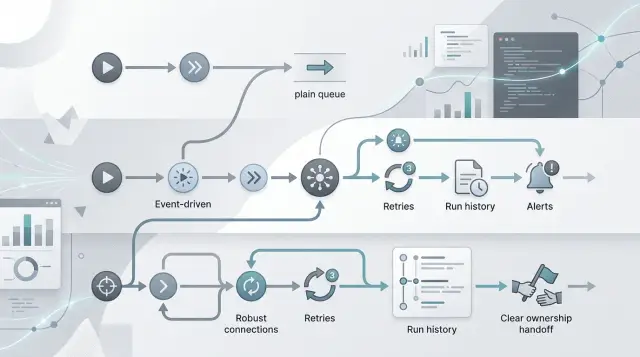
Table of Contents
Why this choice gets messy fast
Most teams do not start with workflow orchestration as a clean design problem. They start with a few background jobs, a delayed email, a webhook handler, and one product action that runs after a user clicks a button. A month later, those pieces depend on each other, and nobody can explain the full path without opening several dashboards and reading old code.
That is why the choice between Temporal, Inngest, and plain queues gets confusing so quickly. On paper, all three move work out of the request path. In practice, they decide who sees failures, who retries them, and who gets blamed when a customer gets two emails, misses an onboarding step, or gets charged twice.
Retries sound like an engineering detail, but customers feel them first. If a job sends a welcome email twice, updates a shipment late, or runs a billing step after the user already canceled, the problem stops being abstract. A retry policy is a product decision hiding inside a technical setting.
Ownership makes the mess worse. When work fails, someone still has to answer four simple questions: who notices first, who reruns it safely, who decides whether the step should retry or stop, and who explains the issue to support or the customer.
Tool names can hide that operating work. A queue looks simple until the team needs delays, deduplication, audit history, and manual replay. An event tool looks friendly until people assume it handles every edge case for free. A workflow engine looks safe until the team realizes it now owns a deeper system with stricter patterns.
This is where small product teams get stuck. They are not picking a library. They are deciding how visible failures will be, how much logic will live in code versus the tool, and how much daily care the system will need. That choice gets expensive long before traffic gets large.
What plain queues do well
Plain queues work best when each job is small, clear, and independent. A worker pulls one job, does the work, marks it done, and moves on. That model is hard to beat when the task takes seconds, not hours, and when one failed job does not put the whole product flow at risk.
That is why queues still make sense for a lot of everyday product work. They keep workers small, cheap to run, and easy to understand. If a team already knows how the app behaves, it can often add a queue without changing much else.
They fit jobs like sending a welcome email, resizing an uploaded image, retrying a webhook, or generating a PDF after checkout. These tasks usually have one clear input and one expected result. You do not need a large orchestration layer for that. You need a worker that can pick up the job, log what happened, and try again when a temporary error shows up.
With plain queues, the app owns the hard parts. That includes retry rules, duplicate protection, and deciding when a job is safe to run again. If an email provider times out, your code decides how many times to retry and how long to wait. If the same image job gets pushed twice, your app needs an idempotency check so it does not process it twice and store extra files.
That tradeoff is often fine. Many teams prefer it because the rules stay close to product code instead of living in a separate tool. For a startup, that kind of boring is usually good.
The weakness is visibility. One queue can feel clean. Five queues, custom retry rules, and handoffs between services can turn into guesswork fast. Plain queues do well when the work is short, the path is direct, and the team is willing to own the logic in the app.
Where Inngest fits
Inngest works well when a workflow starts with product events and one team wants to ship quickly. Think about signup onboarding, trial reminders, failed payment follow up, or a post purchase email flow. You write steps in code, add delays, and set retries without spending weeks building the machinery around it.
That tradeoff matters for small teams. If your engineers would rather fix the onboarding flow than babysit workers, timers, and queue tables, Inngest is a sensible middle ground. For teams that are new to orchestration, that lighter setup is often the point.
Visibility is a big reason people choose it. Runs, step failures, and retry attempts sit in one view, so the team can answer "what happened to this user?" without jumping across logs, cron jobs, and queue dashboards. Product people care about that almost as much as engineers do, because they can trace a broken flow before it turns into a support thread.
Retry logic also stays close to the work. A team can say "retry this API call three times," wait ten minutes, then move to the next step. If it needs a reminder two days later, it can model that directly. Plain queues can do the same thing, but teams often end up stitching together extra workers, timer jobs, and status tables to get there.
Inngest fits best when one product team owns the workflow end to end. The same group defines the event, writes the steps, watches failures, and fixes strange cases. A small SaaS team is a good example. Signup triggers onboarding emails, account scoring, and a sales alert if the user reaches a usage threshold. One team can build that, watch it, and change it next week without asking an infrastructure team for help.
It fits less well when many teams share one long process, or when execution rules need tight control across services. In those cases, a heavier tool may earn its cost. But for event driven product flows with clear ownership, Inngest often gives teams enough retry logic and enough visibility without pulling them into a lot of operations work.
Where Temporal fits
Temporal makes sense when a workflow lasts a long time and failure is normal, not rare. If a process runs for hours, days, or weeks, a simple queue often starts to feel brittle. Temporal keeps workflow state, knows which step already finished, and knows where to continue after a restart.
That changes how you build product flows. You can model a real business process instead of stitching together timers, status flags, and cleanup scripts. A worker can stop in the middle of the flow, come back later, and continue without losing progress.
The fit gets stronger when the flow has many ordered steps, waits on people or outside systems, needs different retry rules for different actions, and the team is ready to own another piece of infrastructure. Those conditions matter more than any feature comparison page.
Temporal is especially useful for approvals, long waits, and deadlines. Imagine a customer submits a financing request. The app checks documents, waits for human review, sends the case to a bank partner, waits up to 72 hours for a reply, and escalates if nothing comes back. That is awkward with plain queues. Temporal handles it cleanly because waiting is part of the workflow instead of a patch around it.
Its recovery model is also strong. If a worker crashes after step four, you do not have to guess what happened or scan logs to rebuild state. Temporal replays workflow history and resumes from a safe point. That can save a team from duplicate charges, repeated emails, or half finished account changes.
The tradeoff is ownership. Temporal is not a small helper library. Someone needs to understand workflow design, worker versioning, and day to day operation. Teams that already treat workflows as product logic usually accept that cost. Teams that only need a few background jobs usually do not.
If the workflow itself is part of the product, Temporal often earns its keep. If it is just glue around a handful of tasks, it can feel heavy fast.
Match the tool to retries, visibility, and ownership
Most teams choose a workflow tool by features. A better filter is ownership. If nobody owns retry limits, failure review, and late night fixes, even the nicest orchestration setup will create confusion.
With plain queues, your team sets the rules in code. That includes how many times a job retries, how long it waits between attempts, when it moves to a dead letter queue, and how you prevent duplicate work. This is often fine when the same engineers who built the workers also watch the logs and can fix issues quickly.
Inngest works well when you want clearer run history and simpler failure visibility without taking on a full workflow engine. A product manager or support lead can often inspect what failed, when it failed, and whether it retried, all in one place. That makes sense for product flows where delays are annoying but rarely dangerous.
Temporal asks for a stronger owner, and that is not a bad thing. It fits cases where work runs for a long time, depends on several steps, or must recover in the right order every time. But someone still has to own workflow versions, worker health, and stuck executions. If no one wants that job, Temporal will feel heavier than the problem.
Before you choose, ask a few blunt questions. Who sets retry limits and backoff rules? Where do people inspect failed runs? Who fixes stuck work after hours? Can the team understand a failure without opening five tools?
A signup flow makes this easy to judge. If one failed welcome email is a minor issue, a queue or Inngest may be enough. If signup also creates billing records, provisions accounts, and syncs data to other systems, Temporal may be the safer choice.
The lightest tool that matches real ownership usually wins. Pick the one your team can operate at 11 p.m., not just the one that looks clean in a diagram.
A realistic example
A refund flow looks simple until one order touches three teams. A customer asks for money back after a duplicate charge. The product needs to refund the payment, send a confirmation email, and leave a note for support so the next agent sees what happened.
A plain queue is often enough when each step finishes quickly and each job can stand on its own. One worker calls the payment provider. Another sends the email. A third writes the support note. If the email fails, you retry that job a few times and move on. One engineer can own this without building much extra logic.
That changes when the team wants better visibility. Support may ask, "Did the refund start, fail, or finish?" Product may want a follow up email two days later if the payment provider still shows the refund as pending. Inngest fits this kind of flow well. You get a clear run history, timed pauses, and an easier way to see what happened for one order without digging through queue logs.
Temporal makes more sense when the refund must wait on something outside your app. Maybe refunds above $500 need finance approval. Maybe the payment provider sends a webhook hours later. Maybe support can cancel the refund while it is still waiting. Then the workflow needs durable state and a clean way to pause, resume, retry, and react to events over time.
This is why the same refund flow can move through three stages as a product grows. It may start with plain queues when the work is short and mostly fire and forget. It may shift to Inngest when the team wants run history and timed follow ups. It may end up in Temporal when approvals, webhooks, and human decisions become normal.
The answer often changes when support needs live status. Once agents need to open an order and see "refund pending approval" or "email failed, retrying," visibility stops being a nice extra. It becomes part of the product.
Mistakes teams make early
Teams arguing about workflow tools often skip the boring part first: define failure before you buy orchestration. If a step times out once, do you retry in 30 seconds, ask a human, or stop and mark it failed? Without rules like that, a more advanced tool just gives you a nicer dashboard for confusion.
Teams also hide workflow state in random places. One flag sits in a jobs table, another in app logs, another in a payment provider, and the rest live in someone's head. Then nobody can answer a simple question like "Did the order ship, or did the email just fail?"
Retries cause the most expensive damage. Teams often retry every error the same way, even after a step already changed money or data. That is how you charge a card twice, create duplicate invoices, or send the same account update again.
Payment steps, refunds, inventory writes, and customer emails need extra care. Those actions need idempotency, deduplication, or a manual review point before the system tries again. Skip that work and retry logic turns a small outage into a customer problem.
Many teams leave support out until the first angry customer arrives. When a user asks what happened, support should see when the job started, which step failed, what the system tried, and whether a person stepped in. If every stuck case still needs an engineer reading logs, the process is broken.
Ownership gets messy fast too. Product defines the flow, engineering owns the queue, operations handles incidents, and nobody owns the rules when something goes wrong. One person needs the final say on timeouts, retry logic, manual recovery, and when a workflow is safe to resume.
That owner does not need to build the whole system. They just need to make the call when failure gets expensive, customer facing, or both.
How to choose without overthinking it
The choice gets much easier when you stop comparing products and map one real workflow on paper. Pick a single flow, such as "user pays, account gets created, a human reviews the setup, and the welcome message goes out." Write every step from trigger to final result.
Then mark how each step behaves. Some steps should finish in seconds. Some wait for a timer, a webhook, or a batch job. Some stop until a person approves the next move. That split matters more than feature lists.
After that, write the failure story in plain language. What happens after one failure? After three? After ten? If the answer stays simple, like "retry a few times, then alert someone," a queue may be enough. If different steps need different retry rules and you want a clearer history, Inngest starts to fit. If the workflow must survive long waits, code changes, and strict recovery rules, Temporal usually fits better.
One more check changes the decision quickly: who needs status besides engineers? If only developers care, logs and a queue dashboard may be fine. If support, operations, or a founder needs to answer "where is this stuck?" then visibility becomes part of the product, not just part of the backend.
Pressure test the workflow before you commit to a tool. Write the whole flow on one page. Ask someone outside engineering to read the status of a run and explain whether it is waiting, retrying, or failed. Take one real failed run and replay it from start to finish. Put a hard cap on retry cost so a bug cannot hammer an outside service all night. Then ask who will still be operating this next year.
If you cannot do that in ten minutes for a simple flow, do not add more orchestration yet. The process itself is still fuzzy, and a bigger system will only hide that problem.
Start with one pilot
Do not move ten workflows at once. Pick one that already causes enough pain to be worth fixing, but is still small enough to watch closely. A refund flow, signup follow up, or failed payment recovery is usually a better pilot than your whole order pipeline.
Run that pilot for a few weeks and watch the work around the workflow, not just the workflow itself. The useful signals are boring but honest: how often the flow stalls or duplicates work, how many minutes someone spends repairing a failed run, how often support needs help explaining status, and who actually notices a problem first.
If plain queues handle the pilot with clear retry logic and enough visibility, keep them. If Inngest gives you better run history and easier replay without much overhead, that may be the right step. If Temporal fixes long running state, handoffs, and recovery that your team keeps getting wrong, the extra setup may be fair.
Leave yourself room to switch later. Keep business rules separate from the orchestration layer, and avoid scattering tool specific code across the whole product. That one decision makes future changes much cheaper.
A small pilot tells you more than a month of architecture meetings. You will see who owns failures, how hard reruns feel under pressure, and whether the tool helps or just adds another system to babysit.
If you want a second opinion before committing, Oleg Sotnikov at oleg.is offers Fractional CTO advisory for startups and small teams that need help with product architecture, infrastructure, or AI-first development. A review of one workflow is often enough to spot whether the real issue is the tool, the retry model, or unclear ownership.
Frequently Asked Questions
How do I choose between plain queues, Inngest, and Temporal?
Start with one real flow, not a feature chart. If the flow has short, independent jobs, use plain queues. If it starts from product events and you want run history with delays and retries in one place, pick Inngest. If the flow waits on people or outside systems for hours or days and must resume in the right spot, pick Temporal.
When is a plain queue enough?
Use a plain queue when each job does one clear task and finishes fast. Good examples include sending one email, resizing an image, retrying a webhook, or creating a PDF after checkout.
This works well if your team is happy to own retries, duplicate protection, and logs in the app code.
When should I use Inngest?
Pick Inngest when product events drive the flow and one team wants to ship fast. It fits onboarding, reminders, failed payment follow-up, and other event-based sequences with delays and retries.
It also helps when support or product people need to see what happened without digging through several systems.
When does Temporal make sense?
Reach for Temporal when the process runs for a long time and failure happens often. It fits approvals, long waits, webhook-driven steps, and flows that must pause, resume, and recover in order.
It asks more from the team, so it pays off only when the workflow itself matters to the product.
What is the biggest retry mistake teams make?
Do not retry every error the same way. If a step already touched money, inventory, or customer data, a blind retry can create duplicate charges, duplicate invoices, or repeated emails.
Add idempotency or a manual check around risky steps before you raise retry counts.
Why does workflow visibility matter so much?
Visibility stops being a nice extra once someone outside engineering needs answers. Support needs to know whether a run is waiting, retrying, or failed so they can explain the issue without asking an engineer to read logs.
If people must open five tools to understand one customer problem, the setup is already too hard to run.
Who should own workflow failures?
One person or one small group should own retry limits, failure review, manual reruns, and after-hours fixes. If product writes the flow, engineering owns the workers, and nobody makes the final call on failure rules, confusion shows up fast.
Clear ownership matters more than a long feature list.
Can I start with queues and switch later?
Yes, many teams should do exactly that. Start simple, learn where retries break down, and move only when the flow needs more state, timing, or recovery than queues handle cleanly.
Keep business rules separate from the orchestration layer so you do not lock the whole product to one system.
What workflow makes a good pilot project?
Choose one flow that already hurts but stays small enough to watch closely. Refunds, signup follow-up, or failed payment recovery usually work well because they touch real customers without dragging in the whole product.
Run it for a few weeks and watch stalls, duplicate work, repair time, and how often support asks for help.
How can I tell that my current setup is no longer enough?
Watch for a few common signs. People cannot explain a failed run without opening old code, retries create customer-facing mistakes, support asks engineering for status, or the flow depends on timers, approvals, and outside events.
When that starts happening, your team needs more than a simple background job setup.


