Technical operations dashboard for founders
Build a technical operations dashboard that shows uptime, release flow, and cloud spend in a few charts founders can review in minutes.
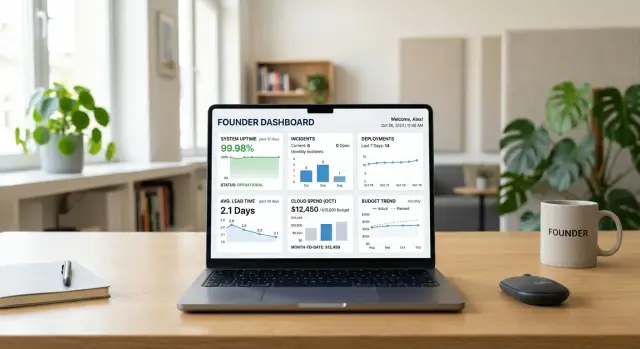
Table of Contents
Why most dashboards create more noise
Most dashboards get crowded for a simple reason: teams keep adding charts and almost never remove them. One graph helped during an outage. Another helped during a cost review. A third came from a weekly engineering meeting. Six months later, the screen looks busy, but the founder still cannot tell whether the business is safe.
Too many charts hide real problems. Urgent signals end up sitting next to side metrics that matter only during an investigation. A small change in cache hit rate might matter to an engineer. It usually does not matter to a founder at 8:30 on a Monday morning. When every line moves, nothing feels clear.
Detail and signal are different jobs. Detail helps people investigate. Signal helps people decide. The first screen should not try to do both.
For most founders, the dashboard should answer four questions fast:
- Is the product working for customers right now?
- Is the team shipping at a healthy pace?
- Did costs jump enough to need action?
- Does any problem need a decision today?
If a chart does not support one of those decisions, move it off the main view. Keep it on a deeper page for the team that uses it.
This matters even more in lean companies. A small team might watch uptime in Grafana, errors in Sentry, deployments in CI, and cloud spend in billing tools. Each view has useful detail. Put all of that on one founder screen and it becomes a control room nobody wants to read.
A good dashboard is quick to scan. Five minutes should be enough. A founder should open it, spot risk, ask one or two sharp questions, and move on.
That means fewer charts, clearer thresholds, and almost no vanity metrics. Total requests, raw log volume, and long tables of service stats often look serious, but they rarely help with a business decision. The best dashboard leaves things out on purpose.
The three questions your dashboard should answer
Most founders do not need a wall of charts. They need a dashboard that answers a few plain questions quickly. If a chart does not help answer one of these, cut it.
- Does the service work for customers today?
- Does the team ship changes at a steady pace?
- Do costs stay within a sensible range?
The first question keeps the dashboard tied to reality. Customers do not care how busy the team is if logins fail, pages time out, or jobs get stuck. A founder should be able to glance at the screen and know whether the product is up, fast enough, and stable enough for normal use.
The second question is about delivery flow, not heroics. You want to see whether the team releases work regularly, whether lead time is getting longer, and whether incidents spike after releases. A steady pace usually beats short bursts followed by cleanup. If shipping slows for three weeks, leadership should see it early.
The third question keeps growth from turning into waste. Cloud bills, software tools, and AI usage can drift upward long before anyone notices. One clear cost view, compared with budget or a normal range, tells you whether spend still fits the stage of the company.
These questions also protect the dashboard from clutter. Many charts look useful but add nothing to a decision. A graph with six months of CPU detail may interest engineers, but a founder often needs one answer: are we healthy, shipping, and spending as planned?
That filter keeps reporting honest and makes weekly review much faster.
Charts that show service health
A founder does not need a wall of monitoring data. Four charts can usually show whether the product feels stable to customers and whether the team fixes trouble fast.
Start with uptime against a simple target. Pick one target, such as 99.9%, and show the result for each week or month. Avoid arguments over tiny decimal changes. If the service missed the target twice in a quarter, that is already enough to start a useful conversation.
Next, track incidents over time. A weekly chart works well for teams that ship often. A monthly chart works better if the product changes more slowly. Count only incidents customers could actually feel, such as outages, severe slowdowns, or broken login and payment flows. If every minor alert becomes an incident, the chart turns into noise.
Put mean time to recover next to incident count, not inside an ops tool. If the team had three outages last month and needed 12 minutes on average to restore service, that says much more than a raw alert total. Fast recovery does not erase downtime, but it shows whether the team can limit the damage.
The last chart should follow the product path that keeps the business running. For a SaaS product, that might be login, dashboard load, and save. For an ecommerce app, it might be product page to checkout. Show response time or error rate for that path.
A compact service health section usually includes:
- uptime versus target by month
- customer incidents by week
- average recovery time by month
- response time or error rate for the product path that matters most
If one of those charts moves in the wrong direction, leadership can ask better questions right away. If all four stay steady, you probably do not need more service health charts on the founder screen.
Charts that show delivery flow
The dashboard should also tell founders whether the team ships steadily or gets stuck. Four charts usually cover that well, and each one answers a different question.
Start with deployments over time. A simple daily or weekly count shows the team's shipping rhythm fast. If releases fall from 15 a week to 4, something changed even if nobody raised a flag. For most small teams, a rolling four week trend works better than a noisy day by day chart.
Then track lead time from commit to production. This shows how long code waits before users get it. Use the median, not only the average, so one ugly outlier does not hide the normal pattern. If median lead time jumps from one day to six, founders should ask where work is waiting: code review, testing, approvals, or deployment.
Change failure rate needs plain language. Do not show a percentage and expect leadership to decode it. Say "2 of the last 18 releases caused a rollback, hotfix, or customer issue." That is easier to read than 11.1%.
If releases slow down, add one more chart that shows friction. Pick only one, based on where the team actually gets stuck. It might be blocked work by week, cycle time by issue type, review wait time, or deployment queue time. If you add all of them, the signal disappears.
A small software company can read these charts in five minutes. You might see deployments stay flat while lead time doubles and blocked work climbs. That usually means engineers still finish code, but handoffs or approvals are dragging out the release.
That pattern shows up in lean teams using a lot of AI tools too. The fix is rarely a bigger dashboard. It is usually a smaller change, such as tighter review rules, better test automation, or fewer release gates.
Charts that show spend
A founder does not need a finance report every morning. You need a few clear charts that show whether costs are stable, why they moved, and whether the business can support them.
Start with one monthly chart for total infrastructure spend. Monthly data is usually enough because daily cost swings create noise. Put the last 6 to 12 months on one line so trends are easy to spot.
Next to that total, add a small breakdown. Keep the buckets simple. Most teams can use three or four: cloud and hosting, software tools, outside vendors or contractors, and one time purchases.
If you create ten categories, people stop reading. If cloud spend jumps, leadership should see that jump in seconds without opening a spreadsheet.
Show cost relative to business activity
A rising bill is not always bad. If active customers doubled, a 20% increase may be perfectly fine. That is why cost per customer, cost per active account, or cost per order often tells a better story than raw spend alone.
Pick one ratio that matches how the company makes money. Keep it stable over time so the chart means the same thing every month. If you change the formula every quarter, people stop trusting it.
This view matters most for small software companies. A founder can accept higher spend when each new customer still improves margins. A founder should worry when customer count stays flat but infrastructure and tool costs keep climbing.
Mark spikes and name the cause
Every unusual spike needs a note on the chart. Do not leave leadership guessing. Write the cause in plain language: "annual security tool renewal," "temporary load test," or "extra GPU usage for a new AI feature."
Those notes prevent bad decisions. Without them, a normal annual payment can look like a spending problem, or a real waste problem can hide inside a busy month.
A simple example: a SaaS team sees cloud spend jump 35% in one month. The note explains that engineers left an old staging cluster running after a release. That is a fixable mistake, not proof that growth is getting too expensive.
When these charts stay clean, founders can ask the right question fast: are we growing, wasting money, or spending more on purpose?
How to build it step by step
Start with decisions, not charts. A founder does not need a wall of graphs. They need a small dashboard that helps them choose what to fix, what to fund, and what to ignore for another month.
A simple process works better than a big dashboard project:
- Write down the decisions leadership actually makes each month. Common examples are whether delivery is slowing down, whether reliability needs attention, and whether cloud costs are rising faster than revenue.
- Match each decision to one chart. If a chart does not help someone act, cut it.
- Use weekly or monthly views for most charts. Founders need trends, not minute by minute movement. Real time panels belong on the team dashboard, not the leadership view.
- Put a short note under every chart. Say what it means and what action follows if it moves the wrong way. One sentence is enough.
- Review the whole dashboard after a month. If nobody used a chart to make a decision, remove it.
The note under each chart matters more than many teams expect. A graph without context invites debate about the graph itself. A short note keeps the conversation on action. For example: "If failed deploys rise for two weeks, pause feature work and fix the build pipeline."
Weekly and monthly views also make spend easier to read. A daily cloud bill can jump for harmless reasons and then drop again. A weekly trend shows whether costs are actually creeping up.
Teams that run lean infrastructure often learn more from cost per customer or cost per release than from raw spend alone. That is one reason founders sometimes ask advisors like Oleg Sotnikov at oleg.is to review their reporting. A second pair of eyes can often spot a noisy metric or a missing cost ratio faster than the team inside the system.
Keep the first version small. Four to six charts are enough for most small software companies. If leadership still asks the same question after looking at the dashboard, add clarity, not more panels.
A simple example from a small software company
Imagine a SaaS startup with 20 people and one product. The founder does not want a wall of graphs. She wants a small dashboard that tells her whether the product is healthy, the team is shipping, and costs still make sense.
For a while, the numbers look calm. The team usually ships four times a week. Small bugs get fixed the same day. Cloud costs move up and down a little, but nothing looks strange.
Then release speed starts to slip. Deployments drop from four a week to one. The time from approved code to production grows from two days to six. Customers have not complained yet, and revenue still looks normal, but the delivery flow already says something is off.
A second chart shows the same pattern from another angle. Average recovery time after incidents jumps from 18 minutes to just over an hour. The change started right after the team switched alerting tools and changed where logs go. Nobody broke the product in a dramatic way. People just need longer to find the problem and decide who should fix it.
At the same time, the spend chart turns upward. The cloud bill rises by 28% in one month even though traffic stays flat. A background job now runs far too often after a config change. Each run is cheap, so nobody notices at first. Together, those extra runs eat money every day.
The founder only needs a few charts to spot the pattern:
- deployments per week
- time from code approval to release
- average incident recovery time
- cloud spend by service
- background job volume
Seen one by one, these changes look small. Seen together, they point to the same cause: a tooling change created slower releases, slower incident response, and wasted compute.
That is why a small dashboard works better than a giant one. The founder can ask one clear question on Monday morning, stop the drift early, and give the team two days to fix the alerts, tune the job schedule, and get releases moving again.
Mistakes that make the dashboard less useful
A dashboard loses its point when one chart tries to answer two different questions. Customer health and team activity should not live in the same view. If a graph mixes uptime, page load time, and story points closed, nobody knows what action to take when the line moves.
Vanity numbers are another common problem. "Total tickets opened" looks busy, but it tells a founder very little. A spike might mean growth, a broken release, or a team that logs tiny tasks as separate tickets. Ticket age, reopen rate, and customer incidents give a much cleaner signal.
Teams also keep adding charts because the dashboard feels too small without them. That usually ends with a screen full of graphs nobody mentions in meetings. If a chart does not help someone make a decision, remove it. The dashboard should earn its space.
Spend often gets buried inside one blended number, and that hides the real issue. A flat monthly total can look fine while cloud usage climbs, observability tools spread, or AI API costs double. Split spend into a few simple buckets so leadership can see what changed and why. Teams using a lot of AI need that detail to catch waste early.
Definitions drifting over time can quietly ruin the whole dashboard. If one quarter counts every support issue as an incident and the next quarter counts only outages, the trend line stops meaning anything. The same goes for deployment frequency, lead time, and production issues.
Keep a short note for each metric that says what it measures, where the data comes from, how often it updates, and who owns the definition. That small habit prevents arguments later. It also makes founder reporting more useful because people spend less time debating numbers and more time fixing what the numbers show.
A quick checklist before you share it
A founder dashboard fails when people need a tour guide to read it. If a chart needs a long setup, cut it or rename it until the point is obvious.
Use a quick test before you send it to leadership:
- Ask someone outside the ops team to explain each chart in one sentence. If they cannot, the chart is too busy, too vague, or labeled badly.
- Check that every chart points to an action. If error rate goes up, who investigates it? If deploy time gets worse, what changes?
- Remove duplicate views of the same problem. Error rate, incident count, and support volume can all matter, but they should not repeat the same message three times.
- Time the review. A founder should scan the dashboard in under 10 minutes and leave with a clear read on service health, delivery flow, and spend.
- Make sure the numbers will still mean the same thing next month. If teams count incidents differently, trust drops fast.
A small example makes this easy to see. If you already show failed deployments by week, you may not need another chart for rollback count unless it adds a different signal. If both lines move together every time, one of them can go.
Teams often think more charts mean better founder reporting. Usually the opposite is true. The best dashboard feels a little spare. It gives leadership enough to spot trouble early, ask better questions, and move on with the day.
What to do next
Start small. A dashboard with four charts you trust is better than 12 that need excuses.
Use numbers that already come from systems your team relies on every day. If your uptime chart comes from monitoring you trust and your cloud spend comes straight from billing data, keep those first. If a delivery chart still needs manual cleanup every week, leave it out until the team can make it consistent.
Put one person in charge of the dashboard. That person does not need to own every system, but they should own the definitions, update rhythm, and follow-up when a number moves. When someone asks what counts as a failed deploy or what sits inside monthly infrastructure spend, one clear answer saves a lot of wasted time.
Keep the review on a fixed schedule. Look at the same dashboard in the same meeting each month, with the charts in the same order. That simple habit makes changes easier to spot. A rise in errors, a slower delivery pace, or a jump in spend stands out faster when the view stays stable.
Resist the urge to add more charts just because you can. If a chart does not help a founder judge service health, delivery flow, or cost direction, cut it. Most dashboards get worse when they try to answer every question at once.
If you want help shaping that founder view, Oleg Sotnikov at oleg.is can review the setup as a fractional CTO or advisor. He works with startups and smaller companies on lean infrastructure, AI driven development workflows, and practical reporting, so the dashboard ends up being something leadership will actually use.
Frequently Asked Questions
How many charts should a founder dashboard have?
Most small software companies should start with 4 to 6 charts. That is usually enough to show service health, delivery flow, and spend without turning the screen into noise.
If leadership still asks the same question after looking at it, improve the chart or note first. Do not add more panels by default.
What should a founder dashboard answer first?
It should answer three things fast: does the product work for customers today, does the team ship at a steady pace, and do costs stay in a sensible range.
A fourth check also matters: does anything need a decision today. If a chart does not support one of those calls, move it off the founder view.
Should founders watch real-time metrics?
Usually no. Founders need trends they can scan in a few minutes, so weekly or monthly views work better on the main dashboard.
Real time panels belong on the team dashboard for people who handle incidents and deployments during the day.
Which service health charts matter most?
Start with uptime against a clear target, customer-facing incident count, average recovery time, and response time or error rate for the product path that matters most.
That gives a fast read on whether customers can use the product and whether the team fixes problems quickly.
How should I show delivery flow?
Use a small set: deployments over time, median lead time from commit to production, and change failures written in plain language. If the team gets stuck in one place, add one friction chart such as review wait time or blocked work.
This shows whether shipping stays steady or slows down before customers start complaining.
What is the best way to track spend on the dashboard?
Keep cost reporting simple. Show monthly total infrastructure spend, a small breakdown by bucket, and one ratio such as cost per customer, cost per account, or cost per order.
When spend jumps, add a short note that names the cause. That stops people from guessing whether the change came from growth, waste, or a one-time payment.
Which metrics usually add noise?
Vanity metrics usually create noise. Raw request totals, log volume, long tables of service stats, and ticket counts often look serious but rarely change a founder decision.
Mixed charts also cause trouble. If one graph blends uptime, story points, and page speed, nobody knows what action to take.
How often should leadership review the dashboard?
Review it on a fixed schedule, usually once a month for leadership. Keep the same chart order each time so changes stand out fast.
The scan should take under 10 minutes. If the team needs a long explanation every month, the dashboard needs less clutter or clearer labels.
Who should own the dashboard?
One person should own the dashboard. That person keeps the metric definitions clear, makes sure the data updates on time, and follows up when a number moves.
They do not need to own every tool. They just need to give one clear answer when someone asks what a metric means.
When should we remove a chart?
Remove or change a chart if nobody uses it to make a decision, if it repeats another chart, or if people argue about what it means every time they see it.
A good test is one month of use. If the chart never led to a question or action, it does not deserve space on the founder screen.


