Tailscale vs WireGuard vs VPN appliance for small teams
Tailscale vs WireGuard vs VPN appliance: compare setup time, access rules, and support work so a small team can choose the right fit.
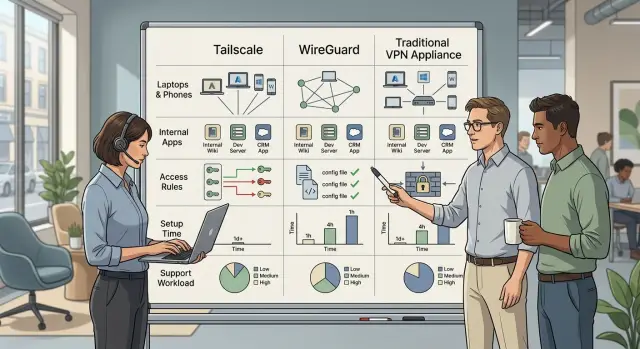
Table of Contents
Why small teams get stuck on remote access
Small teams usually start with a simple need. A few people need access to a few private tools: an admin panel, a staging app, maybe a server dashboard. There is no full-time IT team, so the person who knows the most about tech patches something together.
That first fix often works well enough. Someone opens a port, installs a basic VPN, or shares a quick rule that gets everyone connected. Then the team changes. A new hire needs access on day one. A contractor needs temporary access. Someone gets a new laptop. A tool moves to another host. Someone leaves and access should end right away.
That is when the quick fix turns into weekly cleanup. People forget who can reach what. Rules end up buried in chat or stuck in one person's memory. One login problem can easily burn 30 minutes, which is a lot when support is nobody's real job.
The Tailscale vs WireGuard vs VPN appliance decision is about more than getting a tunnel working. Setup speed matters because teams need something running now. Access control matters because not everyone should reach every tool. Support matters too, because a setup that saves an hour today can quietly waste many more over the next few months.
The best choice is usually the one your team can keep clean without thinking about it every day. If access is clear, easy to change, and easy to shut off, people spend less time fixing login problems and more time doing actual work.
What each option actually is
Small teams want the same basic outcome: safe access to internal tools without making daily work annoying. Tailscale, WireGuard, and a VPN appliance all aim at that goal, but they split the work very differently.
Tailscale is easiest to understand as a managed access layer. Each person installs an app, signs in with an identity provider such as Google or Microsoft, and their device joins a private network. It uses WireGuard under the hood, but you do not have to build most of the access logic yourself. For a small team, that usually means less setup and less day-to-day maintenance.
WireGuard is the tunnel itself. It is a fast, simple VPN protocol, not a full access system with user management wrapped around it. You create the tunnel, exchange keys, decide which devices can talk to which addresses, and keep the configuration in order over time. That gives you more control, but it also gives you more manual work.
A VPN appliance is the traditional route. It can be a physical device in the office or a virtual gateway in the cloud. People connect to that central point first, and it decides what they can reach. Many IT teams like this model because rules, logs, and user control live in one place. The trade-off is obvious: you now own another system that needs updates, policy checks, and support.
These are not three unrelated products. They solve the same problem: private access to internal apps, admin panels, file shares, or databases. The difference is where the management lives.
- Tailscale puts more of the management into a service.
- WireGuard gives you the core building block and leaves the rest to you.
- A VPN appliance puts control into one gateway.
That choice shapes setup time, access rules, and how often your team gets interrupted later.
Compare setup time for the first working setup
Most small teams can get a basic remote access test running faster than they expect. The trouble starts when that quick test has to keep working every day for several people, on different devices, without one person babysitting it.
Setup time depends less on the product than on what you already have ready. Things move faster when you know who needs access, where the internal tools live, who can change DNS and firewall rules, and whether your team already uses Google, Microsoft, or another identity provider.
Tailscale is usually the fastest way to get a first connection working. If team members already have supported login accounts, one person can install the client, add a server, and test access in about 15 to 30 minutes. It slows down when you need subnet routing, custom DNS, tighter policies, or a clean offboarding process.
WireGuard can also be quick, but only for a simple tunnel. If one admin is comfortable with the command line and already has a server with a public IP, a basic connection between two machines can work in 20 to 40 minutes. The extra time shows up later, when you need to manage keys, IP ranges, firewall rules, DNS, and every new laptop or phone by hand.
A VPN appliance usually takes the longest to stand up. Even a virtual appliance needs a place to run, admin access to the network, and time to open ports, import users, and configure clients. A basic proof of concept can fit into an hour if the network is tidy. Real setups often take longer because routing and firewall changes tend to expose old network mess.
The bigger point is this: a quick test is not the same thing as a setup you can trust every day. One successful login proves very little. A working daily setup needs stable DNS, clear access rules, a simple way to remove a user, and onboarding steps another person can follow without guessing.
That is where teams lose time. Networks overlap. DNS points to the wrong place. Firewall rules allow one app but block another. Onboarding drags because each device needs slightly different steps.
If your only goal is the first successful connection, Tailscale usually wins. If you want full control and do not mind manual work, WireGuard stays lean. If your team already runs a managed network and wants everything behind one gateway, a VPN appliance can fit, but it rarely feels fast on day one.
Look at access rules before you choose
Access rules shape daily life more than setup time does. A small team can live with an extra hour of setup. It struggles when nobody knows who can reach which tool.
Tailscale usually starts from the user. A person signs in, joins approved devices, and gets access based on identity and policy. That maps well to how teams actually work, because people change roles far more often than private keys change.
WireGuard starts from the device. You approve peers, keys, and routes. That is clean and efficient for a small, stable setup, but it does not answer a simple question very well: "What can Sam access right now?"
A VPN appliance depends on the model and how much care you put into it. Some support user groups and directory sync. Many small teams still end up with one tunnel that opens a large part of the internal network after login.
That is where problems start. If someone only needs one admin panel, giving them access to the whole subnet is more than they need. Per-app access is usually easier to explain, easier to review, and easier to clean up later.
Adding and removing people also feels different across these options. With Tailscale, you can usually remove a user and cut off access across approved devices in one step. With WireGuard, you often remove several keys, update configs, and make sure no old device still has a valid path in. A VPN appliance can be smooth if you tied it to your identity system from the start. If you did not, offboarding often turns into a checklist that lives in someone's head.
A few problems show up again and again. Service accounts need their own rules instead of hiding behind one employee login. Shared logins save a few minutes and create confusion for months. Contractors need shorter access windows and tighter scope than employees.
Tailscale usually handles these cases more cleanly because it gives you a simple way to separate users, devices, and tagged services. You can build the same result with WireGuard, but you will do more work yourself. With a VPN appliance, teams often settle for broad group rules and live with them longer than they should.
If you are weighing these options, ask one direct question: do you want people to access a network, or do you want each person to access only the tools they need? Small teams often regret choosing the first model once the team grows a bit and outside help joins the mix.
Measure the support burden week to week
Most remote access trouble starts after the first successful login. The same jobs keep coming back: adding and removing people, replacing a lost laptop, fixing a route that stopped working, and checking who still has access.
The support messages are painfully predictable:
- "I can't reach the staging app anymore."
- "My laptop is gone, please block it."
- "Can you add the new contractor today?"
- "Why did access stop after I changed networks?"
- "Who can still reach the admin panel?"
Tailscale usually creates the lightest weekly load for a small team. If you already use Google or Microsoft for sign-in, password resets stay there instead of turning into VPN work. When someone loses a device, an admin can revoke that device and approve a new one. Most odd failures come from subnet routers, DNS settings, or an access policy blocking traffic. A generalist ops person can often fix those issues from the admin view without digging into low-level network settings.
WireGuard is clean and fast, but support work lands on the person who built it. There are no user passwords to reset unless you add another authentication layer. Instead, you manage device configs and public keys. If a laptop disappears, someone has to remove that peer, make a new config, and send it safely. The usual problem is not expiring keys. It is stale access that nobody removed. Broken routes, DNS mistakes, and config drift can take real time to debug.
A VPN appliance often lands somewhere in the middle. It can give you a familiar admin panel, but it also brings its own maintenance. Password resets and MFA issues are common if the appliance keeps a separate user list. Lost devices may mean certificate revocation, client reinstallation, or both. You also inherit firmware updates, license checks, and noisy logs that slow down troubleshooting.
Who reads the logs matters more than most teams expect. With Tailscale, a general IT lead can usually trace sign-in and policy issues. With WireGuard, the same person often needs to inspect routes, firewall rules, and server configs. With a VPN appliance, the work tends to fall to whoever knows the firewall best.
In a normal week, Tailscale asks for the least network knowledge. WireGuard asks for the most. A VPN appliance needs less hand editing than WireGuard, but it still needs someone who understands network rules and keeps the box healthy.
A simple example: five people and three internal tools
Picture a five-person company with three private tools: a staging app, an internal admin panel, and a self-hosted GitLab. An outside contractor joins for six weeks to help with front-end work. Nobody wants a full-time IT admin, but everyone still needs the right access.
The access map is simple:
- The founder uses all three tools.
- The engineer uses GitLab and the staging app.
- The designer uses only the staging app.
- The operations manager uses the admin panel.
- The finance manager uses the admin panel for billing reports.
- The contractor uses GitLab and the staging app, but never the admin panel.
With Tailscale, this setup usually stays straightforward. You put each person in a group, tag the three tools, and write clear rules. The contractor gets a short-lived account and reaches only two services. When the contract ends, you disable that identity and access stops right away. For a small team, that is often the shortest path from "nothing works remotely" to "everyone can log in today."
WireGuard can handle the same job, but you do more by hand. You create and share keys, update peer configs, and often rely on firewall rules to limit who reaches what. Onboarding one contractor is fine. Doing that over and over gets old, especially when roles change. Offboarding also depends on how carefully you remove keys and update configs across devices.
A VPN appliance fits teams that already think in terms of office networks. If someone came from a company with Cisco, Fortinet, or similar gear, the workflow will feel familiar. You can map users to groups and keep everything behind one gateway. The trade-off is upkeep. Someone has to patch it, watch logs, renew certificates, and answer the "why can't I connect?" messages.
This kind of small access map usually makes the answer obvious. If speed matters most, Tailscale is often the easiest fit. If you want manual control and your team is happy managing configs, WireGuard still works well. If your company already has strong VPN gateway habits, an appliance may fit better.
How to decide in one afternoon
You do not need a week of testing. The choice gets simpler when you ignore feature lists and start with your actual tools, your actual people, and the person who will own the mess later.
Write down the internal tools you need to protect: admin panel, database console, staging app, SSH, file storage. Then write the names of the people who need each one. That step alone rules out bad options surprisingly often, because many teams think they need full network access when only two or three apps matter.
Most small teams should answer five questions:
- Which tools need protection right now, and who uses each one?
- Who will manage access after setup when a laptop breaks or a new hire joins?
- Do people need the whole private network, or only a few apps?
- How often do people join, leave, or switch devices?
- Which option still feels easy to run three months from now?
The third question changes the decision quickly. If people only need a few internal apps, a setup with simple user and device rules usually creates less work. If engineers need broad network access and someone on the team knows networking well, plain WireGuard can still make sense. A VPN appliance fits best when you already have someone comfortable managing gateways, updates, and user policies.
The fourth question matters more than many teams expect. If your team adds contractors, rotates devices, or removes access often, support work grows fast. A setup that saves one hour on day one can create small interruptions every week after that.
Be honest about who will handle those interruptions. In a five-person company, that person is often a founder or senior engineer. If nobody wants to babysit VPN access, pick the option with the fewest moving parts, even if it looks less powerful on paper.
If the choice still feels close, use a blunt tie-breaker: pick the setup your team can explain to a new teammate in five minutes and fix on a tired Tuesday.
Common mistakes that create extra work
Most arguments about remote access start with speed charts. For a small team, that is usually the wrong place to look. If your internal tools are a dashboard, an admin panel, and a database console, a few extra milliseconds rarely matter.
Setup friction, access rules, and support load matter every week. A team can pick the fastest option on paper and still lose hours to manual config, confused users, and messy offboarding.
One common mistake is choosing by protocol speed alone. Pure WireGuard can be fast and clean, but someone still has to manage peers, rotate keys, track who can reach what, and fix bad configs. A VPN appliance can also look cheap at first, then eat time with firmware updates, client issues, and firewall quirks.
Another mistake is giving every user access to the whole private network. That feels easy on day one and creates quiet risk later. A designer who only needs the staging CMS does not need direct access to the production database or every internal host.
Tighter access rules also reduce support work. When people only see the tools they need, you get fewer "why can I open this?" surprises and fewer accidents.
Offboarding is another place where small teams slip. Someone leaves, their laptop still has a valid client, and nobody removes the device for two weeks. That is not a strange edge case. It is normal team mess. Remove access the same day, disable old accounts, and make one person responsible for that step.
Teams also skip the boring parts: DNS, logging, and recovery notes. Then the first outage hits. People can connect to the tunnel but cannot resolve internal names, so support still gets messages. If nobody logs connection attempts, you cannot tell whether the problem is authentication, policy, or the app itself. If the admin laptop dies and the only setup notes lived on that machine, recovery gets ugly fast.
The cheapest setup on day one can cost the most to support. Saving a small monthly fee means very little if a founder spends three hours every Friday fixing access.
A simple test works well. If a new hire joins on Monday, can one person give them the right access in 10 minutes, confirm it works, and remove it just as fast later? If not, the setup needs less cleverness and more routine.
Use this quick checklist
A fast decision gets easier when you write a few facts on one page and stop arguing in the abstract. For a small team, the best option is usually the one people can use without asking for help every week.
Start with the real scope: how many people need access, how many devices they use, and which internal tools matter. Five people using one admin panel is simple. Five people using a database, staging app, and file server is not.
Separate broad admin access from normal access. In many teams, one or two people need wide control, while everyone else should only reach the tools they use.
Pick the control model early. A managed service often saves time and cuts routine support. A self-managed setup gives you more ownership, but someone has to maintain it.
Test one join flow and one leave flow with a real device. Add a user, confirm they can reach the right tool, then remove them and make sure access is actually gone.
Write one recovery plan for the bad day. Decide who can fix access if the main admin is locked out, a laptop dies, or a rule blocks the whole team.
This short exercise clears up most of the debate. Teams often compare features first, but support burden is what shows up later. If onboarding takes 20 minutes with one option and two hours with another, that difference will keep coming back.
A small example makes the point. If your team has five people, mixed laptops, and three internal tools, clean access rules matter more than fancy network tricks. If one technical person likes owning the stack, WireGuard can work well. If you want less setup and fewer support requests, a managed option will usually feel better. If you need a VPN appliance on site, count patching, updates, and lockout recovery before you commit.
Take the next step without overbuilding
Most small teams need a boring answer, not a perfect one. Pick the option that solves today's access problem with the least setup, the fewest moving parts, and rules your team can still understand six months from now.
If speed matters most, Tailscale is usually the easiest place to start. A small team can get working access quickly, and day-to-day admin stays fairly light.
If control matters most, WireGuard gives you a lean base and very little extra. That also means you manage more yourself. It fits teams that already have Linux skills, know how they want routing to work, and do not mind owning the details.
If you already depend on office networks, fixed appliances, or vendor contracts, a VPN appliance can still make sense. It often fits older setups better than newer tools do. The trade-off is simple: more hardware, more admin screens, and more support work when something breaks.
A good rule is to choose the smallest setup that covers your real needs. Do not design for a 100-person company if you have seven people today. Teams waste a lot of time building access rules for edge cases that never happen.
Review your access rules before the team adds contractors, part-time staff, or a second environment. That is usually when messy VPN choices start to hurt. A quick review now can save hours of cleanup later.
If the choice still feels fuzzy, a second opinion can help. Oleg Sotnikov at oleg.is works as a Fractional CTO and startup advisor, helping small companies sort out infrastructure, access, and technical trade-offs without overbuilding.
Frequently Asked Questions
Which option is usually best for a small team?
For most small teams, Tailscale is the easiest starting point. You get working access fast, tie sign-in to Google or Microsoft, and remove people or devices without editing configs by hand.
What makes WireGuard different from Tailscale?
WireGuard gives you the tunnel, but you manage the rest yourself. You handle keys, peer configs, routes, DNS, and cleanup when people change laptops or leave the team.
When does a VPN appliance make sense?
A VPN appliance makes sense when your company already runs office-style network gear or wants one central gateway. It fits teams that already know how to patch, monitor, and troubleshoot that box.
Which option is fastest to set up?
Tailscale usually wins on first setup. Many teams get a basic connection running in about 15 to 30 minutes if sign-in and server access already exist.
Do small teams really need full network access?
Not always. If most people only need one admin panel, a staging app, or GitLab, per-app access creates less risk and less support work than opening the full subnet.
What matters most during offboarding?
Same-day offboarding matters most. Remove the user, revoke the device, and confirm old laptops no longer connect. The longer you wait, the more likely stale access stays around.
How should we handle contractor access?
Contractors usually need short-lived access with a narrow scope. Give them only the tools they need, set a clear end date, and avoid shared logins so cleanup stays simple.
What creates the most weekly support work?
The workload shows up in routine tasks, not the first login. Lost laptops, broken DNS, route issues, and new devices all create support work, so pick the setup your team can fix quickly.
Is WireGuard still a good choice for a tiny team?
Yes, if your team has Linux skills and wants full control. It works well for a stable group with broad network needs, but it gets tiring when people join, leave, or switch devices often.
How can we choose in one afternoon?
Start with your actual tools and actual people. If one person can add a new hire in 10 minutes, confirm access, and remove it just as fast later, you picked a setup that will hold up.


