Tailscale SSH vs bastion hosts for small team access
Tailscale SSH vs bastion hosts: compare audit trails, contractor access, break-glass options, and daily setup choices for small teams.
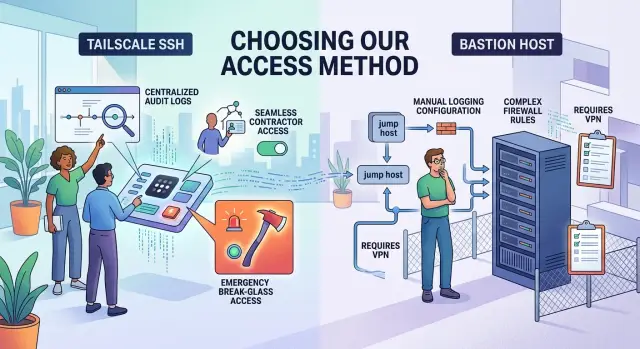
Table of Contents
The access problem in plain language
Small teams usually start with a messy mix of access habits. One founder logs in every day. An employee touches production once a week. A contractor needs two hours on Friday and then disappears for a month. If you do not sort those cases early, access turns into a pile of exceptions that nobody really understands.
Start with people, not tools. Write down every person who might need server access, even if the answer is "rarely." Include founders, technical leads, full-time staff, part-time operators, support people, contractors, and the person who handles emergencies.
Frequency matters more than most teams expect. Daily access needs a smooth path with fewer manual steps. Monthly access can be stricter because a small delay will not hurt anyone. Temporary contractor access should expire fast, or it tends to stay open long after the work ends.
Routine work and emergency work should not follow the same rules. If someone deploys code, checks logs, or restarts a service as part of normal work, give them a normal path. If someone may need to fix an outage at 2 a.m., treat that as break-glass access with tighter controls and a clear reason for use. Mixing those cases creates confusion later.
Then decide what you need to record. For most small teams, the basics are enough: who logged in, when they logged in, which server they touched, and why they had access in the first place. Some teams also need a ticket number, an approval note, or command history for sensitive systems.
That is the real choice between Tailscale SSH and bastion hosts. It is not about which tool feels newer. It is about how your team actually works. A three-person startup with one trusted engineer has a very different access problem from a small company with contractors, client data, and weekend on-call duty.
If you can name the people, the frequency, the emergency cases, and the records you need, the tool choice gets much easier.
How the two options work
Tailscale SSH gives people direct SSH access to a machine, but ties that access to a real user identity instead of a shared network path. A developer signs in with the company identity system, their device joins the private network, and the target server decides whether that specific person can connect. The big difference is that the connection can go straight to the server without a separate jump box in the middle.
A bastion host works like a guarded front door. Your private machines stay off the public internet, and people first connect to one hardened server. From there, they jump to the internal machine they need. That gives the team one place to lock down, monitor, and restrict, which is why many older setups still use it.
The logs also live in different places. With Tailscale SSH, identity and access logs usually sit in the Tailscale admin layer and often in the identity provider too. Server-side SSH logs still matter, but the approval logic usually starts with user accounts, device status, and access rules. With a bastion host, the bastion often becomes the main checkpoint for logs, session history, and command recording if the team enables it. Approval might live in IAM, VPN rules, the bastion itself, or a ticket flow.
That changes the daily work your team owns. Tailscale SSH shifts the effort toward identity rules, device trust, user offboarding, and machine-level access policies. A bastion host shifts the effort toward maintaining the jump server, patching it, hardening SSH, rotating access rules, and keeping the path from the bastion to private machines under control. In both setups, someone still needs to review who has access and remove stale accounts quickly.
Small teams often like Tailscale SSH because it removes one server and cuts setup time. Bastions need more care every week, but they can make sense when you want one narrow entry point, one place for extra controls, or a familiar model for audits.
A simple way to think about it: Tailscale SSH puts trust closer to the user and their device. A bastion host puts trust closer to one controlled machine. Neither option removes admin work. It only changes where that work lives.
What audits usually ask for
Auditors usually start with a plain question: who got into which host, and when? They want a record that ties a real person to a real machine at a specific time. Shared admin accounts make that much harder, even for a very small team.
Reviews rarely depend on the tool name. Auditors care about evidence. If your setup can show user identity, login time, target host, and whether access succeeded or failed, you already cover a big part of the review.
The next question is offboarding. If a contractor leaves on Friday, how do you remove access that same day? Auditors often want proof, not promises. They may ask to see the access change in your admin system, the date it happened, and who approved it.
A few basic rules solve a lot of this. Give each person named access. Avoid shared SSH keys. Remove access in one place when work ends. Keep a dated record of who approved the change.
Logs alone are not always enough. Some teams only need login logs because they run low-risk internal servers and control commands in other ways. Other teams need session records, especially when people handle production data, payment systems, or customer infrastructure. If you cannot explain what happened after login, expect more questions.
You also need to know where approvals live. If one approval sits in chat, another in email, and a third only exists in someone's memory, the audit gets messy fast. Pick one home for access requests and removals, then use it every time.
A small startup with one founder, two engineers, and a short-term DevOps contractor can keep this simple. Give each person named access, store approvals in one ticket system, and remove the contractor on the contract end date. That is much easier to defend than trying to reconstruct events months later from scattered logs.
Working with contractors
Contractors usually expose the real difference between these setups. A full-time employee can learn your norms over time. A short-term vendor needs tight limits from day one.
The safest rule is simple: give access only to the exact hosts and services the contractor needs. If someone is fixing a CI runner, they do not need production database access. If they are updating one app server, they do not need a path to the whole private network.
Tailscale SSH often feels cleaner here because you can tie access to one person and one device, then remove it fast. A bastion host can also work well, especially if you want one controlled entry point and detailed command logs. But the bastion only helps if permissions stay narrow after login. One wide-open jump box is still wide-open access.
Short access windows matter more than teams expect. Open-ended vendor accounts tend to stay around for months because nobody wants to break something. Give access for the week, the sprint, or the ticket. Renew it on purpose if the work continues.
Before anyone gets access, settle four points: which hosts they can reach, which ports or services they need, when access ends, and who checks those accounts each week. Keep that owner explicit. Usually it is the team lead or the ops person.
Do not use shared users. Do not pass private keys around in chat. If three people log in as "admin," you lose a clean audit trail and create avoidable arguments during reviews.
Planning break-glass access
Emergency access only helps if it is boring, limited, and written down before anything goes wrong. This is where teams often find the real gap. They trust the normal login flow, but they never decide what happens when it fails.
Start with names, not roles. Pick two or three specific people who can use emergency access, and keep that group small. If six people can unlock production, you do not have a backup path. You have an extra admin path that nobody really controls.
Contractors should not hold break-glass credentials. They can support an incident, but an employee or owner should open the emergency path and stay accountable for what happens next.
A short rule works better than a long policy. Use break-glass access only when the usual login path is down, the identity provider outage blocks admins, or a live incident threatens customer data or service uptime. Add one more rule: the person who uses it must record the reason right away in the incident ticket or team log.
Store the emergency credential in a vault with a clear release process. Require approval from one named backup owner if time allows. If the problem is severe and nobody can approve, let one person open it, but require a review after the incident. The vault should log who opened the secret, when they opened it, and when the team rotated it afterward.
Test the backup path before a real outage does it for you. Run a short drill every few months. Lock out the normal admin path, use the emergency one, and measure how long it takes. If the team needs 40 minutes to find the secret or the host rejects the login, the plan is only a document.
Choose your path step by step
Start with scale, not tools. A team of four people with eight servers has a very different access problem from a team of 15 with dozens of hosts, outside vendors, and compliance reviews. Count the people, count the machines, and write down who needs shell access at all.
Then look at your record-keeping needs. If you only need to show who connected, when they connected, and which host they touched, the lighter option often wins. For many small teams, the choice is not philosophical. It is a question of whether basic access records are enough.
A practical approach works well:
- Write down team size, host count, and any audit rule you already know about.
- List special cases, especially contractors, short-term admins, and emergency access.
- Pick the lightest setup that still gives clear logs and easy offboarding.
- Add a bastion if you need one place to enforce access, approve sessions, or capture session activity.
- Review the setup after your first contractor engagement or your first real audit request.
Tailscale SSH makes sense when speed and low overhead matter most. You can get a small team working quickly, and daily admin work stays straightforward. That matters. If nobody on the team has time to babysit access systems, the simpler setup is often the safer one because people will actually maintain it.
A bastion earns its place when control needs to be centralized. That usually happens when several people share admin duties, contractors come and go, or an auditor wants one clear checkpoint for access. If you need session capture, stricter approvals, or a single door into production, the extra setup is justified.
Do not treat the first choice as permanent. Teams change fast. One contractor, one security review, or one ugly incident at 2 a.m. can show that your current path is either too loose or too heavy.
A simple team example
A five-person startup has two app servers and one database. The founder still joins production fixes, and nobody wants to spend a week building access rules before real work starts.
They begin with Tailscale SSH because it is fast to set up and easy to understand. Each employee signs in with their own identity, the servers do not need public SSH open to the internet, and the login flow stays simple.
At that stage, the choice makes sense. Three people need regular server access, the database stays private, and the team mainly wants to avoid shared SSH keys and messy manual user setup.
Then a freelance DevOps engineer joins for two weeks to clean up deployments and check backups. The team gives that person access only to the app servers, not the database, and sets a clear end date. That is a reasonable short-term setup for a small company moving fast.
Later, a client asks for audit proof. They want clear answers to basic questions: who accessed production, when they logged in, and whether the contractor still has access after the project ends.
This is where the trade-off gets real. Tailscale SSH often wins early because it removes friction. Once outside access grows, teams usually want tighter records and one place to review production entry.
The startup does not throw away the first setup. It keeps Tailscale SSH for the core team because daily work is still easier that way. Later, it adds a bastion host for contractor and production access that needs more formal tracking.
That split fits a team at this size. Employees keep quick access for normal admin work. Contractors go through the bastion. The database stays behind stricter rules, and client-facing audits have one clear place to check.
The lesson is simple: start with the setup that matches the team you have now, then add structure when more outsiders touch production.
Mistakes that cause trouble later
Access choices rarely fail on day one. They fail months later, when a contractor still has entry, an auditor asks for proof, or the only person who can get in is asleep with a dead laptop battery.
Most of the mess comes from habits, not tools. Small teams start with one shortcut, then keep stacking exceptions until nobody knows which path is still active.
One common mistake is putting employees and contractors in the same access group. It feels faster at first. Later, a short-term contractor keeps broad permissions because nobody wants to untangle shared rules. Separate them early, give contractors narrower access, and set end dates before work starts.
Old SSH keys are another quiet problem. Teams offboard someone from Google Workspace, GitHub, or Tailscale, then forget the keys still sitting in authorized_keys on a few servers. That leaves a back door behind. If you use Tailscale SSH, reduce this risk by turning off direct SSH where you can. If you keep traditional SSH, remove keys automatically during offboarding instead of trusting memory.
Emergency access breaks in a similar way. Some teams depend on one senior admin laptop for every crisis. That is not a plan. If the laptop is lost, locked, or offline, your break-glass process disappears with it. Keep at least two trusted admins able to use the emergency path, and test that path from a different machine.
Logs also cause pain later because teams treat them as optional until an audit lands. Then someone asks who accessed a production box three months ago, what account they used, and whether the session matched an approval. If your logs expired after a week, you cannot answer with confidence. Keep auth logs and session records long enough to match your audit and customer needs.
Bastion hosts create one more trap: teams build a clever gateway that nobody can repair at 2 a.m. A bastion should be boring. Use a simple setup, write down recovery steps, and make sure more than one person can patch it, restart it, and rotate access.
A few boring rules prevent most of this. Keep contractor access separate from employee access. Remove old SSH keys during offboarding. Test break-glass access with two admins, not one. Store logs long enough to answer real audit questions. Keep the bastion simple enough that an on-call person can fix it half-awake.
Small teams do not need a perfect system. They need one that still makes sense after turnover, late-night incidents, and the first serious audit.
Quick checks before you commit
A small team does not need a perfect access setup. It needs one that people can explain, test, and trust under stress.
Start with the question founders and auditors ask when something feels off: who touched production, and when? Pick a real day and ask one person to pull the answer. If they need to search across chat, shell history, and cloud logs for half an hour, the setup is too messy.
Then test contractor removal. Give a sample contractor account access, then remove it while someone watches the clock. A good setup lets you cut access in a few minutes, not after a chain of manual steps on three different systems. If access can linger because one SSH key or one allowlist entry got missed, that will hurt later.
Emergency access needs its own drill. You want a path that still works if your normal identity system breaks, but you also want control. In practice, two trusted people should be able to open that path together and close it right after the fix. If one person can do it alone with no record, that is a hidden back door.
Clarity matters more than most teams admit. Ask a new hire to explain the setup back to you in plain words after a short handoff. If they cannot say who logs in, how approval works, and where records end up, the design is harder than it should be.
One last test catches a lot: run the full login process on a clean laptop. If your team needs a long setup guide, private notes, or one senior engineer on standby, daily access will keep breaking in small, annoying ways. The better choice is usually the one your team can rehearse without drama.
What to do next
Most teams need less tooling and more clear rules. If you are choosing between Tailscale SSH and bastion hosts, write down how access should work before you buy anything.
Keep that document to one page. It should answer simple questions: who can reach production, who approves contractor access, how long temporary access lasts, what gets logged, and who can use emergency access when normal controls fail.
Then test the plan with real people, not guesses. Ask one contractor to use the process from start to finish and time every step. If they get blocked for a silly reason, fix the process, not just the wording.
Run an emergency drill too. Pick a safe scenario, such as a late-night outage on one server, and see how someone gets in when the usual owner is away. You want to learn whether the break-glass path is clear, fast, and still documented.
Pay close attention to the steps people skip. Teams always skip something. Maybe they forget to expire temporary access, or they share a message instead of using the approved path. That usually means the process has one or two annoying parts that need to go.
Good access rules feel boring in daily use. People can follow them without asking for help, and you can explain them to an auditor in plain English.
If you want a second opinion, Oleg Sotnikov at oleg.is reviews access models for startups and small teams. That kind of review can help when audits, contractor access, and break-glass rules are starting to pile up.
Frequently Asked Questions
Is Tailscale SSH enough for a very small team?
For a team with a few trusted people and simple audit needs, yes. It works well when you want named access, easy offboarding, and less weekly admin work.
When should I choose a bastion host instead?
Choose a bastion when you want one controlled entry point into production. It helps most when contractors come and go, several people share admin duties, or you need session records in one place.
Can I use both Tailscale SSH and a bastion host?
Yes, many small teams do that. Keep daily access simple for employees, then route contractor or sensitive production access through the bastion for tighter tracking.
What do auditors usually want to see?
Start with the basics: who logged in, when they logged in, which host they reached, and why they had access. If you handle sensitive systems, keep approval records and session history too.
How should I handle contractor access?
Give each contractor named access to only the hosts and services they need, then set an end date before work starts. If the work continues, renew access on purpose instead of leaving the account open.
Why should I avoid shared admin accounts and SSH keys?
Shared users and shared keys ruin your audit trail fast. When everyone logs in as the same account, you cannot prove who did what, and reviews turn into guesswork.
What should offboarding include?
Remove access from the identity system, then check the servers for old SSH keys or local accounts. Do it the same day, and store a dated note that shows who approved the change.
How do I set up break-glass access safely?
Keep the group small and name actual people, not broad roles. Store the emergency credential in a vault, log every use, and rotate it right after the incident.
How long should I keep access logs?
Match retention to your customer and audit needs, but do not keep only a few days. If someone asks about production access three months later, you should still have a clear answer.
What should I test before I commit to one setup?
Run a real login from a clean laptop, remove a test contractor account, and try the emergency path during a drill. If any of those steps feel slow or confusing, fix the process before you commit.


