System health beyond uptime: signs your stack is fragile
System health beyond uptime means checking deploy pain, manual fixes, and support load so you can spot a stack that looks stable but breaks under stress.
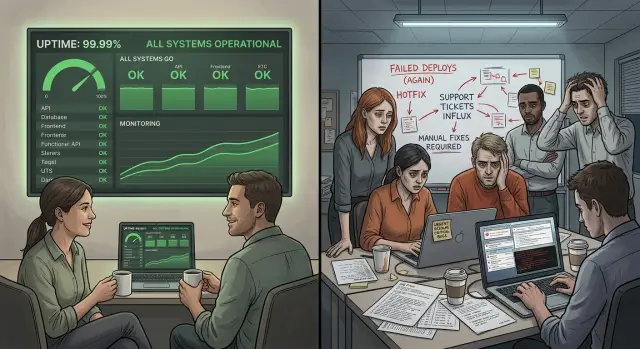
Table of Contents
Why uptime can mislead
Uptime tells you one narrow thing: whether the system stayed available enough to answer requests. That number matters, but it does not tell you how hard the team worked to keep it there.
A service can post 99.9% uptime and still feel painful every day. That figure allows about 43 minutes of downtime in a month. Many teams never hit that limit, yet they still spend hours on shaky deploys, emergency restarts, slow bug hunts, and late-night checks after every release.
This is where system health beyond uptime starts to matter. Customers see a working app and a green status page. The team sees a different picture: one person who knows the restart order, a deployment script nobody trusts, and a support queue that spikes after small changes.
Customer-facing uptime and team-facing stress often move in different directions. You can keep the site online by throwing people at the problem. An engineer watches logs during each deploy. Someone fixes bad data by hand. Support explains the same issue over and over. The app stays "up," but the stack is fragile because normal work depends on constant human rescue.
A green status page also hides how messy operations can get. It does not show whether releases take 10 minutes or 3 hours. It does not show how often the team rolls back, patches production by hand, or delays updates because they fear breaking something small but important.
Picture a startup with a dashboard that rarely goes down. On paper, it looks stable. In practice, every Friday release pulls in two engineers, one ops person, and a founder who stays online just in case. If a login bug slips through, support spends Monday calming angry users while the team cleans data manually. Uptime stayed high, but the system was never healthy.
A healthy stack makes routine work boring. If every normal change feels risky, uptime alone is hiding the truth.
What fragility looks like day to day
If you care about system health beyond uptime, watch what people do on release day. A fragile stack often shows perfect numbers to customers while the team acts nervous behind the scenes.
The first clue is delay. People keep pushing releases to "tomorrow" because nobody trusts a small change to stay small. A bug fix waits for a quiet hour, then for the right engineer, then for extra coffee and a rollback plan. That is deploy pain, even if production stays up.
Another clue is hidden memory. One person knows the exact restart order, which cache to clear, which job to rerun, and which config line breaks login if it moves. When that person is in a meeting, asleep, or on vacation, everyone else slows down or freezes.
Hand work after deploys is another warning. Someone updates a few records in the database, tweaks a config value on one server, or reruns a script "just this once." These fixes feel small, but they leave no clean trail. The next release needs the same rescue steps, and nobody can say with confidence which steps still matter.
Support load tells the same story. After a routine deploy, the support inbox fills with familiar tickets: a report looks wrong, a customer cannot finish checkout, a setting reset itself. Each ticket is easy on its own. The pattern matters. When support repeats the same answers after every change, the stack is asking humans to cover for weak process.
A small SaaS team can have 99.9% uptime and still live like this. They ship twice a month because releases feel risky, the senior engineer remembers the restart ritual from memory, and support loses half a day cleaning up customer issues after each deploy. The dashboard says "healthy." The workday says otherwise.
How to review the stack in one week
A one-week review can tell you more than a shiny uptime chart. If the team ships with stress, patches production by hand, and spends half the week answering repeat complaints, the stack is not healthy.
Start with evidence, not opinions. Pull the last 10 deploys from your release log, chat history, or CI system. Mark each one that needed a rollback, a hotfix, or extra cleanup after release. Even two or three messy deploys out of 10 can point to a pattern.
This works well as a short audit:
- Day 1: review the last 10 deploys and note rollbacks, failed migrations, and emergency fixes.
- Day 2: write down every manual production step people still run before, during, or after a release.
- Day 3: ask support for the most common complaints from the last month.
- Day 4: compare release days with ticket spikes and incident notes.
- Day 5: trace one painful workflow from deploy to final fix.
Manual steps deserve extra attention. Teams often treat them as normal because one reliable person knows the routine. That is exactly the problem. If someone must clear a cache by hand, run a script from a laptop, edit a config in production, or restart a worker at midnight, the process can break the moment that person is away.
Support data adds another layer. Ask for repeat complaints, not the loudest single outage. You want patterns like login failures after releases, slow pages every Monday morning, duplicate emails, or reports that fail under load. These issues may never hurt uptime, but they still hurt customers and drain the team.
Then line up release dates with support spikes and incident notes. A simple timeline often shows the truth fast. Maybe uptime stayed high all month, yet every Thursday release brought a burst of tickets and two hours of cleanup. That is not a stable system. It is a system that survives through extra labor.
Finish by tracing one painful workflow end to end. Pick something common, like a deploy that breaks search and takes three people to fix. Follow the path from code merge to release, alert, support ticket, diagnosis, patch, and customer reply. You will usually find one weak point that keeps causing the same pain.
That is system health beyond uptime. The top-line number may look fine, but the week around it tells you how the stack actually behaves.
Deploy pain tells the truth
A stack can stay online and still punish the team every time they ship. That pain is easy to miss if you only watch uptime. Release work shows whether the system is calm or held together by caution.
Start with one plain number: how long a normal release takes from "ready to ship" to "live and checked." Skip the rare big migration. Measure the usual release. If a tiny fix takes three hours, two approval chains, and a late-night call, the stack is brittle even if users never saw an outage.
Then look at how many people join each deploy. One engineer with clear steps is fine. Four people in a chat room, all waiting to react, is not. When releases need a backend developer, an ops person, QA, and a lead, the process depends on shared memory. People become part of the deployment system.
Count the events around releases for a month:
- Rollbacks after deploy
- Hotfixes in the next 24 hours
- Release freezes before busy periods
- Changes delayed to special maintenance windows
One or two bad weeks can happen. A pattern is the problem. Release freezes tell you even more than incidents do. If the team avoids shipping before demos, billing runs, or Monday mornings, they already know the system can surprise them.
Small changes should not need ceremony. If editing one form field or changing one API response must wait for a midnight window, you are paying hidden tax on every feature. Product work slows down. Support gets more tickets. Engineers stop cleaning things up because each change feels risky.
Healthy deploys are boring. A developer ships during work hours, checks logs and errors, and moves on. If routine changes still need a war room, fix the release process before you trust the uptime number. Smaller releases, stronger tests, clear rollback steps, and better deploy automation usually do more for real system health beyond uptime than another month of pretty status numbers.
Manual fixes add hidden risk
A system can stay online because people keep rescuing it. That still counts as uptime on a dashboard. It does not mean the stack is healthy.
Start with one ordinary week. Ask the team to write down every production task they do by hand, even the small ones they stopped noticing. Include cache clears, service restarts, rerunning jobs, and direct database edits to fix bad records.
This list gets uncomfortable fast. You often find that one engineer knows the right order of steps, the right server, and the one command that "usually works." If that person is asleep, on vacation, or leaves the company, the fix leaves with them.
What to flag first
Some manual work is harmless. Some of it is a warning sign.
- The same person handles the same recovery step every week
- A fix lives in old Slack messages or copied shell commands
- Someone restarts a service after most deploys
- The team edits data directly in production to repair user issues
- Support knows the workaround before engineering fixes the cause
Copied commands deserve extra suspicion. A script on one laptop is not real automation if nobody else can run it safely. Real automation is easy to find, easy to repeat, and clear about what it changes.
A small startup might report 99.9% uptime and still have a fragile tech stack. Picture a release that always needs one engineer to clear a cache, restart workers in the right order, and patch two records by hand. Users may never see a full outage, but the team pays for that stability with stress, delay, and hidden support load.
This is why system health beyond uptime matters. The top-line number stays clean while manual fixes pile up behind it.
Write down every repeated production ritual for a week. Then sort them by frequency and damage. Remove the ones that happen often first. Even two or three fewer manual fixes can cut deploy pain and make the whole stack feel calmer.
Support load shows what dashboards miss
A service can show 99.95% uptime and still create a rough week for customers. The status page looks calm, but the support inbox tells a different story.
Start with releases. After each deploy, count how many tickets arrive in the next few hours and the next day. You do not need fancy analytics for this. A simple release log next to ticket counts often shows a pattern fast.
If every release brings a spike, the stack is not as healthy as the uptime number suggests. Users may still reach the site, but they run into broken logins, failed payments, slow pages, or records that do not show up when they should.
It helps to group complaints into a few plain buckets. Most teams can sort them by:
- login and account access
- billing and checkout problems
- slow pages or timeouts
- missing or delayed data
Those groups show where friction keeps returning. One billing ticket can be bad luck. Twenty billing tickets after three releases point to a deeper problem.
Watch for repeated workarounds too. Support teams usually know them by memory: clear cache, log out and back in, refresh twice, retry after ten minutes, ask us to fix it by hand. When support sends the same reply again and again, the team is covering for a product problem.
That repeated manual help creates cost in places dashboards never measure well. Support spends more time per ticket. Engineering gets pulled into small fixes. Customers lose trust, even if the official uptime number stays high.
A small example makes this obvious. Imagine a SaaS product with 99.9% uptime last month. That sounds fine. But if every Friday release brings 30 tickets about login failures and missing invoice data, users had a bad experience three or four times in that same month. They do not remember the uptime chart. They remember that they could not finish their work.
If you care about system health beyond uptime, compare ticket volume with the uptime number every month. When uptime stays high but support load climbs, your system may be available on paper and fragile in practice.
A simple startup example
Take a small SaaS with a few thousand paying users. Its status report says 99.95% uptime for the whole quarter. The founders feel good about that number, and on paper the stack looks healthy.
The daily reality feels different.
The team stopped deploying on Fridays after a couple of bad nights. Nothing exploded for hours at a time, but two releases caused enough trouble that everyone changed their habits. Now they push changes early in the week, keep a close eye on logs, and avoid touching billing code before weekends. That is deploy pain, even if uptime stays high.
Support sees another pattern. Each time the company changes a plan, coupon rule, or renewal flow, a small group of customer accounts gets stuck. People cannot upgrade, invoices do not match access, or a canceled plan stays active. Support resets those accounts by hand, one by one, after every billing change. The public dashboard still shows green.
There is also a script. One engineer wrote it months ago to fix records when billing data and account permissions drift apart. He runs it manually when the mismatch shows up. Nobody else likes to touch it because it edits live data, has almost no notes, and grew through trial and error. If he is away, the problem waits.
This startup is not down very often. It is fragile in quieter ways. Releases make people nervous. Support carries cleanup work that never shows up in uptime reports. One person holds a fix that the team depends on but cannot safely share.
That is why system health beyond uptime matters. A strong stack does not need lucky timing, hand resets, and one engineer with a private rescue script. If a company needs all three to keep the number high, the number tells only part of the story.
Mistakes teams make with uptime
A high uptime number can make a weak system look healthy. Teams see 99.9% and assume the hard parts are under control, even when every release feels risky and every incident needs a person to step in.
One common mistake is chasing a higher uptime target before fixing deploy pain. If releases take hours, need special timing, or depend on one senior engineer, the stack is already fragile. A cleaner release process usually does more for users than moving from 99.9% to 99.95% on paper.
Another mistake is treating late-night heroics as normal work. When someone keeps saving the day at 1 a.m., managers may call that dedication. It is usually a warning sign. If the team needs constant rescue work, the system depends on memory, luck, and a few tired people.
Teams also count outages but ignore recovery effort. An app may stay online while engineers restart jobs, clear stuck queues, patch data by hand, or babysit a deployment until sunrise. Users may never see a full outage, but the business still pays for the problem through lost sleep, slower work, and more mistakes.
Support load gets dismissed for the same reason. Leaders hear, "the app stayed online," and move on. Meanwhile, support handles duplicate charges, missing emails, failed imports, or pages that technically load but do not finish the job. Users do not care that the server answered if they still need help to get basic work done.
A simple example makes this obvious. A startup pushes a release every Friday night. The site stays up, so the uptime chart looks fine. But each release triggers login bugs for a small group of users, support spends Monday cleaning up tickets, and one engineer runs manual fixes in the database. That is not stability. It is hidden fragility.
A better review adds a few numbers next to uptime:
- failed or rolled back deploys
- after-hours pages
- manual fixes per week
- support tickets tied to releases
- time engineers spend recovering from incidents
This is where system health beyond uptime becomes useful. Uptime tells you whether the app answered. These other signals tell you how much effort it took, how much stress the team absorbs, and whether the stack can handle growth without constant patchwork.
A quick health check
A stack can post 99.9% uptime and still wear the team down. A fast check works better than another dashboard. You want to see whether normal work feels calm or fragile.
Start with the easiest test. Give a new engineer a small bug fix and only the written steps. If they can ship it safely in one pass, your process is in decent shape. If they get blocked by missing setup, hidden scripts, or tribal knowledge, the risk is already there.
Then look at rollback. After a release goes wrong, can the team return to the last good version in a few minutes, or does everyone stop what they are doing and start guessing? A clean rollback path usually means the team planned for failure. Panic usually means deploy pain has been hiding behind a nice uptime number.
Check production habits from the last seven days. If someone changed configs, patched data, restarted jobs, or edited live systems by hand, write it down. One manual fix may feel harmless. A pattern of manual fixes means the stack depends on memory and luck.
Support tells a blunt truth. After routine releases, do users open tickets for things that should have stayed stable? That includes login issues, broken forms, slow pages, missing emails, or odd edge cases that appear every Friday after deployment. Dashboards may stay green while support load climbs.
One more test matters a lot. Watch what happens when one shaky service slows down or fails. If search, billing, auth, or background jobs can drag the whole product with them, the system has a brittle center. Healthy systems limit the blast radius.
A quick score helps. Mark each area as yes, no, or not sure.
- A new engineer can ship a small fix from written steps
- The team can roll back in minutes
- No one touched production by hand this week
- Routine releases did not trigger user tickets
- One failing service cannot disrupt the whole product
If two or three answers come back shaky, treat that as work for this month. That gives you a clearer view of system health beyond uptime than the top-line number ever will.
What to do next
Teams usually make more progress with a short monthly scorecard than with a big rewrite plan. If your uptime looks fine but the work feels hard, start measuring the strain around the system, not just the outage count.
Pick three numbers besides uptime and review them every month. Keep them simple so the team can track them without debate:
- time from approved change to production
- number of manual steps in a normal release
- support tickets tied to the same workflow or feature
These three numbers show whether delivery is getting easier or harder. That is system health beyond uptime in practice. A service can stay online and still waste hours every week through slow deploys, repeat fixes, and support churn.
Do not try to remove every weak spot at once. Start with one manual production task that people repeat often. It might be a hand-run database change, a copy-paste config update, or a release checklist that only one person understands. Automate that one task, document it, and make sure someone else can run it.
Then pick one workflow that creates too many support requests and fix it from end to end. Do not patch the symptom and move on. If password resets, invoice generation, or customer onboarding keeps sending people to support, follow the whole path and remove the break that causes the repeat ticket.
This kind of work is less flashy than a rebuild, but it pays off fast. One cleaned-up release step can save 20 minutes on every deploy. One repaired customer workflow can cut support noise every day.
If your team wants an outside view, Oleg Sotnikov can review stack health, delivery pain, and the practical fixes that will reduce risk first. A good review should leave you with a short list, clear owners, and changes you can make this month.
When deploy time drops, manual work shrinks, and support noise falls, your uptime number starts to mean a lot more.


