Synthetic training data traps in small model tuning
Synthetic training data traps can hide label noise, repeated wording, and thin coverage. Learn simple checks before a small tuned model fails in real use.
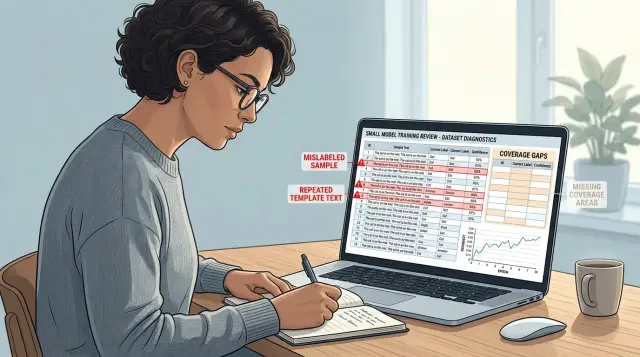
Table of Contents
What goes wrong with synthetic data
Small models learn shortcuts fast. That helps when your dataset is clean and varied. It becomes a problem when the data repeats the same phrasing, the same structure, or the same weak labels.
Synthetic samples often look fine on a quick read. The grammar is tidy, the intent is obvious, and each answer matches the prompt in a neat way. A team can scan twenty rows, feel confident, and miss the real issue: the data is smoother than real life.
That gap matters more with smaller models. Large models can sometimes recover from narrow patterns because they already carry broad language knowledge. A small tuned model leans much harder on whatever you feed it, so it treats accidental patterns like rules.
A common failure looks harmless at first. Every training prompt asks for help in the same polite tone, with full sentences and clear context. Then the model goes live and real users type "refund??", paste half an error log, or ask two questions at once. The model hesitates, guesses, or gives the wrong answer with too much confidence.
These problems usually start in the name of speed. Teams generate hundreds or thousands of examples in one style, label them quickly, and move on to training. The first test run can even look great because the evaluation set often shares the same clean patterns.
The cost shows up later. You spend time tuning prompts, changing parameters, and blaming the model, when the model is mostly reflecting the training set you gave it. If the data taught it that certain words always map to one intent, or that every answer should follow one fixed shape, that is what it will keep doing.
Bad synthetic data is expensive even when it is cheap to make. A week of training on the wrong patterns can leave you with a model that looks sharp in demos and falls apart in support chats, intake forms, or messy internal notes. Fixing that usually means going back to the dataset, not pushing harder on the model.
The warning signs in your dataset
A small tuned model learns habits fast. If your dataset has weak spots, the model will copy them before it learns anything useful.
Some warning signs are easy to miss because the rows look neat and consistent. Neat is not always good. Real users are messy, repetitive, vague, and sometimes wrong.
Watch for a few simple patterns:
- Similar examples get different labels for no clear reason.
- Many rows reuse the same sentence pattern with only a few words changed.
- Rare but costly cases barely appear, or do not appear at all.
- The outputs read cleaner than real user text.
Start with label agreement. If two inputs mean almost the same thing, they should not point to different targets unless you can explain why in one sentence. When teams generate data quickly, they often drift. One row says a refund request is "billing," another says it is "support," and the model learns that the choice is random.
Repeated phrasing is another giveaway. A synthetic set often contains rows like "Please help me with X" or "I need assistance with Y" again and again. A small model learns the frame, not the task. Change the wording in real use and performance drops fast.
Coverage problems hurt even more. The cases that show up once are often the ones you care about most: angry users, unclear requests, mixed intents, short messages like "wrong charge," or messages with spelling errors. If those cases are rare in training, the model still acts confident on them, but the guess is weak.
The tone of the targets matters too. Many synthetic datasets sound polished, calm, and complete. Real support text is often clipped: "cant login. code expired. fix pls". If your training rows all sound like edited prose, the model will expect a world that does not exist.
A simple test helps. Read 50 random rows out loud. If they sound like one person wrote all of them on a good day, stop and review the set before you tune anything.
A simple review process before tuning
Before you tune a small model, read the data by hand. Even a short review catches problems that charts and loss scores will miss.
Start with a sample from every label. If you have five labels, pull a few dozen items from each one instead of reading only the biggest bucket. That keeps common classes from hiding mistakes in smaller ones.
Then read each item one by one. Mark anything that feels plainly wrong: a bad label, an answer that does not match the prompt, repeated filler text, or wording no real user would send. You do not need a complex rubric here. Clear errors are enough.
A simple workflow works well:
- Pull a balanced sample from each label or task.
- Read every example and tag obvious mistakes.
- Put very similar prompts next to each other.
- Count how often each task shows up.
- Compare the sample with a small set of real inputs.
That third step matters more than many teams expect. Synthetic sets often contain dozens of prompts that say almost the same thing with tiny word swaps. A small model learns that pattern fast. It can look accurate in testing, then fail when a real person writes in a shorter, messier way.
Counting task frequency keeps your dataset honest. If most examples ask for summarization, but only a few ask for classification or extraction, the model will lean toward the dominant task. People often call this a tuning issue, but the problem usually starts in the data.
The last check is simple: place a small batch of real user inputs next to the synthetic sample. Look at tone, spelling, length, and ambiguity. Real requests are often blunt, incomplete, or inconsistent. Synthetic prompts are often neat and overexplained.
A support dataset makes this easy to see. Synthetic data might repeat lines like "I am unable to access my account and need a password reset." Real users write "cant log in" or "reset link dead." If you catch that gap before tuning, fixing it is still cheap.
How to spot label noise
Label noise rarely looks dramatic. It usually hides in ordinary rows that seem fine on their own, but clash with other rows that mean the same thing and carry different labels.
Start with pairs. Pull examples that use near-identical wording, ask the same question, or describe the same action in slightly different ways. If one row says "cancel my order" and another says "please stop this order" but they land in different classes, the model learns confusion instead of judgment.
Generated examples often sound clean, so teams trust them too quickly. A small model does not smooth over those mistakes. It copies them.
A practical review usually turns up four patterns:
- near-duplicate samples with different labels
- labels that depend on mind reading rather than text
- borderline cases that bounce between two classes
- annotation rules that need extra explanation every time
That second pattern causes a lot of damage. If the text does not contain enough evidence for one clear label, annotators start guessing. You see this in samples like "I need help with my account" when the label set forces a choice between billing, login, security, or profile changes. That row should not stay as is. Add context, move it to a broader class, or drop it.
Overlap between labels is another common mess. Teams create two classes that sound distinct in a planning document, then find that they collapse in real text. "Refund request" and "billing complaint" often collide. When reviewers split those cases half and half, the rules need work.
Good label checks usually lead back to the annotation guide. Rewrite vague definitions in plain language. Add one or two real examples for each class. State what wins when two labels seem possible. Then relabel the disputed rows after the rules change, not before.
A simple test works well: give the same small batch to two people. If they disagree often on ordinary examples, your labels need work. If they disagree only on rare edge cases, the dataset is in much better shape.
How copied phrasing fools a small model
Small models copy surface patterns fast. If half your synthetic set opens with the same line and closes with the same polite sign-off, the model learns the script before it learns the task. You ask for a refund summary, and it answers in the house style even when that style makes no sense.
This happens all the time with generated datasets. A prompt template produces hundreds of samples that look different at a glance, but the frame barely moves. The customer name changes, the product changes, maybe the complaint changes, yet every answer starts with "Thanks for reaching out" and ends with "Please let us know if you need further assistance." A small model treats those repeated edges as safe bets.
You can spot this with a quick pass through the data. Read the first sentence of 50 examples in a row. Then read the last sentence. If it feels like the same script again and again, the model will latch onto it too.
A few short checks help:
- group samples by the first 4 to 6 words and see which openings repeat
- scan endings for the same sign-off or apology line
- search for template slots where only names, dates, or product IDs change
- compare answers that should sound different but share the same rhythm
The fix is not random wording for its own sake. Keep the meaning the same, but vary how people would actually say it. One reply can be direct. Another can be brief and neutral. A third can explain one extra step. That gives the model more than a shell to copy.
Style matters too. If real users write short, messy requests, training only on polished synthetic text creates a bad fit. The model then sounds stiff in real use, or misses the point when a user skips context. For small model tuning, fewer examples that sound real often beat a large batch of polished clones.
A practical test works well: hide the labels, shuffle the answers, and ask a teammate to mark which ones feel machine-made. If they spot the pattern in two minutes, the model will absorb it in training.
Coverage gaps that break real use
Small models fail fast when the dataset only reflects clean, common requests. They learn the middle of the pattern and miss the awkward cases that show up in real traffic.
A simple coverage map helps. Split requests into what appears often and what costs you most when the model gets it wrong. In a product workflow, "reset my password" may arrive every day, while "I think another user can see my files" may appear once a month. The second case is rare, but you still need it in training because a bad answer has a bigger cost.
A good review usually includes four buckets: frequent and simple requests, frequent but ambiguous requests, rare requests with higher risk, and rare requests that need several steps.
Coverage is not only about topic. It is also about how people write. Real users send short messages, long rambles, half-finished thoughts, and notes with missing context. If your dataset mostly contains polished synthetic prompts, the model learns a tidy pattern that real people do not follow.
Different skill levels matter too. A new user might write, "can't log in after payment." An experienced admin might ask about roles, audit logs, and SSO in one sentence. If both groups use your product, both need representation in the dataset.
You should test messy language on purpose: typos, missing punctuation, polite and irritated tones, vague requests like "it broke again," incomplete requests with one missing detail, and mixed terms from beginners and experts. If you skip that, the model overfits to neat wording and then stumbles on small variations.
Before tuning, review a small sample and ask three plain questions: which user types are missing, which rough input styles are missing, and which uncommon cases would hurt if the model guessed wrong? Fill those holes first. A smaller dataset with broad coverage usually beats a larger one that only covers the easy path.
A realistic example from a support assistant
A support team wants to fine-tune a small model to answer refund questions. They do not have many real tickets, so they generate 500 training examples from one strong template. Each reply sounds polished, calm, and nearly identical, with small changes to names, order numbers, and product details.
The model picks up the wrong lesson fast. Instead of learning the refund rule, it learns the refund script.
In the synthetic set, approved refunds almost always contain the same phrases: "I understand your frustration," "I have reviewed your request," and "your refund has been processed." Denied refunds use another tight set of phrases. The model starts treating wording as the signal, even when the actual reason should come from policy, purchase date, usage status, or account history.
The labels look clean, but the language leaks the answer.
The problem stays hidden while the team tests on more generated samples. Accuracy looks great because the test set sounds just like the training set. Then real users show up.
A real customer rarely writes like a template. They write things like "charged twice need help," "kid clicked buy by mistake," or "app no work want money back." Some users never say "refund" at all. They describe a billing issue, ask a vague question, or mix two problems in one message.
The model struggles because it never learned the decision rule in plain terms. It learned that certain polite phrases often go with approval, and other phrases often go with rejection. When a message comes in with broken English, slang, missing details, or indirect wording, the pattern breaks.
A small batch of real tickets exposes the gap quickly. Even 30 to 50 real conversations can show where the synthetic set went wrong:
- indirect requests instead of clear refund asks
- short messages with typos
- mixed issues like billing plus login trouble
- emotional language that hides the actual request
- edge cases that never appeared in the template set
After that review, the fix is usually obvious. Keep some synthetic data if it helps, but rewrite it around the policy logic, not one polished answer style. Then mix in real tickets early, even if the batch is small.
Mistakes teams make under time pressure
Deadlines push teams toward the fastest path, and that path often teaches a small model the wrong lesson. The trouble usually starts when synthetic labels look neat, consistent, and cheap to produce. People trust them after one quick scan, then move straight to tuning.
That shortcut costs more later. If even a small slice of labels is off, the model starts copying the mistake at scale. A second review feels slow when a release date is close, but skipping it is one of the most common data mistakes in small-model work.
Teams also judge quality on a test set that is too small and too clean. A tiny hand-checked set can make results look better than they are because it leaves out vague requests, mixed intents, spelling noise, and messy phrasing. The model looks accurate in the demo and weak in real use.
Another bad habit is dropping hard cases because they hurt early scores. That gives you a prettier chart. It also gives you a model that breaks the moment a real user writes something unclear, emotional, or slightly off-topic.
Under pressure, many teams make the same four mistakes:
- They accept synthetic labels without a second reviewer.
- They test on a polished sample that does not look like live traffic.
- They remove difficult examples instead of tracking them.
- They add more data that repeats the same wording and call it coverage.
That last mistake is especially common because it feels productive. A team can generate 5,000 extra samples in a day, but if those samples all follow one template, the model only gets better at recognizing that template. It does not get better at handling real language.
A support assistant shows this problem fast. It may score well on short, clean refund requests, then fail when a customer asks for a refund, mentions a shipping delay, and adds a complaint in the same message. The model did not need more copies of the easy case. It needed tougher examples, messier language, and someone willing to review what looked fine at first glance.
Quick checks and next steps
If a batch of examples teaches the model to guess from shortcuts, stop the tuning job. Training on bad patterns does not average out later. It usually locks the mistake in and makes the model look smarter in tests than it will be in real use.
Fix the data before you spend more time or money. Clean labels first, then add wording variety, then remove near-duplicates. That order matters because a larger dataset does not help if the same wrong pattern appears again and again.
A small pilot run is usually the cheapest reality check. Tune on a limited slice, test it on fresh prompts, and read the failures by hand. If the model copies stock phrasing, overfits to repeated templates, or collapses on slightly different inputs, the full run will only make that more expensive.
A short checklist
Use the same short review before every new dataset version:
- Read 30 to 50 random examples without filtering.
- Check whether labels still make sense when you hide the answer field.
- Search for repeated phrasing and near-duplicate pairs.
- Count how many examples cover edge cases, not just common cases.
- Run a tiny tuning job and compare results on unseen prompts.
This routine catches most dataset problems before they turn into model problems. It also keeps teams honest when they are in a rush and want to treat "more data" as the fix.
One small example says it all: a support model may look great if half the training set uses the same apology sentence and the same resolution format. Then a real customer asks about the same issue in plain language, and the model misses it because it learned the template, not the task.
If your team wants a second set of eyes, Oleg Sotnikov at oleg.is reviews datasets, tuning plans, and evaluation workflows as a Fractional CTO and startup advisor. That kind of outside review helps when a team is too close to its own data to spot weak labels, repeated patterns, and thin coverage before the next training run.
Frequently Asked Questions
Why do small models struggle more with synthetic data?
Small models lean hard on the patterns in your training set. If your synthetic data repeats the same wording, tone, or label logic, the model copies those shortcuts and then falls apart when real users write messy, vague, or incomplete requests.
How can I tell if my dataset sounds too clean?
Read 30 to 50 rows out loud. If they sound like one person wrote everything in the same calm style, your set is too smooth and probably too far from real traffic.
What does label noise look like in real data?
Label noise means similar inputs get different labels without a clear reason. A model sees that conflict and learns confusion instead of a rule, so it starts guessing on ordinary cases.
How many real examples do I need before tuning?
You do not need thousands to start. Even 30 to 50 real examples can expose gaps in tone, spelling, ambiguity, and edge cases that synthetic samples usually miss.
Are near-duplicate prompts really a problem?
Yes, because near-duplicates teach the model a script instead of the task. When you change the wording in production, accuracy drops because the model memorized the frame, not the decision rule.
Which edge cases should I add first?
Start with cases that cost you the most when the model gets them wrong. Add short messy messages, mixed intents, indirect requests, typos, and rare high-risk issues before you add more clean easy examples.
Why does my model test well but fail with real users?
Your test set probably looks too much like your training set. If both use the same template style, the score looks good even though the model never learned how to handle real user language.
Should I remove hard examples to improve accuracy?
No. Keep them, tag them, and review them closely. Hard examples usually show where your labels, class rules, or coverage need work, and removing them only hides the problem.
What review should I run before a full tuning job?
Run a small manual review first. Check label agreement, search for repeated openings and endings, compare the set with real inputs, and do a tiny pilot tune before you spend money on a full run.
When should I ask for an outside dataset review?
Bring one in when your team generated data fast, changed label rules more than once, or keeps blaming the model while the same failures return. A fresh reviewer can spot weak labels, copied phrasing, and missing cases much faster than a team that sees the same dataset every day.


