Swift package management for apps with internal modules
Swift package management gets easier when you split networking, domain rules, and UI helpers with clear module lines and fewer dependency surprises.
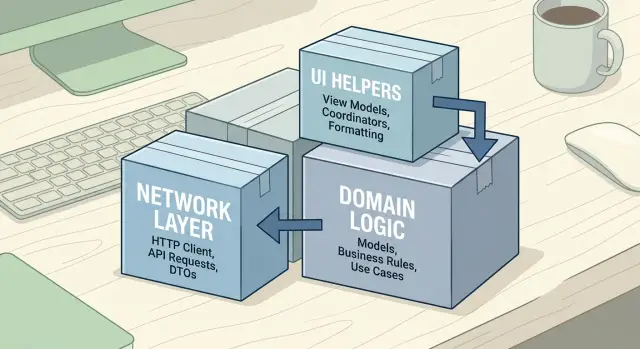
Table of Contents
Why this gets messy fast
Most apps do not start with a module problem. They start with one screen, one API call, and one shared folder that feels harmless. Swift package management gets painful later, when the app grows and the code still acts like it lives in one big room.
The first warning sign is simple: one small change starts touching files all over the app. A product list screen needs a new field, so someone updates the API response, then the mapping code, then a shared formatter, then two view models, then a reusable cell. That is not just normal app growth. It usually means the boundaries were never clear.
Shared helpers make this worse fast. Teams often create a package or folder called Common, Shared, or Utils, then drop everything into it because it saves time today. A month later, that same place holds date formatting, error mapping, loading views, feature flags, and random extensions. Nobody knows what really belongs there, so everybody imports it.
Networking code also has a bad habit of leaking upward. A screen should ask for data it can show, not for raw request and response types. But when a view model imports networking models directly, the UI starts to care about API field names, pagination tokens, and transport errors. Then a backend change turns into a screen change, even when the screen itself did not really change.
Imports often tell the truth before the team does. If UI code imports networking, or domain logic imports SwiftUI, the module lines already broke. The imports are not the root problem. They are the smoke.
A few symptoms usually show up together:
- one feature change triggers edits in several unrelated packages
Draw the boundaries before you move code
Most teams make Swift package management harder than it needs to be. They start by moving files, then spend a week fixing imports. Start the other way around: decide what each module owns before you touch the project.
A simple split works well for most apps. Put API clients, request building, response decoding, and retry logic in Networking. Put business rules, models that express the app's meaning, and use cases in Domain. Put formatters, styles, small reusable views, and view helpers in a UI support module.
That split sounds obvious, but the line gets blurry fast. A price formatter belongs in UI support. A discount rule does not. A JSON decoder for orders belongs in Networking. A rule that decides whether an order can be canceled belongs in Domain.
Write one plain sentence for each module. If you cannot do that, the boundary is still fuzzy.
"Networking talks to external services and turns responses into app data."
"Domain decides how the app should behave."
"UI support gives screens shared presentation tools, not business rules."
Those short sentences save time later. When a teammate asks where new code should live, you already have the answer.
Keep feature screens out of shared packages at first. That is the mistake I see most often. Teams move whole screens into packages because the folder looks big, then every small UI change pulls in shared code, app state, previews, assets, and feature-specific logic. The package stops feeling shared and starts feeling like a second app.
Wait until two or three features need the same screen parts before you extract them. A button style, empty state view, or date formatter is usually safe to share early. A full checkout screen or account flow usually is not.
A good boundary survives small changes. If the API changes, you should touch Networking and maybe a mapper. If a product rule changes, you should touch Domain. If the text style changes, you should touch UI support. When one edit forces changes across every module, the split is off and it will only get worse.
A package layout that stays readable
Most teams split too early. They turn every folder into a package, and a simple rename suddenly touches five targets, three imports, and two test bundles.
Swift package management gets easier when you start with a small set of packages that match real ownership in the app. In most cases, that means a few broad packages first, not one package for every helper, screen, or model.
A simple starting point often looks like this:
- Networking for API clients, request building, auth, and transport code
- Domain for business rules, use cases, and the models those rules own
- UI helpers for design tokens, reusable views, formatting, and small presentation utilities
That is enough for many apps. If one package grows fast, split it later. Doing the reverse is where teams get stuck.
Each package should expose one clear public surface. If other modules need to know ten internal types to use it, the package boundary is wrong. A good package usually exports a small set of entry points, while the messy details stay inside.
Keep models close to the code that actually owns them. Teams often create a giant shared Models package because it feels tidy at first. It rarely stays tidy. A checkout model that only the ordering flow uses should live with that flow, not in a shared bucket that every module starts importing.
Tests should live next to each package, not in one giant app-level test target. When the package owns its tests, refactoring feels safer and faster. You can change the networking package without wondering if some unrelated UI test will break for no good reason.
Hold off on feature packages until the shared layers stop moving every week. If networking, domain rules, and UI helpers still change shape often, feature packages will inherit that churn. Wait until those base packages feel boring. Boring is good here.
A readable layout is not the most modular layout on paper. It is the one where a developer can open the project, guess where code belongs, and make a change without solving a dependency puzzle first.
Split the app in small moves
Big package rewrites usually fail for a simple reason: teams move too much before they see the real dependencies. Small moves work better because every step shows you which imports still make sense and which ones hide a loop.
Before you extract anything, scan the current imports file by file. Write down which module imports what, and mark any circular reference. If a UI helper imports networking, and networking imports a formatter from the UI layer, you already have a knot. Fix that on paper before you move code.
Move the calmest code first. Plain models, enums, and tiny utilities often survive a refactor with almost no changes. They give you a shared base without dragging in UIKit, SwiftUI, or API code.
- Shared data types used by more than one feature
- Small parsing or formatting helpers with no side effects
- Utility code that does not touch storage, network calls, or views
- Constants and simple value objects
Next, extract networking behind a small client interface. In Swift package management, this step matters because concrete API code tends to spread everywhere if you let it. Keep the package thin: request building, response decoding, auth handling, and one protocol that the rest of the app can call.
After the data types stop moving around, pull out domain rules. Price calculations, validation rules, feature flags, or cart limits fit well here. Wait until the models settle first. If you move domain logic too early, every model change turns into package churn.
Pull UI helpers last. Screens often drag extra code with them: image loading, theming, previews, localization, and one-off view extensions. Only extract helpers that many screens use and that stay independent from business rules. A shared badge style is fine. A product card view that imports checkout logic is not.
Build after each move and fix imports right away. Do not stack five module moves and hope the compiler sorts it out later. One clean move, one build, one small test, one commit. Ten boring commits beat one giant refactor that leaves everyone guessing what broke.
Example: a shop app with three shared modules
A simple shop app shows why Swift package management works best when each package owns one kind of job. The product list screen should not know how the API works, how stock rules work, and how prices get painted on screen. That is how small apps turn into dependency puzzles.
One clean split looks like this:
- Networking fetches raw product data from the server.
- Domain turns that data into app rules, such as price handling, stock status, and sorting.
- UIHelpers formats currency, builds badge colors, and keeps small view helpers in one place.
Picture the product list screen loading ten items. The screen asks Networking for data, but it does not get back something ready for display. Networking only returns raw values, such as price_cents, inventory_count, and sale_price.
Domain takes over next. It maps those raw values into plain app models and applies the rules that matter to the business. If an item has low stock, Domain decides that. If sale items should sort above regular items, Domain decides that too. The screen just renders the result.
UIHelpers stays small on purpose. It does not decide whether a product is on sale. It only knows how to show that decision. If Domain says a product has a warning badge, UIHelpers can choose the badge color and format the final price string like "$19.99".
Checkout gets a nice benefit from this split. It can reuse the same Domain rules for totals, stock checks, and sale logic without importing Networking at all. That matters because checkout usually works with products already loaded into the app. It needs the rules, not the API layer.
Now imagine the business changes one rule: sale prices should round differently for one region. If that rule lives in Domain, you change it once. The product list, cart, and checkout all pick it up. No one hunts through view code, and no one touches the network layer for a pricing change.
That is a good test for modular code. When one business rule changes, one package should move first.
Rules that keep dependencies simple
Most module pain starts when one package reaches sideways instead of down. If a UI helper imports checkout rules, or networking knows about screens, tiny edits spread through the app. With Swift package management, this gets annoying fast.
Let UI depend on domain code, not the other way around. Domain code should describe products, carts, pricing, and user actions with plain Swift types. It should not know whether the app uses SwiftUI, UIKit, or both. When the domain stays blind to the interface, you can redesign a screen without rewriting the rules behind it.
Networking should stay narrow too. It can send requests, decode responses, and report errors. It should not import UIKit or SwiftUI, and it should not return view models built for one screen. If the server sends back a product payload, map it into a simple model first. Then let the domain decide what that data means.
Pass plain models across module edges. Simple structs, enums, and small protocols travel well between internal Swift modules. Views, controllers, and package-specific helpers do not. If a type only makes sense inside one package, keep it there.
Keep public APIs small. A package does not need to expose every helper, mapper, and extension. One or two public entry points are often enough. Hide the rest with internal access so other modules cannot build accidental dependencies on implementation details.
A short test helps before you add one more dependency:
- Can this module compile without UI frameworks?
- Does it pass plain models instead of screen-specific types?
- Will one small change stay inside this package most of the time?
Add a dependency only when copying code hurts more than the extra coupling. Duplicating a tiny formatter in two places is often cheaper than creating a shared package that everyone now has to understand. Shared code should remove friction. If it adds a dependency puzzle, keep the code local a bit longer.
Mistakes that create dependency knots
Most dependency trouble starts with good intentions. A team wants cleaner code, so it creates a package called "Shared" and starts dropping every odd file into it. A month later, networking code knows about view models, UI helpers import business rules, and nobody can say what belongs where.
A shared package for leftovers is usually the first trap. If a type has no clear home, stop and name the job it does. "Networking", "Domain", and "UIHelpers" mean something. "Common", "Core", and "Utils" often turn into junk drawers.
The next mistake is splitting too early. Ten tiny packages can look clean in a diagram, but real work gets slower. Every small change touches manifests, imports, and test setup. Keep helpers close to the feature that uses them until more than one module truly needs them. A single date formatter or color extension rarely needs its own package.
Making too much code public adds another layer of pain. Public APIs spread fast because they are easy to import and annoying to remove later. Start small. Expose only the types that other modules must touch, and keep the rest internal. That gives you room to refactor without breaking half the app.
Tests create hidden knots too. If package tests need the full app target just to compile, your module boundaries already leak. Tests should depend on the package they check, plus small mocks or fixtures when needed. When a networking package needs app screens to run tests, the package owns too much or depends on the wrong thing.
Where teams mix concerns by accident
Mixing API response types with screen state is one of the most common mistakes in Swift package management. Response models follow the server. Screen state follows the view. They change for different reasons, so they should live in different places.
A shop app makes this easy to see. ProductResponse might include raw price fields, stock flags, and backend names. The screen only needs a title, a display price, and whether to show a "Sale" badge. If you use one struct for both jobs, networking details leak into UI code, and a small backend change turns into a screen rewrite.
The fix is boring, which is why it works. Keep transport models in the networking package. Keep business rules and app models in the domain package. Keep display helpers and view state near the UI layer. That layout may feel less clever, but it saves time when the app grows.
A quick check before you add a package
Adding a package feels tidy on day one. A month later, you change one small type and half the app rebuilds. In Swift package management, a new package should remove friction, not add another border you have to defend.
Start with the reason for the split. Reuse is a solid reason. "Maybe we will reuse it later" usually is not. If only one feature uses the code now, and that will likely stay true for a while, keep it inside that feature.
A package usually makes sense when you can describe it in one short sentence. "This module calls the API." "This module holds cart rules." "This module formats prices and dates." If you need "and" to explain it, the boundary is probably still fuzzy.
Use this filter before you create anything new:
- At least two features should need the code soon, not someday.
- The module should compile without pulling in SwiftUI or UIKit by accident, unless UI is its whole job.
- Its tests should live with it and prove its behavior without help from the app target.
- Feature files should end up with fewer imports or simpler imports.
- If the move only changes folder names, skip it.
The UI check matters more than many teams expect. A networking package that imports SwiftUI for an error banner is already doing too much. The same goes for a domain module that knows about colors, fonts, or view modifiers. Once UI leaks into lower layers, every small change turns into a dependency puzzle.
Tests are a useful reality check. If you cannot say what the package owns, you probably cannot test it cleanly either. A cart rules package can own discount and tax tests. A UI helpers package can own snapshot or formatting tests. If the only tests still sit in the app target, the package may not have a real job yet.
Picture a shop app. If checkout and order history both need money formatting, a small shared package is fine. If only checkout uses a custom button style, keep that code near checkout. Shared code should lower mental load. If it only moves files around, leave it alone.
What to do next
Stop adding packages for a week and inspect what you already have. Open a few common screens, trace their imports, and mark the spots where one small change pulls half the app into the build. Those are usually the real problem areas, not the folders that merely look messy.
Start with the worst cycles. If Checkout imports a UI helper, that helper imports domain types, and domain code reaches back into app code, write that down. A quick map on paper is enough. You do not need a perfect diagram to see where your internal Swift modules are fighting each other.
Before you create anything new, merge the weak packages. If a package has one enum, two extensions, and no clear reason to live alone, fold it back into a stronger module. Small packages help only when they own a clear job. If they exist just because the split felt neat at the time, they add friction.
A short review checklist helps more than a long architecture doc:
- New code should depend inward, not sideways across unrelated features.
- UI helpers should not import app flows or business rules.
- Shared code should earn its place by serving more than one feature.
Keep the first refactor small. Move one boundary, then watch what happens for a few days. Check build time, test failures, and how many modules a normal feature change touches. If one move makes reviews simpler and cuts import churn, continue. If it creates more wrapper code than clarity, undo it and pick a better seam.
A shop app is a good sanity check. If changing a discount rule forces edits in networking, cart UI helpers, and product list views all at once, your split is still off. If that same change stays inside domain code with one thin update at the edge, your Swift package management is getting better.
Write one dependency rule into code review and enforce it every time. Keep it short enough that people remember it. "Feature modules can use domain and UI helpers, but domain cannot import feature code" is plenty.
If the app still feels tangled after a couple of small passes, outside help can save time. Oleg can review module boundaries, CI, and team workflow without adding extra layers or turning the app into an academic exercise.
The goal is simple: make the next change smaller than the last one.


