Swift concurrency adoption in apps with older SDKs
Swift concurrency adoption gets messy when apps still support older SDKs. Plan the cut lines, wrap old APIs, and keep one calling style for the team.
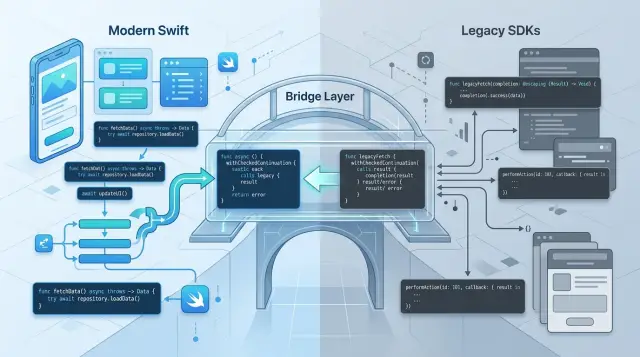
Table of Contents
Why this gets messy fast
Swift concurrency adoption gets awkward when the app has to live with older SDK support for a while. New async code reads top to bottom. Older code often depends on completion handlers, delegates, notifications, and manual queue jumps. Both styles work, but they tell the story in different ways.
That split turns one feature into two ways of thinking. A developer reads an async function and expects clear flow, structured cancellation, and one place to handle errors. Then the same screen also listens to a delegate, waits for a callback, and jumps back to the main queue by hand. The code still ships, but it stops feeling predictable.
A single screen can become a pile of mixed rules faster than most teams expect. Imagine a profile screen that loads data with async/await, uploads an avatar through an older SDK callback, watches reachability through notifications, and updates location through a delegate. Now add a timeout, a retry, and a loading spinner. Nobody looking at that code has one clean model in their head anymore.
Cancellation makes this worse. A Task can cancel cleanly, but an older API may ignore cancellation completely. The user leaves the screen, the task ends, and the callback still fires two seconds later. That is how teams get strange bugs like stale UI, double alerts, or state that flips back after the user already moved on.
Thread hops are another quiet problem. Async code often hides some of the queue work. Older code makes you think about it all the time. When a feature mixes both, people forget which part already runs on the main actor and which part still needs DispatchQueue.main.async. The result is either unsafe UI updates or defensive queue hopping everywhere.
Then team habits take over. Most people copy the last example they saw, especially under deadline. If one pull request uses callbacks and the next uses Task {} around those callbacks, the app starts drifting. After a few months, the team is not maintaining one codebase style. They are maintaining a translation layer in their heads every day.
Pick a small first move
Most teams make this harder than it needs to be. If you try to convert a whole app at once, you get half-migrated code, mixed habits, and weeks of avoidable debate. Start with one feature that your team owns end to end.
Good first candidates are small user flows such as loading an account screen, saving profile changes, or fetching a list that appears in one place. Pick something that goes from UI to view model to service call without crossing five shared modules. If another team controls part of it, skip it for now.
A good first slice usually has four traits:
- one screen or one user action
- code your team can change without approvals from three directions
- one network or storage call
- clear success criteria, like "screen loads" or "save finishes"
That choice matters more than the amount of code. A short path you fully control teaches the team more than a bigger migration that depends on old delegates, notifications, and vendor SDK callbacks.
Keep third-party SDKs behind a wrapper from the start. If a payment, analytics, or auth SDK still uses completion handlers, leave that detail inside a small adapter. Your app code can call an async function, while the wrapper still talks to the SDK in the old way. That keeps the old pattern boxed in instead of leaking into every new file.
Write the boundary down in one sentence where everyone will see it. For example: async starts in view models and services we own; completion handlers stay inside wrappers and untouched legacy modules. That note sounds small, but it stops a lot of back-and-forth in code review.
Set one rule for new code on day one: when the team writes a new app-owned async path, it uses async/await. If code must call an older API, it does so through a wrapper. Swift concurrency adoption gets easier when people stop guessing which style to use in each new file.
That first move should feel almost boring. Boring is good. It means the team can learn the pattern without also fighting app-wide risk.
Draw a hard line between old and new code
Teams get stuck when callbacks and async code live in the same layer. A view model calls one API with await, another with a completion block, and a third one that does both. That is how Swift concurrency adoption turns into two permanent ways of thinking instead of one clear path.
Put the old behavior behind adapters or service wrappers and keep it there. The boundary should sit close to the SDK, not up in screens, coordinators, or view models. Above that line, expose only async functions. Below that line, keep every callback, queue hop, delegate method, and odd SDK rule boxed in.
Put the mess in one box
A good wrapper does more than translate syntax. It also owns the awkward parts people forget six weeks later:
- retry rules
- timeout choices
- thread switching
- SDK error mapping
- weird success states like "nil result, no error"
That matters because older SDK support in Swift often fails in boring, repetitive ways. One SDK returns errors in a callback. Another reports failure with a status code and no error object. If you fix those cases in three view models, you now have three different app behaviors.
Keep that logic in one wrapper and make the app call one async API. For example, a view model should call try await paymentsService.charge(...). It should never know whether the payment SDK used a delegate, a completion handler, or a timer-based retry loop.
Name the boundary so reviews stay simple
Names should make the split obvious. LegacyPaymentsAdapter, ContactsSDKBridge, or OldAuthServiceWrapper are plain, but that is the point. A reviewer can spot the boundary in seconds and ask a simple question: does callback code stay on the legacy side?
Do not let completion handlers leak back upward. Once a view model accepts a callback type, the old model has already crossed the line. Then cancellation gets fuzzy, testing gets messy, and new code starts copying old shapes.
Strict boundaries feel a little heavy at first. They save time later. If the team knows that all new app-facing APIs are async, people stop debating style in every pull request and start fixing real product problems.
Wrap older APIs without changing behavior
For Swift concurrency adoption, wrappers work best when they act like adapters, not rewrites. The old SDK should keep doing the same work, with the same edge cases, while your new async code gets a cleaner surface.
Start with the simplest case: one callback, one result. withCheckedContinuation or withCheckedThrowingContinuation fits well when the older API calls back once and then stops. That gives you an async function without changing the SDK itself.
A lot of teams make the wrapper smarter than the original API. That sounds nice, but it creates new bugs. If the old call returned "success or error," keep that shape. If you need more detail, map it once into a single result type so every caller reads the same contract.
A safe wrapper pattern
The delegate case is where people get burned. If you create a delegate inside the wrapper and nothing holds it, it can disappear before the SDK finishes. Keep a strong reference until the work ends, then release it on success, failure, or timeout.
Timeouts matter too. Older APIs sometimes never call back, or they call back twice when network conditions get weird. Your wrapper should finish once, then ignore anything late. A small state flag helps: when the first result wins, mark the operation as finished and drop every later callback.
A simple pattern looks like this:
- create one wrapper object for the request
- store the continuation and delegate on that object
- resume the continuation exactly once
- clear stored references when the request finishes or times out
Use one return shape for both success and failure. That can be throws, or it can be a single enum if the old SDK already works that way. Pick one style per area of the app. Mixing both inside the same feature gets confusing fast.
Do not move everything to MainActor just because the old code touched UI somewhere. Keep network, storage, and parsing off the main thread. Jump to MainActor only at the point where the app updates a label, a screen state, or a view model property that the UI reads.
That line sounds small, but it saves a lot of debugging later. Your wrapper stays boring, and boring code is exactly what you want when old and new patterns have to live together for a while.
Give the team one mental model
Teams slow down when each method picks its own style. A view model starts a Task, jumps to DispatchQueue.main, then waits for a completion handler from an older SDK. The app may still run, but the code feels slippery. People stop trusting what thread they are on and where errors will show up.
Swift concurrency adoption gets much easier when the team agrees on one public shape for app code. Screens and view models should call async functions. Older patterns still have a place, but they should stay behind a thin adapter layer where the team expects to see them.
A simple set of rules usually works well:
- UI code and view models call
asyncfunctions and useawait. - Services that talk to older SDKs translate callbacks or delegates into
asyncresults. - One method uses one style. If a method starts with
async, do not mix in callbacks and queue hopping. - Each layer has one threading rule. UI work runs on
MainActor, and adapters hide whatever queue rules the old SDK needs.
That last rule saves a lot of time. If every caller has to remember, "this callback might come back on a background queue," bugs keep spreading. Put that knowledge in one place. Then the rest of the app can read like normal sequential code.
This also makes code reviews simpler. A reviewer can look at a screen and ask one question: does it await a service call and update state on the main actor? They do not need to trace delegate chains or guess whether a callback fires once, twice, or never.
Start with the happy path. Make the screen load data, return a result, and render it. After that, add cancellation when the user leaves the screen, then add error mapping that turns messy SDK failures into a few app-level errors. When teams try to design success, cancellation, retries, delegate bridging, and thread fixes all at once, they usually keep both models alive for months.
If the boundary stays strict, the old code can live where it has to, and the rest of the app can feel modern and calm.
A simple example from a real app
A profile screen is a good place to start because one button does one job. The user picks a photo, taps "Save", and an older SDK uploads the avatar with progress callbacks and a final completion handler.
The screen should not learn both patterns. The button tap calls one async method on the view model, and the old SDK stays behind that line.
@MainActor
func saveAvatar(_ data: Data) async {
    isSaving = true
    errorMessage = nil

    do {
        let url = try await avatarService.uploadAvatar(data) { progress in
            self.uploadProgress = progress
        }
        avatarURL = url
    } catch is CancellationError {
        errorMessage = "Upload canceled"
    } catch {
        errorMessage = "Upload failed"
    }

    isSaving = false
}
The wrapper does the awkward part. It converts the SDK's finish callback into an awaited result, but it keeps progress separate. That split keeps the code readable. Progress can change twenty times during one upload. The final result happens once.
func uploadAvatar(
    _ data: Data,
    onProgress: @escaping (Double) -> Void
) async throws -> URL {
    try await withCheckedThrowingContinuation { continuation in
        let request = sdk.upload(
            data: data,
            progress: { value in onProgress(value) },
            completion: { result in continuation.resume(with: result) }
        )
        cancellationStore.set(request)
    }
}
In production code, add a small guard so a late callback cannot resume the continuation twice. That bug shows up more often than most teams expect, especially when users cancel and retry quickly on a slow connection.
Tests should hit the annoying cases, not just the happy path:
- success returns the new avatar URL
- cancel stops the request and keeps the old avatar
- retry after failure starts a fresh upload
- late completion after cancel does not update the screen
This is the sort of change that makes async await migration feel sane. The view model owns one async entry point, the wrapper hides the callback mess, and the team keeps one mental model in new code. That is how Swift concurrency adoption sticks in an app that still depends on older SDK support in Swift.
Mistakes that keep both models alive
Teams usually get stuck when they treat migration like a cleanup project instead of a shipping project. In Swift concurrency adoption, the fastest way to create confusion is to keep both styles active in the same feature for too long.
A common mistake is wrapping every old API before you release anything. That feels neat, but it turns migration into a rewrite. The team spends weeks building adapters, then debugs edge cases nobody hit before. A smaller move works better: wrap only the calls that a new screen or flow needs right now, leave the rest alone, and ship.
Another trap is one function that tries to serve two worlds at once. If a method both returns an async result and also accepts a completion block, nobody knows which path owns errors, cancellation, or retries. That is where duplicate work starts. Pick one public shape for each boundary. If you need a bridge, hide it inside a small adapter so the rest of the app sees one style.
@MainActor can turn into duct tape. When developers add it everywhere to stop crashes or warnings, they hide the real threading rule instead of fixing it. Then slow work creeps onto the main thread and the app feels sticky. Use @MainActor where UI state actually lives. For everything else, be explicit about where the work runs and where results come back.
Cancellation gets ignored because many older SDKs cannot cancel cleanly. That does not mean your app should ignore it too. If the user leaves a screen, your task should stop caring about the result. Even if the old request still finishes, your bridge can drop the callback instead of updating stale state.
The last mistake is boring, and expensive: no tests for weird callback behavior. Old APIs often call back twice, or never call back at all when something goes wrong. Async wrappers make those bugs harder to spot because the hang shows up far from the source.
Watch for these review smells:
- new async code waits on wrappers nobody uses yet
- one API exposes both completion and async forms in the same entry point
@MainActorappears with no clear UI reason- cancelled work still updates the screen
- tests never simulate double callbacks or missing callbacks
If those patterns stay in the codebase, the team will keep two mental models for months. The code may compile, but everyday debugging gets slower.
Quick checks before each merge
A merge can look clean and still keep the old callback style alive in one more corner of the app. That is how teams end up debugging the same feature in two different ways six months later.
A short review pass helps more than a long migration plan. The goal is simple: every new call site should feel boring, predictable, and the same as the last one.
Use this as a merge checklist:
- Read the new code from the screen or feature entry point inward. If fresh code reaches for completion handlers, delegates, or notification callbacks directly, stop there. New code should call async functions and let one wrapper deal with the older API.
- Open the wrapper and make sure it fully owns the messy part. The callback, delegate wiring, continuation resume, and cleanup should live there, not leak into view models, controllers, or business logic.
- Follow each async path once for failure cases. A good wrapper handles cancellation, passes through real errors, and does not wait forever if the older SDK can hang. Timeouts are often worth adding at the boundary, even if the old API never had one.
- Check every UI update. If state changes drive labels, alerts, or navigation, make sure that work lands on the MainActor. Many race bugs look random until you find one background thread touching UI state.
- Look at the tests for ugly timing. You want at least one test where the callback arrives late, and one where it fires twice by mistake. Older SDK behavior is not always polite, and wrappers should protect the rest of the app from that.
One small rule makes reviews faster: if a pull request adds async code, the reviewer should be able to point to one boundary where old behavior gets translated once. If they find two or three boundaries for the same feature, the design is drifting.
That sounds strict, but it saves time. Teams doing Swift concurrency adoption usually do fine with syntax and poorly with boundaries. Clean boundaries are what keep async await migration from turning into permanent legacy Swift app maintenance.
What to do next
Pick one feature this week and move only that slice. A good target is a screen, sync task, or upload flow that already works, touches one older SDK, and causes daily friction. Keep the scope small enough that your team can finish it, review it, and learn from it in a few days.
Write down the rules on one page and keep them boring. Decide where wrappers live, when you use actors, and how you name bridged APIs. For example, you might say that SDK-facing code keeps completion handlers internally, app-facing code exposes async functions, and actors protect shared mutable state such as caches or session data.
A short checklist helps more than a long migration plan:
- Migrate one feature, not a whole module
- Wrap old APIs without changing behavior
- Reject pull requests that mix styles in the same layer
- Track every place where the SDK still forces callbacks, delegates, or main-thread hops
- Review the rules after one week and tighten them
Catch mixed-style code early. If a pull request adds async code in one file and new completion handlers in the next, that split will spread fast. Teams end up debugging both patterns for months because nobody stopped the boundary drift when it was still small.
Measure the blockers with plain numbers. Count how many SDK calls still need wrappers, where cancellation stops working, and where you still jump back to the main actor by hand. Those numbers tell you whether older SDK support is a small inconvenience or the real reason your async await migration feels stalled.
If the team wants a second opinion, bring in one before the rules harden around bad habits. Oleg Sotnikov advises startups and product teams on migration boundaries, rollout rules, and AI-first engineering workflows. That kind of outside review is most useful when the codebase still has a clear path, not after every layer has both models baked in.


