Support workflow design for screenshot heavy bug reports
Support workflow design helps teams collect clear screenshots, useful context, and simple retention rules so bug reports move to fixes faster.
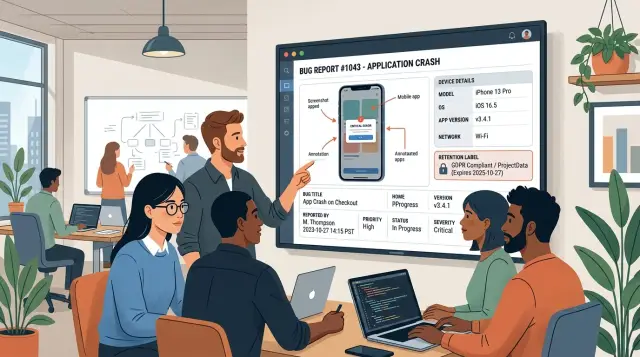
Table of Contents
Why screenshot reports still miss the real issue
A screenshot shows the symptom. It usually does not show the cause.
Support teams often receive an image of an error banner, a broken layout, or a missing button with no note about what happened just before it. Engineering then starts with guesses instead of facts, and that adds delay from the first minute.
Small missing details can change the whole diagnosis. The page may fail only on Safari, only on a small Android screen, only for users on a certain plan, or only after a session times out. Sometimes a form auto-saves, a network drops for a moment, or one account has unusual data that triggers the bug. If the report does not include the device, browser, account state, and last few actions, the screenshot is just a clue.
Cropped images make this worse. A tight crop around the error message hides the URL, page title, open menu, timestamp, and the field or setting that caused the problem. The image looks cleaner, but the useful context is gone.
A simple example shows the pattern. A customer sends a screenshot with the message "Upload failed." Support forwards it right away. Two days later, engineering learns the user was on mobile Safari, had an expired session, and tried to upload a HEIC image after reconnecting to a weak network. The screenshot showed the failure. It did not show the conditions behind it.
This is where the workflow usually breaks. Teams treat the screenshot as the report instead of one piece of the report. Support asks follow-up questions, waits for replies, sends another message, and repeats the cycle. A bug that might take 10 minutes to fix can sit in triage for days because nobody captured the basics the first time.
When reports include enough context around the image, engineers stop guessing. They can reproduce the issue faster, confirm the cause, and move straight to a fix.
What a useful screenshot report should include
Start with the exact page or screen name. "Checkout" is better than "payment page." "Admin > Users > Invite member" is better than "settings." Use the same names your team already uses in tickets and documentation. If names drift, people file the same bug twice and miss earlier fixes.
Then add one short sentence about what the user did right before the problem. Keep it plain: "Opened invoice #4821, changed the due date, clicked Save." That single line often gives a developer the fastest path to the broken step.
Time matters too. Include the exact time, timezone, and a safe account or session reference. "10:14 AM PST, workspace ACME-22, session 7f3c" is much easier to trace in logs than "this morning on a client account."
Device details should live in the same report, not in a follow-up message two days later. Note the device type, browser, app version, and network state when that could affect behavior. A bug on mobile Safari over weak cellular data can look perfectly normal on desktop Chrome over office wifi.
Close the report with two short statements: expected result and actual result. For example: "Expected: invoice saves and returns to the list." "Actual: Save spins for 20 seconds, then the page reloads and the due date stays the same."
That is the minimum metadata worth collecting. Once teams ask for these details every time, screenshot reports stop being loose evidence and start helping people fix the issue on the first pass.
Set simple rules for taking screenshots
The first rule feels a little strict, but it works: ask for the full screen before any crop. A tight crop often hides the page, tab, app state, and visible time. Support then has to ask follow-up questions, and the report slows down.
When possible, keep the browser bar or app header visible. That thin strip of context often explains more than the error itself. It can show the environment, page name, account area, or that the user opened the wrong screen.
One image is rarely enough for a screenshot-heavy issue. Ask for two shots: one right before the error appears and one when it happens. The first image shows the setup. The second shows the failure. Together, they show what changed.
Keep annotations light. One box, circle, or arrow is usually enough. If someone marks five places at once, the screenshot turns into noise.
Privacy needs a hard rule too. Tell users and support agents to blur or block personal data before upload. Names, emails, phone numbers, payment details, internal IDs, and customer messages should not sit in plain view unless the team truly needs them.
A short instruction inside the ticket form often works better than a long policy document. Plain wording is enough: include one full-screen image, leave the top bar visible if you can, add a second image when the error appears, mark one area only, and hide private data.
Think about a checkout bug. A cropped image of a red error box says very little. A full-screen image before clicking "Pay" and another when the error appears can reveal the browser, cart state, test account, and missing field in seconds. That is the difference between a fast fix and three rounds of back-and-forth.
Add metadata without slowing support down
Extra detail only helps when the form stays quick. If agents need a full minute to fill every ticket, they will skip fields or type guesses. The form should collect the basics in a way that is short, automatic, and consistent.
Start with a small set of required fields:
- device type and operating system
- browser or app version
- issue time, filled automatically
- affected area, such as login, checkout, or settings
Dropdowns beat free text for device and browser names. "iPhone 14, iOS 17, Safari" is easy to sort and filter. "My phone, maybe Safari" creates cleanup work and slows triage.
Time matters more than many teams expect. Auto-fill the report timestamp and capture the timezone when you can. A screenshot may show the error, but logs only make sense when the team knows when it happened.
Tags help too, if the list stays short. Two groups usually cover most cases: severity and affected area. Severity tells the team how hard the issue hits users. Affected area tells engineering where to start.
The difference is easy to see. A ticket with a screenshot, "checkout broken," and no metadata can bounce between support and engineering for half a day. The same ticket with Chrome version, mobile device, local time, and a "payments" tag often reaches the right person in one pass.
Do not ask for logs on every report. That turns a quick support task into a slow investigation. Ask for logs only when the screenshot and form fields still leave real gaps, such as a page that fails to load, an action that works once and then breaks, or an error that appears for one user but not another.
If the screenshot and a few clean fields explain what happened, that is enough. Save the heavier evidence for the tickets that truly need it.
Store screenshots in one place and delete them on time
If screenshots end up in email, chat, and ticket comments at the same time, people waste hours looking for the latest file. Put every image in one place that belongs to the ticket itself, not in side conversations. Chat can alert people, but the stored file should live with the case record.
That keeps the process cleaner. When support, QA, and engineering open the same ticket, they should see the same screenshot set, the same version, and the same notes. That removes the usual "which image are we using?" mess.
Access rules should stay simple. Customer screenshots often show names, account numbers, addresses, or internal tools. Support can usually view raw images, but engineering may only need a masked copy. If finance, legal, or account managers need access, write that down instead of deciding case by case.
Retention should match the type of issue. A typo on a settings page does not need the same storage window as a billing dispute or a security report. A simple policy might look like this:
- Keep routine UI bug screenshots for 30 to 90 days after the fix ships.
- Keep payment, account access, or compliance screenshots longer if your records policy requires it.
- Keep security incident evidence until the review closes and follow-up work ends.
- Delete duplicate uploads as soon as someone confirms the canonical file.
- Remove failed or unreadable uploads quickly so nobody references junk.
Teams often skip the last two points, and that creates clutter. Five copies of the same image slow triage, confuse handoffs, and waste storage. Failed uploads are worse because people assume the proof exists when it does not.
Write down exceptions in one short internal note. If legal, audit, or contract terms require certain customer images to stay longer, name those cases and name who approves deletion. A short screenshot retention policy beats guessing every time.
A good rule is simple: if a screenshot helps fix the issue, store it with the ticket. If it adds nothing new, delete it.
Use a predictable handoff from support to engineering
A screenshot should move through the same path every time. If it does not, support wastes time chasing missing details, and engineering tests the wrong thing.
The handoff should answer the basic questions before an engineer opens the ticket.
The handoff flow
Start with a quick support review. Does the screenshot follow the team's capture rules? If the image is cropped too tightly, hides the browser address, misses the error state, or leaves out the visible time, support should send it back or ask for a better one.
Next, support fills the obvious gaps. A useful screenshot is only part of the report. The ticket also needs the page or screen name, account or user type, device and browser, time of the issue, steps taken, and whether the problem happened once or keeps happening. Adding this before handoff is faster than having engineering ask for it later.
Then triage should group duplicates under one issue. Screenshot-heavy reports often look different even when they point to the same bug. One customer may show a broken checkout button while another captures the final error popup. If both came from the same release and the same failed action, they belong under one parent issue.
A simple flow works well:
- Support checks screenshot quality and capture rules.
- Support adds missing metadata.
- Triage merges matching reports into one tracked issue.
- Engineering tests in the same context the customer used.
- Support tells the customer what changed after the fix ships.
That fourth step matters a lot. Engineers should test with the same browser, device type, account state, feature flag, and region when possible. A screenshot from a mobile Safari session can hide a bug that never appears on desktop Chrome.
After the fix
Once engineering confirms the fix, support should close the loop in plain language. Tell the customer what was fixed, whether they need to retry the action, and what to send if the issue still appears.
That last message helps the customer and gives the ticket a clean end point instead of a half-closed thread that returns a week later.
A simple example from report to fix
A customer opens a support ticket after tapping the checkout button on a phone. Nothing seems to happen, so they attach one cropped screenshot and write, "Button does nothing." It sounds clear, but the image cuts off the top of the screen, the app version is missing, and support cannot tell which step of checkout failed.
Support sends a short reply instead of starting a long back-and-forth. They ask for three things:
- a full-screen screenshot
- the app version
- the exact step where the customer got stuck
The customer replies a few minutes later with a second image. This time the whole screen is visible. At the very top there is a small error banner that the first screenshot missed. It says the payment method did not load. The ticket now has enough context to move forward quickly.
Support adds the phone model, OS version, app version, and the customer note that the problem appears after entering shipping details and before payment confirmation. That small bit of metadata changes the ticket from "checkout is broken" to "payment method fails to load on one device setup."
Engineering tests the same checkout step on the same device version and reproduces the issue right away. A layout bug hides the error banner behind the app header on smaller screens, so users think the button failed when the app actually showed an error message they could not see.
The fix is small. Engineering adjusts the banner position and adds a quick test for that screen size. Support confirms the behavior with the customer, closes the ticket, and the team moves on.
This is what a clean process looks like in practice: one better screenshot, a few facts attached to the ticket, and no long email chain full of guesses.
Common mistakes that waste time
Most delays do not come from the bug itself. They start when a ticket leaves support with missing context, mixed evidence, and no cleanup plan.
One common problem is the cropped screenshot that shows only the broken button or error text. Engineering then has to ask where the user was, what page they opened, what account they used, and what happened right before the image. A wider shot often saves one or two follow-up messages. If sensitive data is on screen, mask it after capture instead of trimming away the useful context.
Another slow point is inconsistent field names. One agent writes "user plan," another writes "subscription tier," and a third writes "account type." They may all mean the same thing, but the ticket becomes harder to search. Pick one label for each field and keep it fixed across the whole team.
Storage causes a different kind of waste. Teams often keep bug screenshots forever because nobody owns cleanup. That sounds safe, but it creates clutter, raises privacy risk, and makes old files harder to trust. A simple retention policy fixes this. Decide who removes files, when they expire, and which cases need longer storage for legal or product reasons.
Mixed evidence is another quiet problem. If one ticket contains screenshots from three users, two devices, and different app versions, nobody can tell which image matches which report. Triage gets muddy fast. Keep each user session separate, and label every file so the source is obvious.
A plain naming rule helps more than most people expect. Even a simple format works:
- ticket-number_user-id_screen-number
- ticket-number_page_error-type
- ticket-number_date_version
When image files move across chat, email, and ticket tools with random names, version control becomes messy. People download the wrong file, re-upload duplicates, or comment on an outdated image. Keep screenshots in one place, use one naming rule, and the ticket moves faster with less backtracking.
A short review before the ticket moves on
Tickets that move too early usually come back. Support asks more questions, engineering waits, and the user feels ignored. A short review at this point saves more time than a clever triage setup later.
This check should take less than a minute. If one item is missing, the ticket stays with support until someone fills the gap.
- Reproduction: a teammate should be able to repeat the issue from the ticket alone. Include the action, the expected result, and what happened instead.
- Screenshot scope: the image should show the full app window at minimum. If system context matters, capture the whole screen so engineers can see browser tabs, system messages, or other clues around the error.
- Device and version details: name the device, operating system, app version, and browser when relevant. "iPhone" or "latest Chrome" is too vague and often wastes another round of questions.
- Privacy check: review every screenshot for names, email addresses, payment details, internal IDs, or other personal data. Remove or blur anything engineering does not need.
- Deletion rule: the ticket should say when the image must be deleted. Every file should have an end date or a clear retention period.
A screenshot with the wrong scope, missing version details, or no deletion note is not evidence yet. It is just another attachment.
Teams that build this habit usually fix issues faster because engineering receives a ticket they can act on right away. That is the goal: less back-and-forth, fewer guesses, and a cleaner path from report to fix.
Next steps for a cleaner process
Most teams do not need a new tool. They need one report template, one capture rule set, and a short trial to see where tickets still fall apart.
Start small. Pick one template and use it for two weeks across the whole support team. Keep it tight: screenshot, device or browser, time, page or feature, steps to reproduce, and expected versus actual result.
Then look backward before changing anything else. Take 10 recent screenshot tickets and mark what was missing. You will usually find the same gaps over and over: no timestamp, cropped images, missing user action, or no note about the environment.
A short rollout usually works better than a big rewrite:
- Run one shared template for two weeks and block side formats.
- Audit 10 recent tickets and count the missing fields.
- Train every support agent on the same capture rules.
- Review storage and retention with legal and security teams.
Training matters more than many teams expect. If one agent captures the full screen and another sends a cropped image with no context, engineering gets a different level of detail for the same type of bug. A 30 minute session with a few real examples can fix that quickly.
Retention rules need the same care. Screenshots can include names, email addresses, financial data, internal tools, or customer messages. Legal and security should help decide where files live, who can see them, and when they should be deleted.
After the two-week test, check two numbers: how many tickets needed follow-up questions, and how long engineering took to reproduce the issue. If both numbers drop, keep the process. If they do not, trim fields or fix the capture rules.
If the handoff between support and engineering still keeps breaking, Oleg Sotnikov at oleg.is can help tighten the workflow. He works as a Fractional CTO and startup advisor, and this kind of outside review is often enough to remove friction without adding another layer of process.
Frequently Asked Questions
Why is a screenshot alone not enough for a bug report?
Because the image usually shows the symptom, not what caused it. Without the page name, device, browser, time, account state, and the last action, engineering starts with guesses instead of facts.
What should every screenshot bug report include?
Ask for the exact screen name, what the user did right before the issue, the time and timezone, the device and browser or app version, and the expected versus actual result. That gives engineering enough context to try the same path and confirm the problem.
Should we require full-screen screenshots?
Yes. Start with a full-screen image, then let people blur private data if needed. A crop often removes the URL, header, time, or page state that explains why the error happened.
How many screenshots should a user send?
Two usually work best: one right before the error and one when it appears. The first shows the setup, and the second shows the failure, which makes the change easier to spot.
Which metadata fields should be required?
Keep it small and consistent. Device type, operating system, browser or app version, issue time, and affected area cover most tickets without slowing support down.
When should support ask for logs?
Ask for logs only when the screenshot and form fields still leave real gaps. If a page fails to load, the issue appears once and then disappears, or it affects one user only, logs can save time. For a clear UI bug with solid context, they usually are not needed.
Where should we store screenshots?
Store them with the ticket, not across email, chat, and comments. One source keeps everyone on the same file version and cuts down on duplicate uploads and confused handoffs.
How long should we keep screenshots?
Match retention to the issue type. Routine UI bug images can expire soon after the fix ships, while billing, access, or security evidence may need a longer window because of policy or review needs.
How should support hand off screenshot tickets to engineering?
Support should check the screenshot quality, fill missing context, and merge obvious duplicates before engineering sees the ticket. Engineering should then test in the same browser, device type, account state, and region whenever possible.
What is the fastest way to improve a messy screenshot workflow?
Use one template for everyone for two weeks, then review recent tickets and see what was missing. Most teams find the same problems again and again: cropped images, no timestamp, missing steps, or unclear screen names.


