Support tickets to architecture priorities every month
Use support tickets to architecture priorities as a simple monthly review. Group repeat pain, rank workarounds, and choose fixes that cut friction.
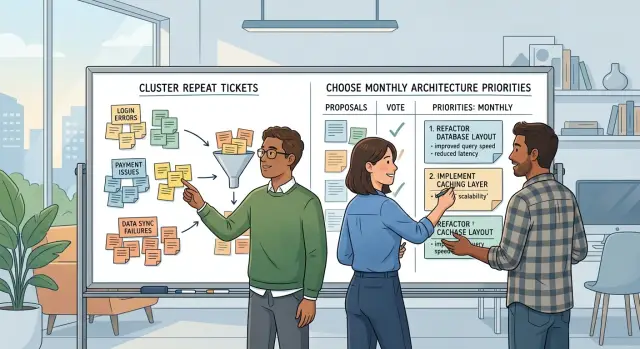
Table of Contents
Why roadmaps miss support pain
Most roadmaps lean toward visible requests. A customer asks for a feature, sales wants something promised for next quarter, and product teams feel pressure to add work people can point to.
Meanwhile, the same small failure can hit dozens of users every week and still stay off the plan.
That happens because pain rarely shows up as one clean signal. It appears in scattered tickets, chat messages, refund requests, and annoyed calls. Each case looks minor on its own. Together, they often point to a system problem that costs more time than the feature everyone keeps discussing.
Workarounds make this easy to miss. Support finds a manual fix, writes a saved reply, or tells customers to click through an odd sequence. The immediate problem fades, so urgency fades with it. But the product did not improve. The company simply moved the cost from engineering to support, and from software to human effort.
Escalations create another blind spot. The loudest issue gets attention first, even when it affects one large customer or one deadline. That is understandable, but it can distort roadmap choices. One angry message feels urgent. Twenty low-grade tickets about the same broken flow often do more damage over a month.
Teams miss support pain for another reason. They review tickets one by one instead of looking for patterns. A login delay, a failed export, and a missing notification can sound unrelated. After a monthly review, they may all trace back to the same queue, retry rule, or brittle integration.
This is more than reporting. It is a way to stop guessing. When teams rely on memory, the roadmap drifts toward requests, opinions, and whoever spoke last. When they group customer friction into themes, they can fix causes instead of cleaning up symptoms.
A roadmap should reflect what customers ask for. It should also reflect what keeps making them ask support for help.
What to collect before the review
Start with a narrow window. Pull the last 30 days of support tickets, not the last quarter. A month gives you enough volume to spot patterns without mixing old problems with new ones.
Do not bring raw ticket counts alone. Small details often show where the product keeps making people work harder than they should. A ticket that reopened twice can tell you more than ten one-off complaints.
Put these records into one shared document or board:
- all tickets from the last 30 days
- tickets marked as repeats or duplicates
- cases that reopened after resolution
- tickets handed from one team to another
- escalations and the stated reason for each one
Teams often miss the notes around the ticket. Save the workaround steps support agents used to get the customer unstuck. Those notes are often the most useful part. They show where the product still depends on tribal knowledge, manual fixes, or hidden settings.
Reopenings deserve extra attention. If a customer comes back after a fix, the issue may run deeper than the original ticket suggested. Handoffs matter too. When support passes a case to product, then to engineering, then back again, the problem is not only technical. Ownership is probably fuzzy, and that slows fixes.
Escalations need one more layer. Do not just count them. Write down why each one escalated. Was the customer blocked from billing? Did a workaround fail? Did support lack the access needed to diagnose the issue? The reason tells you what kind of change might actually help.
Keep the room small. One lead from support, one from product, and one from engineering is usually enough. More people often means more retelling and less decision-making. Support brings real customer pain, product ties the discussion to roadmap choices, and engineering can tell the difference between a simple fix and a deeper structural problem.
If you want better priorities, collect evidence that shows pain, repeat effort, and ownership gaps in the same place.
Group repeat tickets into clear themes
Single tickets are noisy. Patterns are not.
Read each ticket for the thing that failed, not the exact words the customer used. "Upload stuck at 99%," "invoice attachment vanished," and "save never finishes" may sound different, but they can still point to one storage or timeout problem. If the same fix would solve all three, group them together.
Keep user confusion separate from product breakage. A confusing screen creates tickets because people cannot tell what to do next. A broken feature creates tickets because the system does the wrong thing, crashes, or loses data. Those problems need different responses, so they should not sit in the same bucket.
Make the same split for policy issues and system limits. Some tickets come from a rule the company chose, like seat caps, approval rules, or refund terms. Others come from the product hitting a technical ceiling, like slow reports on large accounts or imports that fail past a certain file size. Customers feel both, but only one points to an architecture change.
Plain names work better than clever labels. Anyone on the team should understand the group in five seconds:
- Login emails arrive late (18)
- CSV import fails on large files (11)
- Admin role setup confuses new teams (9)
- Plan limit blocks extra projects (7)
Always keep the ticket count next to each group. Add the number of affected accounts too if you have it. One loud customer can send ten messages, while a quieter bug might hit fifty accounts and produce only four tickets.
Once each group has one root cause, one plain name, and one visible count, the roadmap discussion gets sharper fast.
Score pain without a heavy framework
You do not need a giant spreadsheet or a formal model to score support pain. A small team can make better decisions with a few numbers and one honest conversation.
Start with volume. Count how many customers hit the same issue in the last month, not how many tickets mention it. One broken flow can create ten replies from one person, and that can fool the room.
Then look at support effort. Some problems affect only a few customers but eat hours of agent time because the fix takes several back-and-forth messages, manual checks, or hand-holding. If agents spend 15 minutes per case on one bug and 2 minutes on another, that difference matters.
Risk changes the score fast. A workaround may keep people moving, but it can still create a bigger mess. If support tells users to edit data by hand, skip a verification step, or retry a payment in a strange order, give that issue extra weight.
Business impact is usually plain. If the problem stops onboarding, payment, account setup, or first use, treat it as more urgent than a bug buried deep in an admin screen. Early friction hurts twice: users feel it immediately, and support keeps paying for it until the fix ships.
A lightweight score can use five inputs:
- customers affected this month
- total agent minutes spent
- workaround risk: low, medium, or high
- whether it blocks money or onboarding
- estimated fix effort in days
That last line keeps the discussion grounded. A painful issue that takes one day to fix should often beat a painful issue that needs six weeks and three teams. You are not ignoring the larger problem. You are choosing what reduces pain fastest.
A common pattern is easy to miss until you score it: a medium-volume issue rises to the top because it wastes support time, creates risky workarounds, and hits users before they ever see the product working.
If two issues feel close, pick the one that removes repeated human effort. That choice keeps paying off every month.
Turn themes into monthly priorities
A review only helps if it ends with a short list of changes people will actually ship. Start with the top three themes, not ten. If you spread attention across every complaint, the month ends with half-finished fixes and the same pain shows up again.
For each theme, ask a blunt question: what product or system choice keeps creating this problem? Do not stop at the visible symptom. If customers keep opening tickets about missing notifications, the issue may not be that users forget to check the app. It may be a weak event pipeline, poor retry logic, or a setup flow that hides notification settings.
Then pick one architecture change for each theme. One is enough. If a theme turns into a shopping list, it stalls.
A simple format works well:
- name the theme in plain language
- write the system choice that caused it
- decide the single change that removes the most pain
- assign one owner and one target date
This makes trade-offs visible. A theme with many angry tickets but no clear structural fix may need product work later, not an architecture slot this month.
A small example makes the difference clear. Say one theme is repeated export failures. After a short review, the team sees the real cause: exports run in the request cycle and time out under load. The monthly priority is not "improve exports." It is "move export generation to an async job queue with status tracking." That is specific, testable, and easy to assign.
Put one person in charge, even if several people will touch the work. Shared ownership often means nobody closes the loop. Add a date that fits the month, and decide how you will tell if the change worked. Fewer related tickets next month is a good start.
Leave smaller noisy issues alone for now. Low-count tickets can still matter, but they should not crowd out themes that hurt many customers every week.
A realistic example from one month of support
A small SaaS team noticed the same complaint showing up all month: customers changed plans, got charged the wrong amount, then asked for a refund. Support agents could usually calm people down, but the fix took too long. Every case pulled in billing questions, account history, and a manual check from someone who knew the system well.
By the second week, the support lead saw a pattern. Agents were editing account records by hand to repair broken plan states before finance could issue the refund. That kept customers moving, but it also created risk. One wrong edit could make the next invoice worse.
The team reviewed four weeks of tickets, internal notes, and escalations. They found that one billing-related case reached sales and finance almost every week. Sales had to explain the pricing promise. Finance had to confirm the refund. Support had to patch the account. Three teams touched the same problem, and nobody trusted the process.
When engineering traced the issue, the root cause was not a bad agent workflow. Pricing logic lived in two different services. One handled plan upgrades inside the product. Another applied billing rules for invoicing. In most cases they agreed. After certain plan changes, they did not.
That changed the roadmap discussion fast. Instead of adding another refund macro or giving agents a better admin screen, the team chose one monthly architecture priority: move pricing decisions into a single billing service. They also removed manual account edits from the support playbook except for true emergencies.
The work was not huge, but it was focused. Engineering mapped every place that calculated price, chose one source of truth, and updated the refund path to read from the same billing service. Support kept tracking ticket volume during the change so the team could see if the fix worked.
By the next month, refund tickets dropped, weekly escalations slowed, and agents stopped spending their afternoons repairing records. That is what good support-driven planning looks like: one repeat pain point, one clear technical cause, and one decision that removes the workaround instead of polishing it.
Mistakes that waste the review
The easiest way to ruin a monthly review is to treat the loudest complaint as the biggest problem. A large customer can push hard, and an executive escalation can create pressure, but noise is not the same as frequency. If five smaller accounts hit the same broken step every week, that issue usually deserves more attention.
Teams often break down here. They react to the story they remember best instead of the pattern that keeps repeating. That leads to roadmap calls that feel urgent in the room but do not reduce day-to-day pain.
Another mistake is mixing feature ideas with broken flows. A request for a new export option is not the same as a checkout flow that fails unless support shares a manual workaround. Put those in one bucket, and real product problems get buried under nice-to-have ideas.
Workarounds are easy to dismiss. If support agents keep sending the same copied reply, asking users to refresh, retry, or follow extra steps, that is not just a support habit. It usually points to a weak part of the product that needs a structural fix or a simpler flow.
Teams also let one outage define the whole month. A bad incident matters, and the team should review it carefully, but one ugly weekend should not erase a month of repeat tickets. Unless that outage exposed a deeper flaw, it should not crowd out issues that keep wasting time every day.
The review gets weaker when the team picks too many fixes. Four structural changes can already be hard to finish in one cycle. If the list grows to eight or ten, context switches pile up and half the work rolls into next month.
Closing tickets without a root-cause note creates the same mess later. A ticket should not end with only "resolved" or "customer informed." Someone should write what actually failed: poor validation, missing retry logic, confusing permissions, weak monitoring, or a fragile integration.
A good review often feels almost boring. The team looks for repeats, separates requests from defects, keeps the monthly scope small, and writes down why each issue happened. That habit does more than a long meeting full of opinions.
A short checklist before you lock the plan
A monthly plan gets shaky when the room agrees on a theme but skips the basic checks. Teams often say authentication is a problem or search feels slow and move on. That is not enough. You need numbers, current behavior, and a clear owner before a theme becomes work.
Start with volume. If you cannot say how many tickets sit inside each theme, you are still working from impressions.
The current workaround matters just as much. If support agents already have a reliable fix, the issue may hurt less this month than a problem with no clean answer. On the other hand, a workaround that takes 15 minutes per case, needs engineering help, or confuses users is a warning sign. Write the workaround down in one plain sentence so everyone sees the real cost.
Before you close the review, confirm five things:
- each theme has a ticket count the group trusts
- support can describe the current workaround in simple words
- product, support, and engineering all joined the discussion
- every approved item has one owner and one target date
- support agents know what will change next and what to tell customers now
That last point gets missed all the time. If agents leave the meeting unsure whether a fix is coming this month, they go back to guessing. Customers feel that quickly. Even a short note like "we are reducing timeout errors first, full retry logic comes later" gives support a steady message.
A plan is not locked because the team talked about pain. It is locked when the team counted it, named the workaround, chose an owner, set a date, and gave support a clear story to carry into the next set of conversations.
What to do next
Put a 60-minute review on the calendar for the last week of this month. Keep it small. One product person, one engineer, one support lead, and whoever owns the roadmap can do the first pass well.
Use one shared sheet. That matters more than a fancy tool. If everyone can see the same repeat tickets, the same workarounds, and the same escalations, the discussion stays grounded in what customers actually hit.
Bring a short set of inputs to the session:
- repeat ticket counts from the last month
- examples of workarounds support gave customers
- escalations that needed engineering help
- roadmap notes for the next month or quarter
- release notes from anything shipped recently
During the meeting, look for a few patterns that keep coming back. A broken export, a slow sync job, or a permission issue that support explains five times a week is usually not a support problem. It is a product or architecture problem with a support cost attached.
Do not try to fix everything in one session. Pick one or two themes that keep causing friction, then turn them into concrete work for the next month. A good outcome is specific: reduce timeout errors in one flow, remove one manual workaround, or add better visibility so support stops guessing.
After each release, check those same themes again. If ticket volume drops, keep going. If it does not, the team probably treated the symptom and missed the cause.
For most teams, a simple monthly rhythm is enough. You do not need a large process. You need the habit of looking at the same evidence together every month before the roadmap gets locked.
If you need an outside view, Oleg Sotnikov at oleg.is helps startups and smaller companies sort support patterns into practical architecture priorities. That can be useful when the same issues keep resurfacing and the team does not have time to step back and separate cause from noise.
Frequently Asked Questions
Why do roadmaps miss support pain so often?
Because support pain looks small when teams read tickets one by one. A feature request arrives as one visible ask, but repeat friction hides across chats, reopenings, refunds, and manual fixes. Support often absorbs the cost, so the roadmap shows demand while the product keeps causing the same work.
What should we collect before the review?
Bring the last 30 days of tickets, plus repeats, duplicates, reopenings, handoffs between teams, escalations, and the workaround notes agents used. Those notes matter because they show where the product still depends on manual effort or hidden steps.
How far back should we look at support tickets?
Start with one month. That window gives you enough volume to spot patterns without mixing old problems with current ones. If you pull a full quarter, you blur changes from recent releases and lose focus.
How do we group repeat tickets into useful themes?
Group tickets by the thing that failed, not by the exact words customers used. If one fix would solve several complaints, put them in the same theme. Use plain names like "Export times out under load" so everyone understands the issue fast.
Should we mix user confusion with product breakage?
No. Keep them separate. Confusing screens need better wording, flow, or UI, while broken features need engineering fixes. If you mix both, the team argues about symptoms and misses the real cause.
How should we score support pain without a heavy framework?
Use a small score: customers affected, support time spent, workaround risk, whether the issue blocks onboarding or money, and rough fix effort. That gives you enough to compare pain without building a huge model.
Who should join the monthly review?
Keep the room small: one support lead, one product lead, and one engineering lead. Support brings the real cases, product ties them to roadmap choices, and engineering judges whether the team needs a quick fix or a deeper system change.
How many support-driven priorities should we choose each month?
Pick the top three themes at most. That keeps the month realistic and gives the team a real chance to finish the work. If you spread effort across too many issues, you carry the same pain into next month.
What mistakes usually waste the review?
The loudest customer can distort the whole meeting. Teams also waste the review when they mix feature requests with broken flows, trust raw ticket counts without context, or close tickets without writing the root cause. Those habits push the roadmap toward noise instead of repeat pain.
How do we know a fix actually worked?
Look for fewer related tickets, less agent time per case, fewer escalations, and less need for manual fixes in the next month. Support should also give customers a simpler answer after the change. If ticket volume stays flat, the team likely fixed the symptom, not the cause.


