Support macros that turn repeated replies into product rules
Use support macros to spot repeated workarounds, turn them into backlog items, and add simple checks that stop the same tickets coming back.
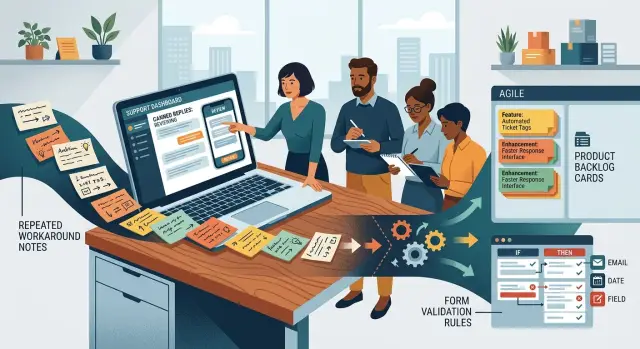
Table of Contents
Why the same reply keeps coming back
When a team sends the same canned reply every week, the problem usually is not the customer. That reply often covers a product gap that still sits in front of every new user.
The gap may look minor at first. A field accepts the wrong format. A button stays active when it should not. Signup lets people reach a dead end with no useful message. Support steps in with a workaround, and after a while the workaround starts to feel normal.
That normal costs time. Even a short macro takes a few moments to find, send, and sometimes explain again in plain language. Do that a few times a day and you lose hours every month to a problem the product could prevent once.
Customers rarely describe the same friction the same way. One person writes, "I never got the code." Another says, "Your signup is broken." A third says, "It keeps sending me back." Different words, same stuck point. If you sort tickets only by the customer's wording, the pattern stays hidden.
Support macros help because they are already condensed. By the time a team writes a standard reply, they have usually seen the issue enough times to know exactly how to answer it. If that same reply keeps showing up, users are hitting the same wall again and again.
Support often sees this before dashboards do. A chart shows the damage later, after enough people fail in the same place. Support sees the friction on day one, in the raw messages, before anyone names the issue or adds tracking.
So when a canned reply keeps coming back, treat it as product evidence. It usually points to a missing message, a confusing step, or a rule the product should enforce on its own.
What counts as a product rule
A product rule is any change in the product that stops the same support reply from being needed again. If your team keeps sending the same macro, the product is still leaving a gap for users to fall into.
That rule does not have to be a hard block. Sometimes it blocks bad input. Sometimes it warns the user before they submit. Sometimes it fixes copy that pushes people toward the wrong action. Sometimes it changes the order of steps so the workaround disappears.
Teams often hear the word "rule" and think only about strict form checks. That is too narrow. A good rule can live in validation, labels, defaults, timing messages, or the flow itself.
In practice, most repeated macros point to one of four fixes. The product should either reject input that always fails later, explain the mistake before submission, replace wording that creates false assumptions, or remove a manual sequence that support keeps teaching people.
A simple test works well. If the same issue appears across many tickets and support gives the same instructions each time, you are probably looking at a product rule. The best backlog from support is not a list of nicer replies. It is a list of preventable mistakes the product should catch, explain, or avoid entirely.
Which macros to review first
Start with the replies your team used most in the last 4 to 8 weeks. That window is long enough to catch repeat issues, but short enough to reflect the product people use now. Go back too far and old bugs or retired flows muddy the picture.
Volume matters more than internal drama. A loud customer, an upset sales rep, or one messy ticket can pull attention away from the friction that hurts more users every day. If one canned reply went out 140 times and another went out 7 times, start with the first one.
Some macros look different but point to the same product problem. One reply might say, "Please refresh and try again," while another says, "Please use a private window." If both appear when customers cannot access the same report page, group them together and count the problem once.
A good first pass is simple. Export macro usage for the last 4 to 8 weeks, rank replies by how often agents sent them, merge the ones that solve the same issue, and leave rare edge cases for later.
That last step matters. A one-off account state, a strange browser extension, or a customer with a custom contract may need attention, but it should not drive the first review. Early on, go after the repeated problems that affect a broad slice of users.
If your team has 200 canned replies, do not review all 200. Take the top 10 to 20 by usage, then collapse overlaps. In many teams, that short list covers most repeat contacts. It is enough to show where a clearer rule, a better validation, or a small product change will save support time next week.
Read the workaround inside the macro
Many support macros look like polite boilerplate, but the useful part is usually one sentence long. It is the sentence where the agent tells the customer what to do so the product works.
That sentence often exposes a hidden rule. If your team keeps writing "please do this first," "wait 10 minutes and try again," or "use the same email you signed up with," the product is relying on support to explain something it should explain or enforce itself.
Read each macro with a pen in hand. Mark every manual step that appears again and again. When agents ask people to refresh, re-enter data, switch devices, clear a field, or follow a special order of steps, you are looking at product behavior that is weak, confusing, or missing a guardrail.
Most repeated workarounds point to one of three problems. The interface uses wording people read the wrong way. The system allows bad input and reacts only after the fact. Or the product has timing users cannot see or predict.
Timing issues are easy to miss if you only read the opening complaint. A macro may say, "Your account can take a few minutes to activate after payment" or "Please wait until the import finishes before closing the tab." When that message appears often, customers are not simply impatient. The product goes silent at the exact moment it should explain what is happening.
Labels cause the same kind of trouble. If customers keep missing a field, choosing the wrong option, or clicking the wrong button, do not write it off as user error too quickly. Reasonable people make the same mistake when the wording nudges them there.
User error is real, but it has a pattern too. One person ignoring a clear warning is normal. Fifty people needing the same canned reply means the warning is weak, badly placed, or too late.
Ask four plain questions when you review a macro:
- Would a first-time user know this step without contacting support?
- Could the form block the mistake before submission?
- Could the screen explain the delay before the user gets worried?
- Does the macro mention the same label, field, or timing issue every week?
If the answer is yes, the workaround belongs in the backlog. The fix might be a clearer label, an inline validation check, a status message, or a better default. The macro already tells you where to start.
Turn a macro into a backlog item
When support macros repeat the same workaround, the product is asking for a fix. Do not start from memory. Paste the full canned reply into a shared review sheet first, exactly as the team sends it. Small details in the original wording often show what the product failed to explain, prevent, or validate.
Then rewrite the issue as one customer problem sentence. Keep it short and plain. "I cannot finish checkout because the company tax ID field rejects spaces" is clear. "Customer had an issue with billing setup" is too vague and usually turns into a weak ticket.
After that, pin the problem to a real place in the product. Name the screen, field, or step. "Checkout > Billing details > Tax ID" gives the team something they can inspect. Broad labels like "payments" or "signup" waste time because nobody knows where the rule should live.
Pick one owner before the ticket goes into the backlog. Support can open it, product can define the behavior, or engineering can take it if the fix is obvious. One person should own the next move. Shared ownership sounds nice, but it often means the item sits untouched.
A good backlog card answers five things: what the customer tried to do, where the failure happened, what input or condition caused it, what the product should do instead, and who owns the decision.
Then rewrite the workaround as a product behavior, not a support script. Instead of "Support tells users to remove spaces from the tax ID field," write "Trim spaces automatically in the Tax ID input and show an inline error only for invalid characters before submit."
That gives engineering something they can ship. It also gives support a cleaner macro later, or removes the need for one at all.
Pick the right fix
When the same reply keeps showing up, do not jump straight to a feature request. Read the exact workaround in the macro first. The wording usually tells you what kind of fix the product needs.
If the macro says things like "remove special characters," "use a work email," or "enter the date as MM/DD/YYYY," add validation where the mistake happens. Users should see the rule before they submit, not after support explains it.
If users are doing the wrong thing because the screen gives the wrong cue, change the copy instead. A vague label, a misleading button, or helper text that hides an important limit can send people in the wrong direction. More checks will only make that page feel stricter. Better words usually fix it faster.
Some macros point to a workflow problem, not an input problem. If agents keep copying data between tools, manually confirming a step, or telling users to contact support to finish a normal task, support has become part of the product flow. That is usually a sign to move the handoff into the product.
One question keeps teams honest: does this happen often enough to matter? Every repeated message feels bigger when agents see it up close. If a case shows up twice a quarter and takes two minutes to answer, it may not deserve backlog space yet.
The point is to separate rules, copy fixes, workflow changes, and noise. Once you do that, the backlog gets smaller and the fixes get sharper.
A simple example from signup
Picture a B2B product with self-serve signup. The form accepts any email address, so someone types a personal address like [email protected] and moves ahead. A few steps later, they hit a block because the product only works for company accounts.
Support sees the same issue again and again. Agents send the same canned reply each week: use your work email, personal domains are not allowed, and restart signup with the right address. The reply solves one case, but it does not solve the reason the case exists.
That repeated workaround is the signal. If support macros keep telling people to change their email domain, the product should say that before the form submits.
The fix is usually small. Check the email domain during signup and show a short message under the field when the address is personal. Plain wording works best: "Use your work email. Personal domains like gmail.com are not accepted."
Now the user gets the answer at the exact moment they need it. They do not finish half the flow, get confused, and open a ticket. They correct the field and move on.
The backlog item can stay simple: block common personal email domains at signup, show a clear message next to the email field, and track how often the rule fires.
This kind of change often cuts ticket volume fast because the form stops bad entries before they become support ticket patterns. It also saves agents from sending the same workaround all week.
When a repeated reply disappears from the queue, that is the real win. The team did not just answer faster. They removed friction from the product.
Mistakes that waste the review
A macro can point to a product gap, but the review falls apart when teams treat the macro itself as the spec. Copying canned reply text straight into the backlog usually creates a weak ticket: too much support phrasing, not enough product detail. Write the issue in plain terms instead. What did the user try to do, where did they get stuck, and what should the product do next time?
Another common mess is packing several problems into one ticket. A macro may mention a missing field, a confusing label, a timing issue, and a bad error message all at once. File that as one item and nobody knows what to fix first. Support also cannot tell which change reduced the replies. Split the pattern into separate issues when the causes differ.
Blaming users wastes the review too. If many people miss a step, the step is probably unclear, hidden, or badly timed. "User failed to follow instructions" rarely helps. "Users miss the tax ID field because the form asks for it only after they click Continue" gives the product team something concrete to test.
Strict checks create a different problem. Teams see repeated mistakes and rush to block them with hard validation. Sometimes that works. Sometimes it blocks real customers with unusual but valid cases that support already knows how to handle. Before you add a rule, check a sample of tickets and ask support which exceptions are normal.
One more mistake shows up after release. Teams ship the fix and move on without asking support what changed. That misses the point. Support should watch the same macro for two or three weeks and report what happened. Did volume drop? Did the wording of new tickets change? Did users find a new path into the same problem?
If the replies stay flat, the fix was probably too narrow. If the macro almost disappears, you found a rule worth keeping.
A quick review checklist
A fast pass through your support macros can tell you whether a repeated reply belongs in the product backlog or should stay as a one-off support answer. If the same confusion hits new users early and the team can stop it with a rule or validation, it should not live in a canned reply for long.
Use this checklist before you open a ticket for engineering:
- Check how fast a new user can hit the problem. If it happens in the first few minutes, fix it sooner. Early friction often turns into churn.
- Make sure the macro points to one clear break. "User cannot finish signup because the phone field rejects valid numbers" is useful. A macro that bundles setup errors, billing questions, and browser issues is not.
- Ask whether the product can block the mistake before support sees it. A field check, a clearer label, a default setting, or a hard rule often removes the need for the reply.
- Confirm that you can measure the change. Count related tickets now, then compare the number after the fix ships. If nobody can measure it, the team will argue from memory.
- Put one owner and one due date on the item. Shared ownership sounds polite, but it usually means the task sits untouched.
This review does not need a long meeting. Ten quiet minutes with five recent macros is often enough to spot weak validation, vague backlog items, and fixes that nobody owns.
Next steps for your team
Put it on the calendar. A 30-minute review every week is enough for most teams. If ticket volume is lower, do it every two weeks. The goal is not a big audit. It is to catch repeated workaround text while it is still fresh.
Start small. Pick one product area, such as signup or billing, and review only the macros tied to that flow. That keeps the discussion concrete. Teams get stuck when they mix account issues, payments, permissions, and bugs into one meeting.
You do not need a fancy system. A shared doc or spreadsheet is enough if it captures the macro name, the repeated customer problem, the proposed product fix, the owner, and the status. After a few rounds, that log will show which macros turned into real changes and which ones keep coming back.
This process also helps product and support speak the same language. A macro that says "please use this exact format" usually points to missing validation. A macro that explains a hidden step usually points to weak rules or a confusing flow. Once the team sees that pattern, the backlog gets cleaner.
If the same issue crosses support, product, and engineering, an outside review can speed things up. Oleg Sotnikov at oleg.is does this kind of sorting as a Fractional CTO, helping teams turn messy support patterns into practical backlog work.
After a month, you should see fewer canned replies in that area. If you do not, narrow the scope again and keep the habit. Small weekly reviews beat a big quarterly cleanup almost every time.
Frequently Asked Questions
How do I know a support macro points to a product problem?
Treat it as a product issue when agents send the same instructions again and again for the same stuck point. If support keeps teaching users a step, the product should usually block the mistake, explain it earlier, or remove the extra step.
Which macros should I review first?
Start with the most-used macros from the last 4 to 8 weeks. That gives you current patterns without mixing in old bugs or retired flows. Volume matters more than the loudest complaint.
What if different macros seem to describe the same issue?
Group them when they solve the same user problem. Two replies can use different words and still point to one broken step. Count the problem once, then write one clear backlog item for that break.
What should I pull out of the macro itself?
Look for the manual step inside the reply. Phrases like "use your work email," "wait 10 minutes," or "do this first" usually expose a missing rule, a weak label, or a status message the product never shows.
How do I turn a repeated reply into a backlog item?
Write one short sentence from the user's point of view, then name the exact screen, field, or step. After that, rewrite the workaround as product behavior. For example, instead of "support tells users to remove spaces," write "trim spaces in the field and show an inline error for invalid characters."
Should I solve this with validation, copy, or a workflow change?
Choose the fix that matches the pattern. If users enter invalid data, add validation before submit. If users follow the wrong cue, change the copy. If support completes a normal task by hand, move that step into the product flow.
When is a repeated macro not worth fixing yet?
Not every repeated reply deserves backlog space right away. If the issue shows up rarely, affects odd edge cases, and takes almost no time to answer, log it and move on. Spend your first effort on broad problems that hit many users.
How can I tell if the product fix actually worked?
Measure the related ticket volume before and after the change. Then ask support what happened in the next two or three weeks. If the macro almost disappears, the fix worked. If the count stays flat, the rule was too narrow or the real cause sits somewhere else.
Who should own these macro-based backlog items?
Put one owner on each item. Support can surface the pattern, but one person needs to drive the next step and close the loop with product and engineering. Shared ownership usually leaves the ticket sitting there.
How often should the team review support macros?
Run a short review every week, or every two weeks if ticket volume stays low. Keep the scope narrow at first, like signup or billing, so the team can spot patterns fast and ship small fixes instead of arguing over a huge list.


