Support conversations for product discovery in plain steps
Learn how to use support conversations for product discovery by spotting bugs, workarounds, missing concepts, and delayed decisions.
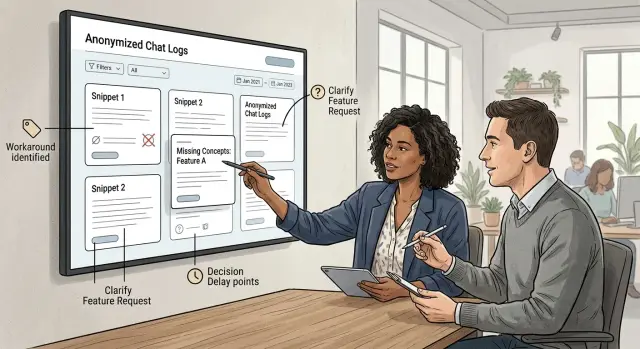
Table of Contents
Why support chats reveal more than ticket labels
Most teams record the clean part of a support case: the bug, the request, the reply time. The messy part often disappears. A customer says, "We export it to a spreadsheet, fix it by hand, then upload it again," and nobody writes that down.
That missing detail matters. It shows what people need badly enough to do extra work.
Customers also describe pain through symptoms. They say a screen is confusing, a setting is missing, or a task "doesn't work." But there is usually a job behind that complaint. They may be trying to send an invoice before finance closes the day, get approval before a shipment goes out, or finish setup before a meeting starts. If you only log the surface issue, you miss the blocked job.
Repeated confusion is another signal teams shrug off. When different customers use different words for the same action, the problem is often naming, not documentation. One person asks how to "publish," another asks how to "go live," and a third asks how to "make it visible." They are all asking about the same thing. The product and the customer do not share the same language yet.
Silence can be just as useful as a complaint. A long gap between messages may look like a slow reply or a distracted user. Sometimes the customer left to ask a boss, check policy, or get legal approval. That is not a support delay. It is approval friction. The product asked for a decision before the person had enough context or confidence.
A simple example shows the difference. A user asks why they cannot invite a teammate, disappears for three hours, then returns with a screenshot. The ticket may end up tagged as a permissions bug. The deeper issue could be unclear roles, hidden approval steps, and the need to ask an admin before moving on.
That is why support chats are useful for product discovery when you read them as small stories, not labels. Look for the shortcut, the blocked job, the odd wording, and the pause before the next message. Bugs still matter, but these quieter signals often point to the changes that remove repeat pain.
What to listen for in real conversations
Users rarely give you the real problem in one clean sentence. They describe the symptom, the extra step, or the delay. Listen for what happened before the question, not just the question itself.
One phrase should always make you stop: "we do this by hand first." That usually means the product does not match how the work gets done in real life. A manual step can point to a missing feature, a poor default, or a setup flow that asks for too much too soon.
Repeated questions matter too, even when the wording changes. One person asks, "Where do I set this up?" Another asks, "Do I need to create this before inviting my team?" A third asks, "Why can't I start from this screen?" Those are not separate problems. They often point to one unclear idea in the product.
Pauses tell you a lot. If someone says they need to check with a manager, confirm with finance, or ask their admin before they can continue, pay attention. The product may force a decision too early.
A few patterns show up again and again:
- Users describe a side step outside the product.
- They ask the same thing twice in different words.
- They pause because another person must approve or explain something.
- They complete the task, but with obvious doubt.
Do not file all of this under "bug." A bug is a clear failure. Confusion is different. Hesitation is different. Workarounds are different too. If a button works but the user still does not know what happens next, the screen is doing its job badly even though nothing is broken.
The best support notes are often small. Write down the exact words people use, especially when they sound awkward or indirect. Those phrases often show the gap between how your team talks about the product and how customers think about their work.
Sort each signal into four buckets
If a team marks every support issue as a bug, it loses half the story. Many conversations point to friction long before anything actually breaks. A simple tagging system makes those signals easier to compare.
Use four short tags:
bug- something fails, shows the wrong result, or behaves in a way the product did not intendworkaround- the user still gets the job done, but only through extra steps, copy-paste, spreadsheets, or manual helpconcept- the user does not understand the model behind the product, the terms you use, or what a feature is fordelay- the user stops and waits because they cannot decide what to choose, who should act, or what happens next
These four tags cover more than most teams expect. A user who asks, "Can I just export this and fix it by hand?" probably does not have a bug. That is a workaround. A user who says, "I do not know what this field means," points to a missing concept. A user who goes quiet after asking about setup, permissions, or pricing often signals a decision delay.
Keep the tags short. Short tags get used. Long labels turn into debate, and debate kills consistency.
For most teams, one primary tag is enough. If a conversation includes more than one issue, tag the strongest signal and add one short note. That keeps the review usable instead of messy.
A small team can start in one afternoon. Open the last 20 conversations and tag each one with only these four labels. In many teams, bugs are not the biggest bucket. Workarounds, missing concepts, and decision delays explain more of the stalled signups, repeat questions, and slow rollouts than anyone expected.
A simple review process
Start with one full read and do nothing else. Do not tag, score, or jump to a fix yet. Read the whole exchange from top to bottom so you can feel the pace, what the user tried first, and where their patience started to wear thin.
Then write the user's goal in one plain sentence: "They wanted to invite a teammate" or "They were trying to finish setup before a meeting." This matters because support teams often log the visible issue and miss the job the person came to do.
After that, find the first point where progress slowed. It might be a vague error, a confusing term, a missing permission, or the moment the user asked, "What am I supposed to do next?" That first slowdown often tells you more than the final complaint. The bug may be real, but the slowdown shows where the product stopped making sense.
Now add one tag and one short note. One tag is enough. If you add three or four, the pattern disappears. A note such as "user did not understand billing term" or "setup required info they did not have ready" gives the product team something concrete to work with.
A short example makes this clearer. A user writes in because they "can't finish onboarding." The lazy tag is "bug." But when you read the whole thread, you see they paused when asked to choose a workspace type. They did not know the difference, guessed, and then backed out. The deeper issue is not a broken screen. It is a missing concept.
Save repeated patterns for a weekly review instead of reacting to every case on the spot. One odd conversation can be noise. Five conversations with the same slowdown usually point to user pain you can fix.
Look past the bug to the blocked job
A ticket rarely starts with the real problem. People report the thing they can see: a button that fails, a page that spins, a setting they cannot find. What they care about is the job that stopped. Maybe they needed to send an invoice before lunch, approve a teammate, or finish setup before a client call.
One follow-up question changes the whole review: "What were you trying to get done today?" The answer tells you whether you have a one-off defect or a bigger product gap. If five people hit different errors while trying to do the same task, the product is probably getting in their way long before the bug appears.
A reported bug often hides something less obvious. The screen may fail, but the deeper issue is confusion about the next step, a missing option, or copy that makes people guess. When support notes only "upload failed," the team fixes the upload and moves on. When support adds "user tried three file types because they could not tell which one we accept," the product problem becomes much clearer.
Workarounds are even more revealing. Pay attention when people say they copied data into a spreadsheet, asked a coworker to do it manually, or used another tool to finish the task. Those are not side notes. They show where the product stops helping and where users build their own bridge.
A simple review can use four questions:
- What job was the person trying to finish?
- What step slowed them down first?
- What workaround did they use, if any?
- How would you describe the issue without naming the screen?
That last question is especially useful because screen-based wording is usually too narrow. "The permissions modal won't save" becomes "A manager cannot give a new hire access before their first shift." The second version is better because it ties the issue to an outcome, a role, and a real moment.
Teams that write tickets this way find patterns faster. They stop collecting isolated bugs and start seeing blocked jobs.
Example: an onboarding question that exposed a bigger gap
A small onboarding question can tell you more than a bug report. One new customer asked during setup: where do we invite teammates?
Support pointed them to the admin area and explained the role options. The customer thanked them, then came back later with almost the same question. They were not confused by the screen itself. They were unsure what the roles meant and who should get access first.
That pause mattered. The team had planned to roll the product out that day, but they stopped and waited for a manager to approve access. Nothing crashed. No error appeared. Still, adoption stalled.
If you tracked this as a solved support ticket, you would miss the real signal. The problem was not "user could not find invite button." The problem was that the setup path asked people to make an access decision before the product gave them enough context.
This is a common pattern. A user asks one surface question, support answers it, and the conversation keeps circling because the product has not made the next step clear.
When the team reviewed the exchange, they found three weak spots. The role labels sounded internal, the setup flow pushed account structure before team setup, and the screen never explained who should invite people first.
They changed the labels to plain language, added a short note under each role, and moved "Invite your team" into a clearer first-run step. They also added a simple prompt for admins: invite one manager first, then add everyone else.
After that change, fewer new customers paused at the same point. Support spent less time repeating the same explanation.
That is the point of support-driven discovery. You are not only collecting questions. You are finding the moments where the product asks users to stop, guess, or wait for permission.
Common mistakes when teams review support
A busy inbox can fool a team. If you only track how many tickets came in, you learn which issues are loud, not which issues block real progress. Ten small questions about setup can matter more than one dramatic bug if they all point to the same missing step, unclear term, or hidden decision.
Teams also waste good signals when they treat every workaround as user failure. If people keep exporting data to a spreadsheet, asking a teammate for help, or delaying a setup choice for days, that behavior tells you something about the product.
A few mistakes show up often:
- Ranking problems by ticket volume alone.
- Calling repeated workarounds "confusion" instead of asking why the workaround exists.
- Stopping the learning process once support closes the ticket.
- Sending raw chat logs to product and expecting someone else to find the pattern.
- Mixing urgent triage with discovery review.
That third mistake is common. Support solves the immediate issue, but the lesson stays buried in the conversation. A refund request may really be a pricing misunderstanding. A login complaint may start earlier, when the person first created an account and chose the wrong path.
Raw transcripts do not help much on their own. Product managers rarely need every message. They need a short summary: what the user tried to do, where they got stuck, what workaround they used, and what part of the product or copy may have caused it.
Separate firefighting from review time. Triage needs speed. Discovery needs calm attention and a small weekly ritual. Even 30 minutes can turn support into a steady source of product fixes, clearer onboarding, and fewer repeat questions.
A weekly checklist that actually works
Set aside 30 minutes each week for a small review. Pull a sample of recent conversations, not just the loudest complaints. Include chats that ended with a fix, a workaround, or a stalled decision. All three can reveal product gaps.
For each conversation, capture the same five notes:
- One sentence on what the user was trying to do.
- Any workaround, even if it seemed good enough at the time.
- The words the user used that your product never says.
- Who else had to approve, review, or decide before the user could move on.
- Which other conversations look similar.
That first note matters more than it seems. If you cannot state the user's goal in one simple sentence, the team will argue about the symptom instead of the blocked job.
Workarounds deserve their own note. When users export data to a spreadsheet, ask a teammate to check something, or leave the app to finish a task, they are telling you where the product stops short.
Missing product terms are another strong signal. Users describe the world in their own words. If they keep asking for a concept your interface does not name well, the product may confuse them before they ever reach the broken part.
Decision delays belong in the notes too. If several users need a manager, finance lead, or client to step in, the friction may sit in permissions, pricing, trust, or sharing, not in the screen where they got stuck.
Walk into the product meeting with three grouped patterns, not twenty separate anecdotes. That gives the team something it can act on this week.
What to do with what you find
A pile of notes does nothing on its own. After a week or two, choose one signal that keeps showing up. Do not chase ten ideas at once. Pick the pattern that appears often, slows users down, or creates repeat contact.
Turn that pattern into a small product question. Instead of saying "users are confused," ask something you can test: "Would clearer plan limits reduce upgrade questions?" or "If we ask for team size later, do more people finish setup?" A good question points to one behavior in one place.
Before anyone plans a bigger build, test the smallest change that could remove the friction:
- rewrite a button label or helper text
- change the order of one step in a flow
- adjust a permission so the right person can finish the task
- add one missing example, template, or default setting
- show a short explanation at the moment of choice
Small tests save time. If a copy change cuts repeat tickets in half, you learned something useful without a long sprint. If it fails, that helps too. You can move to a deeper fix with better evidence.
Share the result in a short summary that support, product, and leadership can read in under two minutes. Keep it plain: what users said, where they got stuck, what you think caused it, what you changed, and what happened after the change.
A simple example: if five people ask whether they can invite teammates before finishing setup, the issue may not be the question itself. The product may hide team setup too early, or the roles may block the wrong person. That points to a flow or permission problem, not a training problem.
Some teams see the pattern but still stall because nobody owns the follow-up. In that situation, outside help can be useful. On oleg.is, Oleg Sotnikov offers Fractional CTO and startup advisory support for teams that need help turning messy support signals into clear product decisions, owners, and small tests.
Every repeated signal needs a next step. Change the message, change the flow, change the permission, or decide not to act and write down why.
Frequently Asked Questions
Why are ticket labels not enough for product discovery?
Ticket labels hide the part that explains why the issue matters. A label might say permissions bug, but the chat may show that the user needed approval, did not understand the roles, and had to wait for an admin. That context shows where the product slows real work.
What should I look for in support chats besides bugs?
Watch for manual steps, repeated rewording, and pauses in the conversation. If someone exports data to a spreadsheet, asks the same thing twice in new words, or disappears to check with a manager, the product likely creates friction even if nothing broke.
How do I tell a bug from a workaround?
A bug stops the task because the product fails or shows the wrong result. A workaround means the user still finishes the job, but only by doing extra work like copy-paste, manual edits, or asking a coworker to step in.
What does a long pause in a support chat usually mean?
Often it means the user had to leave the product to get context, approval, or a decision. That pause tells you the screen asked for too much before the person felt ready to move on.
Why do users keep asking the same thing in different words?
When users describe the same action with different words, your product language does not match their language yet. That usually points to naming, labels, or unclear concepts rather than missing docs alone.
How should I tag support conversations?
Use four short tags: bug, workaround, concept, and delay. Pick one main tag for each conversation, then add one short note about the slowdown so the pattern stays easy to review later.
What is the fastest way to review old support chats?
Start with about 20 recent conversations and read each one from start to finish. Write the user's goal in one sentence, mark the first point where progress slowed, then add one tag and one short note.
How do I find the blocked job behind a complaint?
Ask what the person wanted to get done that day, not just what screen failed. A complaint about upload, roles, or setup often makes more sense when you name the real job behind it, like sending an invoice or inviting a teammate before a meeting.
What mistakes do teams make when they review support conversations?
Many teams rank issues by ticket count alone, call workarounds user error, or stop learning once support closes the case. They also dump raw transcripts on product instead of writing a short summary with the goal, slowdown, workaround, and likely cause.
What should I do after I spot a repeated support pattern?
Pick one repeated pattern and turn it into a small question you can test. Then try the smallest change that fits the problem, such as better copy, a different step order, or a clearer permission, and watch whether repeat questions drop.


