Support bot boundaries that prevent costly mistakes
Support bot boundaries help teams limit actions, route risky cases to humans, and stop confident wrong answers before they reach customers.
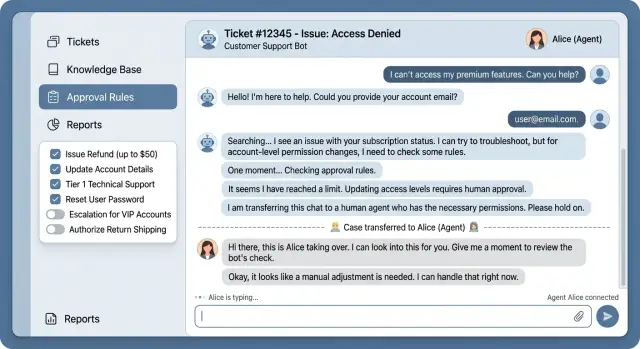
Table of Contents
Why personality is not the main problem
Customers do not open a support chat hoping for a charming bot. They want the right answer fast, and they want the bot to stay out of trouble. If it sounds warm but gives the wrong refund rule or changes the wrong setting, the tone stops mattering.
A friendly bot can still do real damage. It might guess a billing policy, promise a feature that does not exist, or suggest a fix that makes the issue worse. People often forgive a stiff reply. They do not forgive a false answer that costs them time or money.
Problems usually start when the bot drifts outside its role. A bot that should explain help docs starts interpreting edge cases. A bot that should collect details starts making account decisions. Smooth language can hide bad judgment.
Picture a small SaaS team with a bot that handles plan questions. A customer asks whether their tier includes SSO, and the bot guesses instead of checking approved product facts. The customer upgrades for the wrong reason, then opens an angry ticket when the feature is missing. The problem is not personality. The problem is that nobody told the bot where to stop.
Good boundaries are simple. The bot can answer common questions from approved sources, ask a few clarifying questions, and hand the case to a person when the request touches billing disputes, account access, legal issues, or anything unusual. That protects the customer first. It also protects agents from cleanup work and keeps the business out of preventable trouble.
That is why boundaries matter more than personality design. Tone can make a chat feel less cold. Boundaries decide whether the bot is safe to use at all. A plain, careful bot with clear limits is usually better than a polished one that improvises.
Define the bot's job before you write prompts
A bot fails fast when its job is vague. Teams often start with tone, greeting style, and long prompt rules. Start with a plain job description instead. If a new support agent cannot read it in two minutes and explain it back, the scope is too wide.
Bots work best when they own a small set of low-risk requests. That might include order status, password reset steps, plan limits, outage notices, or collecting details a human will need later. These answers stay close to written policy.
Then write down what the bot must never finish. Refunds, account closure, billing changes, security settings, legal claims, and custom discounts usually belong to a person. If a request can cost money, change access, or create a promise, keep the bot out of it.
It also helps to separate what the bot may read from what it may do. It may read help docs, account status, shipping data, or past tickets. That does not mean it may edit an account, apply credit, or cancel a subscription.
A small SaaS example makes the difference obvious. The bot can see that a customer's payment failed and explain the retry process. It should not swap the card on file, extend the renewal date, or say "your access will stay active" unless that rule is explicitly approved.
Use one stop rule that everyone remembers: if the next step changes customer data, money, access, or policy, the bot stops and escalates. One clear rule is better than a page full of exceptions.
Keep the final scope short. A one-page note is enough: what the bot handles, what it can read, what it never does, and when it hands off. Prompt writing gets much easier after that because the prompt describes a job instead of trying to invent one.
Limit what the bot can do
Most support damage starts when a bot can act, not when it sounds awkward. Good boundaries start with read access. Let the bot check order status, subscription tier, shipping progress, or help docs first. Do not give it permission to change billing details, cancel accounts, issue refunds, or reset security settings on day one.
Even after the bot proves it can handle simple cases, keep write access narrow. Requests involving money, identity disputes, legal complaints, security alerts, login problems, or access recovery should go to a person. These cases move quickly when a trained agent takes over. They go badly when a bot guesses.
Identity checks need a hard stop, not a polite guess. If the bot cannot confirm the user with strong evidence from the signed-in session, a verified code, or another trusted signal, it should refuse account changes. A customer may sound convincing and still be the wrong person. Blocking the action is annoying for a minute. Giving the wrong person access can create days of cleanup.
You should also limit how far the bot can go in one conversation. A simple rule works well: let it do one lookup and one safe action, then stop. If a chat starts chaining requests - update the email, change the plan, add a refund, remove a seat - the bot should pause and hand off. Small errors pile up fast when the bot keeps moving.
Every action needs a plain reason in the log. Do not settle for a vague note like "user requested change." Record what the bot did, what evidence it used, and why the rule allowed that step. A human reviewer should be able to read the log in ten seconds and say, "Yes, that makes sense" or "No, that should never have happened."
This is the boring side of support automation, and it matters more than personality. If the bot stays inside clear limits, people can trust it with the easy work and spot trouble before it spreads.
Make escalation feel normal
Customers get frustrated when a bot keeps repeating itself after it stops being useful. Offer a human handoff early, often after one or two failed tries, instead of forcing a long loop. Good boundaries include a simple exit when the issue needs judgment, access, or care.
The handoff should feel like normal service, not like the bot gave up. Tell the customer why you are escalating in plain words: "I am sending this to a support agent because this involves billing" or "This needs a person because I cannot verify account ownership in chat." That short reason builds trust.
When the case moves to an agent, the customer should not need to repeat everything. Pass the full chat transcript and the details the bot already collected, such as account email, order number, device, error message, and the steps the customer already tried. A handoff without context wastes time and makes the bot look careless.
Some requests should skip the bot almost immediately. Account lockouts, identity checks, billing disputes, refund complaints, legal or privacy concerns, and messages that mention data loss or money loss all belong on a faster path. If someone is already upset and asking to cancel, that is another strong signal to route the case to a person.
Be clear about what happens next. A customer who hears "A human will review this next" is calmer than one who sees a vague "Your case has been escalated." If response times vary, say that too.
Your agents should shape the rules over time. Give them a quick way to flag chats with notes like "the bot should never handle this type again" or "ask for the invoice number earlier." That feedback loop matters more than polishing the bot's tone.
A small team can review flagged cases once a week and add a few hard rules each time. After a month, escalation usually feels much smoother because the bot stops pretending it can solve everything. The best result is quiet: fewer loops, faster help, and fewer confident wrong turns.
Teach the bot to avoid confident wrong answers
Wrong answers do more damage than a bland tone. A support bot can sound friendly and still create refunds, broken trust, or hours of cleanup if it guesses.
The safest setup starts with a simple rule: the bot should say when it is not sure. That sounds obvious, but many teams reward smooth replies instead of correct ones. If the bot cannot confirm an answer from approved docs, tools, or customer records, it should stop and say so.
Give it a narrow source of truth. Do not let it patch together answers from old help articles, half-finished internal notes, and vague memory from prior chats. If the billing system says one thing and the help center says another, the bot should not pick the nicer answer. It should say the information does not match and hand the case to a person.
When details are missing, ask one clean follow-up question. One is usually enough. If a customer says, "My account was charged twice," the bot can ask, "Can you share the charge date or the last four digits of the card?" That moves the case forward without turning the chat into an interview.
Short refusal patterns help more than long apologies. Replies like these are clear and easy to test:
- "I cannot cancel a contract from chat, but I can send this to billing."
- "I do not have enough information to confirm that change."
- "I can help with account access, but I cannot change payment ownership here."
- "These records do not match, so a human agent needs to review this."
Write these patterns into the prompt and test them against messy, real requests. Include cases where customers ask for policy exceptions, legal answers, refunds outside the rules, or actions on the wrong account.
One useful habit is to score the bot on restraint. If it answers 90 percent of simple questions and refuses the risky 10 percent, that is often better than a bot that tries to answer everything. In support automation, caution is usually cheaper than cleanup.
Set boundaries step by step
Start with the last month of tickets and sort them by repeats. Look for patterns, not rare disasters. If the same question showed up 30 times, that is a better starting point than a once-a-year billing mess.
Then cut the list down hard. Keep only cases that are both repeatable and low risk. A bot can handle routine work, but it should stay away from anything that could lock someone out, expose account data, or trigger a refund by mistake.
Good starting cases are usually simple: sharing basic account or plan information, sending standard troubleshooting steps, checking order or ticket status, routing users to the right form or team, and answering common "how do I" questions.
For each case type, write rules as yes-or-no checks. Do not write vague goals like "be helpful" or "solve the issue." Write direct rules such as: "If the customer asks about billing and the account is not verified, escalate." Or: "If the message mentions lost data, skip the bot and send it to a person."
This is where boundaries become real. The bot should know what must be true before it acts, what it may say, and when it must stop.
Before launch, test the rules on real conversations. Use messy examples, not perfect ones. Include short messages, angry replies, missing details, mixed requests, and users who ask two things at once. If the bot fills in gaps with guesses, tighten the rule.
After launch, review failures every week with your support team. Read the chats where the bot stalled, answered too fast, or passed the user around. One bad pattern matters more than ten smooth chats because that bad pattern shows where the rules are still too loose.
A smaller bot usually works better. If it handles 20 percent of tickets without causing cleanup work, that is a solid start.
A realistic example from a small SaaS team
A small SaaS team gets a billing request that looks simple, but it can go wrong fast. A customer says they lost access to the account owner's inbox and need billing ownership moved to a new person.
If the bot tries to be helpful and makes the change, the team risks handing control of invoices and payment settings to the wrong person. This is exactly where boundaries matter more than tone.
The bot should check only what it can verify safely. It can compare the customer's message with details already in the account and billing system, but it should not change ownership, swap billing contacts, or expose payment data on its own.
A good reply is plain and calm: "I can help collect the details for our billing team, but I can't transfer billing ownership in chat. I need a few items first so the team can review this safely."
Then it gathers low-risk details such as the company name on the account, the old billing email if they know it, a recent invoice number or amount, and the account workspace or domain name. That gives the bot enough context to prepare the case without pretending it has authority it does not have. It also avoids bad habits, like asking for a full card number or making a promise it cannot keep.
How the handoff works
Once the bot has the details, it opens a billing ticket and attaches the full chat. The handoff should include a short summary for the agent: the customer lost access, asked for a billing ownership change, provided invoice X, confirmed company Y, and needs manual review.
The customer should hear exactly what happens next: "I've sent this to our billing team with the conversation attached. They'll review the ownership request and contact you at the address you provided."
That last part matters. The customer does not have to repeat the story, and the agent starts with the facts instead of digging through chat logs.
For a small team, this saves real time. One agent can pick up the case, verify the request with the right checks, and finish the change without cleaning up a messy bot mistake first. That is a much better use of automation than a bot that guesses and gets it wrong.
Mistakes teams make early
Most early failures come from bad limits, not bad wording. Teams spend hours polishing tone, then give the bot too much freedom. That is how a support bot turns a simple chat into a billing error, an account change, or a privacy problem.
The first mistake is broad access. A bot does not need admin rights just because a human agent uses them. If it can cancel accounts, edit billing details, or issue refunds on its own, one wrong answer stops being embarrassing and starts costing money. For most teams, the safer start is narrow: look up status, suggest steps, collect details, and hand off.
The next mistake is hiding the human handoff. Some teams treat escalation like failure, so they bury the option and hope the bot solves everything. Customers notice quickly. If someone asks about a charge, a locked account, or anything tied to risk, they should not have to fight the interface to reach a person. A clean handoff feels normal. A blocked handoff feels like stonewalling.
Old content causes more damage than many teams expect. If the bot reads last year's policy, retired pricing, or an outdated help center article, it will answer with confidence and still be wrong. People trust clear language. They do not care that the source document was stale. Someone on the team needs to own the docs and remove outdated rules before the bot uses them.
Bad success metrics make all of this worse. Low escalation numbers look good in a dashboard, but they can hide bad outcomes. If the bot keeps people in chat while giving the wrong answer, the metric goes up and the support experience gets worse. Track resolution quality, reopened cases, refunds after support, and handoffs that happened too late.
One giant prompt is another common trap. Support cases are messy, and one oversized instruction block usually creates conflicts. Billing, account access, product setup, and bug reports need different rules. Boundaries are easier to maintain when you split work into smaller flows. Testing gets easier too, because you can see which rule failed and fix that part instead of rewriting everything.
Quick checks before launch
A support bot is ready only when it can say no, stop, and hand off without creating confusion. Nice tone helps, but limits matter more. If the bot cannot refuse risky requests or admit uncertainty, it will eventually create a mess for your team.
Before you put it in front of customers, run a short release check:
- Ask for something outside its job. It should refuse in plain language and say what the customer should do next.
- Trigger a case that needs a person, such as a billing dispute, refund request, account access problem, or contract question. The bot should escalate cleanly instead of trying to sound helpful.
- Test risky actions. If an action can change money, data, permissions, or legal terms, require human review every time.
- Open the agent view and confirm the full chat history, user details, and bot decisions appear in one place.
Keep the review simple. Pick ten real conversations, including a few messy ones. Check whether the bot answered correctly, refused when needed, and escalated early enough. If you see one confident wrong answer in a risky area, treat it as a rule problem, not a one-off.
Human review should sit closest to the moments that can hurt trust or cost money. That usually includes account changes, payment issues, exceptions to policy, and anything involving personal data. Make those routes boring and clear. Customers do not need a clever explanation. They need the right handoff.
If your team is still working out safe limits and escalation rules, an outside review can help. Oleg Sotnikov at oleg.is works with startups and smaller businesses as a Fractional CTO and advisor, with a strong focus on practical AI automation. That kind of review is useful when you want support automation to cut workload without letting a bot guess its way into expensive mistakes.
Frequently Asked Questions
Why do boundaries matter more than personality in a support bot?
Because customers care more about a correct answer than a friendly tone. A bot with clear limits can solve simple issues and stop before it touches money, access, or policy.
What should my support bot handle first?
Start with repeat questions that stay close to written rules, like order status, password reset steps, plan limits, outage notices, or collecting details for an agent. Keep the first scope small so you can test it without cleanup work.
Which requests should always go to a human?
Send anything risky to a person. That includes refunds, billing disputes, account closure, ownership changes, security settings, legal issues, privacy concerns, and any request that could change data, money, access, or policy.
Can a bot safely change billing or account settings?
Not at first, and often not at all. Let the bot read account status or help docs, but keep write actions narrow unless you can verify identity, log the reason, and review the results closely.
When should the bot escalate instead of trying again?
Offer handoff early, usually after one or two failed tries or as soon as the chat enters a risky area. If the bot cannot verify the user or the issue needs judgment, it should stop and explain why a person will take over.
How do I stop the bot from giving confident wrong answers?
Teach the bot to say when it does not know. If approved docs, tools, or account records do not confirm the answer, it should ask one clear follow-up question or hand the case to an agent.
What should the bot use as its source of truth?
Use one source of truth for each topic, such as current help docs, billing data, or account records. If two sources conflict, the bot should not pick the nicer answer; it should flag the mismatch and escalate.
What should I log when the bot takes an action?
Log the action, the evidence, and the rule that allowed it. A human should be able to scan the note fast and understand what the bot saw, what it did, and why it stopped or moved forward.
How should I test bot boundaries before launch?
Test real chats, not polished examples. Try messy messages, mixed requests, angry replies, missing details, and risky cases like refunds or lockouts, then check whether the bot answered, refused, or escalated at the right moment.
Is it okay if the bot handles only a small share of tickets?
Yes. A bot that handles a small set of low-risk tickets well beats one that tries to solve everything and creates damage. If it resolves routine work and avoids expensive mistakes, that is a strong start.