State machines in React for checkout and approval flows
Learn how state machines in React make checkout and approval flows easier to reason about, with fewer edge-case bugs than scattered booleans.
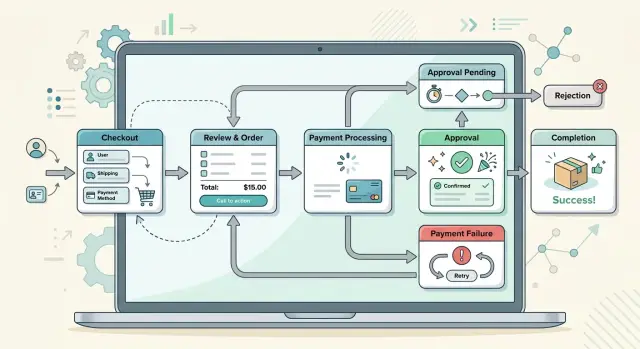
Table of Contents
Why these flows break so easily
Checkout and approval screens rarely stay simple for long. A request starts, fails, retries, and the user edits a field in the middle of it. The page still remembers an old error or success message. Soon the same screen tries to be loading, editable, failed, and finished at once.
That usually starts with separate booleans. A component gets isLoading, hasError, isSubmitted, isEditing, maybe isRetrying too. Each flag sounds reasonable by itself. Together, they can describe states that should never exist.
A checkout form is a familiar example. A user clicks "Pay," the request starts, and isLoading flips to true. The payment fails, so hasError becomes true. Then the user edits the card field, but isSubmitted never resets. Now the screen can show an error banner, an active "Place order" button, and a "View receipt" button left over from an earlier success path. The code followed every flag. The screen still feels broken.
Approval flows fail in the same way. A request can be pending review, sent back for edits, approved, or locked. If different parts of the page store different flags, they drift apart. One section still thinks the item is editable while another has already switched to approved. Users notice this fast. Buttons look wrong, disabled inputs wake up again, and messages stop matching the current step.
Async behavior makes all of this worse. Retries, slow networks, browser back actions, saved drafts, and auto-refresh add timing problems. When state lives in loose flags across components, every edge case invites one more patch.
That is why state machines fit these flows so well. One clear state, with explicit moves to the next state, is much harder to break than a pile of flags that quietly fall out of sync.
What a state machine means in plain words
A state is one named situation the UI is in. If you can point at the screen and say, "the user is entering payment" or "the request is waiting for approval," that is a state.
A transition is the event that moves the UI from one state to another. A button click can trigger it. So can a server response, a timeout, or a user editing a form after a failed payment.
In React, the rule is simple: the app can be in one allowed state at a time, and it can move only in ways you listed ahead of time. That sounds small, but it removes a lot of messy behavior.
Take a checkout flow. The screen might move through cart, shipping, payment, processing, payment_failed, and order_complete. Each name matches something the user can actually see.
Now think about the buttons. In payment, the user can click "Pay." In payment_failed, they can click "Try again" or "Edit card." In order_complete, the pay button should be gone. The state decides which actions make sense.
The same idea works for an approval workflow. A request can be draft, submitted, approved, rejected, or changes_requested. If the request is still a draft, an "Approve" button makes no sense. If it is already approved, "Submit for review" should not appear.
This is where state machines earn their place. Impossible combinations stop existing by design. You do not end up with a screen that is both "submitting" and "approved," or a checkout that shows a success message while the form still asks for card details.
The shift is straightforward. Instead of scattering isLoading, isApproved, hasError, and showSuccess across components, you name the real situations and the events that move between them. The UI gets easier to read, and odd bugs have fewer places to hide.
Two simple flow maps
A flow map gets useful when it answers one question: "What can happen next?" That is why this approach works so well for checkout and approval screens. It turns vague UI rules into a short list of allowed moves, and it makes the bad moves obvious.
A checkout flow often looks like this:
cart -> addressaddress -> paymentpayment -> reviewreview -> paidpayment -> failed
Real products add branches. From address, the customer can go back to cart. From failed, they can retry. From review, they can edit the address or payment method before they confirm. A cancel action usually returns them to cart or ends the session. It should not jump to paid.
Some moves should never happen. cart -> paid is invalid. failed -> paid is invalid unless the user completes another payment attempt. paid -> payment usually makes no sense inside the same checkout machine. If a refund exists, that is often a separate flow, not a hidden jump backward.
An approval flow is smaller, but the rule stays the same:
draft -> submittedsubmitted -> approvedsubmitted -> rejectedrejected -> draft
This map tells the UI what to show. In draft, the user can edit and cancel. In submitted, they may be able to withdraw the item if review has not finished. In rejected, they can edit and resubmit. In approved, the item is done, so edit controls usually disappear.
The blocked moves matter just as much as the allowed ones. draft -> approved should not happen. rejected -> approved should not happen without another submitted step. approved -> submitted is usually nonsense unless you create a new version.
That is the practical win. One map tells every component the same story. Buttons, loaders, errors, and confirmations stop inventing their own rules.
Why booleans spread bugs across components
Most teams start with innocent flags: isLoading, isSubmitting, hasError, isComplete. One component owns one flag, a hook owns another, and an API call flips a third. It feels simple at first.
Then real user behavior hits the screen. Someone edits a form after a failed payment, refreshes during approval, or clicks submit twice. The UI lands in states nobody meant to build.
A few common combinations look like this:
isSubmitting = trueandhasError = trueisComplete = truewhileisLoading = truehasError = falsebut the form is still lockedisSubmitting = falseeven though the request is still in flight
Each flag makes sense on its own. Together, they create too many combinations for anyone to hold in their head. You stop reading a clear flow and start solving a logic puzzle.
Debugging slows down for the same reason. If a bug report says, "the spinner stayed on after approval changed," you have to trace props, hooks, effects, and async handlers across several files. A named state like awaiting_payment, payment_failed, waiting_for_approval, or approved tells the story much faster.
That difference matters in code review too. When the flow is explicit, a reviewer can ask direct questions. Can waiting_for_approval move straight to approved? What sends payment_failed into retrying? What returns retrying to ready? Those checks are concrete.
With scattered flags, reviewers have to guess every possible combination by hand. Most people catch the obvious path and miss the weird one. That is how edge case bugs slip through.
This is why state machines fit checkout and approval flows so well. They remove accidental states instead of patching around them later. You define the allowed states, define the allowed transitions, and block everything else. The code gets easier to review, easier to test, and easier to trust when users do something unexpected.
How to build one step by step
Start away from the code. Open the product, click through the checkout or approval flow, and write down the states users can actually be in. For checkout that might be cart, entering_details, submitting_payment, paid, failed, or canceled. For approvals, it might be draft, pending_review, approved, rejected, or reopened.
Then list the events that move the flow. Some come from the user, like submit, edit, or cancel. Some come from the server, like payment_succeeded, payment_failed, or review_expired. Teams often forget these server events, and that is where strange bugs usually start.
Before you build components, draw the allowed moves between states. A quick box and arrow sketch is enough. submitting_payment can move to paid or failed. It should not jump back to cart unless you add a real event for that.
A simple build order works well:
- Name each state as a full situation, not a tiny flag.
- Name each event as something that happened.
- Decide which next states each event allows.
- Put the API call or other side effect on the transition that needs it.
That last step matters. If the machine enters submitting_payment, that transition can call the payment API. If it enters approved, that transition can create an audit log or refresh the order. You keep the reason and the action together, which makes retries and error handling easier to follow.
In React, the component should mostly read the current state and render from it. If the state is failed, show the retry screen. If the state is pending_review, lock editing. Try not to pass around extra booleans like isLoading, isPaid, and canEdit. Those flags drift apart fast, especially when several components own different pieces of the same flow.
One clear state is easier to test, easier to change, and less likely to break when the product team adds another awkward case.
A realistic example with retries and changes
A good test for this pattern is a flow that goes backward after something fails. That is where many checkout bugs show up.
Checkout after a payment failure
A shopper fills the cart, enters a shipping address, and reaches payment. The card charge fails because the bank times out. The app moves to payment_failed.
At that point, the shopper has two sensible actions. They can try the payment again, or they can edit the address because they notice the ZIP code is wrong. A state machine makes both paths boring in the best way.
If they click "Edit address," the machine moves to editing_address. It also clears the payment error message, because that message belongs to the old payment attempt. The cart stays intact. The chosen shipping method can be checked again after the address update. The screen shows the address form, not the payment form with a stale red banner still hanging around.
After they save the new address, the machine can go to review_order. That matters because taxes or shipping cost may have changed. Sending them straight back to card entry is often wrong.
From there, each event leads to one clear screen:
- Retry payment -> payment form
- Edit address -> address form
- Save address -> review screen
- Submit payment -> processing or success
Approval flow with changes requested
The same idea helps in an approval workflow. An employee submits a purchase request. The machine moves from draft to waiting_for_manager.
The manager opens it and sees the receipt is missing. They click "Request changes." The machine moves to changes_requested, and the employee now sees an editable form. They do not see a half approved screen with disabled fields and a warning box on top. That mixed state is what boolean-heavy code tends to create.
When the employee uploads the receipt and clicks resubmit, the machine goes to waiting_for_manager again. If the manager approves it, the machine moves to approved. There is no moment where approved = true and needsChanges = true fight each other.
That is why this pattern feels calmer once the flow gets messy. A shopper returns to the right step. A manager sends work back cleanly. The screen matches the state every time.
Mistakes teams make when adopting this pattern
Teams often draw a clean machine, then punch holes through it a week later. Someone adds a quick admin action that jumps an order from review straight to approved. Someone else adds a shortcut that marks checkout as complete after one API response. Those escape hatches feel harmless, but they skip rules the rest of the app still depends on.
That is how a careful flow turns back into guesswork. If payment, review, or approval must happen in order, every transition should go through the machine. A state machine helps only when the team treats it as the source of truth, not as one more layer beside the old habits.
Another common mistake is keeping the old booleans around forever. Teams add a machine, but leave isLoading, isError, isApproved, showRetry, and hasTimedOut spread across components. Now two systems describe the same screen. Sooner or later they disagree.
This happens a lot in checkout and approval UIs. The fix is blunt but effective: once the machine covers a case, delete the matching boolean.
API calls also end up in too many places. A button handler sends one request, an effect sends another, and a helper retries a third. When that happens, nobody knows which action moved the screen forward. Put side effects on state changes instead. Entering submitting_payment should trigger the payment request. A PAYMENT_FAILED event should move the app to payment_failed. Retry should be its own transition, not a loose callback.
Teams also forget the awkward paths that users hit every day: first load with empty data, slow requests that should time out, retries after failure, and changes requested after approval looked final. If the machine does not model those cases, bugs move into the gaps.
State names cause quieter problems too. Names like active, open, or done sound neat, but they hide meaning. awaiting_manager_approval tells you what is happening. changes_requested tells you what the user can do next. Vague names invite vague code.
When the machine starts feeling messy, most teams do not need fewer states. They need clearer ones.
Quick checks before you ship
A flow usually feels done when the happy path works once on your laptop. That is exactly when strange bugs sneak in. A short review of the machine catches the gaps before users do.
For checkout and approval screens, a quick release check is usually enough:
- Match each visible screen to one named state.
- Check every button and user action against a single event.
- Look for combinations that should never exist.
- Draw the error paths on paper.
- Test transitions, not only final results.
A small example makes this obvious. Say a shopper clicks "Pay now" and the request times out. In a state machine, the app moves from paying to payment_failed, and the UI can show one clear choice: retry or change payment method. In a boolean-heavy setup, you often end up with a spinner still visible, the button still disabled, and no clean way back.
The same check helps with approval screens. If a manager asks for changes, the item should not still count as approved in another part of the page. One transition should update the whole flow.
That is why state machines in React usually ship with fewer edge case bugs. You are not guessing which flags line up. You can point to the exact state, the exact event, and the exact next step.
What to do next
Most teams get better results when they fix one painful flow first instead of trying to clean up the whole app. Pick the screen that keeps causing support tickets, strange retries, or bugs nobody can reproduce twice. In many products, that is checkout or an approval workflow.
Use the current mess as the starting point. If users can get stuck between "submitting" and "done," or if one component thinks an order is paid while another still shows a spinner, that flow is ready for a rewrite.
Before anyone touches code, get the people who know the flow into one room and sketch it. A whiteboard is enough. Write the actual states, then write what can move the user from one state to another. Teams often spot missing cases in ten minutes this way.
A short sketch usually needs answers to four questions:
- What states can the user actually be in?
- What event moves the flow forward?
- What should happen on failure or timeout?
- When can the user go back and change something?
After that, build a small proof of concept. Keep it narrow. Do not refactor the whole checkout system or every approval screen at once. One flow, one machine, one set of explicit transitions is enough to see whether the approach makes your code easier to reason about.
If it works, turn it into a repeatable pattern for the team. Save the state map. Keep event names consistent. Add a few tests around transitions before you spread the approach to other screens.
This kind of cleanup pays off fast because the bugs get simpler. You stop asking, "Which boolean got out of sync?" and start asking, "Why did this event move to that state?"
If you want a second set of eyes on a messy React flow, Oleg Sotnikov at oleg.is advises startups and small businesses on product architecture, Fractional CTO work, infrastructure, and practical AI-first development. That kind of outside review can help a team tighten the state model before a small bug turns into a long rewrite.
Frequently Asked Questions
When does a React flow need a state machine?
Use one when a screen can move through several named steps and users can go forward, fail, retry, or edit in the middle. Checkout and approval flows fit this pattern well because timing issues and old flags often leave the UI in a broken mix of states.
Are booleans ever enough?
Yes, for small screens with one simple async action, a couple of booleans can work. Once you add retries, back actions, edits after failure, or server-driven changes, flags usually drift apart and the bugs get harder to trace.
What states should a checkout machine have?
Start with states the user can actually see, such as cart, address, payment, review, processing, payment_failed, and order_complete. If a state name does not match a real screen or situation, rename it until it does.
How should retries work in a state machine?
Treat retry as its own event and move the flow back to the right state on purpose. For example, after payment_failed, a retry can send the user to payment or processing, while an edit action can send them to address or review and clear the old error.
Where should API calls go?
Put them on state changes, not in random button handlers and effects. When the app enters submitting_payment, run the payment request there, then send back payment_succeeded or payment_failed so the next screen follows the same rules every time.
How do I handle edits after a failed payment?
Move the user to a real edit state and clear any message tied to the failed attempt. After they save the change, send them to a review step if totals, tax, shipping, or validation might change before they pay again.
Do state machines work for approval screens too?
They help a lot because approval work has strict steps and blocked moves. A request can go from draft to submitted, then to approved, rejected, or changes_requested, and the UI can lock or open fields based on that single state.
Do I need a library to use this pattern?
No. You can start with a reducer, a plain object map, or any simple event-to-state setup. A library helps when the flow grows large, but the real win comes from naming states and transitions clearly, not from the tool itself.
How do I test a state machine in React?
Test transitions instead of only final snapshots. Check that each event moves from one allowed state to the next expected one, and check that blocked moves stay blocked so the app cannot jump from draft straight to approved or from cart straight to paid.
What is the easiest way to adopt this in an existing app?
Pick one painful flow first and map the states and events on paper before you touch the code. Build the machine for that flow, delete the old booleans that overlap with it, and watch whether bug reports get easier to explain and fix.


