Startup stop list: what not to build, buy, or automate
A startup stop list helps founders cut waste before new projects start. Learn what to pause this quarter and how to explain the choices clearly.
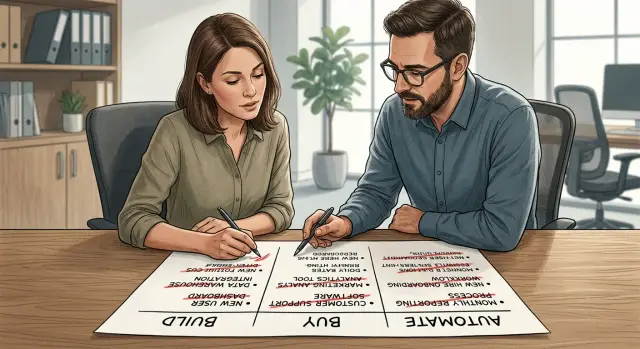
Table of Contents
Why broad plans lose founder trust
Founders hear ideas all day: new tools, new features, new automations, new hires. A broad plan can sound polished and still feel useless. If every line says "yes," the founder still has to decide what to say "no" to.
That is where trust starts to slip. A plan with ten good ideas hides the tradeoffs. It does not show which work will eat six weeks, which purchase will lock the team into extra setup, or which automation will create more cleanup than time saved. Advice like that feels safe for the advisor and expensive for the company.
Long wish lists also hide team strain. A founder hears, "we can do all of this," while engineers hear late nights, context switching, and half-finished work. When nobody names the cuts, the plan stops sounding practical and starts sounding like a pitch.
Useful technical advice usually has some friction. A credible lead will say, "Do these two things now, delay that migration, skip the new analytics tool, and leave support automation alone until the process is stable." That kind of answer is easier to trust because it accepts limits.
A startup stop list makes those limits visible. It shows what to pause this quarter before anyone adds fresh work to the roadmap. That shifts the conversation from abstract ambition to an actual decision.
Picture a five-engineer SaaS team. The founder wants a mobile app, a billing rewrite, AI support replies, and a new dashboard in one quarter. Without a stop list, every item stays alive and competes for time. With one, the team might cut the mobile app, keep the billing cleanup, and delay AI support until ticket volume and reply quality are easier to measure.
Broad plans lose trust for a simple reason: they avoid the hard part. Founders do not just need options. They need someone who will narrow the field.
What a stop list should cover
A useful startup stop list is a short record of work the team will leave alone for one quarter. Each entry should name the thing, say no to it clearly, and give one plain reason. That boundary matters. Founders trust advice faster when they can see what will not consume time, money, or attention.
Most stop lists cover three areas: work you will not build this quarter, tools you will not buy right now, and tasks you will not automate yet. That usually includes side features, internal dashboards, redesigns, full rewrites, new analytics suites, extra project tools, and automations for processes that still change every week.
Each item needs one reason in plain language. Keep it short and specific: "Too few users ask for it." "The current tool is good enough." "This process still changes." "It would take three weeks and save ten minutes a day." Simple reasons stop circular debate better than long notes.
Every item also needs a review date. Without one, a stop list turns into a graveyard of old opinions. Review it in the next quarter plan, or tie it to a clear trigger such as 20 paid customers, a new hire, or a jump in support volume.
This is where a stop list becomes more than a parking lot. It turns into a filter for build vs buy decisions and automation timing. A founder can scan it in two minutes and see the tradeoffs.
A good entry might read like this: "Do not build a custom CRM this quarter. Sales runs fine in the current tool. Review after we hire a second salesperson." That is hard to misread, and that is the point.
How to make the list in one meeting
A useful stop list does not need a workshop, a slide deck, or a week of prep. One focused meeting is enough if everyone looks at the same page and uses the same rules.
Put every open request in one document before the call starts. Product ideas, tool trials, automation plans, bug-fix wishes, founder asks, and team "nice to have" work should all sit in the same view. If something lives only in chat or in one person's head, pull it in first.
Then sort each item into three buckets: build, buy, or automate. That sounds basic, but it changes the conversation fast. Teams often argue about a feature when the real question is whether they should touch it at all this quarter.
A simple scoring pass keeps the meeting honest:
- Urgency: does this matter now, or can it wait a quarter?
- Effort: will this take hours, weeks, or a full team?
- Risk: what breaks if you do it, delay it, or ignore it?
- Ownership: who will carry it from start to finish?
- Timing: what date makes this still worth doing?
Do not chase perfect numbers. A rough 1 to 3 score is enough. The point is to compare requests side by side, not pretend you can predict the future.
If an item has no owner, cut it. If nobody can name a real deadline, cut it or park it. Unowned work lingers, burns attention, and sneaks back into planning later.
A small example helps. Say a founder wants a custom analytics dashboard, a new support tool, and an AI workflow for invoice tagging. In one meeting, the team may decide the dashboard can wait, the support tool stays on hold until ticket volume rises, and invoice tagging is worth testing because finance already spends four hours a week on it.
Keep the final list short. If a founder cannot read it in two minutes, it is still a backlog, not a stop list.
What not to build first
The easiest way to waste a quarter is to build software that keeps an old habit alive. If a spreadsheet already runs the process, a custom tool often just adds a nicer screen, more bugs, and one more thing to maintain.
This shows up in request trackers, approval forms, and internal reporting pages. A founder asks for "something cleaner than the sheet," the team spends three weeks on it, and nobody works faster. If the sheet is messy because the process is messy, code will not fix it.
Be careful with requests from one loud customer. That kind of ask feels urgent because it is easy to picture and easy to scope. But if only one customer wants it and the rest stay quiet, you can burn a sprint on work that never helps retention or sales.
Dashboards fall into the same trap. Teams like building them because they look useful in a demo. But if nobody opens the dashboard during the weekly review and makes a decision from it, do not build another one. Start with a simple report or even a shared note with the same numbers.
Custom integrations can waste time too, especially when the team may replace one of the apps soon. Spending a month connecting your product to a CRM right before switching CRMs means you pay once to build it and again to rebuild or remove it.
The worst projects look small at first and stay expensive after launch. A script that saves 10 minutes a week can still turn into constant upkeep if it touches billing, permissions, or messy data. Small gains do not justify long maintenance.
A stop list earns trust when it cuts this work early. Skip anything that copies a manual workflow, solves a problem only one customer mentions, feeds a report nobody reviews, depends on a tool you may replace, or needs months of care for a tiny payoff.
Founders usually respect a clear no faster than a vague maybe. It shows you protect the roadmap instead of filling it.
What not to buy right now
A lot of startup waste starts with a tool purchase that tries to fix a people problem. If the team still handles the same task three different ways, a big platform usually adds one more layer of confusion. Clean up the process first. Then decide if software still needs to change.
That matters most with large suites. A new CRM, support platform, or project tool can take weeks to set up, yet the daily mess often stays the same. If leads sit untouched, tickets get vague replies, or product requests never get ranked, the issue is probably not the software.
Annual contracts deserve extra suspicion. Founders often sign for a discount before anyone has used the product in real work. A monthly plan costs more on paper, but it gives you room to learn fast and cut fast. Two or three weeks of real use tells you more than a polished demo ever will.
Unused seats are another quiet leak. Teams buy for the org chart they hope to have, not the one they have now. If only four people log in each week, paying for twelve seats is not planning ahead. It is drift.
A simple filter helps:
- Do people use the tool every week for real work?
- Did the team test it with live tasks, not a demo account?
- Does it replace an old tool, or sit beside it?
- Will setup take longer than the pain it solves?
Single-purpose products can also be a bad buy. A tool that removes one small annoyance may still need admin setup, permissions, training, and another bill to approve. That is a lot of effort for a minor gain.
Overlapping tools create the same problem. Two note apps, two analytics tools, or two ticket systems turn into another admin job. Someone has to manage access, keep data in sync, and explain which tool the team should trust.
What not to automate yet
Automation fails most often when a team tries to speed up work that nobody has cleaned up yet. If the process has missing steps, side messages in chat, or handoffs that live in one person's head, software will lock in the confusion.
In a stop list, automation needs a stricter filter than most teams expect. A messy manual process is annoying. A messy automated process is harder to see, harder to fix, and often more expensive.
Work that changes every few days should stay manual for now. Early-stage teams revise pricing, approval rules, support replies, and lead handling all the time. If you automate that too soon, someone will spend more time updating rules and checking output than doing the task by hand.
Founder judgment is another hard stop. If a decision still needs a founder call, keep it visible. Hiring screens, enterprise deal terms, refund exceptions, and product promises often sit in that category. You can prepare notes, sort inputs, or draft options, but the final call should stay with the person who owns the risk.
Messy source data also kills automation. If customer data lives across spreadsheets, email threads, and a half-filled CRM, any workflow you add will spread bad inputs faster. Before you automate, assign one owner for the data and one place where the team updates it.
The warning signs are usually obvious:
- People explain the process differently.
- One person fixes mistakes at the end.
- Inputs arrive in different formats every week.
- The task saves 10 minutes but creates 20 minutes of review.
That last one matters more than teams admit. An auto-summary, auto-tag, or auto-routing step can look cheap, but if someone still reads every result and corrects half of them, the gain is fake.
A simple test helps. Run the task manually for two weeks and write down the exact steps, who owns each step, and how often the rule changes. If the steps stay stable, the owner is clear, and the output needs only light review, automation is probably worth it. If not, leave it off this quarter's list.
A simple quarter planning example
A small SaaS team starts quarter planning with three ideas on the table: move to a new CRM, build a custom report tool, and add AI-written support replies. All three sound reasonable. None fixes the founder's most pressing problem. New leads wait too long for follow-up, and sales calls happen after interest has already cooled.
That changes the plan fast. The team uses a stop list before approving new work. They pause the report tool because only a small group asks for those reports today. They also pause the CRM migration. A new CRM might look better, but moving records, rebuilding fields, and retraining the team can eat a month with little short-term gain.
The quarter gets one main goal: contact leads faster.
So the team ships a small change inside the current setup. When a lead submits a form, the CRM creates a task, alerts the sales owner, and prepares a first reply for review. Nobody tries to rebuild the sales process. Nobody starts a long migration.
They keep the AI work small too. Instead of automating the full support flow, they draft one reply type for a common support question. A person still checks the message before sending it. That saves time without letting weak replies reach customers.
After four weeks, they review a few simple numbers:
- How long new leads wait for a first reply
- How often the sales team uses the draft
- How much editing support agents do before sending
- Whether close rates or reply rates improve at all
If the team barely uses the new draft, they stop there. If follow-up gets faster and people keep using it, they add the next small step. The result is plain: one real improvement, two paused projects, and less wasted effort. Founders usually trust that more than a busy roadmap.
Mistakes that weaken the stop list
A stop list fails when the team cannot see why an item belongs on it. If every request gets the same "low priority" tag, founders hear taste, not judgment. They want a reason tied to money, time, or risk.
Short reasons work better. "Won't affect sales this quarter" is strong. "Duplicates our current CRM" is strong. "The process still changes every week, so automation would freeze a bad workflow" is strong. Each one tells the team why the work stays out.
Vague labels cause a different problem. "Maybe later" sounds harmless, but nobody knows what later means. Put a real trigger on the line instead: after churn drops, after the migration ends, or after support volume passes a set number. A date or condition makes the decision easier to revisit.
Personal preference can also hide behind technical language. Founders notice when "architecture concerns" really means "I do not want this vendor" or "I would rather build my own version." If the issue is cost, say cost. If the issue is lock-in, say lock-in. Plain language builds more trust than clever wording.
Some teams cut work and never name the business risk of waiting. That weakens the whole document. If you delay a billing fix, say invoices may stay messy for another quarter. If you postpone analytics cleanup, say the team will keep making decisions with rough numbers. A stop list should show the tradeoff, not just the cut.
A stronger entry names the paused item, the reason it is out this quarter, the business risk of waiting, the trigger for review, and the next review date.
The last mistake is constant churn. If the list changes every week, nobody treats it as a real decision. Update it when an assumption changes, not when someone has a fresh opinion on Tuesday afternoon.
A steady list makes new proposals easier to trust. Founders can see that you protect focus with a clear argument, not with habit or ego.
Quick checks before you approve new work
New work looks cheap on day one. A few tickets, one vendor demo, maybe a quick automation idea. By week three, the team is split, support gets noisier, and the main roadmap slows down.
A stop list only works if every new idea passes the same short test. Start with the obvious question: does this solve a problem people feel every week? If customers or staff keep running into the same issue, it is real. If it shows up once in a while and people already work around it in a few minutes, wait.
The next check is speed. Can the team ship a small version this quarter? If the first useful version still sounds big, the idea is not ready. Cut it down until it fits. One report beats a full analytics area. One workflow beats a full internal tool.
Use a short review before you approve anything:
- Who feels this problem every week?
- What is the smallest version we can ship this quarter?
- Do we already pay for a tool that covers most of it?
- If we automate it, whose work actually disappears?
- What do we stop doing if we start this now?
That third question saves more money than most founders expect. Teams often plan custom work while an existing tool already does 70 percent of the job. It may not be perfect, but perfect is expensive. For one quarter, good enough often wins.
The automation check matters too. Some automations do not remove work. They just move it. A team might auto-generate summaries, then spend the same amount of time fixing bad summaries by hand. That is not a gain. It is extra maintenance.
One more rule helps: every yes needs a clear no beside it. If a new project starts, something else must pause, shrink, or disappear. Without that trade, founders approve work faster than the team can finish it.
This is where founder technical advice earns trust. Good advice does not just suggest what to build next. It cuts weak work early, before the quarter fills up with half-finished ideas.
What to do next this quarter
Before you approve any new project, write down the work your team will not touch for the next 90 days. That one page often does more for alignment than a longer roadmap because it forces real tradeoffs.
Keep the page short enough to read out loud in one sitting. If people cannot hear it and react to it in five minutes, it is probably still too vague.
A simple draft works well:
- List three to five items you will not build this quarter.
- List the tools you will not buy yet.
- List the automations you will delay on purpose.
- Add one sentence for each item that explains why it waits and what would change that decision.
- Name who can challenge the list before it is final.
Then put the draft in front of product, sales, and support. Each group sees a different kind of waste. Product may spot extra scope, sales may flag a purchase driven by one loud prospect, and support may point out manual work that still needs a human touch.
Read the list out loud in the meeting. That small step matters. Weak logic sounds weak when people hear it. You will catch fuzzy items like "improve reporting" or "test AI for support" and replace them with decisions people can act on.
If the team needs an outside view, Oleg Sotnikov at oleg.is works with startups as a Fractional CTO and advisor, and this kind of stop-list review fits the way he helps teams cut tool sprawl, stage AI work sensibly, and focus on the few changes worth doing now.
Do not leave the meeting with a nice document and no cuts. Leave with a stop list, one owner, and a review date 30 days out. That is enough to keep the quarter honest.
Frequently Asked Questions
What is a startup stop list?
A startup stop list is a short record of work you will not touch this quarter. It covers things you will not build, tools you will not buy, and automations you will not set up yet.
Each item should say no in plain language, give one reason, and include a review date or trigger.
Why do broad plans make founders lose trust?
Because broad plans hide tradeoffs. They make every idea sound possible, so the founder still has to figure out what to cut.
Trust grows when someone names the limits, says what can wait, and protects the team from extra work that will not pay off soon.
What should go on the stop list?
Most teams put three things on it: features they will not build, software they will not buy, and workflows they will not automate.
Good entries stay specific. "Do not build a custom CRM this quarter" works better than "improve sales tools later."
How long should the stop list be?
Keep it short enough to read in two minutes. If it feels like a backlog, it is too long.
Three to five strong cuts usually work better than a long document full of vague maybes.
How do we decide what not to build first?
Skip work that keeps a messy process alive instead of fixing it. Internal dashboards nobody uses, features for one loud customer, and custom integrations for tools you may replace soon often belong on the stop list.
If the work looks small now but will need care every month, cut it early.
When should we avoid buying a new tool?
Hold off when the team has not cleaned up the process yet. A new platform will not fix unclear ownership, weak follow-up, or messy handoffs.
Be extra careful with annual contracts, unused seats, and tools that overlap with what you already pay for.
When should we delay automation?
Wait when the process still changes every week, the data lives in too many places, or one person keeps fixing mistakes at the end.
Automation helps when the steps stay stable and the team trusts the inputs. Until then, manual work is often cheaper and easier to control.
Can we make a stop list in one meeting?
One focused meeting is enough if everyone works from the same document. Put every open request in one place, then compare urgency, effort, risk, ownership, and timing.
If an item has no owner or no real deadline, cut it or park it.
How often should we review the stop list?
Review it during the next quarter plan or sooner if a clear trigger hits. A trigger could be more paid customers, higher support volume, or a new hire.
Do not rewrite it every week. Constant changes turn a decision into noise.
What makes a stop list weak?
Weak stop lists use vague labels like "low priority" or "maybe later." That tells people almost nothing.
A stronger entry names the item, the reason it waits, the risk of waiting, and what would make you review it again. That keeps the discussion honest.


