Modernize startup stack without a rewrite budget in phases
Need to modernize startup stack on a tight budget? Upgrade auth, billing, and data imports one boundary at a time without slowing delivery.
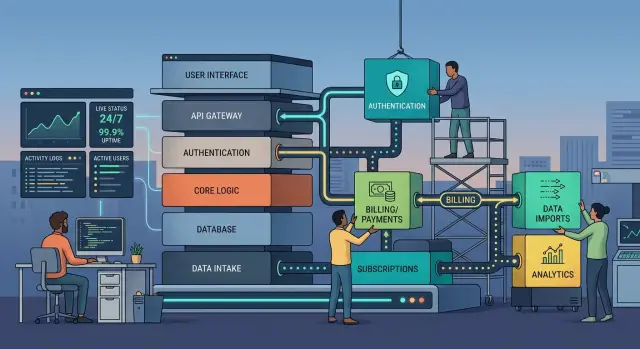
Table of Contents
Why rewrites stall small teams
A full rewrite sounds tidy. For a small team, it usually turns into two jobs running at once.
The old product still needs attention. Support tickets keep coming in. Bugs still need fixes. Sales still wants the integration that closes the next deal. While all of that is happening, the same team is supposed to build the replacement, move old data, and handle every odd edge case the current system picked up over the years.
That split wears people down fast. Cash often runs short before the new system feels complete. Early demos can look better than the old product, but demos skip the strange details real customers depend on. Teams then spend months rebuilding behavior they assumed they could leave behind.
Product work does not stop during a rewrite. Billing still breaks. Permissions still need updates. A big customer still asks for a change to admin access. Those requests push migration work to the side. A few weeks later, the team has to relearn what it was doing before it can move again.
Deadlines slip because rewrites hide work until late. Authentication looks simple until you hit password resets, session expiry, admin roles, audit logs, and old login methods that still work in production. Billing looks manageable until refunds, failed charges, taxes, and plan changes show up. Imports look easy until someone uploads a broken CSV with ten years of bad data.
After a while, trust drops. Founders stop believing estimates. Engineers get tired of rebuilding the same ideas twice. Customers hear that a fix is coming "soon" and start planning around delays.
Small teams usually get better results by changing one boundary at a time. A narrow upgrade can ship, prove itself, and lower risk before the next change. That approach also fits how Oleg Sotnikov tends to work: keep delivery moving, keep scope tight, and avoid betting the company on one giant replacement.
Choose one boundary first
Teams get stuck when they try to change auth, billing, and imports at the same time. Those areas all sit close to users and revenue, but they break in different ways. One focused change gives you a real win without stopping the rest of the product work.
Pick the boundary that blocks shipping most often. Ignore what sounds modern. Start where the team loses time every week.
If login issues slow demos, support, and admin access, start with auth. If invoices, renewals, or plan changes keep turning into fire drills, start with billing. If new customers cannot get data into the product without manual cleanup, start with imports.
A good first boundary has a few traits. It has a clear start and end. One team can own it. You can test it without touching the whole app. And you can keep the old path running while the new one proves itself.
User count matters, but blast radius matters more. A broken admin login may affect fewer people than customer sign-in, yet it can still block the whole company. A messy import flow may touch only new accounts, but if every sale depends on setup working, it should move up the list.
The best boundaries are easy to describe in one sentence. Auth means a user signs in and gets a valid session. Billing means a plan changes and the system records it correctly. Imports mean a file goes in and clean records come out. If you cannot describe the job that simply, the boundary is still too wide.
Say you run a small SaaS product and engineers spend hours every week fixing broken CSV uploads for new customers. Billing is old, and auth is messy, but imports are blocking revenue now. Start there. Build a new import path, test it on a small group, and leave everything else alone until it works.
That is what phased modernization looks like in practice. One boundary, one owner, one release you can test.
Map the current flow on one page
Before you touch code, draw the current flow on a single page. Keep it plain. A messy but honest map is better than a neat diagram that hides the painful parts.
Start at the first request and follow it all the way to stored data. If a user signs up, trace each step. The form sends data, the app checks auth, a billing service creates a customer, the backend writes records, and a job might sync data into another database later. Write down every hop, even the ones that seem obvious.
Small teams often skip the work that happens outside the main app. That is usually where the surprises live. Mark every outside service, every webhook, every scheduled job, every spreadsheet upload, and every manual fix someone does on Friday afternoon when something breaks.
Your page should answer four simple questions:
- What starts the flow?
- Who or what touches the data next?
- Where does the data end up?
- What happens if a step fails?
Pay close attention to data changes. Note every place where a field gets renamed, split, rounded, reformatted, or copied into another system. Also mark where ownership changes. A customer email might start in your app, move into an auth provider, then show up as billing data somewhere else. That is where duplicate records and hard-to-find bugs often begin.
Put rollback on the same page, not in someone's head. If a release fails, who switches traffic back? Which queue gets paused? What data needs cleanup? Write the answer beside the step that can fail. If you cannot describe rollback in a line or two, the change is probably still too big.
This exercise is especially useful when a founder is working with a Fractional CTO. It turns vague system knowledge into something the whole team can see and use. Sometimes the map shows that the real problem is not old auth code at all. It might be a CSV script no one trusts, a billing webhook with no retry plan, or a manual patch nobody wrote down.
Once you can see the flow, you can replace one piece without guessing what it will break.
Upgrade in small releases
Big swaps look fast on a whiteboard. They rarely feel fast in production. Keep the old path alive and change one edge at a time.
Start by putting a stable interface in front of the old code. That can be an API route, a queue consumer, or a thin internal wrapper. The rest of the app should talk to one contract while you change what sits behind it.
Then build the new service behind that same contract. If you are replacing auth, the login flow should return the same session shape. If you are replacing billing, the app should still receive the same subscription status and webhook events. The product team should not need a second round of UI changes just because the plumbing changed.
A careful rollout is usually simple:
- Keep the old path as the default.
- Send a small slice of traffic to the new path.
- Compare both results for the same requests.
- Watch logs, failed jobs, and support tickets.
- Increase traffic only when the checks stay clean.
That small slice matters. Start with internal users, a test tenant, or one low-risk customer group. Five percent is often enough. You do not need a dramatic launch. You need proof that the new path behaves the same, or better, under real traffic.
Comparison is where teams often cut corners. Check the output, but also check timing, retries, edge cases, and what users report. A new import pipeline may finish successfully while quietly dropping one column. A new billing service may charge correctly but fail to update plan limits. Logs catch some of this. Support catches the rest.
Teams that run lean systems often prefer this method because rollback stays easy. When a release passes, move a little more traffic. When it does not, pause, fix the problem, and try again. Day to day, that can feel slower. In practice, it avoids the month-long cleanup that follows a broken cutover.
Auth, billing, and imports need different care
Auth breaks trust fast. Billing breaks revenue. Imports break data quality. One migration plan does not fit all three.
When you change auth, keep token rules, session length, refresh timing, and logout behavior steady until the new path proves itself. Users will tolerate a slow page for a day. They will not tolerate random sign-outs or failed mobile login after a browser update. If you need new token logic, release it behind a flag and watch sign-in failures right away.
Billing needs even more caution because small mistakes either keep charging people or stop charging them. Preserve the full history of subscriptions, invoices, retries, refunds, and failed payments before you switch providers or rewrite billing logic. Many teams copy only the happy path and miss the ugly cases: a card that failed yesterday, a retry due tomorrow, or a user in a grace period. Those cases matter.
Imports need a different kind of protection. Do not let raw files write straight into core data. Put uploads in a staging area, validate columns and formats, and block bad rows before anything becomes permanent. One broken CSV can create hundreds of wrong records in minutes. A short review screen is boring, but cleanup is worse.
All three areas need a plan for duplicate events and partial failures. Payment webhooks can arrive twice. Import jobs can stop halfway. A user can click upload again because the first spinner looked stuck. Make repeated events safe, keep clear status records, and decide ahead of time when the team should retry, roll back, or leave the result alone.
Support should hear about the release before users do. Give them a short note that explains what users may notice, which errors are expected during cutover, and when a ticket needs engineering help.
That prep cuts confusion. It also makes a risky release feel much more manageable.
A simple SaaS example
Picture a small B2B SaaS team with one recurring problem. Customers upload CSV files with orders, contacts, or inventory, and the import job fails every week on some edge case the old code never handled well. The team cannot stop feature work for a full rewrite because sales still needs new reports and customers still keep asking for product changes.
So the team picks one boundary and leaves the rest alone. Instead of touching every part of the app, it puts the old importer behind one internal endpoint with a clear input and output. That sounds minor, but it changes a lot. The app now talks to one stable door, even if the code behind it changes later.
Next, the team builds a new importer that uses the same contract. It parses files better, logs each step, and returns cleaner error messages. No one moves every customer at once. The team sends one customer segment through the new path first, such as newer accounts with simpler file formats or one lower-volume pricing tier.
Now both paths can be compared with real files instead of guesses. For every upload, the team checks row counts, failed rows, duplicate handling, and total processing time. If the old importer says a file had 9,842 valid rows and the new one says 9,701, rollout stops until someone finds the gap. That side-by-side check saves a lot of pain later.
Feature work keeps moving the whole time. Product work continues because the import change sits behind one boundary instead of leaking across the codebase. Support gets fewer mysteries too, because the team can see where each file failed and why.
After two quiet release cycles, the call gets easier. Error rates stay low, timings stay steady, and support tickets drop. The team removes the old import path, keeps the endpoint, and moves on to the next weak spot.
Mistakes that slow the work down
Teams often lose time for a simple reason: they stop treating the change like surgery and start treating it like cleanup. That is when a focused upgrade turns into side work with no finish line.
One common mistake is rebuilding nearby systems just because they look old too. You start with auth, then someone wants to fix user roles, clean up the admin panel, and rename half the tables. Scope grows fast, and the original problem stays in place.
Another mistake is flying blind after launch. If you skip metrics and trust gut feel, customers will usually find the problem first. For auth, watch login success rates and password reset failures. For billing, track checkout completion, failed charges, and support tickets. For imports, watch job duration, error counts, and duplicate records.
Changing data models and user flows in the same sprint also creates confusion. If you switch billing providers and redesign the pricing page at the same time, you will not know what hurt conversions. Keep one moving part at a time. It feels slower, but it saves days of guessing.
Backfill work gets ignored more often than it should. Teams postpone old data cleanup until cutover week, then discover missing fields, bad timestamps, or records that do not match the new format. A backfill job is part of the migration, not background admin work.
The fallback path matters more than many teams expect. If you remove it too early, one hidden edge case can block logins, stop renewals, or break imports for a whole customer segment. Leave the old route in place until the new one survives real traffic and messy cases, not just a staging demo.
A safer pattern is simple: upgrade one boundary, measure the result, backfill early, keep the old path alive for a while, and remove it only after the numbers stay stable.
That discipline keeps delivery moving while the stack changes underneath.
Quick checks before each release
Small releases help only if you can spot trouble fast. Before you push a change to auth, billing, or imports, test the old path and the new path with the same input and compare the outcome. The pages may look a little different. The result should match.
That check needs to include side effects, not just what appears on screen. If a user signs in, confirm that the right session starts, the right account loads, and no extra records appear. If a customer pays, confirm one invoice, one charge, and one email. If an import runs, confirm row count, skipped rows, and error messages.
A short pre-release pass usually catches the failures that hurt trust most:
- Run one old-path test and one new-path test with the same user or sample file.
- Read logs for retries, timeouts, duplicate webhook events, and repeated jobs.
- Tell support the release window, what users may notice, and which symptoms mean "roll back now".
- Check that your rollback switch works through config, routing, or a flag without shipping new code.
- Walk through one real user journey from start to finish, not just the changed screen.
Billing changes deserve extra attention. A payment flow can look fine in the app while logs show a second charge attempt after a timeout. Auth changes fail in quieter ways. Users may sign in, then get stuck in a redirect loop or lose access to the right workspace. Import changes often pass small tests but break on messy real files with blank cells, odd dates, or duplicate IDs.
The support step matters because it shortens the path to an answer. If support knows the release window and the likely symptoms, they can separate a release issue from a normal bug in minutes instead of bouncing customers between teams.
Use one real journey every time. Pick an actual path a customer takes: sign up, verify email, start a trial, pay, upload data, and see the result. If that path works cleanly, the release is probably ready. If it feels shaky anywhere, wait and fix it first.
What to do next
Start with one boundary and give it a two-week target. Pick the part that hurts most often and touches the fewest other systems. For one team that might be login. For another, it is the billing handoff. For another, it is the CSV import that creates support tickets every week.
If the scope does not fit into two weeks, cut it again. A small win that ships beats a smart plan that sits in a doc for a month.
Before anyone writes code, define success in plain language so product, support, and finance can all read it in a minute:
- Users can complete the flow without manual help.
- The team can measure errors and drop-offs on day one.
- Finance can still match charges, refunds, or invoices.
- The old path stays available until the new one proves stable.
That short list does two jobs. It stops engineers from drifting into a bigger rewrite, and it gives non-engineers a clear way to approve the change.
Share the plan early with the people who will feel the change first. Product can confirm customer impact. Support can point out the failure cases people actually report. Finance can catch billing and reporting problems before they reach real accounts. A 20-minute review now can save a week of cleanup later.
Keep the next step boring and concrete. Choose one owner, one release window, and one rollback plan. For most teams, that is enough to get moving.
If the team is stuck between "patch it" and "rewrite it," an outside review can help. Oleg Sotnikov does this kind of sequencing work as a Fractional CTO for startups and small businesses, and oleg.is is where he outlines that advisory work. The useful part is rarely more code. It is picking an order that lowers risk while product, support, and revenue keep moving.
Write the two-week target on one page and put a date on it. Then ship the smallest boundary change your team can measure by the end of that window.
Frequently Asked Questions
How do I know if we need phases instead of a full rewrite?
Pick phases when the product still needs weekly fixes, support work, and sales-driven changes. If the same team cannot pause that work for months, change one part at a time instead of rebuilding the whole app.
What should we modernize first: auth, billing, or imports?
Start with the part that slows shipping or blocks revenue most often. If login failures hurt demos and support, start with auth. If plan changes and renewals keep breaking, start with billing. If new customers get stuck on CSV cleanup, start with imports.
How small should the first boundary be?
Keep the first boundary small enough that one team can own it and explain it in one sentence. A good test is this: you should know what starts the flow, what result you expect, and how you roll back if it fails.
Do we really need to map the current flow first?
Yes. Draw the current flow on one page before you touch code. Include outside services, webhooks, scheduled jobs, and manual fixes, because those hidden steps usually cause the worst surprises.
Can we keep shipping features during the migration?
Yes, if you put a stable contract in front of the old code and leave the rest of the product alone. That lets the team keep building product work while you replace one path behind the same input and output.
How do we test a new path without risking everyone?
Keep the old path as the default and send a small group through the new one first. Compare outputs, timing, retries, logs, and support tickets on the same real requests before you move more traffic.
Why are auth changes so risky?
Auth failures break trust fast because users notice them right away. Keep session rules, token behavior, refresh timing, and logout flow steady at first, then watch sign-in errors and redirect issues as soon as you release.
What usually goes wrong in billing migrations?
Billing has ugly edge cases that teams often miss, like retries, refunds, grace periods, and failed charges from yesterday. Preserve history, check for duplicate webhook events, and confirm the app records one charge, one invoice, and the right plan status.
How should we handle CSV and data import changes?
Do not let raw files write straight into core data. Put uploads into a staging step, validate columns and formats, show clear row errors, and make repeat uploads safe so one bad file does not create a cleanup job for the team.
When should a small team bring in a Fractional CTO?
Ask for outside help when the team keeps looping between patching and rewriting, or when no one can name the order of work and the rollback plan. A Fractional CTO can narrow the boundary, map the real flow, and keep delivery moving without turning the project into a long rewrite.


