Staging strategy for small teams: full, slim, or preview?
Staging strategy for small teams depends on release risk, test needs, and budget. Compare full clones, slim environments, and preview builds.
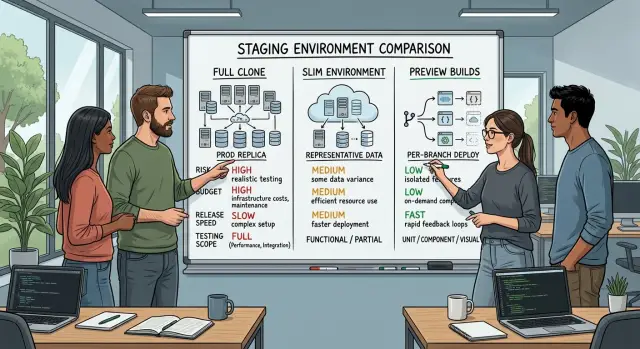
Table of Contents
Why this gets messy fast
Small teams rarely get separate rhythms for building, testing, and releasing. The same people who write code on Monday often fix bugs, review pull requests, and ship on Friday. That makes staging feel like both a safety net and a tax.
The trouble starts when one extra environment creates work every single week. Someone has to keep config in sync, load useful test data, fix deploy scripts, rotate secrets, and notice when staging drifts away from production. On a team of four or five, that work lands on the same people trying to finish the product.
A weak staging setup creates a different problem. It looks fine until release day, then small differences turn into real bugs. Background jobs behave differently. Emails fail. File storage points to the wrong place. Permissions break only with production style data. The team thinks it tested the release, but it really tested a simpler version of the app.
Teams also overcorrect. They build a full copy of production for every change, even when the update is a text fix, a small form change, or one extra field in an admin screen. Then releases get heavy. Developers wait for deploys, QA waits for data, and simple changes sit behind infrastructure chores.
That is why this choice gets messy fast. It is not only about test quality. It is also about time, cloud spend, and how much friction a team can absorb before shipping slows down.
The tension is easy to see. Say a team ships once a week and makes six to ten changes per release. If staging catches one serious bug but adds half a day of upkeep every week, the team feels that cost right away. If staging is too thin and misses a broken checkout or webhook, the cost is even higher.
What the three options mean
If your team ships often, the staging setup changes two things immediately: how many release problems you catch, and how much time and money you spend before launch.
These three options sit on the same scale. The closer you get to production, the more realistic testing becomes. The lighter the setup, the faster and cheaper it gets.
- A full clone copies most of production. Teams usually mirror the main app, database structure, background jobs, queues, permissions, and major integrations.
- A slim environment keeps only the parts you need for common checks. You might run the app, one database, and a few core services while skipping heavy data loads and rarely used integrations.
- A preview build creates a short lived version for each branch or pull request so people can review changes before they merge.
The tradeoff is simple. A full clone gives you the best chance of catching environment specific bugs, but it costs more to run and maintain. A slim environment is cheaper and easier to keep healthy, but some production only issues slip through. Preview builds are the fastest option for feedback, though they usually test one change at a time rather than the whole system under real conditions.
Small teams do not need to treat these as ideology. They are just tools for different kinds of risk. If payments, permissions, or background jobs can fail in expensive ways, realism matters more. If most changes are UI tweaks or small workflow updates, speed matters more.
When a full clone earns its cost
A full clone makes sense when a bad release can break payments, expose the wrong data, or trap users in a broken flow. Small teams feel those mistakes harder because they have less room for rollback chaos, support spikes, and lost trust.
If your app handles checkout, subscriptions, refunds, user roles, approval flows, or long workflows that jump between screens, jobs, and emails, a near production staging setup often pays for itself.
The main benefit is accuracy. You want staging to behave like production, not like a simplified guess. That means matching app versions, database versions, queues, cron jobs, feature flags, worker settings, and integration config as closely as you can. A payment test can pass in a thin setup and still fail in production because one webhook secret changed or one worker runs a different image.
A full clone also needs regular care. Teams often budget for servers and forget the weekly maintenance. Someone has to refresh masked data, keep secrets in order, update config after production changes, and make sure email, storage, search, and monitoring still behave the way they should.
Three jobs usually decide whether this setup stays useful: refreshing safe test data on a schedule, keeping secrets and service settings aligned with production, and updating staging whenever production architecture changes. If nobody owns those jobs, the environment goes stale fast. Then people stop trusting the results, which defeats the point.
This should not be the default for every small team. If most releases are low risk, like text edits, small forms, minor UI work, or internal tools, the upkeep can cost more than the bugs you prevent. In that case, a slim setup or preview builds usually make more sense. Save the full clone for the parts of the product where failure gets expensive.
When a slim environment is enough
A slim staging environment works well when your team ships often but cannot justify a full copy of production. You still test the parts that break most often without paying to mirror every service and every background job.
For most small teams, that means keeping three things close to real: the app, the database structure, and a small set of live integrations. Pick the integrations that can stop a release cold, such as login, payments, email delivery, or file storage. If one of those fails, users notice fast.
You can fake the rest. Internal tools, low risk webhooks, rare admin flows, and outside services that almost never change do not always need a live connection in staging. A stub or mock usually works if that area fails rarely and a bug there will not block normal users.
This setup only works if the team stays honest about what it does not test. Run the main user paths every day. A short daily pass catches more issues than a big test session right before release. For a typical product, that means creating an account, signing in, finishing the main task, checking emails or notifications, and confirming that data lands in the database.
A simple rule helps:
- Keep real services for actions that affect revenue, access, or saved data.
- Stub services that support edge cases or rare workflows.
- Refresh test data often enough that the database still feels real.
- Review the gaps before any larger release.
That last step matters more than teams expect. A slim environment can hide trouble if the missing pieces pile up over time. Before a larger release, review what you stubbed, what changed since the last release, and whether any low risk service has turned into a real risk.
For many teams, this is the most practical middle ground. It cuts cost, keeps testing focused, and avoids the false comfort of a full clone that nobody can maintain well.
When preview builds help most
Preview builds work best when your team needs fast eyes on changes, not a full rehearsal of production. They are great for pages, flows, copy, and small front end updates where someone can click around and spot problems in minutes.
A product manager can review a new signup step on Tuesday. Design can check spacing and states on Wednesday. The developer can fix rough edges before the change touches the shared staging setup. That short loop saves more time than most teams expect.
For small teams, preview builds are often the cheapest option because each branch gets its own temporary version. Nobody waits for a shared environment to free up. Two people can review two different changes at the same time without stepping on each other.
They are especially useful when the app changes often at the UI level. A team working on React or Next.js, for example, can create a preview for every pull request and let product and design approve the real screens instead of guessing from screenshots.
Still, preview builds have clear limits. They usually do not mirror production closely enough for heavy integration testing. If a feature depends on payments, background jobs, outside APIs, complex permissions, or real database behavior, a preview can give false confidence. The page may look right while the deeper workflow still breaks.
Use them for UI review, copy changes, layout checks on real devices, quick approval from product or design, and basic smoke testing. Keep them temporary. Old previews pile up fast, confuse reviewers, and waste money. Set a rule to delete them when a branch closes or after a short number of days.
Preview builds work best as a fast filter. They catch obvious issues early and keep the main staging environment free for tests that need more trust.
How to choose your setup step by step
Start with damage, not tooling. A good setup protects revenue, customer trust, and release speed without burning cash on servers nobody uses.
Write down the failures that would hurt most. Keep them concrete. "Users cannot pay," "new accounts cannot log in," or "orders sync with the wrong totals" tells you far more than vague labels like "checkout issue" or "API bug."
- List the breakages that would cost you money, support time, or angry customers.
- For each one, ask what it takes to test it honestly. A layout bug may only need preview builds. A billing flow, background job, or data migration often needs real services, real queues, and a database that behaves like production.
- Set a monthly budget cap before anyone creates environments. A staging stack can quietly grow into a second production bill.
- Choose the cheapest setup that covers the real risk. That often means preview builds for design and content checks, plus a slim environment for flows that touch auth, payments, jobs, or data changes.
- Add more only when you have proof. If a missed issue reaches production and your current setup could not catch it, expand the environment. If not, leave it alone.
This keeps the conversation grounded. You are not choosing between "simple" and "serious." You are matching test depth to business risk.
Teams that run lean usually get better results this way. It is the same logic Oleg Sotnikov applies in AI first engineering work: protect the paths that can break the business, keep infrastructure small, and expand only when the evidence says you need to.
A simple example from a weekly release team
A team of five ships every Thursday. Most weeks, they change onboarding screens, tweak filters, fix small bugs, or adjust copy in the app. Those changes still need checks, but they do not need a full copy of production with every service, integration, and edge case.
Their setup has three layers, and each one has a clear job. That keeps costs down and avoids the usual mess where every change waits for the same heavy test setup.
First, each feature branch gets a preview build. Product and design use it to review the UI, click through the new flow, and catch obvious problems early. If a button is in the wrong place or a page breaks on mobile, they see it in minutes instead of after a merge.
For day to day QA, the team uses a slim environment. It has the app, the database, and the few services that matter for normal testing. It does not mirror every background job or outside integration. That is enough for most weekly work because the daily check is simple: does the feature behave the way users expect?
They save the fuller clone for changes that touch billing, subscriptions, or account permissions. When money or access rules are involved, a thin setup can hide ugly problems. Before those releases go live, the team runs the change in an environment that is much closer to production and tests the whole flow from start to finish.
This works because effort matches risk. Quick UI review happens in preview builds. Regular QA happens in the slim environment. Higher risk work gets the expensive test path only when needed.
Mistakes that waste time and money
Most waste starts before anyone deploys anything. Teams get into trouble when they build an environment first and decide what to test later.
That is how people end up copying production by default. A full clone sounds safe, but it costs real money in cloud spend, setup time, and maintenance. If the release only changes one checkout page or one API route, you probably do not need every background job, every integration, and every regional setting running all week.
Data causes more trouble than many teams expect. A staging site without realistic seed data or working test accounts gives false confidence. People click around, see empty screens, and mark the build as fine. Then production breaks because nobody tested a messy customer record, an expired subscription, or a user with the wrong permissions.
Preview builds can waste money too. They are cheap to create and easy to forget. After a few weeks, you have old branches, stale databases, and half finished environments still online. Someone opens the wrong version and files bugs that no longer matter.
Another common mistake is treating staging like a shared junk drawer. Designers try rough experiments there. Developers park side projects there. One person tests a migration while another checks a release. Soon nobody trusts the results because the environment no longer matches anything real.
The fix is simple: decide what each environment is for, load seed data that matches real user behavior, create test accounts for the cases that usually break, set an expiry date for preview builds, and give one person ownership of cleanup, fixes, and access rules.
Ownership matters more than teams expect. If nobody owns cleanup, broken builds stay broken, old test users pile up, and staging drifts away from production. Small teams usually do better with fewer environments, clear rules, and one person who closes the loop each week.
Quick checks before you commit
Before anyone spins up more servers, answer a few plain questions. If the answers are fuzzy, the setup usually costs more than it saves.
Start with the bugs you expect staging to catch. Name them out loud: broken checkout, bad permissions, failed email delivery, or a slow query after a schema change. If the team cannot list the failures that matter, they are guessing.
Then test how fragile the setup is. Ask one engineer to rebuild it from scratch with the current docs, scripts, and secrets process. If that takes more than a day, the environment will drift, break, and turn into a side job nobody wants.
A short checklist helps:
- Can we describe the few failure types this environment must catch?
- Can one person recreate it in one working day?
- Does the monthly spend make sense compared with the cost of a bad release?
- Do our tests cover the flows that bring in money?
- Do we delete old environments on schedule?
The budget question is not only about hosting cost. It is about consequence. If a failed release blocks payments or damages customer data, paying for a closer copy of production is usually fair. If most releases touch content, layout, or low risk admin screens, a slimmer setup is often enough.
Revenue paths need real test coverage. Teams often pay for staging and still miss the flows that matter most: signup, checkout, renewals, invoicing, and password reset. If automated tests skip those paths, staging can look safe while the business stays exposed.
Cleanup is the last easy check, and teams skip it all the time. Old preview builds, unused databases, and forgotten test files quietly raise the bill and confuse QA. Put an expiry rule in place so stale environments disappear on time.
If two or three of these checks fail, fix that first. A simpler setup with clear rules beats a fancy one nobody can maintain.
What to do next
Most small teams wait too long because every option feels half right. That often costs more than picking a decent default and learning from a few real releases.
Choose one default path for the next quarter. For many teams, that means preview builds for fast product checks and a slim staging environment for anything that touches shared services, auth, billing, or migrations. If your app breaks in ways that only show up under production style infrastructure, move to a full clone for those releases.
Write the choice down in one short note that everyone can follow. Keep it simple: what normal changes use by default, which changes need extra testing, who can ask for a fuller environment, and when you will review the setup again.
Also write down the signals that mean it is time to add more. Be concrete. If you see two or three escaped bugs in a quarter tied to config, background jobs, data migrations, or outside integrations, that is a strong reason to upgrade. If release days keep dragging because people do manual checks to make up for missing coverage, count that too.
Track bugs and cost in the same place. Many teams track escaped bugs and forget the price of the environment, or track cloud spend and ignore engineer time. Put both in one sheet, issue tracker, or dashboard: monthly staging cost, maintenance hours, release delays, and escaped bugs. Looking at both sides together makes the tradeoff much easier to judge.
If the choice still feels fuzzy, an outside review can save a lot of wasted time. Oleg Sotnikov at oleg.is works with startups and small companies on architecture, infrastructure, and AI driven development workflows, and this kind of staging decision is exactly the sort of practical tradeoff a Fractional CTO can help sort out.
Pick a default, define the trigger for a fuller setup, and review the numbers after a quarter. Then you can make the next decision with real evidence instead of guesswork.


