Stack cost review by workflow: find waste in your tools
A stack cost review groups tools by workflow so you can spot overlap, cut dead spend, and see what supports shipping, support, sales, or nothing.
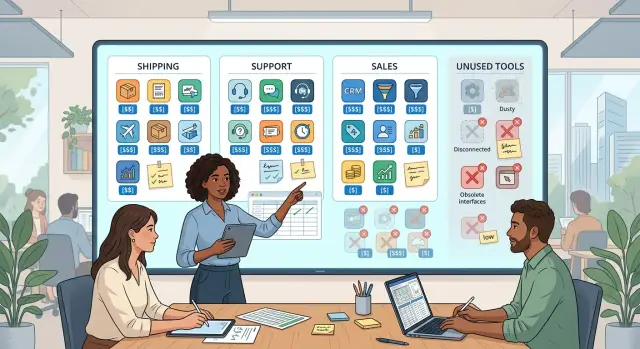
Table of Contents
Why separate tool budgets miss the real spend
Most teams do not buy software one workflow at a time. They add tools as problems appear. Sales picks one app, support adds another, engineering signs up for three more, and finance sees a stack of separate invoices.
On paper, that can look neat. In practice, the real cost of doing one job disappears.
A single workflow often runs through several paid tools. Shipping a feature might touch issue tracking, design, code hosting, CI, error tracking, cloud hosting, and team chat. None of those bills looks outrageous on its own. Together, they can cost far more than the team expects.
That is why separate budgets hide waste so well. A $19 add on in marketing, a few extra seats in support, and an old analytics plan in engineering rarely trigger alarm by themselves. Spread across departments, small charges feel harmless. Added up over a year, they are often the easiest money to cut.
There is another problem too: nobody owns the full path from work to bill. One team keeps paying because another team still has an account. A trial turns into a paid plan. A contractor seat stays active after the project ends. Two teams buy different tools for the same job and never compare notes.
A workflow view fixes that because it asks a better question: what work does this bill support right now?
Take customer support. One support workflow might rely on a help desk, team chat, an internal knowledge base, a reporting add on, and a separate AI assistant. When you group those costs together, you can judge the workflow as a whole. Does the team use all of it every week? Do two tools overlap? Did the reporting add on save enough time to earn its place?
That shift sounds small, but it changes the review. You stop treating software as a pile of subscriptions and start treating it as part of the cost of getting work done. Waste becomes easier to spot, especially the quiet kind: old renewals, duplicate tools, and seats nobody noticed were still active.
Build one list of every tool and every bill
Most teams do not overspend because one tool is wildly expensive. They overspend because charges sit in five places and nobody sees the full picture at once.
Start by pulling every software cost into one sheet, even if the data is messy at first. Use card statements, finance exports, emailed invoices, and annual contracts. If a tool bills once a year, convert it to a monthly number too. That makes later comparisons much easier.
Keep the sheet simple, but make every line item follow the same format. For each tool, track the vendor, monthly cost, annual contract amount, seat count, renewal date, internal owner, and any extra charges such as storage, support plans, or usage overages.
Those extra charges matter more than most people think. A tool that looks cheap at $29 per month can turn into a much larger bill once storage blocks, API usage, premium support, or added admin seats show up. If you skip those fees, the review points you in the wrong direction.
It also helps to note who approved the purchase, if you know it. Bills without a clear owner tend to survive for years.
Do not limit the list to software bought through the normal purchasing flow. Someone may have put a design app, monitoring service, or AI subscription on a company card and never mentioned it to finance. Someone else may expense it every month. Those small purchases often hide the easiest savings.
A growing team can end up with three note apps, two form builders, and several small AI subscriptions before anyone notices. Each charge looks minor alone. Together, they can equal a full salary over a year.
If you work with a technical advisor or Fractional CTO, this is often the first useful document to build. It turns vague cost complaints into a clean inventory. Once the sheet is done, you can sort tools by workflow and see which ones earn their place and which ones just keep renewing.
Group each tool by the work it supports
A cost list gets much easier to read when you sort tools by the work people do every week. Department budgets often hide the real picture. One team may pay for a tool while three teams depend on it, or nobody does.
A small set of buckets is usually enough:
- shipping
- support
- sales
- shared work
- no active use
Put each tool in the bucket where people rely on it most. Git hosting, CI, error tracking, and cloud monitoring usually belong in shipping. A help desk, call recording tool, or knowledge base usually fits support. CRM, proposal software, and outbound tools belong in sales.
Some tools sit in the middle. Chat, docs, password managers, and meeting software often belong in shared work because the whole company uses them. Do not force those into one department just because one manager owns the bill.
If two groups really share a tool, split the cost in a simple way. Use seat count, usage data, or a rough percentage everyone accepts. A 50/50 split is fine when usage is close. You do not need perfect math. You need a fair picture of where the money goes.
This is where many reviews get clearer fast. A tool can look necessary inside one budget and unnecessary once you place it next to everything else in the same workflow.
The last bucket matters more than most teams expect. Some tools no longer connect to any live workflow. Maybe the sales team stopped using a prospecting tool months ago. Maybe an old design app stayed on auto renewal after a rebrand. If no active process depends on it, label it clearly.
That changes the conversation. A tool that supports revenue or product delivery needs a careful review. A tool with no active use needs a short deadline: cancel it, downgrade it, or prove why it stays.
Check who uses each tool and how often
Most waste hides in quiet tools, not expensive ones. A stack cost review gets much clearer when you compare who you pay for with who actually shows up and uses the tool.
Start with seats. If you pay for 25 users and only 9 people logged in last month, that gap matters. The same goes for usage based pricing. A tool can look cheap per month and still waste money if nobody depends on it.
Do not stop at login data. Some people sign in once, then do all their work somewhere else. Look for proof that real work happened inside the tool.
Useful signals include:
- logins over the last 30 to 90 days
- tickets closed or updated
- calls logged by sales
- commits, builds, or deployments
- document edits and comments
The pattern matters more than one number. A support tool with few logins may still matter if the team closes every ticket there. A docs tool with many logins but almost no edits may just be a place people open by habit.
Then ask the owner a blunt question: "What would stop if this tool disappeared tomorrow?" Push for a direct answer. "People like it" is not enough. "We would lose call recordings used in customer disputes" is a real answer. "Nothing would break for two months" usually means you found dead weight.
Overlap shows up fast once you do this. Sales may track calls in one system while account managers keep the same notes in another. Engineers may write docs in two places. Product teams often pay for one tool for planning and another for the same roadmap view. When two tools do the same job, habits split, data gets messy, and both bills stay alive.
A simple example makes the point. A 15 person startup pays for 20 seats in a project tool, 12 seats in a docs tool, and a separate wiki. Activity shows daily work in the project tool, light edits in the docs tool, and almost no changes in the wiki. That is a strong case to cut one writing tool or move to a smaller plan.
Count users, check activity, and ask what breaks. That is usually where the waste shows up.
Run the review in five steps
Use one month of real charges, not budget guesses. Actual invoices show the small add ons that turn into real waste: extra seats, old plugins, and tools a team forgot it still had.
- Pull every charge from the same 30 day window. Export card statements, invoices, and app store bills. Put each line in one sheet with the vendor, plan, amount, renewal date, and team owner.
- Map each tool to one workflow. Give every bill a single home such as shipping product, customer support, sales, hiring, finance, or internal admin. If a tool seems to fit everywhere, ask what job people pay it for most often.
- Check owner, usage, and overlap. Name one person who can explain why the tool exists. Then compare login data, seat counts, and feature overlap. Two tools that both record meetings or both manage tickets rarely need to stay side by side for long.
- Make a decision for each tool. Use four labels only: keep, merge, replace, or cut. That keeps the review from turning into a long argument.
- Set dates before the next renewal. A decision without a date usually dies in chat. Assign the person who will cancel, migrate, or reduce seats, and write the exact deadline next to the tool.
Teams often get stuck on step three because people defend the tool they chose last year. Keep the standard simple. If nobody uses it often, owns it clearly, or can explain why it beats a tool you already pay for, it should not renew as is.
A startup can finish this review in an afternoon if one person owns the sheet and asks direct questions. A larger team may need two short meetings, one with finance and one with tool owners. Either way, the review works best when you judge tools by the work they support, not by who bought them.
A simple example from a growing team
One 25 person software company thought its software costs looked normal. Each team had a budget, every manager approved their own tools, and nobody saw the full picture in one place.
When they finally pulled every bill into one sheet, the pattern was obvious. Product paid for one issue tracker, two chat tools, and three docs apps. Support had a help desk plus a second shared inbox tool. Sales kept a CRM, a call recorder, and a proposal app.
On paper, each purchase made sense. In daily work, the overlap was hard to defend.
Product used Jira every day, so that stayed. But the same team also had Slack and Microsoft Teams, even though almost all internal discussion happened in Slack. Teams survived because one client asked for it months earlier, then stopped using it. Nobody canceled the renewal.
Documentation was even messier. The team had active notes in Notion, old process pages in Confluence, and scattered specs in Google Docs. People often searched all three before asking a coworker. That wasted time, and it also hid the real cost. They were paying for confusion as much as software.
Support had Zendesk for tickets and Front for a shared inbox. After the review, they saw that Zendesk already covered most of the workflow they needed. Front handled only a small slice of messages, and two people used it every week.
Sales had a normal set of tools: HubSpot, a call recorder, and a proposal app. The surprise was seat count. Former reps still had paid access, and several current reps had not opened the proposal app in more than a month.
Once the company grouped spend by workflow instead of by department, the fixes were straightforward:
- Jira stayed under shipping.
- Slack moved to a shared company budget because every team used it.
- Teams and Confluence did not renew.
- Extra paid seats disappeared from the proposal app and call recorder.
This review did not require a dramatic tool purge. The company kept the tools people used, moved one shared tool to the right bucket, cut two renewals, and removed unused seats. The yearly savings mattered, but the bigger win was clarity. After that, every new tool had to answer one plain question: what work does this support that we cannot already do?
Mistakes that keep waste on the books
Waste often stays in a stack for boring reasons, not because anyone chose it on purpose. A team adds one tool for a rush project, another for a new hire, and a third because one person likes the interface. Six months later, nobody wants to touch the bill.
One common mistake is canceling too fast. Before you shut off a tool, export the data, save settings, and write down what depends on it. Teams forget this all the time with support tools, analytics, and design apps. Then someone needs an old file, a customer thread, or a report, and the company pays for one more month just to recover it.
Another mistake is keeping a tool because one person prefers it. Preference matters a little. Cost and real use matter more. If one designer wants one whiteboard app while the rest of the company uses another, that extra subscription is not a harmless personal choice. It is a duplicate bill that keeps growing over the year.
Small charges also hide well. A $12 plugin, a $19 seat, a $29 automation add on - each one looks harmless on its own. Put them together across 12 months and they often cover a contractor budget, part of your hosting bill, or another meaningful expense. In a stack cost review, the tiny charges deserve the same attention as the big contracts.
Teams also waste money when each department buys its own version of the same tool. Sales gets one scheduler, support gets another, product gets a third, and nobody notices the overlap because each budget sits in a different spreadsheet. That is how companies end up paying three times for one basic job.
Annual contracts create another blind spot. People stop reviewing them because the money already left the account. That logic keeps bad spend alive. If a tool is unused, mark the renewal date now, plan the replacement if needed, and stop it before the next term starts.
A short filter helps:
- Can the team export its data today?
- Do at least two people use the tool each week?
- Does another paid tool already do the same job?
- Is the annual renewal date on a shared calendar?
- Would anyone notice if this tool disappeared for 30 days?
If the answers are weak, the bill probably should not stay.
Quick checks before you cancel anything
Before you turn off a tool, pull out the data people may need later. Export customer records, tickets, reports, templates, audit logs, and billing history. Then ask each team lead one direct question: "If this tool disappears tomorrow, what work breaks first?"
A tool can look idle because only a few people log in. That does not mean you can remove it without trouble. One finance admin may need old invoices for tax work. One support manager may rely on saved replies and shared inbox rules. One engineer may have a quiet automation that still moves leads, alerts, or status updates between systems.
Check four things before you cancel:
- Data exports open correctly and include the fields people need.
- Integrations and automations have a clear replacement.
- Shared inbox routing, filters, and reply templates will keep working elsewhere.
- Each owner knows the shutoff date and who to contact if something breaks.
Make sure every team hears the same plan on the same day. If sales thinks a CRM add on ends Friday but marketing expects it next month, people will keep building work around a tool that is about to go away. A short internal note works well: what changes, when it changes, what stays the same, and where the replacement lives.
Keep a fallback plan for the first two weeks after the cut. Delay full account deletion if the vendor allows it. Save admin access, keep the last invoice, and write down how to restore the service quickly. If a missing integration blocks orders or a support queue stops routing, you want a simple way back.
One missed rule can erase the savings from the whole cancellation. Ten extra minutes spent checking exports, automations, and team handoffs often saves days of cleanup.
What to do in the next 30 days
Move while the numbers are still fresh. A stack cost review works best as a short cleanup sprint, not a slow committee project.
This week, finish your first workflow map. Put every tool under the work it mainly supports: shipping, support, sales, hiring, finance, or internal admin. If one tool touches two areas, pick the main one and add a note. That simple rule stops the map from turning into a debate.
Then act before the next billing cycle hits. Tools without an owner are usually the easiest place to start. If nobody can say why a tool exists, who uses it, and what would break without it, you probably do not need the paid plan.
A practical plan for the first 30 days
- Days 1 to 7: build the full map, confirm current prices, and name one owner for every paid tool.
- Days 8 to 14: cancel or downgrade the obvious stragglers, old trials, duplicate chat tools, extra form builders, and partly used analytics seats.
- Days 15 to 21: simplify one workflow only. Pick the messiest one and remove overlap there first.
- Days 22 to 30: measure again. Compare spend, seat count, and actual usage after the cleanup.
Keep the first pass narrow. If your product team uses one tool for tickets, another for roadmaps, and a third for release notes, clean that up before touching everything else. Small wins are easier to defend, and they give you a clear before and after number.
Growing teams often find the biggest waste in mixed workflows. One AI coding tool sits with engineering, another sits on a founder's card, and a third hides inside cloud credits. Infrastructure costs drift the same way. When product, infra, and AI tools all blur together, the review gets harder than it looks.
That is where outside technical help can save time. If the review starts crossing into architecture, infrastructure, and AI tooling at the same time, a broader technical pass usually works better than a finance only exercise. Oleg Sotnikov at oleg.is does this kind of work as a Fractional CTO and startup advisor, helping teams look at tooling, systems, and operating costs together instead of as separate problems.
Frequently Asked Questions
Why should I review tool costs by workflow instead of by department?
Review by workflow because work crosses team lines. Shipping one feature can touch design, code hosting, CI, error tracking, cloud hosting, and chat, so separate budgets hide the full cost.
When you group spend by the job it supports, waste shows up faster. Old renewals, duplicate tools, and unused seats stop looking harmless once they sit next to each other.
What should I put in my first tool inventory?
Start with every paid tool, even the small ones. Pull charges from card statements, invoices, expense reports, app stores, and annual contracts.
For each line, record the vendor, plan, monthly cost, annual amount, seat count, renewal date, owner, and extra fees like storage, API usage, or support. Those details stop cheap plans from hiding real spend.
How do I handle annual contracts in this review?
Convert the annual price into a monthly number so you can compare it with everything else. That makes the sheet easier to read and helps you judge the workflow cost as a whole.
Do not ignore annual tools just because the money already left the account. Mark the renewal date now and decide whether to keep, replace, downgrade, or cut it before the next term starts.
Where do shared tools like chat and docs belong?
Put a shared tool in the bucket where people rely on it most, or place it under shared work if the whole company uses it. Chat, docs, password managers, and meeting tools often fit there better than under one team.
If two groups truly share it, split the cost in a simple way. Use seat count, usage data, or a rough percentage that everyone accepts.
What usage data matters before I cut a tool?
Seat count gives you a fast start, but do not stop there. Check whether people actually do work in the tool, not just open it once in a while.
Look for signals like tickets closed, calls logged, commits pushed, builds run, or documents edited. Then ask one direct question: what breaks tomorrow if this tool disappears?
How do I spot duplicate tools?
Duplicate tools show up when two apps solve the same job for the same people. You often find them in chat, docs, roadmaps, shared inboxes, note apps, schedulers, and AI subscriptions.
Compare real use, not brand names. If one tool gets daily work and the other sits mostly idle, cut or merge the weaker one unless it handles something the first tool cannot.
What is the fastest way to run a stack cost review?
Use one month of real charges and keep the review simple. Pull every bill into one sheet, map each tool to one workflow, check owner and usage, then label each tool as keep, merge, replace, or cut.
A small team can finish the first pass in an afternoon if one person owns the sheet and asks direct questions. Speed matters because loose reviews turn into chat threads and nothing changes.
When should I cancel a tool instead of downgrading it?
Cut the tool when no live process depends on it and nobody can explain why the paid plan stays. Downgrade it when the team still needs the product but pays for extra seats, storage, or features it does not use.
Replace it when another tool already covers the work better or when you want to simplify a messy workflow. Keep it when people use it often and it earns its cost.
What should I check before canceling anything?
Export the data first. Save customer records, tickets, reports, templates, audit logs, settings, and billing history before you touch the account.
Then check integrations, automations, inbox rules, and handoffs between teams. Tell every owner the shutoff date, keep a short fallback plan for the first two weeks, and avoid full deletion until you know the replacement works.
When does it make sense to ask a Fractional CTO for help?
Bring in outside technical help when the review starts touching architecture, infrastructure, AI tooling, and team workflows at the same time. Finance can find charges, but someone still needs to judge overlap, migration risk, and what the business actually needs.
A Fractional CTO can speed this up by building the inventory, sorting tools by workflow, and turning vague cost concerns into clear actions. Oleg Sotnikov does this kind of work for startups and small teams that want a cleaner stack and lower operating cost.


