Split databases by workload: when it helps and when not
Split databases by workload when one app still needs one product surface but different read, job, and analytics loads start fighting each other.
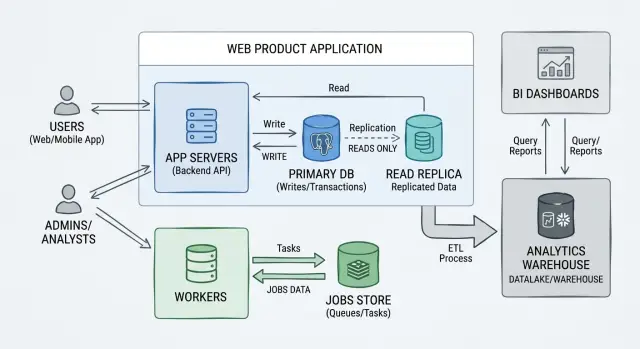
Table of Contents
What problem are you actually solving
Teams rarely split databases because the app got bigger. They do it because one database starts doing too many different jobs.
The first signs often look random. A page hangs for two seconds. A support screen times out. An email worker falls behind. Then someone runs a heavy report and the whole product feels slow.
Those problems share the same cause. Different kinds of work are fighting over the same storage layer. Customer actions need quick, predictable reads and writes. Background jobs do many small updates for long stretches. Reports and analytics scan large parts of the data and keep disks, memory, or connections busy much longer than normal product traffic.
Your app can still be one product, one team, and one codebase. That does not mean it needs one database for every workload. Product boundaries and database boundaries are different. Users can see one simple product while the backend uses separate storage paths to keep daily actions smooth.
That is why teams split databases by workload instead of by service. They are not trying to turn a decent app into a pile of microservices. They are trying to stop reports from slowing checkout, stop jobs from competing with live traffic, or stop analytics queries from filling the same connection pool the main app needs.
Picture a SaaS product where customers update records during the day, workers process imports in the background, and managers open dashboards with date range reports. If all three hit the same database, the busiest one can punish the other two. The product is still one product. The conflict sits in the workload, not in the feature list.
So the problem is not "we need more architecture." It is "different kinds of database work are hurting each other, and users can feel it." Once you see that clearly, splitting load without splitting the whole app starts to look reasonable.
Why one product can need more than one database
One product does not have to mean one database. You can keep one codebase, one login system, one admin area, and one roadmap while storing different workloads in different places.
Yes, that adds moving parts. It should. The goal is not to make the system look clever. The goal is to stop very different types of work from blocking each other.
Most products put at least three workloads on the same database. Normal customer requests need fast reads and small writes. Background jobs run in batches for email, syncs, imports, or recalculations. Reporting and analytics read lots of rows at once, then group, count, filter, and sort them.
Those workloads want different things. Customer traffic cares about low latency. Jobs care about throughput and can run for minutes. Analytics cares about wide scans and heavy aggregation. Put all three on one busy database and they start tripping over each other.
A nightly job can flood the disk with writes or hold locks longer than expected. A reporting query can push useful cache pages aside and make normal screens slower. Even when the database stays up, people feel the conflict through timeouts, lag, and odd spikes.
That is why a single product can end up with multiple databases. The split happens at the storage layer because that is where the pressure builds.
One product, separate pressure zones
A common setup is simple. Keep the main app database for customer traffic, move heavy jobs to a separate store, and send reporting to a replica or analytics database. None of that requires breaking the product into services.
Think about a product with dashboards, scheduled imports, and monthly reports. During the day, customers need quick page loads. At night, imports touch thousands of records. On Monday morning, finance runs large reports. If all of that hits the same database, one noisy workload can spoil the rest.
Used well, split databases by workload is just a way to reduce conflict. If there is no conflict yet, extra databases only add work.
Signs your workloads are fighting each other
A single database can look fine until different kinds of work land on it at the same time. Then small delays turn into customer problems. The app still works, but it feels brittle.
One obvious sign is when internal reporting slows customer actions. A dashboard query that scans a large orders table should not make sign in take four seconds or cause checkout to stall. If support opens reports and the product gets slower for everyone else, the workloads are competing for the same CPU, memory, disk, or connections.
Imports cause the same kind of damage. A big CSV upload, a sync from another system, or a backfill job can flood the database with writes and index updates. Customers feel that pressure right away as slower page loads, timeouts, or forms that seem stuck.
Background workers often leave a clean pattern in your graphs. Maybe every hour the queue wakes up and response times jump. Maybe every night billing or email jobs hammer the same tables your app uses during the day. When those spikes happen on a schedule, it is usually not bad luck.
Analytics traffic creates another familiar mess. Analysts run wide queries, sort huge result sets, and join tables the product touches all day. If those queries run during business hours, they can fill the connection pool and push normal app requests into a queue.
Index tuning can make the conflict easier to spot. You add an index to speed up a report and writes get slower. Then you change that index to help checkout and the report becomes painful again. When each fix for one task hurts another, the database is doing jobs that want different shapes.
This is usually the point where "single product multiple databases" stops sounding excessive and starts sounding practical. You are not splitting because neat boundaries feel nice. You are splitting because customer traffic, jobs, and analytics behave differently and keep stepping on each other.
If you can point to repeated lock waits, connection spikes, slow queries during imports, or hourly worker bursts, the case is getting stronger. Splitting adds operational work, so the pain should be real and easy to name.
How to decide what to split first
Start with a plain map of workloads. Put them on one page so you can see who hits the database, when, and why. Most teams find more than they expected: product reads, user writes, background jobs, admin screens, imports, exports, reporting, and ad hoc analytics.
That map matters because the first split should solve a real problem, not satisfy an architecture idea. If slow reports bother one person once a week but background jobs delay customer actions every day, jobs deserve attention first.
You do not need a fancy diagram. A small table is often enough. For each workload, note how often it runs, how much load it creates, what breaks when it slows down, and whether it needs fresh data right away.
Then measure the pain. Look for lock waits, CPU spikes, storage pressure, queue buildup, and read latency during busy hours. You are trying to find the workload that hurts other workloads the most.
Pick the first split with the clearest payoff
The best first split usually has low product risk and a clear upside. Analytics is a common first move because reports can often lag by a few minutes and reporting queries tend to be heavy. Background jobs are another good candidate when they scan large tables or update rows in bursts.
Customer writes are usually the worst place to start. They have the strictest consistency rules, and mistakes show up fast.
Take a simple SaaS product: customers use the app all day, a worker sends emails and syncs data, and the team runs dashboard queries for internal reporting. If dashboard queries slow customer pages, move analytics first. If workers lock hot tables and delay normal requests, move jobs first.
Set ownership rules before moving data
Before you move any table, decide which database owns each type of write. One table should have one source of truth. If two databases can both accept writes for the same record, drift will show up sooner than you expect.
Be clear about freshness too. Some data must stay current, like account balance or inventory. Some data can lag, like weekly charts, audit views, or batch email stats.
If you want database workload isolation to help, choose the first split that removes pain quickly, keeps ownership clear, and gives you a boring rollback path.
How to split by workload step by step
Pick the workload that causes the clearest pain, then move only that one. Teams create a mess when they separate reads and analytics, move jobs, and redesign syncs in one push. If reports are slowing customer actions, move reporting first and leave the rest alone.
Keep the product model the same. You are changing where one type of work runs, not rebuilding the whole app. A sensible first move is to copy only the tables and fields the new path needs into a second database, using scheduled syncs or replication.
The sequence is usually simple. Choose one workload with a clear owner and one success metric. Copy only the data that workload needs. Route only that workload to the new database. Compare lag, errors, and record counts on both sides. Keep a fast switch that sends traffic back to the old path.
Routing should stay narrow at first. If you move analytics, keep product writes and normal user reads on the main database. If you move background jobs to a background jobs database, point only workers to the new store and leave the web app alone.
Checks matter more than the move itself. Track sync delay, failed queries, and missing records, not just database CPU. Silent gaps are common. A report that loads fast but drops 3 percent of orders is worse than a slow report.
Rollback should stay dull. Use a feature flag or config switch so you can return that workload to the original database in minutes. Small, reversible changes beat heroic migration weekends, especially on lean teams that still need to ship product work.
Once the new path stays stable for a while, decide whether the next workload should move. Many teams stop after one split because that single change fixes the real problem.
A simple example from one product
Imagine a small SaaS app with customer accounts, billing, and usage reports. Early on, one database handles everything. That feels clean, and for a while it works.
Trouble starts when the app grows. A customer logs in to change a plan or download an invoice while a scheduled report scans months of event data and a batch job generates PDFs in the background. The product is still one product, but the database now carries very different kinds of work.
Accounts and billing should stay in the main database. Those records need current data every time. If a payment succeeds, the app must show the new plan right away. If an invoice is voided, support needs to see that same truth without delay. Keeping those transactions together makes the product easier to trust.
The heavy background work belongs somewhere else. A separate jobs store can handle retries, job state, queue polling, import tasks, email sends, and document generation. That keeps background activity from fighting with logins, checkout, and account updates.
Reports often need another split. Product metrics and trend reports ask broad questions: how many teams were active this month, which plans upgrade most often, or how usage changed after a release. Those reads touch lots of rows and often need indexes that do not help billing or account pages. Moving that data to analytics storage gives reporting room to breathe.
After the change, customers do not care that one product now uses multiple databases. They notice that pages load faster, billing screens stop timing out, and reports no longer make the whole app feel slow. Support sees fewer strange failures during busy periods. Engineers also get a clearer picture of what is breaking when something goes wrong.
That is the point of splitting by workload. Keep the product model together where consistency matters, then move heavy reads and background work to storage that fits those jobs better.
Mistakes that create more work
A second or third database can fix a real problem. It can also create one. Teams often split databases by workload because the diagram looks cleaner, not because the product needs it. Then they inherit sync scripts, stale data, and harder incident response.
The most common mistake is moving too early. If one database still handles product traffic, jobs, and reporting without clear pain, extra stores mostly add upkeep. A tidy architecture chart is cheap. Running three databases during an incident is not.
Data movement causes the next wave of trouble. Before you copy anything, decide what lives where, who owns it, how often it moves, and what happens when a sync fails. If you skip those rules, the same customer or order record drifts apart across systems. Then every bug turns into an argument about which copy is correct.
Ownership beats access
Teams can read from many places. They should not write to many places.
Pick one store that owns each class of data. Let the other databases act as read copies, reporting stores, or job specific stores. That sounds strict, but it removes a lot of confusion.
Analytics creates a different kind of risk. Reporting data often lags behind the app by minutes or hours. That is normal. Problems start when people treat analytics data like live product data and use it for exact, current answers such as order state, quotas, or account access.
Teams also forget the boring work that comes with a new store. Someone has to set backups, test restores, add alerts and health checks, document schema ownership and sync jobs, and control who can change structure or retention rules. Skip that work and the new database feels fine right up until the first failure. Then recovery takes much longer because nobody practiced it.
This matters even more with a jobs store. It may reduce pressure on the main app database, but it still needs the same care. Lean teams usually add another database only after they can point to one exact problem it will remove.
The cleanest setup is usually the least dramatic one. Each database has one clear job, one owner, known data lag, and the same backup and monitoring standards as the rest of the product.
Quick checks before you commit
A split is worth the effort only when the pain is specific, repeatable, and expensive enough to fix. If your database slows down once in a while, that is not enough. If the same reports, jobs, or read heavy screens keep hurting the rest of the product, you have a real case.
You should be able to point to the exact source of the trouble. Name the tables, the query patterns, and the time windows when things go bad. "Analytics feels heavy" is too vague. "Three dashboard queries scan event tables for 20 seconds and block customer writes every morning" is something you can act on.
Before you split, ask five direct questions. Does one workload hurt the others often? Can you name the tables and queries causing the pain? Does the split remove one clear bottleneck instead of spreading confusion around? Can your team run another data store well, including backups, alerts, restores, access rules, and schema changes? Will customers or staff feel the improvement within a few weeks?
That last question matters more than teams like to admit. A cleaner diagram is not a win by itself. If nobody notices the result except engineers, the cost may be too high for now.
Here is a small example. Say your product uses one main database and finance runs heavy month end reports against the same data. If moving those reads to a reporting store cuts report time from 30 minutes to 5 and keeps customer activity smooth, that is a strong reason to split. If the gain is tiny, keep the system simpler.
Good splits fix a bottleneck you can describe in one sentence. If you need a long debate to justify it, wait and measure more.
What to do next
Start with the smallest split that solves a real problem. If read traffic slows writes, move reads first. If heavy reports lock tables and annoy customers, separate analytics first. If workers create spikes at odd hours, give background jobs their own database. A small move is easier to test, easier to roll back, and easier for the team to understand.
Write down one clear success target before anyone touches production. Pick numbers you can measure, not vague hopes. That could mean cutting API latency from 400 ms to 180 ms, dropping lock timeouts close to zero, or lowering cloud spend by removing an oversized primary database. If you cannot say what should improve, the split will turn into architecture for its own sake.
A short plan keeps the work honest. Name the first workload to move and the reason it causes pain. Define the metric that should improve. List the tables, queries, and jobs that depend on that data. Decide how data will sync and how you will check that it stays correct. Set a review date to confirm the split helped more than it hurt.
Ownership matters more than most teams expect. After the move, someone needs to watch data freshness, broken pipelines, schema changes, and access rules. If nobody owns data quality, the team ends up arguing about whether the new database is wrong or just late. Pick one person or one small group before the migration starts.
It can also help to get a second set of eyes on the plan before you add replicas, queues, caches, and warehouses all at once. Most products do not need all of that. They need one careful change that removes the actual bottleneck.
If you want that outside review, Oleg Sotnikov at oleg.is works with startups and small businesses on product architecture, infrastructure, and Fractional CTO support. That kind of review is most useful when it keeps the design lean and solves the database problem you actually have, not the one a diagram suggests.
Frequently Asked Questions
How do I know one database is the actual problem?
Look for repeatable conflict, not random slowness. If reports slow sign-in, imports make forms hang, or workers cause hourly latency spikes, one database likely handles too many different jobs.
Check your graphs and query logs. Lock waits, connection pool spikes, slow queries during batch work, and write delays during reporting usually point to workload conflict.
Should I split by workload or by service first?
Start with workload splits, not service splits. If the product still makes sense as one app, you usually gain more by separating customer traffic, jobs, or analytics than by breaking the code into services.
Service splits make sense when teams, deploys, or domain ownership already push you there. Do not split the app just because the database feels busy.
What should I move first?
Move the workload that hurts other workloads most often. For many teams, that means reporting or analytics because those queries scan a lot of data and can usually tolerate a bit of lag.
Jobs also make a good first move when they hit hot tables in bursts. Leave customer writes for later because mistakes there show up fast.
Can one product use multiple databases without turning into microservices?
Yes. One product can keep one codebase, one login flow, and one roadmap while using separate databases underneath.
Users do not care how you store the data. They care that pages load fast and actions finish on time.
Is a read replica enough for reporting?
Sometimes. A read replica works well when you need lighter reporting and can accept slight lag.
If reporting needs different schemas, heavy aggregates, or long scans that still cause trouble, use a separate reporting or analytics store instead of pushing everything onto a replica.
Should background jobs get their own database?
Often, yes. Jobs tend to run in bursts, retry often, and touch many rows for long stretches. That can clash with login, checkout, and normal page loads.
Give jobs their own store when queue traffic or imports keep slowing live requests. Keep one database as the owner for product data, then sync or copy only what workers need.
How do I avoid data drift after the split?
Pick one source of truth for each type of write and stick to it. Let other databases read, report, or process copies, but do not let them all write the same record.
Also decide how much lag you can accept before you move anything. If everyone knows which database owns billing, accounts, or inventory, you avoid most drift problems.
When is splitting too early?
Wait until the pain feels specific and repeatable. If one database still handles traffic, jobs, and reports without customer pain, extra databases mostly add sync work, backups, alerts, and more things to debug.
Split when you can name the exact workload, tables, and time window causing trouble. If you cannot describe the bottleneck in one sentence, keep measuring.
What should I monitor during the migration?
Watch the result that matters to users first. Track API latency, page response time, timeout rate, queue delay, lock waits, sync lag, and failed queries.
Do not stop at database CPU. A fast report with missing rows still counts as a bad move, so compare record counts and spot-check real outputs during the rollout.
How do I roll back if the new database causes problems?
Keep rollback boring. Route only one workload to the new database and keep a feature flag or config switch that sends it back to the old path in minutes.
Test that switch before you need it. Small, reversible moves beat a big migration that forces you to fix everything live.


