Encryption key rotation for small teams: owners and steps
Encryption key rotation gets easier when a small team assigns named owners, backup contacts, and clear steps for access, handoffs, and scheduled changes.
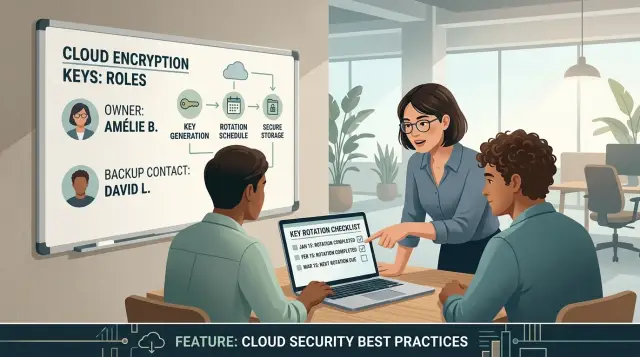
Table of Contents
Why small teams lose track of encryption keys
Small teams usually create their first KMS keys in a rush. One engineer, founder, or early DevOps hire sets them up, production starts working, and everyone moves on.
That is when the trouble starts. The keys keep doing their job, so the rest of the team treats KMS like a black box and assumes the cloud provider handles everything that matters.
A few months later, those same keys may protect database snapshots, app secrets, file storage, or signing operations. The team relies on them every day, but simple questions take too long to answer: who owns this key, who can approve a change, and who checks the impact before rotation?
Small teams feel this more than large ones because roles overlap. The person who created the key may also manage deployments, support incidents, and vendor accounts. If that person takes a vacation, leaves the company, or just forgets the original setup, the team can get stuck at the worst possible time.
The problem usually appears during a change. Someone needs to rotate a key, update permissions, or replace an old service account. Then the chat thread starts: "Who made this?" "Can we disable the old one yet?" "Will this break logins or backups?" Those are bad questions to ask in the middle of a release.
Good encryption key rotation starts with clear ownership. If no one owns a key, no one tests the rotation steps, confirms which systems depend on it, or keeps the record current.
A short owner list solves more than people expect. For each key, write down the primary owner, a backup contact, what the key protects, and who approves risky changes. Keep that note where the team already looks during incidents, like an internal runbook or operations folder.
This is not paperwork for its own sake. It saves time when something breaks and reduces the chance of lockouts caused by guesswork. On a small team, that can save a release, a weekend, or a very tense Monday morning.
Assign a real owner to each key
Every production and staging key needs one named person attached to it. Use a real name, not a team alias. If nobody can answer "Who owns this key?" in five seconds, the team will hesitate when access changes or a rotation goes wrong.
Pick the person who understands the service, the data behind it, and the cost of getting the change wrong. That is often the engineer who maintains the system day to day, not the most senior person on the org chart. If a database, queue, or storage bucket depends on the key, the owner should know that path well enough to judge timing and risk.
Shared aliases are a poor substitute for ownership. "security@" or "devops@" may look tidy in a spreadsheet, but they hide responsibility. When a problem appears, nobody knows who approved access, who checked the rollout, or who should stop a risky change.
The owner also needs enough authority to do the job. They should be able to approve or reject access requests, choose a rotation window, and require a test before production changes go live. If they carry the risk but need three other people to make every decision, they do not really own the key.
For a small team, this can stay simple. The engineer who runs billing can own the payments service key. The engineer who maintains uploads can own the file storage key. One person might own several keys, but each key should still point to one person.
This matters most during encryption key rotation. When one person owns the call, reviews move faster and mistakes are easier to trace. KMS should feel like any other part of the app: someone owns it, someone can answer questions, and nobody has to guess.
Add a backup contact
One owner is not enough. If only one person understands an encryption key, the team can freeze during an outage, a vacation, or a messy offboarding. Every production key needs one backup contact, and that record should include their name, role, and direct way to reach them.
Do not name a backup by job title alone. "Someone from engineering" is how teams end up waiting for the wrong person. Pick someone who already knows the system, can get access quickly, and can make calm decisions under pressure. On a small team, that is often a second engineer, an engineering lead, or a fractional CTO who already helps with infrastructure.
The backup also needs a clear rule for when they can act. Without that rule, people hesitate and ask for permission in the middle of an incident. Keep it plain: the backup can step in if the owner is unreachable during a production issue, during planned time off, when you suspect credential misuse, or when a rotation deadline is about to slip.
Just naming a backup is not enough. Keep them informed when anything changes. If the owner updates KMS permissions, swaps a service account, or changes which app uses the key, the backup should know the same day. A short note in team chat or an update in the internal doc is enough. Two minutes of context now can save an hour later.
Test the handoff before you need it. Run a drill in staging or with a low-risk secret. Ask the backup to find the record, confirm access, follow the rotation steps, and note where they got stuck. That matters more than a neat document.
When the owner is away, the backup should still know what the key does, who depends on it, and how to rotate it without guessing. If they cannot complete a simple staging handoff on their own, they are not a real backup yet.
Keep a short record for every key
Every encryption key needs a short record that a tired teammate can read during an incident and still understand. If the only documentation lives in one person's head, or deep inside the KMS console, people start guessing.
Write the basics in plain language. Note the system that uses the key, the environment, and why it exists. "Billing service, production, encrypts stored invoices" is clear. "Main app key" is vague and becomes useless later.
Names matter as much as technical details. Record the owner, backup contact, and the person who approves changes. On a small team, two of those roles may belong to the same person. That is fine. The point is that nobody has to ask around when access breaks or a rotation request needs approval.
You also need the path the application takes to reach the key. Write down where the app reads it from, where it is stored, and which identity can use it. That may be as simple as the secret name, the KMS alias, the service account, and the config variable the app expects. Details like that save a surprising amount of time when a deploy fails.
A useful record usually includes five things: the system name, environment, and purpose; the owner, backup, and approver; the storage location and read path used by the app; the last rotation date and next target date; and where the runbook or change notes live.
Keep the dates visible. If the last rotation date is missing, teams often assume someone else handled it. Store the record in a shared internal doc, an ops notebook, or another secure workspace the team already uses. People should be able to find it in under a minute.
One rule helps a lot: update the record the same day you create, rotate, disable, or replace a key. If that slips, the record becomes fiction very quickly.
Use a rotation process people can follow
Encryption key rotation fails when the team treats KMS like magic. A small team needs a short routine that one person can run, another person can review, and everyone can understand a month later.
Start with the owner. They create a new key version in KMS, label it clearly, and note the date or change ticket. Then they update the app configuration or secret store so new encrypt and decrypt requests use the new version.
Do the switch during a quiet period if possible. A Tuesday morning with the team online is usually better than a late Friday deploy.
After the change, check the systems that usually fail first: app logs for decryption or permission errors, alerts from workers and scheduled jobs, audit logs in KMS and the cloud account, and one or two real flows such as login, checkout, or file upload.
Do not rush to delete the old version. Keep it available for a short rollback window so you can recover quickly if a background job, old worker, or forgotten script still depends on it. During that overlap, the app should write with the new version while the old one remains available only for rollback.
If the checks pass, disable the old version first. That gives the team one more safety step before full removal. If nothing breaks during the agreed window, remove it according to your rule.
Write down what changed before anyone moves on. The note can stay brief: the new version ID, the old version ID, the systems updated, who made the change, who approved it, and when the rollback window ends. That small record often makes the difference between a smooth rotation and a stressful afternoon.
A simple example from a small product team
A five-person SaaS team keeps this process simple. Maya, the founder, owns the payment encryption key because she approves billing changes and talks to the payment provider when billing breaks. Ben, the engineer who runs deployments, is the backup contact. If Maya is away, Ben can open the record and finish the job without guessing.
They decide to rotate the payment key after a contractor leaves. The contractor did not manage billing alone, but he had temporary access during a checkout redesign. That is reason enough to rotate.
Before they touch production, Maya and Ben test the change in staging. They do not stop after one payment test. They check the full path that could fail later: a customer completes checkout and the order is stored correctly, a refund still works and the app can read the payment record, and a webhook arrives with signature checks and decryption still working.
After the tests pass, Ben creates a new version in KMS and switches the app so all new writes use it. They keep the old version active for one day. That short overlap gives retries, queued jobs, and delayed webhooks time to finish. It also lowers the chance of a late-night lockout if one worker still points to the older version.
Before they close the task, Ben updates the record right away. The note lists Maya as owner, Ben as backup, why they rotated the key, when the older version will be turned off, and which tests passed.
Six months later, nobody has to piece the story together from chat logs. The team can see who owned the decision, who could step in, and what changed. That is what good encryption key rotation looks like on a small team.
Mistakes that lead to lockouts and confusion
Most encryption key rotation failures happen because of timing and ownership, not because cryptography is hard. A small team changes one setting, assumes KMS will handle the rest, and discovers a few hours later that half the system still uses the old secret.
A common mistake is rotating late on a Friday. If the person who owns the service goes offline, nobody wants to touch production and a simple mismatch turns into a weekend incident. Rotate when the team is awake, reachable, and able to watch logs for a while afterward.
Another problem starts when someone updates the key before dependent services reload their secrets. Web apps often restart quickly, so they look fine at first. Batch workers, queue consumers, and cron tasks are where teams get surprised. They may keep old credentials in memory, wake up hours later, and fail on the first decrypt call.
Here is a typical example. The main app works after the change, so the team closes the task. At 2 a.m., the billing export job starts, tries to read encrypted data with stale settings, and crashes. By morning, finance sees missing reports and nobody remembers which process still had the old configuration.
Access lists cause a different kind of confusion. Teams leave former owners on the policy and forget to add the current backup contact. Then the wrong person still has permission while the person on call cannot inspect or revert anything. That creates a security problem and an operations problem at the same time.
Skipping rollback is the last trap. Before you rotate, write down exactly how to switch back, who can approve it, and how long the previous key stays available during the change window. A short overlap period is usually safer than a hard cutover.
Before you start, make sure someone who knows the system is available during and after the change, long-running workers can reload secrets or restart cleanly, scheduled jobs are part of the verification plan, old access has been removed, and the rollback path has been tested instead of guessed.
If the plan does not cover people, timing, and rollback, it is not really a plan.
Final checklist
Small teams usually do better with a short, boring checklist than with a policy nobody reads. KMS does not remove the need for ownership, dates, and test steps. If any of those are missing, encryption key rotation turns into guesswork.
Before you close the task, confirm a few basics:
- Each encryption key has one named owner and one backup contact.
- The team can quickly find the record that explains what the key protects, where it is used, and what breaks if it fails.
- The next rotation date is on a shared calendar, not in one person's memory.
- Monitoring covers failed decrypts, login issues, job failures, and error spikes after the change.
- The rollback path has been tested recently.
A small example makes the point. A product team rotates a database encryption key but only checks the main app. Hours later, a background worker starts failing because it still uses the old setting. Basic monitoring would catch that quickly. A tested rollback would keep it from turning into an outage.
Keep the process plain: one owner, one backup, one record, one date, and one recent rollback test. That is usually enough to make encryption key rotation feel routine instead of risky.
What to do next
Start with the keys that protect the most sensitive parts of your product. For most small teams, that means customer data, payment systems, and the secrets that let production services read or write private information. If you only fix three things this week, start there.
Do not try to clean up everything at once. Pick a short list, open each record, and assign one owner plus one backup contact. Shared ownership sounds safe, but it usually means nobody acts when a rotation date slips or an alert appears.
Then remove stale access. Former employees, old contractors, abandoned service accounts, and broad admin roles often stay attached to KMS longer than anyone expects. A 20-minute access review can remove a lot of risk and make the next rotation much less stressful.
For most teams, a one-page rule is enough. Every encryption key should have one owner and one backup, every key should show the last rotation date and next rotation date, every rotation should include a short test and a rollback note, and nobody should create a production key without adding the record first.
After that, run one real practice rotation on a lower-risk key. Time it. Watch where people hesitate, which systems break, and whether the backup can step in without guessing. That small test usually reveals weak spots faster than another meeting.
If your team wants a second set of eyes before changing production secrets, Oleg Sotnikov at oleg.is can help review infrastructure, ownership gaps, and practical operating steps in a fractional CTO role. That kind of outside review is useful when the work clearly matters but the current records are thin.
Put one owner name next to your highest-risk key today. Then add the next rotation date to the calendar and remove one stale access entry before the week ends.
Frequently Asked Questions
How often should we rotate a KMS key?
Rotate on a schedule your team can keep, and rotate sooner after staff changes, contractor access, or any sign that credentials leaked. For many small teams, a regular calendar reminder plus event-driven rotations works better than chasing a perfect policy.
Who should own each encryption key?
Choose the person who knows the system, the data it protects, and the risk of breaking it. That person should have enough authority to approve access, pick the timing, and require testing before production changes.
Why do we need a backup contact for every key?
One owner helps, but one owner can be offline, on vacation, or gone from the company. A backup contact keeps the team moving during incidents and planned rotations without a long Slack search.
What should we record for each encryption key?
Keep it short and specific. Write the system name, environment, purpose, owner, backup, approver, where the app reads the secret or alias, the last rotation date, the next target date, and where the runbook lives.
When should a small team rotate a key?
Pick a quiet window when the team is online and able to watch logs after the change. A normal weekday morning usually beats a late Friday deploy because you have time to catch worker and job failures.
Should we delete the old key version right after rotation?
No. Keep the old version available for a short rollback window while new writes use the new version. After your checks pass, disable the old version first and remove it only after the agreed window ends.
What should we test after a rotation?
Check the flows that break first when decryption or permissions fail. Look at app logs, KMS audit logs, workers, scheduled jobs, and one or two real user actions such as login, checkout, or file upload.
How do we avoid background job failures during rotation?
Make long-running workers and scheduled jobs reload secrets or restart cleanly during the change. If you only test the web app, a queue consumer or nightly job can fail hours later with stale settings.
What access should we clean up before rotating a key?
Review who can use the key and remove former employees, old contractors, abandoned service accounts, and broad admin roles that no longer need access. Then make sure the current owner and backup can inspect and revert the change if needed.
What should we do first if our key management is messy?
Start with the keys that protect customer data, payment systems, and production secrets. Assign one owner and one backup, add the next rotation date to a shared calendar, remove one stale access entry, and practice one low-risk rotation before touching the most sensitive systems.


