Search stack for small products: what to use first
Search stack for small products can stay simple. Compare client-side search, database search, and external engines to pick the lightest setup that works.
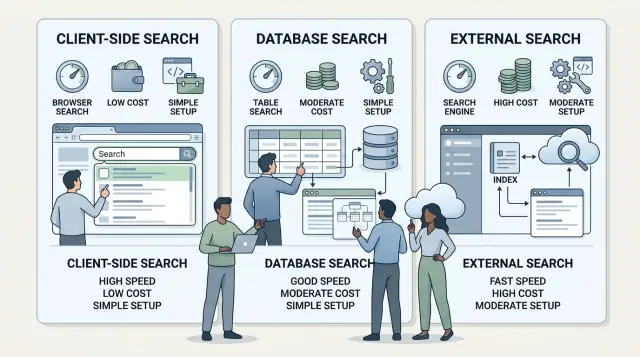
Table of Contents
Why picking search feels harder than it should
Most teams start by comparing tools, not by defining the job. They look at search libraries, database features, and hosted engines before they answer a simple question: what should users be able to find, and how fast should it feel?
That mistake makes search seem more complicated than it is. A docs search, a help center, an admin table, and a product catalog all have different needs. One might need typo tolerance and good ranking. Another just needs fast filtering over a small set of records.
A small SaaS can have both problems at once. Its public docs may have 120 pages, while its product may search through customer records, tags, and invoices. Using one approach for both often creates friction right away.
Bad search usually shows up in plain ways. Users type an obvious word and get zero results. Pages feel heavy because the browser loads too much data. Results come back, but the order feels wrong, so people stop trusting the box.
The tricky part is that the wrong stack adds work long before users complain. Teams end up building sync jobs, cleaning search indexes, tuning ranking rules, and chasing stale results between systems. Even a simple search box can turn into extra infrastructure, extra failure points, and more code to maintain.
That is why site search choices feel bigger than they should. The tool is only half the decision. The other half is volume, content type, and how much "smart" behavior people actually expect.
The lightest option often wins early. If your content is small and simple, client-side search may be enough. If your data already lives in a database and queries are predictable, database search may do the job. External engines make sense too, but usually when search quality, speed, or scale starts to break the simpler options.
Teams that pause and define the job first usually save themselves a rewrite later.
What to check before you choose
Start with volume. A search box over 800 records is a different job than one over 80,000. Write down how many records people can search right now, not the number from a growth slide. Teams often build for a future they may not reach for a year, then pay for extra moving parts they did not need.
Next, check how often those records change. If your data updates once or twice a day, a simple setup can work well. If stock levels, ticket status, comments, or prices change all the time, users will notice stale results fast. Fresh results matter just as much as fast results.
Filters deserve the same level of attention. Many products say they need search, but users really need search plus a few useful filters. Think about what people actually click now: category, status, date, price, owner, tag, or location. Keep the list honest. If only two filters get used every week, design for those two first.
Typos can change your choice more than scale does. If people search exact IDs, order numbers, or short internal names, strict matching is often fine. If they search article titles, product names, or free text, people will misspell things. Someone typing "wirless mouse" still expects a result for "wireless mouse". If that matters, note it early.
Then set a speed target that feels okay on mobile. Test on a normal phone, not a fast office laptop. For many small products, results that appear in about half a second feel fine. Push much past a second, and the search feels slow even if the rest of the app is quick.
This is the boring part of choosing a search stack for small products, but it saves rework. A simple note with record count, update frequency, real filters, typo needs, and mobile response time will usually make the right option much clearer.
When client-side search makes sense
Client-side search works best when your content set is small and changes at a calm pace. The browser downloads a compact search index with the page, then runs the search locally. For a docs site, help center, or tiny catalog, that is often the simplest setup that still feels good.
The biggest upside is speed after the first load. Once the index is in the browser, results can appear almost instantly because the page does not need to ask a server on every search. That makes the experience feel snappy, especially for people who search more than once in the same visit.
A small product site is a good fit. Think of a SaaS company with 40 help articles, 20 docs pages, and a short template library. In that case, sending a modest index to the browser is usually easier than building database queries or running a separate search service.
Client-side search tends to fit well when:
- you have a limited number of pages or items
- search content changes a few times a day, not every minute
- people mostly search after they already opened the site
- you want the lightest setup with the least moving parts
The tradeoff is the first page load. If the index gets too large, people on slow connections will feel it. A search box that responds in 50 milliseconds after load is not much comfort if the page needed an extra three seconds to become usable. Mobile users notice this first.
Set a cutoff before the site grows. That saves rework later. A practical rule is simple: if the search index starts creeping into the multi-megabyte range, or if your content count is climbing every month, client-side search is probably near its limit. The same goes for pages that update often, because you do not want stale results sitting in someone’s browser.
For small docs and support content, I would start here. It is cheap, easy to maintain, and good enough for many early products. Just keep an eye on bundle size and decide in advance when you will move to database search.
When database search is enough
Search stays simpler when you keep it next to your product data. If your app has a few tables, clear filters, and a modest number of records, your main database can often handle search on its own.
For many small products, the text search built into PostgreSQL or another SQL database is enough for a long time. You can search titles, notes, or descriptions, then sort by date, status, or relevance in the same query. That is often all users need when they want to find the right customer, invoice, ticket, or document fast.
This setup also keeps rules in one place. The same query can apply permissions, hide archived records, and respect filters like account, owner, or region. You do not need to copy data into another system and then chase bugs when search shows stale results or items the user should not see.
You still need to test it on real data. A query that feels instant on 5,000 rows can slow down badly on 500,000, especially after joins and permission checks. Load a realistic sample, run common searches, and measure the actual response time.
Write load matters too. If records change all day, indexes need more work, and search updates can add overhead. A support app with constant ticket edits behaves very differently from a product catalog that changes once a week.
A simple database check usually points in the right direction when:
- your records already live in one main database
- users care more about filters and sorting than typo tolerance
- permissions affect every result
- search terms are short and fairly predictable
- your write rate is low enough that indexes stay cheap
If that sounds familiar, start with the database. Many teams add an external engine too early, then spend weeks syncing data, fixing stale indexes, and explaining strange ranking. A clean SQL query with the right indexes is often the lighter choice.
When an external engine earns its keep
An external search engine starts to make sense when search quality matters more than keeping the setup tiny. If people search often, expect good ranking, and leave when results feel off, a basic client-side search or plain database query may stop being enough.
This usually happens when the catalog grows, filters pile up, or the content spans several languages. A few hundred items with simple titles is one thing. Tens of thousands of records, faceted filters, typo tolerance, and mixed content types is a different job.
A search stack for small products should stay light for as long as possible. Still, there is a point where a separate engine saves time because it handles ranking, stemming, synonyms, and misspellings better than a quick in-house setup.
Signs the extra system is worth it
- Users search by vague phrases, not exact names
- You need fast filters across many fields
- Your content includes multiple languages or messy text
- Search quality affects sales, support load, or retention
The tradeoff is real. You now have another bill, another system to watch, and another data flow to keep in sync. If new products, articles, or users reach the engine late, people get stale results and trust drops fast.
Plan the boring parts early. Decide how data moves into the engine, how you detect sync failures, and who gets alerted when indexing breaks. Search feels simple on the surface, but the maintenance work decides whether it stays reliable.
Do not trust demo queries. Test with the searches real people type: misspelled brand names, partial product names, short queries like "api key", and overloaded words that mean two different things. Synonyms need the same treatment. If your users search for "invoice", "bill", and "receipt" interchangeably, check whether the engine handles that the way your product should.
Ranking also needs an owner after launch. Someone has to review poor-result queries, adjust weights, and decide what should rank first. Without that, even a good external search engine slowly turns into an expensive black box.
How to choose step by step
Most teams pick search backwards. They start with tools, not with the places where people actually type a query.
A better process is boring on purpose. That is why it works.
A simple decision path
Start by listing every page or screen where search appears. Include the obvious ones, like a docs page or product list, but also admin screens, help centers, and internal tables. Search often breaks because one forgotten screen has very different needs from the rest.
Then write down what should match. Do users search by title, SKU, tag, company name, error code, or full text inside a long document? This step clears up whether simple filtering is enough or whether you need ranking, typo handling, and stemming.
For most teams building a search stack for small products, the right first move is the lightest option that solves today's job. If users search a few hundred items on one page, client-side search is often enough. If the data already lives in your app database and queries stay simple, database search is usually the next step.
Before you commit, test real searches instead of imagined ones:
- Pull ten queries from support tickets
- Add a few terms from sales calls or demos
- Include one or two messy searches with typos
- Check whether results feel right in the first few positions
- Note which searches fail and why
This quick test catches bad assumptions fast. A team may think users search by product name, then learn they mostly search by invoice number or by a short phrase from an email.
Set a review point based on growth, not worry. For example, revisit the choice when your catalog reaches a certain size, when result ranking starts to feel off, or when response time slips past a limit your users notice.
That keeps you from buying an external search engine six months too early. It also keeps you from clinging to a simple setup after the product has outgrown it.
A realistic example for a small SaaS product
Picture a small SaaS team with two places to search: a help center and a library of workflow templates. They do not need one search system for both on day one, and trying to force that usually creates extra work.
The help center has 70 articles. Each page already ships to the browser, the content changes a few times a week, and users mostly search for exact terms like "billing", "API token", or "invite user". Client-side search fits this well. It feels fast, costs almost nothing, and the team can ship it in a short sprint.
The template library is a different job. It has 4,000 items, and people filter by category, app, team type, and last updated date. That is a better fit for database search with filters. A simple PostgreSQL setup can handle queries like "CRM templates" plus "sales" and "recently updated" without much drama.
For a while, this split works better than a single fancy tool. The docs search stays simple. The library search uses the database because structure matters more than clever ranking.
Trouble starts later, not earlier. The template library grows to 25,000 items. Users type messy queries, expect typo tolerance, and want better ranking. Support starts hearing the same complaint: "I know the template exists, but search shows weak matches first." That is the point where an external search engine earns its keep.
The team still does not need to move everything. They keep client-side search for docs and move only the template library to the external engine. That is a good search stack for small products when the rules stay clear.
Support also needs a simple explanation for users. Something like this works:
- Docs search checks article text in your browser
- Template search uses filters first, then ranks matches by relevance
- Short or vague queries may show broader results
If support can explain why results look the way they do, the setup is usually simple enough to manage.
Mistakes that cause rework
Teams often create extra work by solving the wrong search problem first. A search stack for small products usually breaks down not because the tool is bad, but because the setup starts too heavy, too messy, or too late in the wrong area.
The most common trap is copying a big-company stack. A small product with a few thousand records does not need a separate search cluster, index pipelines, and ranking dashboards on day one. That setup adds syncing bugs, more bills, and more things to debug. If your app can search fast enough in the browser or in the database, adding an external engine early is often just expensive future cleanup.
Another costly miss is waiting too long on typo tolerance. Users do not type carefully. They search for "inovice" instead of "invoice" or drop a letter on mobile. If search returns nothing, support tickets start piling up, and then the team rushes in fuzzy matching as a patch. That late fix is harder because ranking, indexes, and tests already depend on exact matches.
Messy ranking rules also cause rework. Relevance rules should answer, "What best matches this query?" Business rules should answer, "What do we want to promote, hide, or pin?" When teams mix those together in ad hoc SQL, app code, and search settings, results get weird fast. One change for marketing can break search quality for everyone else.
Private data creates the most painful mistakes. If users can search records they should not even know exist, the fix is not cosmetic. The team usually has to redesign indexing, filtering, and caching. Search must respect access rules before results reach the screen, not after.
A lot of teams also blame the engine for bad content. That is backwards. Search will struggle if titles are vague, tags are inconsistent, or half the records use internal names nobody searches for. Before adding a new engine, clean the inputs:
- make titles plain and specific
- merge duplicate tags
- remove filler words
- add common aliases people actually type
- fix stale or empty records
If you do those basics first, you avoid the kind of rework that eats two sprints and still leaves search feeling unreliable.
Quick checks before you commit
If a search setup looks clever but fails simple tests, it will cost time later. A good search stack for small products should let the team explain results, fix weak spots fast, and spot bad queries before users complain.
Start with ranking. Run one real query for a product name, one for a feature, and one for a fuzzy phrase a customer might type. Someone on the team should be able to say why the first result ranked first. Maybe the title matched exactly. Maybe tags got more weight. Maybe newer records move up. If nobody can explain the order, tuning search turns into guesswork.
Then break it on purpose. Try a typo, a missing space, or a plural instead of a singular word. "invoce" should still find "invoice" if search is part of daily use. You do not need perfect spelling correction on day one, but common mistakes should still lead somewhere useful.
Speed is easy to ignore until mobile users feel it. Test search on a phone over regular mobile data, not office Wi-Fi. Type a few characters and watch what happens. If results lag, jump, or freeze the page, the setup is too heavy for the job.
Change is another good test. Ask a teammate to add one more searchable field or a new filter. That edit should feel routine. If it needs a migration, app changes in several places, and a risky rewrite, the search layer is too rigid for a small product that still changes often.
Query tracking should start on day one. Log every search, especially zero-result searches. Those misses tell you what users expected to find and failed to find.
After a week, patterns usually show up:
- repeated typos
- names users give a feature that differ from your label
- filters people expect but cannot use
- gaps in content or product data
A small SaaS team can run these checks in one afternoon with ten sample queries and one phone. If the setup passes, keep it simple. If it fails on speed, ranking, and query tracking, fix that now before your product grows around a weak search layer.
Next steps for a lean setup
Most teams do better with a short trial than a full rollout. A search stack for small products should earn its complexity, not get it on day one.
Start with a small test set and real queries. Pull 30 to 50 searches from support tickets, sales calls, onboarding chats, or the search box if you already have one. Include messy queries too: typos, short phrases, product codes, and questions people ask in plain language.
Use that test set to compare the lightest options first:
- Try the simplest setup on a copy of your real data.
- Measure how often users get the right result in the first few hits.
- Note response time, setup time, and monthly cost.
- Write down what failed, not just what worked.
That last part matters. A simple browser search may be enough for a small help center. A database query may be fine for products, tickets, or internal records. An external engine should wait until you can point to a real problem, such as poor ranking, typo handling, or slow queries on larger data.
Also write the signs that should trigger a change later. Keep this short and concrete. For example: search takes more than 500 ms for common queries, users often miss obvious results, filtering logic gets messy, or search infrastructure costs more than the feature is worth. These are much better triggers than a vague plan to "scale later".
If search affects your product architecture, background jobs, data model, or cloud bill, get a short review before you build too much around the wrong choice. This is the kind of decision an experienced Fractional CTO can check quickly. Oleg Sotnikov often works with small teams on lean architecture and AI-first operations, so a brief review can save weeks of rework and a pile of extra services you never needed.
Keep the first version boring. If users find what they need and your team can maintain it without pain, that is enough for now.


