Slack decision channel: capture decisions without meetings
Set up a Slack decision channel to record choices, owners, deadlines, and follow-ups before context gets buried in chat or lost after another call.
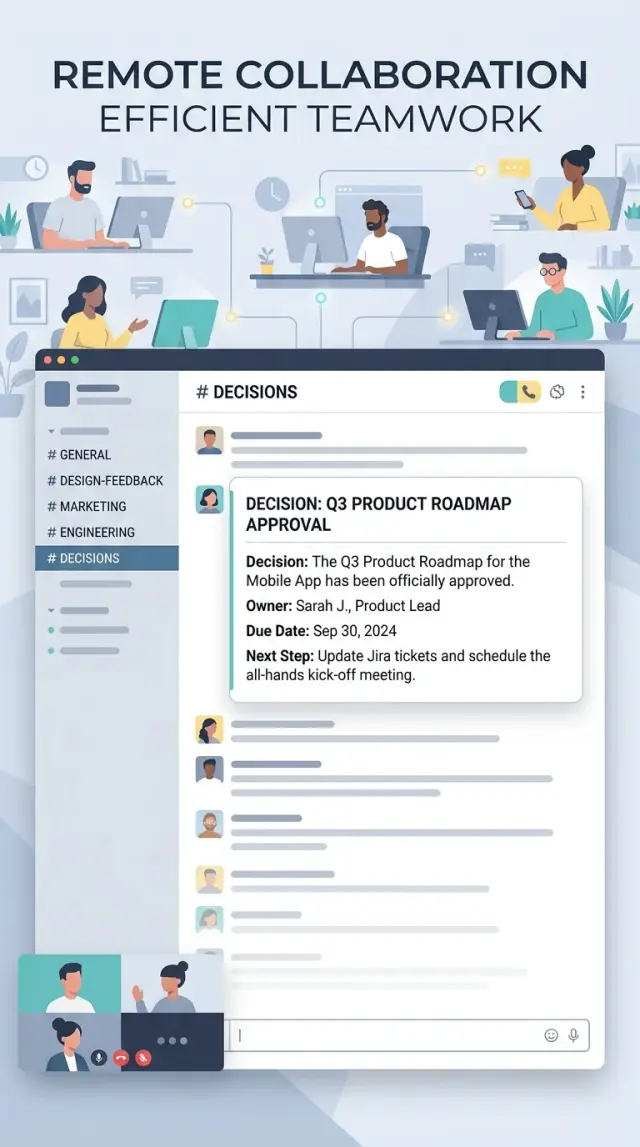
Table of Contents
Why decisions disappear in chat
Slack is fast. It is terrible at memory.
A final choice often lands in the same stream as rough ideas, side comments, status updates, and jokes. Two days later, the actual decision looks like any other message.
The problem gets worse when the conversation spreads out. One person adds details in a thread, someone else sends a DM, and the last part happens in a quick huddle. Each piece makes sense on its own, but nobody can see the full chain in one place.
Calls create another gap. People leave with a vague sense that "we decided something," but nobody writes down the exact outcome while it is still fresh. By the next morning, one person remembers a firm deadline, another remembers a tentative plan, and a third thinks the topic is still open.
Most decisions disappear for four simple reasons:
- final calls sit next to unfinished debate
- context gets split across threads, DMs, and calls
- people remember the outcome differently
- nobody writes down an owner and a next step
Ownership is where teams often slip. "We should do this" sounds fine in the moment, but "we" usually means "no one yet." If no message names an owner and a next action, the task drops behind newer messages within hours.
A small product team feels this quickly. A designer posts two options, an engineer adds a constraint, and the founder says "let's go with B." Later that day, someone asks whether B is approved for this sprint or just preferred for later. Nobody knows, because the answer lives across a thread, a voice chat, and one short DM.
Teams revisit the same questions because the record is weak, not because they cannot decide. They need a reliable way to see what changed, who agreed, and what happens next.
A Slack decision channel fixes that by separating the final call from the messy conversation around it. Chat can stay noisy. The decision log should stay clear.
What the decision channel should do
A decision channel is not another place to debate. It is a clean record of what the team already chose, so nobody has to scroll through 200 messages to find the answer a week later.
That matters when people join late, switch projects, or come back from time off and ask the same question again. A good decision channel stops that loop.
It has four jobs:
- keep the final call separate from the back-and-forth
- give each decision one short post
- make one person responsible for the next step
- put a date on that next step
It should not capture every opinion, draft, or half-formed idea. Normal channels are still the right place for debate, questions, and quick reactions. If people start arguing inside the decision channel, it turns into the same mess you were trying to avoid.
A simple rule works well: discuss elsewhere, publish the outcome here.
Each post should feel final enough that a new person can read it and move on. They should understand what the team chose, who owns it, and when that person will act. If three people share ownership, nobody owns it. Pick one person, even if others will help.
Used this way, a decision channel becomes a lightweight team log. It cuts down on meetings because people trust that decisions will not vanish into chat history. It also makes follow-up easier. On Friday, you can scan the channel and see which choices turned into action and which ones need a push.
If it does only that, it is already useful.
What every decision post should include
A decision post should answer the basic questions fast. If someone reads it two days later, they should know what the team chose, why they chose it, who will act on it, and what still needs an answer.
Start with one sentence that states the decision plainly. Skip the backstory. Write, "We will delay the mobile release by one week to fix the onboarding bug," not "After some discussion, the team agreed that it may make sense to consider a short delay."
Then add a short reason. One or two lines is enough. People do not need the full debate in the log. They need the reason that settled it, such as customer risk, cost, timing, or a hard technical limit.
The next part is where many teams get sloppy. Every post needs an owner, a due date, and a note on what work changes because of this call. If the decision affects product, sales, support, or hiring, say so. Otherwise, people keep working from the old plan.
If one open question still blocks action, write that down too. That does not weaken the decision. It stops the team from treating a half-made choice like a final one.
Simple tags make the channel easier to scan later. Keep them boring and consistent: product, sales, hiring, ops. Four to eight tags is plenty for a small team.
A simple decision notes template can look like this:
Decision: Move the customer webinar from Thursday to next Tuesday.
Reason: Sales needs two more days to confirm attendees.
Owner: Mia
Due date: Friday, 3 May
Affected work: Email campaign, landing page copy, support schedule
Open question: Do we keep the same demo script?
Tags: sales, ops
That is enough for most cases. If a post needs three paragraphs to explain itself, the team probably has not made the decision yet.
Keep each post short, final, and easy to search. The goal is not perfect records. The goal is to capture decisions before they sink into chat history and turn into "I thought we agreed" a week later.
How to set it up in 30 minutes
Start with one public channel. Name it something plain, like #decisions. A decision channel works best when people do not have to guess where final choices live and when new teammates can read old calls without asking around.
Public usually beats private. Most decisions affect more people than the small group that made them. When the channel is open, people can search it later, spot patterns, and avoid reopening the same debate two weeks later.
You can set the basics in half an hour:
- Create the channel and write a short description. One sentence is enough: use this channel only for final decisions, not for debate.
- Pin a tiny template people can copy. Keep it to five lines: decision, reason, owner, date, next step.
- Pick who posts. After a meeting, let the meeting owner post it. After an async thread, let the person who made the final call post it.
- Agree on the moment a choice becomes final. For example, when the manager approves it, when the deadline passes with no objections, or when the owner says, "Decided" in the thread.
- Put a 15-minute review on the calendar after one week. If nobody follows a rule, remove it.
The template matters because people need to use it when they are busy. If it is too long, they skip it. If it asks for too much detail, they promise to fill it in later and never do. A short format wins because it gets used.
A small team might start with this:
Decision:
Reason:
Owner:
Date:
Next step:
One more rule helps a lot: keep comments under each decision post for clarifying questions only. If the team wants to reopen the choice, start a new thread elsewhere and post a fresh decision when the discussion ends. That keeps the channel clean and readable three months from now.
A simple format people will actually use
A decision channel only works if posting feels easier than opening a doc. If people have to think about structure each time, they will skip it, post half the details, or bury the decision inside a long thread.
Keep each post short. Eight lines is a good ceiling. That forces people to write the outcome first instead of retelling the whole debate.
Use the same order every time. When every post follows one pattern, the team can scan ten decisions in a minute and still spot the owner, due date, and next step without hunting through chat.
A good order is simple: decision, why, owner, due date, and next follow-up if there is one. Put the decision in the first line. Do not make people read to the end to find out what was decided.
Decision: We will move customer bug reports into one shared queue.
Why: Support and engineering are missing duplicates.
Owner: Mia
Due: May 14
Follow-up: Review volume and response time next Friday.
That template is short enough to post fast, but complete enough to help later. If someone joins the thread three days after the discussion, they can still tell what changed, who owns it, and when the team expects movement.
A few small rules make it easier to keep up:
- Write one decision per post.
- Use plain dates, not "soon" or "next week".
- If there is no follow-up, say "Follow-up: none".
- Put extra debate in the thread, not in the main post.
The fixed order matters more than perfect wording. One person might write "Owner" and another might prefer "Assigned to," but teams do better when they do not improvise. Pick one format and stick with it for a month.
Short posts also lower the social cost of writing them. People are much more likely to log a decision when it takes 30 seconds. That can save an hour of confusion later.
A realistic example from a small team
A small SaaS team keeps seeing the same support question: "What are the trial limits?" People land on the pricing page, start a trial, then ask support how many users, projects, or exports they get. Support keeps answering something the site should say clearly.
The team does not need a meeting for this. Support posts the pattern in the decision channel after seeing it come up 11 times in one week. Product reads the thread, checks the pricing page, and makes a call: show the limits on the pricing page in plain text.
Example post
Decision: Add trial limits to the pricing page

Why:
Support answered the same trial-limit question 11 times this week.
People are missing this information before they sign up.

What we will do:
Show trial limits under the trial plan on the pricing page.
Use plain language, not tooltip text.

Owner:
Marketing owns the copy and will ship it by Friday.

What we are not doing now:
No popup for now.
A popup adds friction and takes more work to test.
If the pricing page copy fixes the confusion, we do not need the extra prompt.

Follow-up:
Support will count the same question again next Wednesday.
If confusion stays high, product will review a stronger change.
That single post gives the team enough context to move. Nobody has to search three threads later to remember who owned the change or why the popup idea got dropped.
This is where a decision log helps. One clear post beats a long thread full of half-decisions. Anyone joining later can read it in under a minute and know what changed, who owns it, and what happens next.
Mistakes that make the channel useless
A decision channel usually fails for boring reasons, not because the idea is bad. Teams break it by turning it into a storage closet for half-finished thoughts. Then nobody trusts it, and people go back to asking, "Wait, what did we decide?"
One mistake is posting long meeting notes when all people need is the final call. A full transcript feels thorough, but it hides the only part that matters. If someone has to read 40 lines to find the decision, the channel stops being useful. Put the choice at the top, then add only the context needed to explain it.
Shared ownership creates the next mess. When three people sit in the owner slot, work drifts. One person assumes someone else will follow up, and the deadline slips without anyone noticing. One decision needs one owner, even if other people help.
Teams also ruin the channel by logging every tiny choice. If people post every wording tweak, every small bug fix, and every routine reply, the channel fills with noise. Soon real decisions disappear in the scroll. Record choices that change scope, timing, priorities, budget, customer impact, or who does the work.
Due dates matter. Without a date, a decision is just a nice sentence in chat. People tell themselves they will remember, but Slack moves fast and memory is weak. A simple deadline keeps follow-up visible and gives the owner something concrete to act on.
Private chats create another problem. A founder messages an engineer, the engineer says "sounds good," and now the real decision lives in a direct message nobody else can see. A week later, product, support, or marketing works from the wrong assumption. If the team should know it, the final call belongs in the shared channel.
A simple check fixes a lot: every post should answer five things in plain English - what was decided, why, who owns it, when it is due, and what happens next. If a post misses two of those, it probably should not count as a decision record.
Quick weekly checks
A decision log stays useful only if someone cleans it up every week. Set a 10-minute block on the calendar, open the channel, and review the last few posts while the details are still fresh.
This works best when one person owns the sweep for the week. In a small team, that can rotate. The job is simple: fix gaps, ask short follow-up questions, and close the loop before old decisions turn into guesswork.
Check for posts with no owner. If nobody owns the next step, the decision is only a note. Tag one person and ask for a clear due date.
Check items that should already be done. If a date passed, ask for a status update in the thread and edit the post if the plan changed.
Ask whether anyone reversed a recent call. Teams change their minds all the time, especially in chat. That is fine, but the channel should show the latest decision instead of leaving two conflicting messages behind.
Clean up tags that people ignore. If nobody uses a label after a few weeks, remove it. A short tag list beats a clever one that nobody remembers.
Pull up one older decision from a month or two ago and confirm it still holds. Sometimes the team solved the original problem another way, and the old note now points people in the wrong direction.
A quick sweep like this prevents a common Slack problem: people remember the debate, but not the final call. Then the same issue comes back in another thread, and the team spends 20 more minutes repeating itself.
Keep the review boring and consistent. You are not writing a report. You are checking three things: a clear owner, a current status, and a result people can trust.
What to do next
Pick one team and run the process for two weeks. That is long enough to see real behavior and short enough to fix small problems before they spread across the company.
Choose a team that makes frequent decisions in chat. Product, engineering, customer success, or a small startup leadership group usually works better than a large company-wide rollout.
A simple trial looks like this:
- Create one decision channel for that team.
- Ask everyone to use the same template in every decision post.
- Have the team lead post the first few entries to set the tone.
- Review the channel once a week and fix anything people skip.
The template matters more than the tool. If every post follows the same shape, people can scan it fast and find the owner, date, and next step without reading a wall of chat. If formats drift, the log turns into another noisy channel.
Keep the template short. A good post usually needs the decision, why the team made it, who owns the next action, and when the team will check progress. If someone needs five paragraphs to explain it, the format is already too heavy.
Wait on automation at first. Do not add bots, reminders, forms, or fancy workflows on day one. Tooling will not fix a habit problem. Once people post decisions without being chased, then add light reminders or a weekly summary.
One small rule helps a lot: if a thread ends with "so we should do X," someone posts the final decision in the channel the same day. That keeps context from vanishing into chat history.
After two weeks, ask three plain questions. Did people use it without pushback? Could anyone find an old decision in under a minute? Did owners actually follow up? If the answer is mostly yes, roll it out to the next team.
If your team needs help setting this up, Oleg Sotnikov at oleg.is works with startups and small businesses as a Fractional CTO and advisor. He helps teams tighten technical decision-making, operating habits, and AI-first development workflows without adding process for the sake of it.
Frequently Asked Questions
What is a Slack decision channel for?
Use it to record the final call, not the debate. Each post should say what the team chose, why, who owns the next action, and when that person will do it.
Should people discuss options inside the decision channel?
No. Keep debate in normal channels or threads, then post the outcome in the decision channel. That keeps the record clean and easy to search later.
Should the channel be public or private?
Start with a public channel in most cases. Teams can search old decisions, new people can catch up faster, and fewer decisions get stuck in private messages.
What should every decision post include?
Keep it short and consistent. Start with the decision, then add a brief reason, one owner, a due date, and the next step or follow-up.
What if several people work on the same decision?
Pick one person anyway. Other people can help, but one owner needs to drive the next step. When everyone owns it, nobody does the follow-up.
How do we handle decisions that still have one open question?
Write down the open question in the post and name what still blocks action. If the team has not made a real choice yet, wait and post when the call is final.
Should we log every small choice?
No. Log choices that change scope, timing, priorities, budget, customer impact, or ownership. Skip tiny edits and routine work, or the channel fills with noise fast.
How do we get people to actually use it?
Use a plain template that takes about 30 seconds to fill in. If posting feels as easy as sending a normal message, people will keep doing it.
How often should we review the channel?
Run a short weekly sweep. Check for missing owners, overdue dates, and decisions that the team changed later. Then update the thread before confusion spreads.
Who should post the decision after a meeting or async thread?
Have the meeting owner post the final decision the same day. If a thread ends with a clear call, the person who made that call should log it right away.


