Single server deployment that stays sane for longer
A single server deployment can run your app, workers, and monitoring for longer than many teams expect if you set limits and keep ops simple.
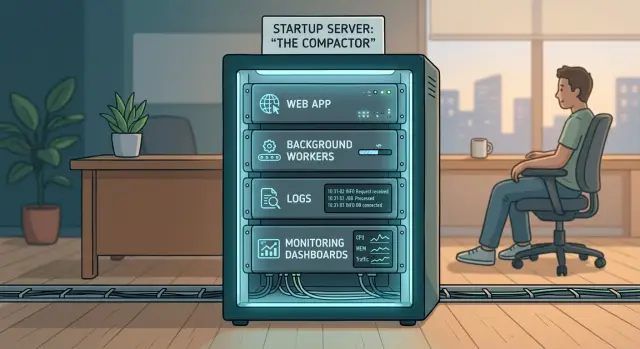
Table of Contents
Why teams add too much too early
Small teams often copy infrastructure from companies that are ten times bigger. That usually starts from a good instinct. People want reliability, room to grow, and fewer surprises later. But early infrastructure is often fear dressed up as planning.
A startup with one product does not need the same setup as a company with separate operations, security, data, and application teams. When you spread a young product across multiple machines too soon, you add more places to debug, more secrets to manage, more config drift, and more alerts that do not matter.
That cost shows up in normal work long before it shows up in scale. Deploys take longer because services must restart in the right order. Bugs get harder to trace because logs live in different places. Small changes turn into tickets, follow-up fixes, and weekend cleanup. Every extra tool needs updates, backups, and somebody who knows how it works.
Most early products do not need that burden. They need fast feedback. They need to learn where the real pressure is: CPU, memory, disk, slow queries, noisy workers, or one busy hour every day. One host makes those problems easier to see.
That is why experienced operators often keep things compact longer than newcomers expect. The goal is not to be cheap for its own sake. The goal is to delay complexity until a real problem forces it.
One well-run machine can buy months of learning. Sometimes it buys years. When the time comes to split the stack, you know why you are doing it and which part needs to move first.
What one host can do well
A single machine can handle more than many teams expect. For a modest SaaS product, one solid box can run the web app, a few worker processes, the database, and basic monitoring without turning into chaos.
The trick is simple: split by process before you split by machine. Run the app server in its own service. Run workers in separate services with their own limits and restart rules. If image processing spikes or email jobs back up, that should not take down the main app.
Keeping related parts close helps. Hosting PostgreSQL on the same machine is often fine while traffic is still moderate and the data set fits comfortably in memory and local disk. The app can talk to the database over a local socket or private interface, which removes a whole category of network and firewall problems. Small teams feel the difference right away. Setup is simpler, backups are easier to reason about, and latency stays low.
Background jobs also get easier to manage on one host. A worker that sends emails, creates invoices, or imports CSV files can sit next to the app and use the same database. You still get separation, but you get it through processes, containers, service units, and resource limits instead of more machines.
Monitoring belongs here too. Early on, you do not need a giant observability platform. You need to know when disk space is shrinking, memory is tight, a worker has stopped, or error rates have jumped. Local logs, Prometheus, Grafana, and an error tracker are usually enough.
One host also teaches good habits. You notice which process eats RAM. You set memory and CPU limits. You keep deploys boring. That is often much healthier than spreading a small system across three machines and spending half the week on internal networking.
Think of one machine as a small cluster in one place. Give every process a name, clear restart behavior, and a backup plan. If one part needs more room later, you can move that piece out without rebuilding everything.
Where the limits show up first
A one-host setup rarely breaks because traffic suddenly explodes. More often, background work starts fighting the app for the same CPU, memory, and disk. The machine still runs, but it feels uneven. Pages slow down, jobs pile up, and small incidents get harder to untangle.
CPU trouble often starts with workers, not web requests. Report generation, image resizing, imports, and reindexing can grab every core for a few minutes. Users feel that as slow page loads or random timeouts. Worker concurrency needs limits early. Without them, one noisy job can make a healthy app feel broken.
Memory pressure usually arrives before traffic looks scary. Teams expect a traffic problem, but RAM disappears in quieter ways: a few workers, a database cache, one build process, and a leak nobody noticed last week. Then the host starts swapping and response times jump.
Disk space is another common trap. Logs grow every hour. Backups pile up because nobody wants to remove old ones. Uploaded files, error dumps, and build artifacts add more weight. Then one morning the database cannot write, or the app cannot rotate logs, and the outage feels sudden even though the warning signs were visible for days.
A few signals usually show trouble early:
- Workers take much longer than usual to finish.
- Memory stays high after traffic drops.
- Free disk space shrinks every day.
- Restarts help for a while, then the problem comes back.
Recovery gets ugly when nobody has practiced it. Many one-host systems look fine until the first bad deploy, failed disk, or broken migration. If you have not tested a restart, a rollback, and a restore from backup, you do not know how long recovery will take.
The good news is that early limits are usually visible. Watch CPU during worker bursts, track memory over time, keep disk usage on a budget, and run restore drills before you need them.
How to build a sane one-host stack
Start with one Linux machine and make deployment boring. A sane setup does not need many moving parts. It needs clear boundaries, a repeatable deploy, and a way to spot trouble before users do.
Keep the whole machine rebuildable from scratch. Write one deploy script that pulls the code, builds the app, applies config, restarts services, and runs a quick health check. If a teammate cannot run that script and get the same result, the setup will drift.
Give each part of the system its own process. You can do that with containers or with systemd services. The tool matters less than the rule. The web app, background workers, database, cache, and proxy should not disappear inside one giant runtime that hides failures.
Put a reverse proxy in front of the app. nginx is a common choice because it handles TLS, static files, compression, and simple rate limits without much drama. It also gives you one clean place for request logs, timeouts, and request size limits.
Most teams can start with a short stack: one app service for HTTP requests, one worker service for background jobs, one database if it lives locally, one reverse proxy, and one place for logs and basic metrics.
Set limits early. This is the part teams skip, and they usually regret it later. Cap worker concurrency, set memory limits, define restart rules, and put disk alerts on logs, backups, and temp files.
Monitoring does not need to be fancy. Track CPU, RAM, disk, queue depth, error rate, and restart count. Watch the machine, the app, and the workers separately so you can tell what is actually failing.
Then do the test that exposes weak setups: reboot the server on purpose. Check what starts automatically, what waits for dependencies, and what quietly fails. A one-host stack is healthy when it comes back clean after a full restart, not when it only works after manual fixes at 2 a.m.
How to keep failures small
Most outages on one machine start as small, boring problems. A worker eats too much RAM. Logs grow for days. One process exits and never comes back. If you want a single server to stay calm, assume every part of the stack can misbehave.
Start with hard limits on workers. Your app should keep its share of CPU and memory even when imports, email jobs, or AI tasks pile up. If one worker can take the whole box, users will think the app is down even though the server is still running.
A simple rule works well here: queue more jobs, do not start unlimited workers. Slow background work is annoying. A blocked login page is worse.
Restart failed processes quickly with systemd or container restart rules so the app, workers, and monitoring return in seconds. Add a small delay between retries. That keeps one bad deploy from turning into a nonstop crash loop that burns CPU and fills the disk with logs.
Disk space deserves more attention than many teams give it. Set log rotation early. Delete old logs on a schedule. Watch disk use, repeated restarts, and memory pressure together, because those signals often show up as a group.
Backups need one strict rule: never keep your only backup on the same host. Send database dumps and any needed files somewhere else. Then test a restore. A quick restore drill on a spare machine tells you whether the backup is real, complete, and usable.
Picture a small SaaS app that runs web traffic, a report worker, and monitoring on one box. A report job suddenly uses 6 GB of RAM. With limits in place, the job slows down or fails, the worker restarts, and most users never notice. Without limits, the app stalls, the database fights for memory, and one bad job turns into a late-night outage.
A simple SaaS example
Imagine a SaaS product with 3,000 active users. People log in, upload a few files, run searches, and get email updates. Traffic rises during work hours and drops at night. Nothing about that load demands a fleet of machines.
One box can handle it well. The host runs the web app, PostgreSQL, Redis, and two workers. One worker sends emails and webhooks. The other handles slower jobs like imports, report generation, and image processing.
This works because each part has a clear job. The app handles fast user requests. Redis holds queue data and short-lived cache entries. PostgreSQL stores business data. Workers take anything that would slow down a page load and process it in the background.
The team does not need to watch dozens of dashboards all day. A short daily check is usually enough: error rate, queue lag, free disk space, RAM use, and database growth. That habit catches most problems early. If errors jump after a deploy, they roll back quickly. If queue lag grows every afternoon, they know background jobs need attention before users complain. If disk space keeps shrinking, they fix logs, backups, or file retention before the host gets tight.
The team waits for pressure they can measure. Maybe RAM stays above 80% for days even after tuning. Maybe imports delay emails long enough to annoy customers. Maybe PostgreSQL needs more disk I/O than the app and workers can share. Those are real reasons to split the stack.
Until then, one well-run host is easier to back up, easier to understand, and easier to fix when something goes wrong.
Mistakes that make one host feel fragile
A one-host setup usually breaks for ordinary reasons, not because one machine is a bad idea. Teams make it fragile when they add moving parts faster than they add real need.
The first mistake is tool pileup on day one. People add a separate queue service, log pipeline, metrics service, process manager, cache, search node, and several admin panels before the app has steady traffic. Every extra process wants RAM, disk, ports, upgrades, and attention. You do not get maturity from that. You get more ways to trip.
Most early stacks work better with fewer pieces: the app, the database, a reverse proxy, one worker process, and basic monitoring. If the product earns more complexity later, add it then. Until then, every extra service should answer one plain question: what pain does it remove today?
Workers create the next mess. Web traffic may look fine, then one import job or email batch pushes the whole box into swap. The site feels random and slow, but the real problem is usually a worker with no limits.
A few guardrails help a lot: cap worker concurrency, set job timeouts and retry rules, restart workers before memory growth gets silly, and keep heavy jobs away from the busiest user hours.
Backups create false confidence too. Many teams say they have backups, but they have never restored one. That is not safety. It is a checkbox.
A restore test finds the problems that matter: missing files, broken credentials, bad dump scripts, or a backup that takes six hours to load when the business can only afford one. Run restore drills on a schedule and write the steps down while nobody is under pressure.
Another common mistake looks smart on a diagram: splitting services across machines too early because it feels more serious. Now the app depends on the network for things that used to be local. You add more config, more secrets, more failure points, and more debugging.
Split services when the numbers tell you to. The database may need its own disk and memory profile. Workers may hurt user traffic. Those are solid reasons. A prettier architecture diagram is not.
A quick check before you split the stack
Teams often add a second machine because the first one feels messy, not because it is full. That usually points to an operations problem, not a capacity problem.
Before you split anything, run four checks.
- Reboot the box on purpose and watch what happens.
- Restore last night's backup into a fresh test environment.
- Look at real usage over time instead of one bad spike.
- Ask one person to explain every running service in plain English.
The reboot test catches more than people expect. Services start in the wrong order. Workers miss environment variables. A database mount appears too late. Those are all fixable problems, and none of them require another server.
Backup tests are even more honest. Plenty of teams feel safe because backup jobs succeed. Then they try a restore and find missing secrets, broken file paths, or a dump that does not match the current app version.
Capacity checks should stay simple. If the machine sits around 20% to 40% CPU most of the day, RAM does not swap, and disk still has comfortable room, splitting early may only give you two problems instead of one. If deploys or traffic bursts regularly push the box to the edge, the case for another machine gets much stronger.
The last check is blunt, and that is why it works. If one capable engineer cannot explain the whole host in ten minutes, the setup is already too tangled. Clean that up first. A simpler machine often buys more time than a larger fleet.
When to add another machine
A second machine should solve a specific pain, not calm a vague fear. If the app, workers, database, and monitoring still fit on one host without much drama, keep the setup small.
The right time to split is when one problem keeps coming back and you can describe it in one sentence. "Imports spike CPU and slow the app." "Backups fight with the database for disk I/O." "Deploys feel risky because every service restarts on the same box." Those are real reasons. "We might grow soon" is not.
Write down the trigger before you add the machine and make it measurable. Move workers off the main host if background jobs regularly slow user requests. Move the database if storage growth, memory pressure, or disk latency becomes the steady bottleneck. Add a standby or replica if recovery time is too long for the business. Split monitoring only if logs and metrics start competing with the product for space or CPU.
Keep the next split boring. Reuse the same deploy process, the same alerting rules, and the same naming style. If adding one machine also adds three new tools, you probably made life harder.
A simple example makes the point. Say a SaaS app runs well on one box most of the day, but nightly report jobs make the site sluggish for 40 minutes. Add a small worker machine first. Do not move the database, reverse proxy, and monitoring at the same time. One change, one reason, one rollback plan.
If your team is deciding whether to split a stack, this is the kind of practical review Oleg Sotnikov covers on oleg.is in his Fractional CTO work. The useful question is not whether a bigger setup looks more serious. It is whether the current machine has a measured bottleneck that another machine will actually remove.


