Single region vs multi region: when two regions pay off
Single region vs multi region sounds like an uptime choice, but customer location, recovery goals, and team load should decide it.
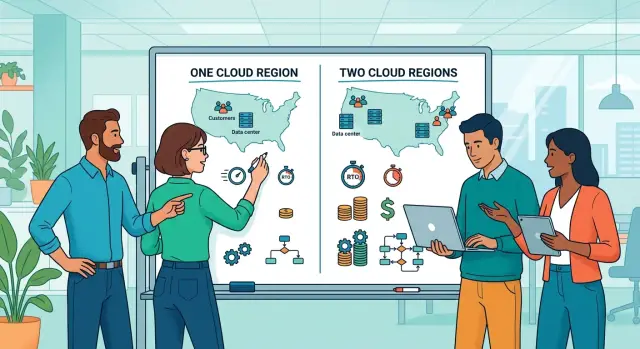
Table of Contents
Why this choice gets expensive fast
Most teams don't feel the real cost of this decision on day one. In the single region versus multi region debate, the extra spend isn't just cloud bills. It's more systems to run, more checks to maintain, and more time spent keeping everything in sync.
One region is usually cheaper and easier to operate. You deploy in one place, store data in one place, and check one set of logs when something breaks. That keeps day-to-day work manageable, which matters a lot for small teams.
A second region changes the job. You're no longer running the app twice. You're deciding how traffic moves, how data stays current, and what happens when one side fails at the worst possible time. That means failover rules, traffic routing, data replication, conflict handling, regular disaster tests, more monitoring, and extra standby capacity.
That work only pays off when customers really feel a regional outage. If users can tolerate a few hours of downtime, or if you can restore service from backups without major damage, a second region often doesn't return enough value to justify the cost.
Teams get ahead of themselves here all the time. A founder sees a big company running across multiple regions and assumes that's the safe choice. Big companies also have bigger support teams, stricter customer contracts, and much higher outage costs.
For many startups, the first reliability gains come from simpler work: clean backups, tested restores, better alerts, and a clear recovery target. A half-finished multi-region setup rarely beats that.
If one region can meet your recovery goals and keep customers happy, it's usually the better choice. You spend less, move faster, and leave yourself fewer ways to fail.
Start with your customers
Customer location matters more than the cloud diagram. Teams often add a second region because it feels safer or more global. That only pays off when users live far enough away to notice the delay, or when revenue depends on more than one market staying online during an outage.
Start with paying customers, not hoped-for customers. Pull the last 6 to 12 months of invoices, renewals, or active accounts and group them by country or broad region. If most revenue comes from one market, one region close to that market is usually the right default.
Traffic maps can be misleading. You might see visitors from 40 countries, but that doesn't mean you need infrastructure in all of them. Check support tickets, sales calls, and churn notes before you solve for geography. If users aren't saying "the app feels slow," the problem may be database queries, large assets, background jobs, or weak caching rather than physical distance.
A few numbers usually settle the debate. Where do most paying customers live today? Which market brings the biggest share of recurring revenue? Where do latency complaints actually come from? Which customer group would hurt the business most if service slowed for an hour?
Keep future plans separate from current facts. "We want to expand into Europe next year" is a plan. "Europe already brings 35% of revenue" is a reason to revisit your cloud region strategy. Mixing those two ideas leads to early spending and extra operational work.
A simple example makes this clearer. Say your SaaS company has users in many places, but almost all paying teams are in the US and Canada. A single US East region will often serve them well, keep costs tighter, and spare the team from running failover, replication, and deployment checks across two regions. If large contracts later come from Germany or Singapore, then a second region may start to make business sense.
Let customer location drive the first move. Expansion plans can shape the second one later.
Set recovery goals in numbers
Start with two numbers, not architecture diagrams. First, how long can the service stay down before the damage gets expensive? Second, how much recent data can you afford to lose if you have to restore from backup?
Teams often call these the recovery time objective and recovery point objective. Plain English works better: how many minutes of downtime can you survive, and how many minutes of data can you recreate by hand?
Tie those numbers to real pain. If your app brings in $2,000 an hour, an hour down costs more than irritation. If 500 customers hit an error page during payroll, trust drops, renewals get harder, and support load climbs fast.
Contracts matter too. Some businesses can accept a half-day outage on an internal tool. Others promise uptime, reporting deadlines, or transaction records. In those cases, a long outage turns into refunds or breach notices.
Write down the failures you actually plan for:
- a zone failure inside one region
- a full regional outage
- a wider provider outage
- human error such as deleted data, bad code, or broken networking
That list changes the design. A zone failure usually points to redundancy inside one region. Human error usually points to backups, access control, and tested rollback steps. A second region helps with some regional failures, but it won't save you from every bad deploy or mistaken database delete.
This is where the decision gets much simpler. If you can stay down for a few hours and lose 15 minutes of data, a solid setup in one region with redundancy across zones, backups, and restore drills may be enough. If you need service back in five minutes and can lose almost nothing, both the bill and the complexity rise fast, and a second region may start to make sense.
Be honest about what actually breaks your business. A checkout flow, a medical record system, and an internal reporting tool should not share the same targets. Pick numbers that match revenue, support pressure, and contract risk. Then test whether your team can meet them, because a promise on paper is useless during an outage.
Count the work a second region adds
Most teams price a second region as extra compute, storage, and bandwidth. That's the easy part. The harder part is the weekly work your team now owns.
Every change has to land twice, and both regions have to stay close enough that failover is boring. If one region quietly drifts from the other, your backup plan only works on paper.
The extra work shows up everywhere. You deploy the app in both regions and check that config, secrets, and feature flags match. You monitor twice the surface area and need alerts that tell you which region is unhealthy and which one is fine. You run backups, restore tests, and retention checks for data in both places. You do failover drills on purpose, not just after an outage. And you keep runbooks current so the on-call person knows what to do at 2 a.m.
Databases make the choice much less simple. If writes have to wait for both regions, users may feel more delay. If changes copy to the second region a little later, the app stays faster, but you can lose the last few seconds or minutes of data if the primary region dies.
That tradeoff matters more than many teams expect. If customers can tolerate a small gap, delayed replication may be fine. If every write must survive, you need a stricter setup and you have to accept slower performance or more design complexity.
The cloud bill also hides the people cost. A second region means more alerts, more dashboards, more incident reviews, and more time spent proving that backups restore cleanly. It also stretches the on-call load, because someone has to understand replication lag, DNS behavior, failover, and failback.
Ownership has to be explicit. Decide who runs primary-region failure tests, who signs off on the results, and who fixes the gaps those tests uncover. If nobody owns the drill, it will slip.
This is usually the point where the debate becomes real. If your team already struggles to keep one region tidy, two regions won't make you safer. They will give you two places to drift, two places to break, and a larger bill when something goes wrong.
Use a simple decision process
Start with facts, not fear. Teams hear one outage story and jump straight to a second region. Then they inherit more moving parts, a bigger bill, and a setup nobody tests.
Put the numbers on one page: where paying customers actually are, what uptime or recovery promises you've made, how long recent outages lasted, how much data loss you can accept, and who owns failover and restores.
That turns the choice into a business decision. If most users are in one area, you have no strict uptime terms, and your last serious incident ended in 20 minutes, spend money on a stronger setup in one region first.
Usually that means spreading services across zones, tightening backups, automating rebuilds, and running restore drills until the team can do them calmly. Many startups skip those basics and reach for geography instead. That's backwards. A second region helps only after you can recover cleanly in one region.
Compare the gap honestly. A well-hardened setup in one region might solve the problem for far less money. Two regions add replication, traffic routing, extra monitoring, more deployment checks, and more ways to break things during an incident. If the same small team runs both, the operating burden matters as much as uptime.
Ask one plain question: what failure can a second region prevent that better backups and faster restore cannot? If you can't answer that in one sentence, you're probably not ready.
Add a second region when it closes a gap you can name. Maybe customers sit on two continents and latency hurts sales. Maybe a contract says you must recover in minutes, not hours. Maybe your outage history shows one provider region creates too much business risk.
Review the decision every 6 to 12 months. Growth changes the math. So do new customer regions, larger contracts, and tighter recovery targets. If the gap is still theoretical, keep one region and harden it. If the gap already costs money or trust, the second region has earned its place.
A realistic startup example
A small SaaS company sells payroll software to businesses in one country. Almost all of its users log in during the same working hours, and most support tickets come from that same time zone. The team keeps revisiting the single region versus multi region question, but the business numbers make the first answer fairly clear.
An outage hurts them, but not every outage hurts the same way. If the app is down for 10 or 15 minutes, customers complain and support gets busy. Once downtime passes an hour, some customers delay payroll runs, a few ask for credits, and new sales calls get harder. That gives the team a practical target: keep most incidents well under an hour, and make full recovery possible inside that window.
They don't jump to a second region. First, they clean up the basics in one region. They tighten backups, run restore tests every month, and prove that they can rebuild the app from scratch. They also add failover inside the same region for the parts that break most often, such as app servers and the database replica.
Those changes aren't flashy, but they move the numbers. Recovery gets faster because the team has written steps, tested snapshots, and fewer manual tasks. Costs stay under control too. A second region would mean duplicate databases, more monitoring, more deployment checks, and more chances for configuration drift. For a team with limited time, that extra work can kill product momentum.
Sixteen months later, the picture changes. The company wins customers on another continent, and those accounts start to matter. Now latency is worse for a meaningful share of users, and a regional outage would hit active customers in two markets at once. At that point, a second region is no longer a fear purchase. It's tied to revenue, customer experience, and disaster recovery planning.
That's usually the better sequence. Get good at recovery in one region first. Add the second region when customer spread, revenue exposure, and recovery numbers make the trade worth the extra work.
Mistakes that push teams too early
A second region often looks like a safety move. For a small team, it can create a new set of risks before it removes the old ones.
One common mistake is mixing up availability zones and regions. If your cloud setup already spreads traffic across multiple zones in one region, you may already have protection against many routine failures. That's not the same as full regional recovery, but it covers more real outages than people expect.
Teams also copy patterns from very large companies. That usually goes badly. A company with a platform team, a site reliability team, and round-the-clock support can run fully live systems in both regions or keep a ready standby. A startup with three engineers and a founder on pager duty usually can't.
The design starts to follow status and fear instead of customer need. If your users can tolerate a few hours of disruption in a rare case, two regions may cost more than the risk they reduce.
Another mistake is treating every outage like a full regional failure. Most incidents are smaller than that. A bad deploy, a broken migration, an expired certificate, a database mistake, or a queue backlog can take you down just as easily. A second region won't help if the same bug ships to both places.
The app itself also gets harder once you cross regions. Session handling, database writes, file storage, caches, queues, background jobs, and failover rules all get more complicated. Cross-region traffic adds delay and cost, and data consistency gets messy fast. Teams often approve the infrastructure plan before they accept the product and code changes it requires.
The hidden bill isn't just cloud spend. You also pay for drills, on-call load, extra monitoring, duplicate security review, and more support work when behavior differs between regions. That's a common pattern in production systems: teams budget for servers, then forget the human time.
A second region makes sense when your recovery goals are strict enough to justify all that extra work. Before that point, one well-run region with tested backups, clear rollback steps, and solid zone redundancy is usually the better bet.
Quick checks before you decide
This call gets simpler when you stop treating it like a status move. A second region only makes sense when it solves a real business problem that your current setup can't handle at an acceptable cost.
Look at what happens today, not what might happen someday. If most of your paying customers sit close to one region and your response times are already fine, you may not need more geography yet.
Before you add another region, check five things. First, where customers actually use the product today. Look at paid accounts, real traffic, and support patterns. If 80% of usage comes from one area, better caching or faster queries may help more than another region.
Second, whether your backups can restore service fast enough for the business. Time a real restore into a clean environment. A backup that exists but takes nine hours to recover is no help if the business can only absorb one hour of downtime.
Third, whether the team runs failover tests on purpose. If nobody has practiced the switch, the second region is just extra spend. One scheduled drill usually teaches more than weeks of architecture diagrams.
Fourth, whether the team can carry the extra alerts, dashboards, and runbooks. Two regions mean more moving parts, more pages, and more chances for configuration drift. Small teams often feel that pain before customers do.
Fifth, whether a second region would protect real revenue this year. Put a number on it. If an outage in one region would cost $5,000 and the second region costs $60,000 a year to build and run, the math is hard to defend.
One issue matters more than many teams admit: operating discipline. Better backups, tested recovery, and cleaner runbooks usually fix the first wave of risk before multi-region does.
If your answers are vague, stay with one region for now and tighten recovery work first. If the answers are clear, tested, and tied to revenue, then a second region has a reason to exist.
What to do next
Before you pay for a second region, put the decision on one page. Show where your customers are, how much downtime you can actually afford, and how much extra operational work your team can carry without breaking.
That one-page note cuts through vague thinking. It turns "we should be safer" into numbers you can defend in a budget review, a board meeting, or a contract discussion.
Keep it simple. Mark where customers live today, not where you hope they'll be next year. Write recovery targets in numbers, such as 15 minutes of data loss and one hour to restore service. Name the people who would own deployments, failover, testing, and incident response. Then define the triggers that would justify a second region, such as enterprise contract terms, hourly revenue at risk, or repeated latency complaints from another continent.
If your current setup still has basic gaps, fix those first. Reliable backups, restore tests, monitoring, alerting, and a written recovery runbook usually buy more safety per dollar than a full multi-region build.
This choice is rarely a pure architecture question. It's a business tradeoff. If one region already meets your customers' needs and your recovery targets are realistic, you'll often get a better result by hardening what you already have.
A second region starts to make sense when the numbers stop being theoretical. Maybe one hour of downtime now costs real revenue. Maybe a customer contract sets strict disaster recovery planning targets. Maybe users on another continent wait long enough for pages and APIs that support tickets keep piling up. Those are solid reasons.
If you want an outside review before adding cost and complexity, Oleg Sotnikov at oleg.is works with startups as a Fractional CTO and advisor on architecture, infrastructure cost control, and practical AI-first operations. That kind of review is most useful when it stays grounded in uptime, team capacity, and spend instead of fear.
Write the page, fix the weak spots, and set hard triggers. If those triggers aren't active yet, stay in one region and run it well.
Frequently Asked Questions
Should most startups start with one region?
Yes. If most paying users sit in one market and you can recover inside your downtime target, one region usually costs less and gives your team fewer ways to fail. Get backups, restore drills, alerts, and zone redundancy working first.
When does a second region actually make sense?
Add a second region when it solves a real business problem. Common reasons include meaningful revenue in another market, strict recovery terms in customer contracts, or outage costs that backups and faster restores no longer cover.
Should I choose regions from traffic maps?
No. Start with paying customers, renewals, and support history. A traffic map may show visitors from many countries, but that does not mean those users need local infrastructure.
What numbers should I set before I decide?
Write down two numbers: how long the service can stay down and how much recent data you can lose. If the business can survive a few hours of downtime and a small data gap, one well-run region may be enough.
Is a second region always safer?
Not on its own. A second region adds replication, traffic routing, failover rules, and more room for config drift. If your team does not test the switch often, you may spend more and still struggle during an outage.
Will a second region protect me from bad deploys and deleted data?
Usually no. The same bad deploy, broken migration, or mistaken delete can hit both regions. Backups, rollback steps, access control, and restore practice protect you from those failures better than geography alone.
Are multiple zones in one region enough for reliability?
Often yes for common failures. Spreading across zones helps with many server or zone issues without the full cost of a second region. It will not cover a full regional outage, so match it to the risk you actually face.
What extra work comes with a second region?
You take on duplicate deployments, secrets, monitoring, backups, restore tests, failover drills, and runbooks. Databases also force a tradeoff between faster writes and tighter data protection, which adds more design and on-call work.
How do I know my team is not ready for two regions?
If one region already feels messy, stop there. Missed restore tests, drifting config, unclear incident steps, and slow recoveries all mean you should harden the current setup before you expand it.
How often should I revisit the single region versus two regions decision?
Review it every 6 to 12 months, or sooner after a large contract, expansion into a new market, or a painful outage. Revisit the plan when latency complaints grow or downtime starts to cost real revenue.


